
Barn2 Media WooCommerce Restaurant Ordering 2.1.12


- Secure Payment
- Support from Monday to Friday
- With you since 2018
$99.00 El precio original era: $99.00.$5.99El precio actual es: $5.99.
Quick summary
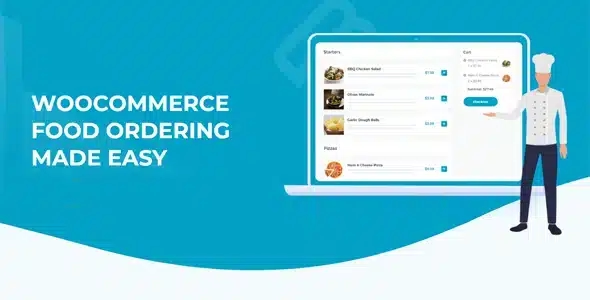
Barn2 Media WooCommerce Restaurant Ordering is a specialized extension designed to transform your WooCommerce store into a clear, streamlined, and customer-centric restaurant ordering system. It's ideal for restaurants, bars, cafes, dark kitchens, and food businesses that want to take online orders seamlessly. It organizes your menu, reduces errors, and allows customers to order quickly and easily, without distracting extra steps or confusing screens.
What problem does it help solve?
Using WooCommerce as is makes the food ordering process slow: individual product pages, too many clicks, difficulty displaying variations like sizes, extras, or sides, and clunky navigation for tables, delivery, or pickup. This results in incomplete orders, confused customers, and a purchase flow designed for physical products, not for dishes chosen in a rush, on a mobile device.
If you've ever had customers call saying, "I couldn't find the full menu on the website" or "I couldn't add the extra I wanted," the problem isn't in your kitchen, but in how WooCommerce displays the menu. In a restaurant, customers want to see the entire menu grouped together, select multiple dishes at once, and submit their order without having to constantly navigate between pages or waste time searching for hidden categories.
On the other hand, when order volume increases, manual management using generic forms or WhatsApp messages becomes unmanageable. Errors arise when copying data, confusion arises with customer notes, and response times are disorganized. The result is a bottleneck at the most critical moment of the service: precisely when demand is highest and every second counts.
Why this solution makes a difference
WooCommerce Restaurant Ordering adapts WooCommerce to the actual behavior of an online diner. Instead of forcing the customer to browse product pages one by one, it presents the menu in a list optimized for selecting multiple dishes at a single view. This way, the user acts as if they were looking at a physical menu, but with the convenience of selecting quantities, variations, and notes all from one screen.
In real-world projects, this reduces friction with every order. The time previously wasted explaining how to find a category over the phone now translates into clearer orders and higher average order values. When you start noticing staff spending too much energy correcting incorrect orders or interpreting confusing notes, the difference a structured order flow makes is felt every day in operations.
Furthermore, the business gains consistency: fewer scattered steps, fewer unnecessary clicks, and a purchase journey aligned with the logic of a restaurant, not an electronics store. The front-of-house or kitchen team receives the information already organized within WooCommerce, making it easier for each order to arrive correctly, in order, and with the important details visible from the start.
Signs you need this product
- Customers complain that it's difficult to find specific dishes or extras within your online menu.
- You noticed that WooCommerce works well for physical products, but the experience of ordering food feels forced or unnatural.
- Your team wastes time reviewing incomplete orders, calling the customer to confirm options, sizes, or sides.
- The volume of orders has grown and the current way of taking orders (generic forms, messages, scattered pages) is becoming unmanageable.
- You want to offer a seamless ordering system for delivery, collection, or on-site consumption without resorting to external platforms that take a cut of your profit margin.
When does it make sense to use it (and when doesn't)
WooCommerce Restaurant Ordering adds value when your WordPress site serves as the primary point of contact for food or beverage orders. This makes sense if your business relies on a menu structured by categories (appetizers, burgers, pizzas, desserts, drinks) and you need customers to be able to create their complete order in just a few steps. In this context, the plugin acts as a visual "brain" for WooCommerce, tailored to the dynamics of the restaurant industry.
It's also especially useful when managing different time slots, daily menus, or specific menus for delivery and pickup. A clear menu organization reduces your team's workload and prevents customers from trying to order items you don't offer at certain times or that are poorly located in the store.
However, it's not necessary if your website only displays a static menu without online ordering, such as a simple PDF menu or a list of dishes without a shopping cart. It also doesn't add real value to projects where the culinary aspect is secondary and you only sell, for example, cooking classes or small quantities of gourmet products, where a standard WooCommerce catalog is sufficient.
Who it fits best for
- Restaurants that manage online orders for home delivery and collection, and need the customer to be able to choose dish, size and extras without help.
- Cafes, bars, and food trucks that want to use WordPress as an order center, avoiding dependence on external delivery platforms.
- Dark kitchens and virtual kitchens that work with high volumes in specific time slots and require a clear and fast order flow.
- WordPress agencies and developers who build websites for restaurant businesses are looking for a specific way to transform WooCommerce into a food ordering system.
- Companies with several food product lines (pizzas, sushi, hamburgers, daily menus) that need to display different menus within the same store.
Practical benefits
- Real operational improvement: The menu is organized into views designed for quick ordering, which reduces bottlenecks during peak hours and makes the workload of the kitchen and delivery more predictable.
- User experience: The customer navigates the menu as they would in a physical restaurant, viewing grouped dishes and selecting multiple items without losing context or changing pages all the time.
- Control and organization: Orders arrive at WooCommerce with the relevant information already structured, making it easy to track from the first click to delivery or collection.
- Time saving: Clarification calls, cross-messaging, and manual corrections are reduced, freeing up staff to focus on preparation and service.
- Error reduction: Having a clear selection flow minimizes omissions of extras, size confusion, or wrong dishes, avoiding returns and customer inconvenience.
How it fits within WordPress
Within WordPress, WooCommerce Restaurant Ordering acts as a layer that adapts how your food products are presented to the actual logic of a menu. It doesn't replace WooCommerce or turn it into a different system; it leverages its existing product, category, and ordering structure, but reorganizes the experience so that a restaurant can work comfortably with it.
When working with WordPress, you control the site's design, text, and pages. This plugin integrates seamlessly into that workflow, adding the necessary views to display the menu in a concise and user-friendly way. This way, the admin panel remains the same as you already know, but the front end of your store becomes much more suitable for users who want to order food from their mobile phone or computer, without distractions.
Typical use cases
- A neighborhood restaurant that wants to stop relying on third-party apps and start receiving orders from its own website, with categories such as "Daily Menu", "To Share" and "Desserts" visible on a single screen.
- A chain of pizzerias that manages various flavors, sizes, and combinations; the use of a structured menu view makes it easy for the customer to quickly configure their complete order, including extras and drinks.
- Dark kitchen specializing in sushi and poke bowls where the volume of orders during dinner hours is high; the optimized flow reduces ingredient combination errors and improves confirmation time.
- Cafeteria that combines breakfast, brunch and takeaway dishes; a suitable list allows separating schedules and menus without confusing the user with products that are not available at that time.
Frequently Asked Questions about Barn2 Media WooCommerce Restaurant Ordering
How does WooCommerce Restaurant Ordering differ from using only standard categories and products?
With standard categories and products, users must open each individual listing to add a dish to their cart, significantly lengthening the ordering process. WooCommerce Restaurant Ordering, on the other hand, presents the menu in a condensed menu view where quantities, variations, and sides can be selected all from a single screen. This reduces clicks, speeds up the purchase decision, and better adapts to the actual behavior of those ordering food online, especially on mobile devices.
Is WooCommerce Restaurant Ordering suitable for small restaurants with few dishes?
It makes sense in small restaurants where online orders represent a significant part of the business and you want customers to be able to complete their selection in seconds. Even with a limited menu, a menu-style display simplifies the process and avoids confusion. However, if you only display the menu for reference and orders are always placed by phone or in person, this feature doesn't offer a significant improvement in that context.
How does WooCommerce Restaurant Ordering help manage variations such as sizes or extras?
WooCommerce Restaurant Ordering leverages WooCommerce's variations structure to integrate them directly into the order flow. On the same menu view, customers can choose from sizes, combinations, or add-ons based on your product settings. This eliminates the need to navigate to separate pages and reduces the risk of missing items, improving the accuracy of every order your restaurant receives.
What impact does WooCommerce Restaurant Ordering have on my team's daily work?
On a daily basis, your team receives clearer and more complete orders. By not relying on individual notes or generic forms, the information for each dish, variety, and extra is already organized within WooCommerce. This allows the kitchen, bar, and delivery teams to work with greater predictability, spend less time interpreting what the customer wanted to order, and focus on execution. When you start to notice a reduction in errors, stress during peak hours also decreases.
Does it make sense to use WooCommerce Restaurant Ordering if I already sell other products in my WooCommerce store?
It's useful when a significant portion of your catalog consists of prepared food or menus, and you want to offer a distinct ordering experience compared to your other products. In this scenario, WooCommerce Restaurant Ordering focuses on the restaurant menu, while the rest of your catalog continues to function with the standard WooCommerce design. This allows you to maintain a hybrid store layout, but with a restaurant ordering section optimized for speed and clarity.
Conclusion
Barn2 Media WooCommerce Restaurant Ordering exists to solve a very specific problem: adapting WooCommerce to the real-world operation of a restaurant that takes online orders. If you've ever experienced your WordPress menu causing confusion, unnecessary steps, and order errors, this plugin streamlines the experience so customers can order quickly and your team receives clear information. The result is a more organized workflow and an online menu that supports your service rather than hindering it.
Latest update:

Written by: WPClub
With over seven years of experience curating, managing, and distributing GPL products, our content is based on hands-on experience, technical review, testing, and feedback from thousands of users. We aim to democratize and simplify the WordPress world so you can choose with confidence, speed, and ease.
Your Individual Purchase Includes:
- Lifetime updates.*
- Official product, ready to use.
- Immediate access to the product.
- Clean and virus-free files.
- GNU GPL V2/V3 License
- Technical support in Spanish and English.
* In the case of memberships, the period during which you will receive updates will depend on the type of membership purchased: monthly, annual, or lifetime.
Notify Update
We update products Monday through Friday. However, if the product you see is not yet updated, you can notify us so we can prioritize updating it whenever possible.
Get your questions answered here
Here you'll find answers to frequently asked questions about our service: how it works, what it includes, and how to get the most out of it.
On how many websites can I use the products?
You can use any product from our store on any website you want.
Will I get updates?
Absolutely. If you buy an individual product, you'll get lifetime updates for that product.
On the other hand, if you purchase a membership, you will receive updates until your membership expires.
What if I have a problem?
First of all, we want you to know that you can count on us. We will assist you and provide the necessary support, so you can rest assured.
On the other hand, it is important for you to know that, given the time difference between countries, your time and ours may not be the same, so we will be delayed accordingly.
Our opening hours start at 9 AM from Monday to Friday, UTC -3. We are open until around 6 PM.
Do they provide technical support?
Yes, and regarding the time, it is usually on average within 24 to 48 business hours.
However, there are times when we have already provided an answer and solution in less than a day, depending on the case.
Are there download limits?
No. We don't believe in that format, so you can download as many times as you want. No problem. We pay for high-quality professional storage precisely to avoid problems.
Do they provide license keys?
No. Giving out the keys is not a viable option, as we have had experiences where they end up circulating everywhere and we can even lose the associated accounts.
That said, all products are original and, in cases where a license key is required to function, we will take care of pre-activating them for you.
Does my purchase include an invoice?
Yes. After payment, you will be able to access your invoice immediately in the "Purchases" section of your user account.
That is why it is important that you properly complete the information requested at the time of payment.
Is there a warranty?
Yes, of course. If there's a problem we can't resolve, or if there's an external issue that doesn't have a general solution, you'll receive support and, if necessary, a full refund. We have a 14-day refund policy from the date of purchase.
- It should be noted that there is no warranty if the product works well and it simply wasn't what you wanted.
There have been instances where someone buys a product, the product works perfectly, but they don't like it and want a refund, keeping the product. That's not right.
However, everything is evaluable and reasonable. Let's use judgment together.
What are the opening hours?
Our opening hours are:
- Monday to Friday, from 9 a.m. to 6 p.m.
- Saturday and Sunday: No service.
UTC -3 time

Our Reputation on Trustpilot
Many thanks to those who take the time to give us a rating on Trustpilot. Each and every one of your comments is very helpful to us. We strive to provide a rewarding experience for every member of our community, always with respect and care. We'll be here!






















WPClub Memberships
Access our entire catalog for a single payment. We offer three memberships: Monthly, Annual, and Lifetime (One-Time Payment).
- Save thousands of dollars
- Unlimited daily downloads
- No recurring payments
- Fast downloads by AWS
- Quality service and support, validated since 2018
- We work with love for our community