
Admin Columns Pro Plugin 7.0.18


- Secure Payment
- Support from Monday to Friday
- With you since 2018
$199.00 El precio original era: $199.00.$5.99El precio actual es: $5.99.
Quick summary
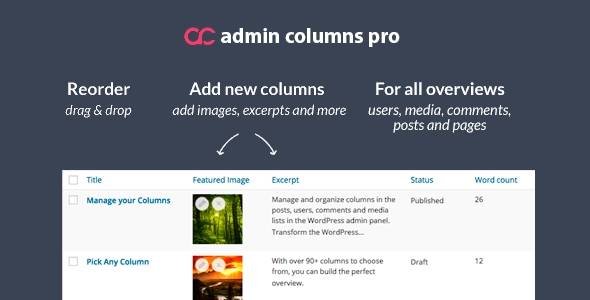
Admin Columns Pro is an advanced WordPress admin extension that lets you customize and optimize columns on listing screens (posts, pages, products, users, orders, and more). It's designed for those who work daily with numerous records and need to view, sort, and filter key information without having to open each item individually. It helps reduce clicks, improve visibility, and enable faster decision-making directly from the dashboard.
What problem does it help solve?
In WordPress, the "All Posts," "Pages," and "Products" screens always display the same basic columns, regardless of the project type. When you manage tens or thousands of pieces of content, this generic list becomes largely useless: you don't see custom fields, specific product information, relevant user data, or important statuses without opening each item individually.
If you've ever found yourself spending several minutes figuring out which entries need review, which products are out of stock, or which orders require attention, the problem isn't the amount of content itself, but rather the lack of a view adapted to your workflow. The dashboard forces you to click on each record, load the editing screen, check the data, and go back, over and over again.
In real-world projects, this translates into days filled with repetitive tasks: checking statuses, searching for specific fields, sorting by information not appearing in the list, or even exporting to spreadsheets for filtering. Admin Columns Pro addresses precisely this deficiency: transforming WordPress listing screens into truly configurable "boards" for your daily workflow.
Why this solution makes a difference
Admin Columns Pro doesn't just display more columns; it changes how you work with content in the dashboard. It lets you choose what data is displayed, in what order, and how it can be sorted or filtered, using the information already on your site. This reduces unnecessary steps, prevents you from opening editing screens unnecessarily, and gives you a comprehensive view of what's happening on your site in real time.
When you start noticing that you're spending more time browsing the dashboard than making decisions, having clear and personalized lists directly impacts your productivity. Seeing from a single screen which products lack images, which entries aren't assigned to a category, which users haven't filled in certain information, or which orders meet specific conditions allows you to take immediate action.
On the other hand, when working with teams, having views tailored to each person's role reduces errors: the editor sees the editorial information they need, the store manager focuses on sales and inventory data, and the order reviewer quickly identifies exceptions. The result is a much more organized dashboard, less prone to confusion, and aligned with how the project is actually managed.
Signs you need this product
- You manage large volumes of content, products, or orders, and the standard WordPress listing no longer allows you to locate the information you need at a glance.
- You notice friction every time you want to filter by specific fields (such as metafields, taxonomies, or custom data) and end up resorting to very limited manual searches.
- You're wasting time every day going into each item just to check or change a simple piece of information that you could review from the list itself.
- Your site has grown: there are more authors, more products, more orders, and errors are starting to appear due to a lack of visual control over statuses, dates, required fields, or incomplete information.
When does it make sense to use it (and when doesn't)
Admin Columns Pro provides real value when the volume of information in the dashboard is no longer easily managed with standard views. If you work with a small blog, with few static pages and no complex additional information, you may not need to customize columns or advanced filters; the default screens may be sufficient.
However, when content types incorporate custom fields, specific taxonomies, or business data (such as prices, internal statuses, responsible parties, key dates, or proprietary metrics), this plugin becomes a crucial management tool. It also makes sense when multiple people use the dashboard daily and each needs to focus on different data, preventing visual clutter with irrelevant fields.
This arises when administration becomes a bottleneck: slow editorial reviews, inaccurate inventory control, confusing order tracking, or scattered internal reporting. In this context, ensuring that each dashboard view aligns with your project's workflow makes all the difference between a simply "published" site and a truly operational management environment.
Who it fits best for
- Online store managers who need to control products, variations, stock, order statuses and specific fields without relying on spreadsheet exports.
- Editorial teams that manage multiple authors, sections, and content types require clear views for tracking statuses, revisions, publication dates, and their own editorial fields.
- Development professionals and agencies that create custom solutions in WordPress and need to deliver to their clients a dashboard where they can manage complex data without getting lost among screens.
Practical benefits
- Real operational improvement: The dashboard listings cease to be generic tables and instead reflect the logic of the business: internal statuses, responsible parties, amounts, critical fields, or key indicators visible at a glance.
- User experience: Each user accesses cleaner screens tailored to their role. Unnecessary steps are reduced, along with the sense of clutter that often arises when a site has grown without a clear management structure.
- Control and organization: Being able to see in the listings which items are incomplete, what data is missing, or which records require review makes it much easier to keep the site updated and consistent.
- Time saving: Fewer clicks, less page loading, and more decisions made directly from the listings. Repetitive tasks like reviewing, searching, and correcting are significantly reduced.
- Error reduction: By displaying critical information on screen, oversights are reduced: products without visible prices, orders with empty key fields, content without assigned taxonomies, or inconsistent data.
How it fits within WordPress
Admin Columns Pro integrates seamlessly into the WordPress admin core, directly impacting the listing screens for different content types. It doesn't alter how data is stored or replace the logic of other plugins; rather, it leverages existing stored information to present it in a more useful and actionable way.
In your actual workflow, it fits right in when you need to review, search, or manage sets of records: before you start deep editing. From a single view tailored to your needs, you can identify which items require changes, prioritize tasks, and access only what truly needs detailed editing. This transforms the dashboard into a more analytical and less purely administrative space.
Typical use cases
- In an online store with hundreds of products, the catalog manager sees columns in the listing such as price, stock, main category, promotional tag and an internal "pending review" flag, facilitating the massive maintenance of the inventory.
- On a publishing site with many guest authors, an editor has columns for editorial status, deadline, responsible party, site section, and internal notes fields, streamlining the control of which content is stuck or ready to publish.
- In a corporate project with custom content types (e.g., events, courses, or properties), the operations team sees data in the listing such as key dates, available slots, sales manager, and internal status, allowing them to immediately identify priorities and next steps.
Frequently Asked Questions about Admin Columns Pro
How does Admin Columns Pro differ from standard WordPress columns?
Standard WordPress columns display a fixed set of data (title, date, author, basic categories) and have very limited sorting and filtering capabilities. Admin Columns Pro expands these options by allowing you to define which fields appear, their order, their width, and their behavior. This way, you can build views that are truly aligned with how you use your site: custom fields, specific taxonomies, internal metrics, or any data relevant to your daily operations.
Is Admin Columns Pro useful if my site uses custom content types and custom fields?
Yes, it's precisely where it adds the most value in projects with structured content and custom fields. When working with custom entry types (for example, properties, courses, projects, bookings), you often rely on metafields that don't appear in the default listings. With Admin Columns Pro, these fields are no longer "hidden" on the editing screen and become part of your views, making it easier to locate, sort, and filter records based on that data.
Does Admin Columns Pro help you work faster with WordPress-based online stores?
Admin Columns Pro is especially useful for those managing large catalogs and numerous orders. By configuring columns to view product and order information directly within the listings, unnecessary visits to editing screens are reduced. This is particularly noticeable when you need to review prices, stock levels, orders with specific conditions, or internal tracking fields. The workflow becomes more streamlined and focused on a single view.
Is Admin Columns Pro suitable for teams with multiple user profiles?
In projects involving editors, store managers, marketing professionals, or administrators, each role typically requires different information to perform their work. Admin Columns Pro allows you to adapt the views to these needs, ensuring that each person sees what truly matters to them, rather than a generic table. This reduces confusion, simplifies onboarding new team members, and keeps the dashboard aligned with the organization's internal processes.
Do I need Admin Columns Pro if I only manage a small WordPress blog?
If your site consists of only a few posts, pages, and categories, and you don't use custom fields or additional content types, adding Admin Columns Pro is probably not a priority. In that scenario, the standard WordPress views are sufficient to keep the site organized. This plugin only becomes relevant when the volume of content grows, custom data is added, the number of users involved increases, and daily administration becomes too time-consuming.
Conclusion
Admin Columns Pro exists to solve a very specific problem: the lack of useful views on WordPress listing screens as your site grows and information becomes more complex. By transforming those listings into configurable dashboards tailored to your workflow, it allows you to gain control, reduce repetitive tasks, and improve the quality of your daily management. If you're starting to feel that the dashboard no longer helps you see what's important, it's time to consider this option.
Latest update:

Written by: WPClub
With over seven years of experience curating, managing, and distributing GPL products, our content is based on hands-on experience, technical review, testing, and feedback from thousands of users. We aim to democratize and simplify the WordPress world so you can choose with confidence, speed, and ease.
Your Individual Purchase Includes:
- Lifetime updates.*
- Official product, ready to use.
- Immediate access to the product.
- Clean and virus-free files.
- GNU GPL V2/V3 License
- Technical support in Spanish and English.
* In the case of memberships, the period during which you will receive updates will depend on the type of membership purchased: monthly, annual, or lifetime.
Notify Update
We update products Monday through Friday. However, if the product you see is not yet updated, you can notify us so we can prioritize updating it whenever possible.
Get your questions answered here
Here you'll find answers to frequently asked questions about our service: how it works, what it includes, and how to get the most out of it.
On how many websites can I use the products?
You can use any product from our store on any website you want.
Will I get updates?
Absolutely. If you buy an individual product, you'll get lifetime updates for that product.
On the other hand, if you purchase a membership, you will receive updates until your membership expires.
What if I have a problem?
First of all, we want you to know that you can count on us. We will assist you and provide the necessary support, so you can rest assured.
On the other hand, it is important for you to know that, given the time difference between countries, your time and ours may not be the same, so we will be delayed accordingly.
Our opening hours start at 9 AM from Monday to Friday, UTC -3. We are open until around 6 PM.
Do they provide technical support?
Yes, and regarding the time, it is usually on average within 24 to 48 business hours.
However, there are times when we have already provided an answer and solution in less than a day, depending on the case.
Are there download limits?
No. We don't believe in that format, so you can download as many times as you want. No problem. We pay for high-quality professional storage precisely to avoid problems.
Do they provide license keys?
No. Giving out the keys is not a viable option, as we have had experiences where they end up circulating everywhere and we can even lose the associated accounts.
That said, all products are original and, in cases where a license key is required to function, we will take care of pre-activating them for you.
Does my purchase include an invoice?
Yes. After payment, you will be able to access your invoice immediately in the "Purchases" section of your user account.
That is why it is important that you properly complete the information requested at the time of payment.
Is there a warranty?
Yes, of course. If there's a problem we can't resolve, or if there's an external issue that doesn't have a general solution, you'll receive support and, if necessary, a full refund. We have a 14-day refund policy from the date of purchase.
- It should be noted that there is no warranty if the product works well and it simply wasn't what you wanted.
There have been instances where someone buys a product, the product works perfectly, but they don't like it and want a refund, keeping the product. That's not right.
However, everything is evaluable and reasonable. Let's use judgment together.
What are the opening hours?
Our opening hours are:
- Monday to Friday, from 9 a.m. to 6 p.m.
- Saturday and Sunday: No service.
UTC -3 time

Our Reputation on Trustpilot
Many thanks to those who take the time to give us a rating on Trustpilot. Each and every one of your comments is very helpful to us. We strive to provide a rewarding experience for every member of our community, always with respect and care. We'll be here!






















WPClub Memberships
Access our entire catalog for a single payment. We offer three memberships: Monthly, Annual, and Lifetime (One-Time Payment).
- Save thousands of dollars
- Unlimited daily downloads
- No recurring payments
- Fast downloads by AWS
- Quality service and support, validated since 2018
- We work with love for our community