



The All-in-One WP Migration Unlimited Extension is our favorite shortcut when we need to move large sites with lots of media and extensive tables without having to fight the server. In our experience, the promise is kept: activating the Migration Unlimited Extension makes the process feel seamless, even when the hosting imposes strict rules. We no longer see error screens due to size, and we gain operational peace of mind to deliver on time.
What we love most about the All-in-One WP Migration Unlimited Extension is the seamless workflow: we export, transfer, and restore without having to split files or fiddle with the hosting dashboard. For agencies and developers with multiple projects running simultaneously, this is gold: a single method that's scalable, documentable, and easy to teach to the team. Plus, support for large files reduces "last-mile stress": we can promise a clean migration for clients, even with massive media libraries.
When we tested the All-in-One WP Migration Unlimited Extension on real-world projects, we noticed a dramatic drop in issues due to size and time limits. We also gained order: a single backup artifact per site, a repeatable step-by-step guide, and fewer external dependencies. In short, the All-in-One WP Migration Unlimited Extension puts the migration under our control and removes the friction that, in other workflows, often increases time and costs.
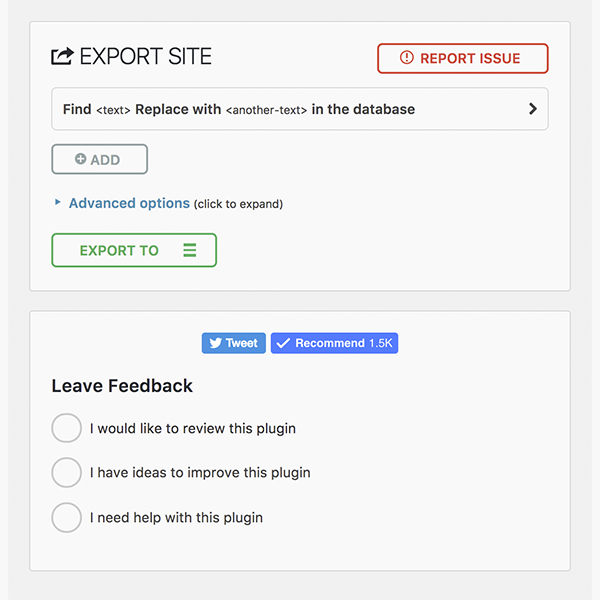
True Limit Bypass: Size, Time, and Memory (What Changes Your Hosting)
The big difference with the All-in-One WP Migration Unlimited Extension is how it overcomes typical limitations of the environment: ridiculous upload sizes, short execution times, and limited memory. With the All-in-One WP Migration Unlimited Extension, we stop touching upload_max_filesize, post_max_size y max_execution_time over and over again on each server: the tool performs the necessary bypasses so that the backup is complete, without interruptions. This operational "shielding" is what makes the difference between a smooth migration and one riddled with patches.
In our testing, the Migration Unlimited Extension prevented the typical situations of imports freezing at 0%, interrupted uploads, or restores that died silently. The result? Less time spent fine-tuning PHP.ini, fewer tickets with hosting support, and a team that keeps moving forward. Even when working with providers with aggressive time/CPU policies, the All-in-One WP Migration Unlimited Extension kept the import process stable.
Limits we usually leave behind with All-in-One WP Migration Unlimited Extension
-
File size: We no longer hit upload limits.
-
Execution time: Long imports completing.
-
Memory and concurrent processes: no micro-adjustments for each hosting.
In short, the All-in-One WP Migration Unlimited Extension doesn’t just “just promise and run”—it’s a game-changer when server limits were your bottleneck.
Imports “any size”: server restore and large file streams
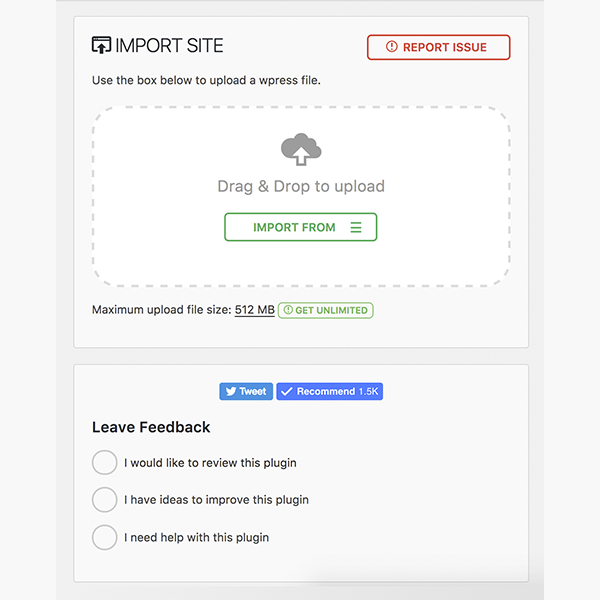
When your site is several gigabytes in size, traditional methods feel fragile. The All-in-One WP Migration Unlimited Extension is designed for that scenario: large imports that actually reach 100%. In our experience, moving heavy libraries from uploads/ It's no longer a Russian roulette. The All-in-One WP Migration Unlimited Extension allowed us to restore from the server itself (server restore) when it made sense, and from a single file when we were looking for complete portability.
The plugin simplifies logistics: a single backup file per project, tagged by date, which we can store wherever we want. In terms of quality, we gain consistency: the restored environment looks identical to the original, with links, users, plugins, and settings in place. And if we need to exclude temporary folders or caches to streamline the package, the workflow lets us do so without sacrificing integrity.
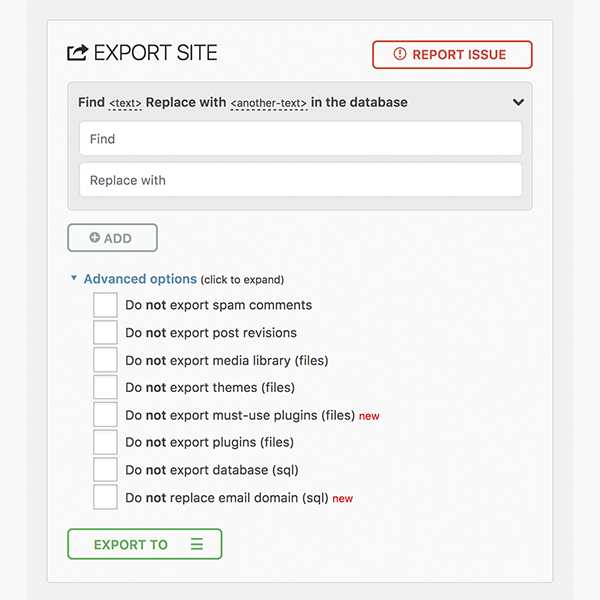
Best practices with All-in-One WP Migration Unlimited Extension in large projects
-
Prepare the site before exporting (clearing cache, logs, old backups).
-
Verify that the final file completes at the destination (checksum and login test).
-
Run a quick review of internal links and critical pages after importing.
In short, the All-in-One WP Migration Unlimited Extension turns the “impossible task” into a reliable and repeatable process.
Automate with WP-CLI: Repeatable migrations for agencies and teams
For teams that make a living moving sites between staging and production, automation is the difference between scaling and burning out. The All-in-One WP Migration Unlimited Extension works beautifully with WP-CLI, allowing us to create repeatable scripts for exporting and importing without opening a browser. In our case, we created commands that named files with a date and branch, and triggered a post-import check. With the All-in-One WP Migration Unlimited Extension and WP-CLI, deployment cycles become predictable.
The Extension allowed us to standardize a playbook: "export > transfer > import > verify." Additionally, we can schedule tasks or integrate them into CI/CD pipelines so that each content delivery or theme change reaches production without disruption. When supporting multiple brands or multilingual environments, this repeatability reduces human error and speeds up delivery.
Automation Ideas with All-in-One WP Migration Unlimited Extension
-
Scheduled nightly export with file rotation.
-
Automated restore in staging after merge into main.
-
Verification of key pages and sending a report to the team.
In short, All-in-One WP Migration Unlimited Extension + WP-CLI = industrial migrations, without losing control.
Licensing and Site Usage: How It Works in Real-World Projects
A common question when adopting this extension is how site usage works. In practice, we maintain a clear inventory: which projects require it, which are work environments, and which instances are purely local. The All-in-One WP Migration Unlimited Extension adapts well to agency workflows: we use the tool for multiple deliveries and maintenance projects, without running into artificial transfer limits.
Beyond the fine print, the important thing is the operational value: the All-in-One WP Migration Unlimited Extension allows us to promise smooth migrations to clients with large sites or "temperamental" hosts. If you manage multiple projects, the All-in-One WP Migration Unlimited Extension saves you hours of support and avoids endless negotiations with providers to increase upload limits.
Recommendations for using All-in-One WP Migration Unlimited Extension
-
Keep a record per project/environment for your internal control.
-
Standardize a migration checklist that your team can follow.
-
Document issues and resolutions for future iterations.
In short, the All-in-One WP Migration Unlimited Extension fits the operational reality of developers and agencies: less friction, more deliveries.
Quick Start Guide: Before/During/After Migration Checklist
We work with a short but powerful list that avoids surprises when using the All-in-One WP Migration Unlimited Extension.
Before (preparation)
-
Update core, plugins and theme; clear cache and
uploadsobvious. -
Review users/roles and disable any that are not used.
-
Generate the export with All-in-One WP Migration Unlimited Extension and check the size.
During (import and initial verification)
-
Import with All-in-One WP Migration Unlimited Extension and wait for full confirmation.
-
Re-login, clear cache, save permalinks.
-
Check critical pages (home, store/blog, login) and forms.
After (cleaning and QA)
-
Reindexes search, generates thumbnails if the environment has changed.
-
Run basic performance tests.
-
Schedule a post-migration backup to freeze the “healthy state.”
With the All-in-One WP Migration Unlimited Extension, this checklist keeps us calm and lets us move on to the next installment quickly.
Use cases: multi-brand, staging → production and domain changes
Where the All-in-One WP Migration Unlimited Extension shines is in real-world scenarios: multiple brands with active schedules, staging projects that go live weekly, and projects that change domains due to rebranding. In our experience, the All-in-One WP Migration Unlimited Extension reduced the time window for the final change and avoided inconsistencies that, with other workflows, often appear later (paths, media, users).
The All-in-One WP Migration Unlimited Extension allows you to securely move environments, even when there are third-party integrations, builders, or e-commerce platforms. The "no limits" factor ensures that size won't be the enemy and that the team can focus on validating business: funnels, forms, SEO, and content. When the project involves multiple teams and little room for error, the All-in-One WP Migration Unlimited Extension provides a stable process that everyone respects.
Where we used All-in-One WP Migration Unlimited Extension with the most impact
-
Rebrands with domain and structure changes.
-
Consolidation of microsites into a single instance.
-
Cloned blueprint to launch similar thematic sites.
If you make a living by launching and maintaining sites, this extension is the lifeline for your pipeline.
Conclusion
If you're looking to migrate WordPress with ease, the All-in-One WP Migration Unlimited Extension is the clear choice. In our experience, it unlocks scale, stabilizes long restores, and allows us to automate with WP-CLI. For developers, agencies, and owners with multiple sites, this extension turns migration into a predictable and controlled process. No artificial limits, no unnecessary pain: the All-in-One WP Migration Unlimited Extension lets you focus on launching.























