



Directorist Multi Directory Linking is the extension that breaks down silos between directory types and transforms them into a navigable ecosystem. Simply put: we add a smart field to our directory listings that links to listings from other directories and displays them where they provide the most value. This way, a user who lands on a listing isn't "stuck"; they discover related content without having to return to the search bar. With Directorist Multi Directory Linking, this experience feels natural, coherent, and, above all, useful.
We adopted it to connect verticals we had already created (for example, professionals ↔ service locations, brands ↔ providers, courses ↔ instructors). Before, each directory existed in isolation, and the metrics reflected this: premature exit pages and short sessions. After activating Directorist Multi Directory Linking, navigation became more in-depth; time on site increased because users could effortlessly find the other half of what they were looking for. In our case, we configured the block's label to make sense for each vertical ("Serves at," "Distributed by," "Dict by"), and the difference was immediate.
Where does it make the most sense? In projects with multiple, complementary content types: healthcare (clinics ↔ doctors), education (courses ↔ teachers), tourism (routes ↔ providers), and B2B (brands ↔ distributors). Directorist Multi Directory Linking excels when there are real relationships that should be made visible to guide decisions. It's not just a simple "you might also be interested in this"; it's an explicit, managed bridge that organizes the exploration process.
How to create relationships between directories: from builder to record in 5 minutes
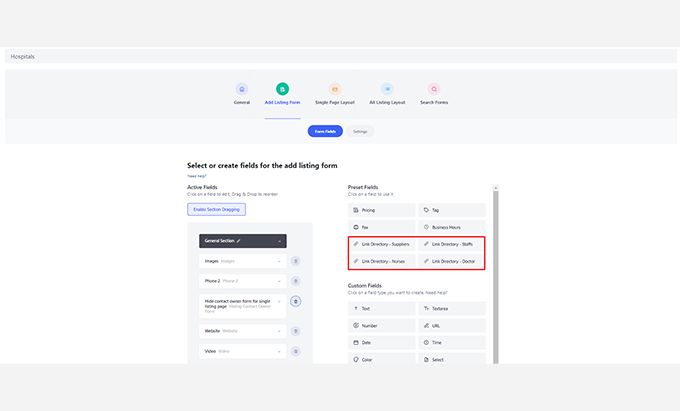
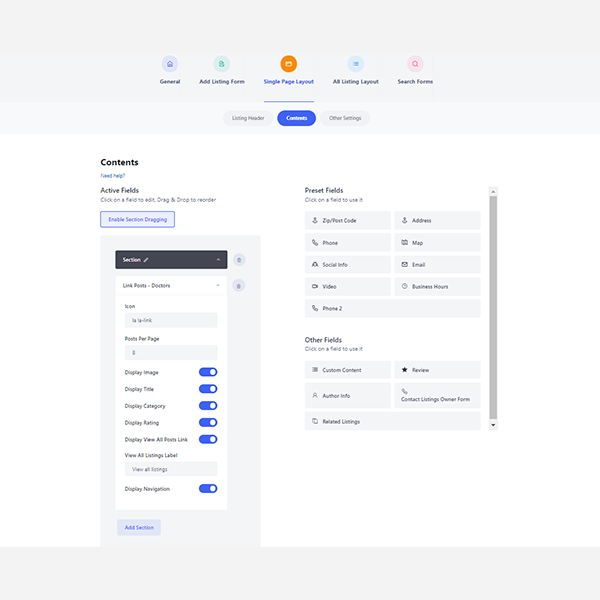
The process is straightforward and requires no code. We access the Directory Builder, add the Directorist Multi Directory Linking field in “Add Listing” (for the owner or admin to complete), and define whether the selection will be single or multiple. Then, in Single Listing, we choose the location where the linked listings will appear and customize the label the user will see. With that, we have live relationships between directories.
In our implementation, we started with a small pilot: doctors → clinics. We created the "Practices at" field in the "Professional" category, and when editing a doctor's profile, we selected the corresponding clinics (from another directory) using a search function. Then we published, and that was it! Directorist Multi Directory Linking rendered the linked clinics in the doctor's profile, with pagination if there were more than we wanted to display at once. We repeated the process in reverse (clinics → doctors) to complete the loop.
One powerful detail: the custom labelChanging “Related Listings” to “Distributed by,” “Locations,” or “Brands they work with” speaks the language of the vertical and improves click conversion. Another advantage is the sMultiple choice: In our experience, it's rare for a professional to work in only one place or for a brand to have only one distributor. With Directorist Multi Directory Linking, we solved this without hacks or cloned fields.
Recommended experiences: professionals↔spaces, brands↔suppliers, courses↔instructors
Health (professionals ↔ spaces): On the professional's profile, we display "Works at" with clinics and centers; on the clinic's profile, we list "Available Professionals." Thanks to Directorist Multi Directory Linking, users can book or call with context, and we maintain a single source of truth per entity.
B2B (brands ↔ suppliers): For brands, it says “Distributed by” (official suppliers); for suppliers, it says “We work with these brands.” Thus, Directorist Multi Directory Linking guides the B2B buyer from the product to the acquisition channel seamlessly.
Education (courses ↔ instructors): In courses, "Taught by"; in instructors, "Active Courses". With Directorist Multi Directory Linking, we increase the exploration rate of extensive catalogs because students follow their favorite instructors or discover associated programs.
Tourism (routes ↔ providers): In routes, "Operated by"; in service providers, "Available routes". The traveler completes the cycle: inspiration → specific operator.
In our experience, Directorist Multi Directory Linking added context at just the right moment. We noticed that users moved from static listings to journeys with real intent (contact, quote, booking). The key is that each link is logical and useful; we avoid filler relationships so as not to dilute the message.
Governance and quality of links: relevance, etiquette, and pagination
With power comes responsibility. We define a governance policy for Directorist Multi Directory Linking with three simple rules:
Relevance or nothingIf the link does not add value, it is not created.
Clear labelThe label should explain the relationship (“Serves at”, “Distributed by”, “Provides”) and not be generic.
Pagination and limitsWe display a controlled number of linked listings and enable pagination when there are many, so as not to overload the record.
Furthermore, we avoid unnecessary loops. Although Directorist Multi Directory Linking supports bidirectional relationships, we prefer to define a primary direction and, if necessary, a shorter return path. For example, in healthcare, the focus is on the professional; the clinic lists the main ones, not all of them, and we prioritize quality over volume. This approach organizes the front end and maintains a high click-through rate (CTR) for the truly important elements.
Our experience: when the link is well-named and limited, the user trusts and follows it. Directorist Multi Directory Linking allows us to achieve that balance with single/multiple selection options, editable labels, and integrated pagination.
Monetization and control: premium plans, admin-only access, and selection rules
Multi-Directory Linking also opens up business opportunities. In our model, we use it in two ways:
Plan feature: we only allow certain plans to add links (for example, the Pro Plan can link up to 3 clinics or 5 brands).
Editorial curation (admin only)In sensitive verticals (health, legal), we enable only the admin to configure the links to ensure accuracy and prevent spam.
The control also extends to who can be linked to. With Directorist Multi Directory Linking, we defined required/optional fields and guided owners to complete their listings to be linked to more frequently (better photo, correct categories, contact information). This editorial "push" raised the overall standard of the directory and gave us an additional selling point for upgrading our plans.
In campaigns, Directorist Multi Directory Linking becomes a hook: "if we link you to X, you gain immediate exposure in Y." We use it in new category launches to "seed" them with relationships from already established directories.
Measurement: time on site, CTR to related listings, and form submissions
We measure the impact of Directorist Multi Directory Linking with three KPIs:
Time on site / session in cards with and without links.
CTR in the linked listings block (block clicks/impressions).
Value actions after clicking on a link (calls, forms, map routes).
In our experience, activating Directorist Multi Directory Linking and adjusting the label to the vertical's language immediately increased the CTR. We also observed that users who clicked at least once on a link were more likely to convert (because they were following a logical path: from information to a specific provider). To complete the process, we added events in Analytics for each interaction with the Directorist Multi Directory Linking block and optimized position, card size, and order (prioritizing relevance and proximity).
The improvement isn't magic: the block needs to be visible, clear, and useful. We iterated on microcopy (“Serves at,” “Teaches,” “Sells”) and limits on displayed items. Directorist Multi Directory Linking gave us the flexibility to experiment without touching code or redoing templates.

Conclusion
If your content types need each other, don't leave them isolated. Directorist Multi Directory Linking transforms separate directories into a cohesive discovery network: clear relationships, meaningful tagging, and inviting navigation. In our experience, Directorist Multi Directory Linking increased time on site, boosted click-through rates (CTR) to related listings, and moved users closer to taking action (calling, booking, writing). It's the missing piece that allows your platform to function as a cohesive ecosystem, not a collection of isolated islands.























