



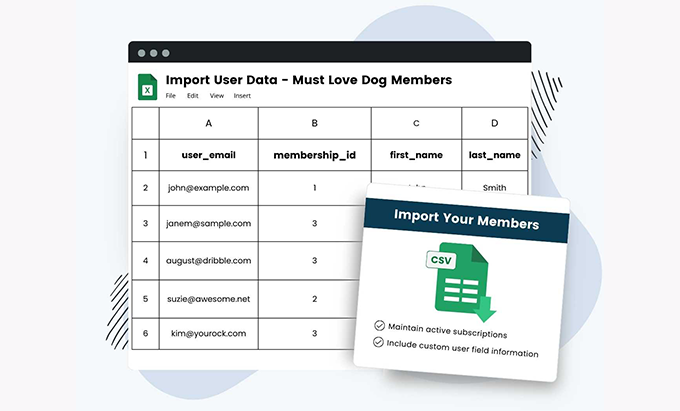
When you need to migrate from a spreadsheet to a live website with active memberships, PMPRO Import Users from CSV is our go-to solution. This plugin for Paid Memberships Pro uploads users from a CSV file and automatically assigns them levels, start and expiration dates, roles, and metadata. In our case, PMPRO Import Users from CSV allowed us to upload thousands of members with their levels and expiration dates in a single pass. We also used update mode to preserve existing users and only adjust their membership status. If your goal is a frictionless migration without writing any code, PMPRO Import Users from CSV does the heavy lifting for you.
What is PMPRO Import Users from CSV and why use it?
PMPRO Import Users from CSV is a specialized importer that understands the logic of Paid Memberships Pro. From a standard CSV file (comma-separated values), it creates or updates users, assigns membership levels, sets start and end dates, applies status (active, canceled, expired), defines roles, and saves user metadata (name, surname, billing fields, etc.). When we implemented it, PMPRO Import Users from CSV transformed a messy Excel spreadsheet into a clean and active user database in minutes.
Key benefits
Bulk additions and updates without touching the database.
Clear mapping of columns for levels, dates, and status.
Password control and welcome emails.
Secure reprocessing with logs and prior validation.
Compatible with multisite and existing PMPro workflows.
CSV structure: minimum and advanced columns (levels, dates, status, usermeta)
A good CSV file is 80% of the battle. PMPRO Import Users from CSV supports basic WordPress columns and PMPro-specific columns.
Examples of rows
Suggestions:
Usa UTF-8 and comma separator.
Dates in ISO format (YYYY-MM-DD) and consistent time zone.
If you are going to include usermet Extra, add columns with the meta name (e.g.:
billing_phone,company).
In our workflow, we validated the UTF-8 encoding and separator to avoid overlapping columns; PMPRO Import Users from CSV imported everything without any issues.
Create vs. update: secure strategies without breaking credentials
PMPRO Import Users from CSV can can bring to life new users or to update existing ones. The critical thing is deciding what to overwrite.
Flags to avoid touching what shouldn't be touched
Passwords: Do not rewrite them unless it is part of the plan (you can force a reset by email).
roles: defines one rule per level (e.g., Gold →
pmpro_member + subscriber).MembershipIf you already have one active, decide whether you replace, you extend dates or you add a new level (if you use multiple levels).
We used PMPRO Import Users from CSV in update mode: it respected credentials and only corrected levels and expirations.
Migration playbook: before, during and after (including staging)
Minimize risks with a controlled process. This is how we operate with PMPRO Import Users from CSV:
Prior validation, batches and rollback
Before: cleans duplicate emails, normalizes domains, defines the dictionary of levels.
Staging: try with 50–100 rows and check that PMPRO Import Users from CSV assigns levels and dates as waits.
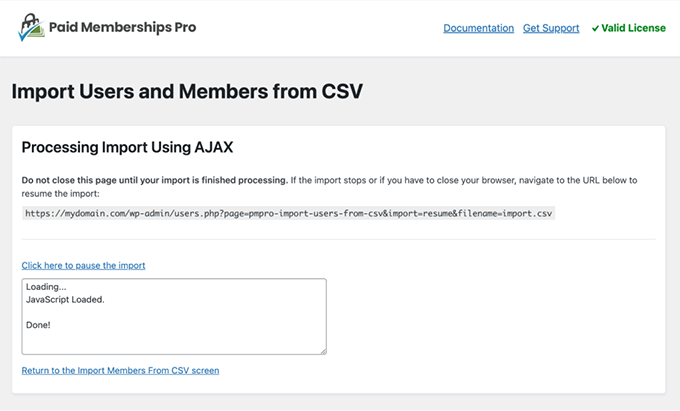
During: imports in batches (e.g., 5k per batch), monitors server times and logs.
After: exports a sample of the final register, checks dates, status and access to content; if something fails, re-imports with the corrected CSV.
In our case, PMPRO Import Users from CSV processed thousands of records in batches and maintained consistency between levels and dates.
Emails and passwords: welcome, reset and notifications
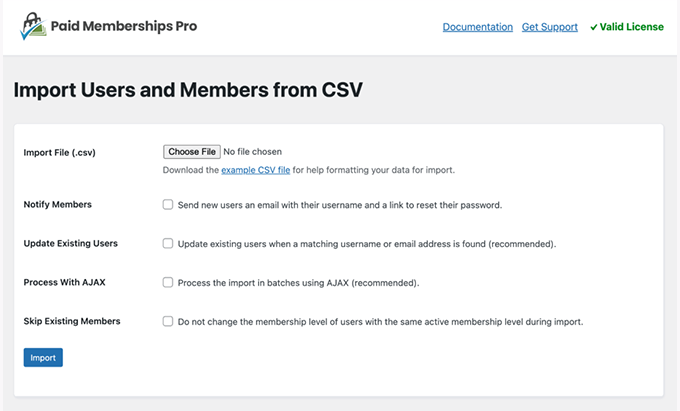
A migration isn't complete until the user can log in. With PMPRO Import Users from CSV, you decide whether to send a welcome email, reset passwords, or keep existing ones.
Welcome: message with access link and password policy.
Reset: Force password change on first login if you imported temporary values.
Segments: sends different messages by membership_level.
Sending an informational email first and then, 24 hours later, resetting the password worked for us; PMPRO Import Users from CSV left the profiles ready so that each user could complete the process without support.
Troubleshooting: UTF-8 encoding, separators, quotation marks, and date formats
Typical errors have a quick solution:
Rare characters: save the CSV in UTF-8 without BOM.
Misaligned columns: checks commas within texts; encapsulates with double quotes.
Incorrect datesUse ISO
YYYY-MM-DDAvoid local formats.Duplicate emails: deduplicates before; PMPRO Import Users from CSV stops invalid rows.
TimezonesIf there are offices in multiple countries, normalize everything to UTC and let PMPro display locally.
When specific errors appeared, we re-exported only those rows and PMPRO Import Users from CSV corrected them without redoing the entire batch.
Multisite and roles: bulk assignments and exceptions
In WordPress networks, define whether the registration goes to the main site or a subsite. PMPRO Import Users from CSV allows you to assign roles by default and exceptions by level.
site_id in networks and role rules
It matters to site_id Correct (if your setup requires it).
Map levels to complementary roles (access to forums, support, courses).
For exceptions, add a column
role_override.
With PMPRO Import Users from CSV we consolidate access on the main site and specific permissions on course subsites.
Step-by-step implementation: from CSV template to success
Build your CSV template with minimal columns (login, email, level, start, end, status).
Clean duplicates and validate emails.
Try with 50 rows in staging using PMPRO Import Users from CSV.
Adjust mappings (roles, usermeta) and test again.
Import in batches into production with PMPRO Import Users from CSV.
Send welcome/reset emails according to your strategy.
Audit access to restricted content by level.
Document the process for the next mass update.
This script with PMPRO Import Users from CSV reduced support tickets and accelerated the membership go-live.
Conclusion
If you're serious about your membership, you need clean data and correct access from day one. PMPRO Import Users from CSV converts your spreadsheets into real users with valid levels and dates, without scripts or hours of manual work. In our migration, PMPRO Import Users from CSV loaded thousands of members, respected credentials, and left everything ready so the team could focus on sales and support, not spreadsheets.























