
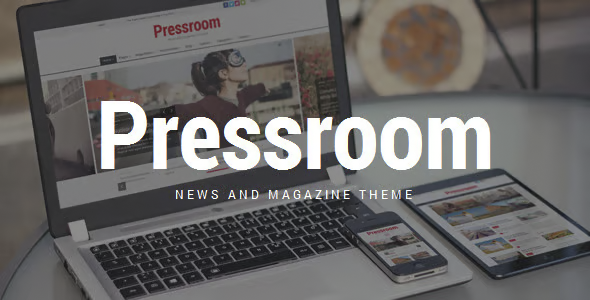
Pressroom News Magazine WordPress Theme 7.4


- Secure Payment
- Support Monday to Friday
- With You Since 2018
$59.00 The original price was: $59.00.$6.99The current price is: $6.99.
quick summary
The Pressroom News Magazine WordPress Theme is designed for editorial projects that publish content frequently and need organization, readability, and a clear homepage. It solves the typical chaos of blogs and online magazines: hard-to-find articles, unprofessional design, and low engagement. It's especially useful for digital media outlets, news portals, niche magazines, multi-author blogs, and sites that rely on daily updates of fresh content.
What problem does it help solve?
In WordPress publishing projects, the problem is usually not publishing itself, but how all the published content is displayed. When you start noticing that your new articles are getting lost among dozens of older posts, the homepage doesn't tell a clear story, and visitors don't know where to begin, the result is less time spent on the page and fewer internal clicks.
In this context, a generic blog design severely limits the content's potential. Without distinct blocks for featured news, main categories, special sections, or opinion columns, everything looks the same. If you've ever experienced your editors investing hours in crafting excellent content only to have the homepage resemble a flat list of posts, the problem lies in the structure and visual hierarchy, not the content itself.
Pressroom addresses this need by creating a digital magazine and newspaper layout that organizes information clearly: what is seen first, what is highlighted, how to navigate sections, and how readers are invited to continue reading. The goal is for each visitor to understand at a glance what type of publication it is, which categories are key, and which articles deserve immediate attention.
Why this solution makes a difference
When working with WordPress on news projects, the difference between a generic theme and an editorial theme designed for news is evident every day. Pressroom is built with a magazine-style homepage layout, areas for main headlines, content blocks by section, and defined spaces for recent and featured articles. This reduces the need to "invent" layouts on each page and maintains a consistent style effortlessly.
In real-world projects, this translates to less time spent adjusting widgets and more time publishing content. Each new article finds its natural place on the homepage based on category and relevance, without you having to manually reorganize the entire site. Furthermore, the structure designed for continuous reading helps increase the number of page views per session, because the reader always has the next relevant article just a click away, whether in the sidebar, at the bottom, or in thematic blocks.
When you start noticing that your team is arguing more about how to "fit" the news into the design than how to improve it, Pressroom becomes a concrete way to regain visual control, maintain editorial order, and give a professional impression without overloading the WordPress dashboard with unnecessary adjustments.
Signs you need this product
- Problem already present on the site: Your homepage looks like a chronological blog with no clear sections, and visitors only see the last 3-4 posts before leaving.
- Friction when working in WordPress: You spend too much time changing widgets, testing page templates, and still the homepage doesn't reflect the editorial structure you have in mind.
- Loss of control or time: Editors don't quite know which articles to highlight, where to place them, or how to give visibility to several important categories at once.
- Typical growth scenario: The personal blog has become a niche magazine, new authors have joined, there are more sections, and the current design can no longer handle the volume of content.
When does it make sense to use it (and when doesn't)
Pressroom makes sense when your project revolves around the frequent publication of news, features, analyses, or blog posts organized into thematic sections. It provides real value when you need an editorial homepage that distributes information in blocks, highlights headlines, presents several categories side-by-side, and maintains a professional media style, but without relying on heavy-duty layout designers for each page.
It's especially useful for local news portals, specialized digital magazines, company news sites, educational projects, and multi-author blogs that require balanced visibility across different sections. If you've ever launched a new category and couldn't find a clear way to display it on the homepage without disrupting the entire design, this theme addresses precisely that need.
Conversely, Pressroom isn't necessary if you're only managing a simple corporate website with a few static pages, a small portfolio, or a personal blog with infrequent posts. It's also not the best option when the site focuses almost entirely on selling products without relevant editorial content; in those cases, an e-commerce-oriented design will make more sense than a magazine layout.
Who it fits best for
- Small or medium-sized newsrooms and digital media outlets: Teams that publish daily or weekly news and need to display multiple sections (politics, culture, sports, technology, etc.) without losing order.
- Niche blogs with growth: projects that started as personal blogs and now have contributors, differentiated categories, and a defined editorial calendar.
- Communication and marketing departments: Organizations that manage a “news hub” or press room on WordPress and require a presentation similar to that of a professional media outlet, with press releases, internal notes, and featured articles.
Practical benefits
- Real operational improvement: The homepage is already designed to structure news, reports, and categories without having to constantly redesign; the workflow focuses on writing and programming, not on adjusting layouts.
- Use experience: The reader immediately understands what type of media they are visiting, finds recurring sections and detects priority content thanks to differentiated blocks and a clear visual hierarchy.
- Control and organization: You have specific areas to highlight the most important things of the day, evergreen content, fixed columns or themed sections, maintaining a visible editorial criterion in the structure.
- Time saving: Manual adjustments are reduced with each cover change; it is enough to assign categories and mark which entries have special weight at any given time so that the whole remains coherent.
- Error reduction: Having a consistent design reduces layout mismatches, disordered blocks, or inconsistent home pages that confuse regular readers and new visitors.
How it fits within WordPress
Within the WordPress ecosystem, Pressroom acts as the visual and structural foundation of an editorial site. It doesn't compete with the admin panel or publishing functions, but rather dictates how those posts are presented on the public side. The logic is simple: you continue creating posts and organizing them by category, and the theme takes care of giving them the layout typical of a digital magazine or newspaper.
In your workflow, this means that editors manage regular content from within WordPress, while the design already includes the homepage, article listings, internal sections, and news details, all designed for easy reading. Instead of relying on a visual builder for each page, Pressroom establishes consistent templates that maintain the publication's identity across the entire site, from the homepage to the archive pages.
Common usage scenarios
- Local news portal: A news outlet that publishes daily information about a city or region, with distinct sections (news, events, opinion). Pressroom helps display multiple news stories per category on the homepage, highlighting the day's headlines and keeping the archive accessible.
- Specialized digital magazine: A project focused on technology, health, marketing, or another topic, featuring analytical articles, interviews, and reports. The theme allows in-depth content to stand out without being buried under the latest news.
- Newsroom type corporate blog: A company that wants to present its press releases, success stories, and news items in a format similar to a news outlet, making it easier for journalists, clients, and partners to locate key information.
Frequently Asked Questions about the Pressroom News Magazine WordPress Theme
What differentiates Pressroom from a standard WordPress blog theme?
Pressroom is designed for sites with a complex editorial structure, where multiple sections coexist with high publication volumes. While a standard blog theme focuses on a simple chronological list, here the homepage is organized into thematic blocks, featured areas, and specific spaces for news, articles, or opinion pieces. The intention is that important content depends not only on its publication date but also on its relevance within the site's editorial strategy.
Is it suitable for projects with multiple authors and different types of sections?
Yes, it makes particular sense in projects with multiple writers and defined sections. When working with several authors, the challenge isn't just publishing more, but maintaining a well-organized homepage where each section has a clear presence. Pressroom facilitates this organization through templates designed to display different categories, allowing for balanced visibility of columns, news briefs, feature articles, or special reports, even when the daily volume of publications is high.
What happens if I publish content very frequently every day?
When the publishing rate is high, a poorly structured design causes new stories to quickly overshadow still-relevant topics. With Pressroom, the homepage layout helps establish stable blocks for key sections and reserves space for the most important content, preventing everything from disappearing after just a few hours. This gives editors a more controlled framework to decide what remains visible and what fades into the background without losing their presence on the site.
Does it fit into projects that mix quick news with longer content?
It fits particularly well in this scenario. Many media outlets combine brief news items with long-form features, interviews, and in-depth analysis. Pressroom allows both types of content to coexist without cannibalizing each other: shorter news items can occupy dynamic sections of the homepage, while longer articles remain in more prominent areas. This makes it easier for the reader to identify what is urgent, what is relevant in the medium term, and what deserves a more leisurely read.
Does it make sense to use Pressroom for a personal blog with few categories?
On a simple personal blog with few categories and infrequent posts, Pressroom might be more complex than necessary. Its approach is designed for projects with a clear editorial structure, multiple sections, and a consistent volume of content. If your site only has one or two sections and you post occasionally, a simpler design might suffice. Pressroom truly shines when the main challenge is organizing and presenting a large amount of information without sacrificing clarity.
Conclusion
The Pressroom News Magazine WordPress Theme exists to solve a very specific problem: how to present large volumes of content in WordPress in an organized, clear, and professional manner, with the focus of a news outlet or digital magazine. If your project already functions as an editorial environment and you're starting to notice that the design isn't keeping up with the growth of your content, this theme provides a structure designed to handle news and sections every day, reducing friction and maintaining the site's identity on every page.
Last updated:

Written by: WPClub
With over seven years of experience curating, managing, and distributing GPL products, our content is based on hands-on experience, technical review, testing, and feedback from thousands of users. We aim to democratize and simplify the WordPress world so you can choose with confidence, speed, and ease.
Your Individual Purchase Includes:
- Lifetime updates.*
- Official product, ready to use.
- Immediate access to the product.
- Clean and virus-free files.
- GNU GPL V2/V3 License
- Technical support in Spanish and English.
* In the case of memberships, the period during which you will receive updates will depend on the type of membership purchased: monthly, annual, or lifetime.
Notify Update
We update products Monday through Friday. However, if the product you see is not yet updated, you can notify us so we can prioritize updating it whenever possible.
Get rid of your doubts here
Here you'll find answers to frequently asked questions about our service: how it works, what it includes, and how to get the most out of it.
How many websites can I use the products on?
You can use any product from our store on as many websites as you like.
Will I get updates?
Absolutely. If you buy an individual product, you'll get lifetime updates for that product.
On the other hand, if you purchase a membership, you will have updates until your membership expires.
What if I have a problem?
First of all, we want you to know that you can count on us. We will assist you and provide the necessary support, so you can rest assured.
On the other hand, it is important for you to know that, given the time difference between countries, your time and ours may not be the same, so we will be delayed accordingly.
Our opening hours start at 09 AM from Monday to Friday, UTC -3. We are open until around 18 PM.
Do you provide technical support?
Yes, and regarding time, it is usually on average within 24 to 48 business hours.
However, there are times when we have already provided a response and solution in less than a day depending on the case.
Are there download limits?
No. We don't believe in that format, so you can download as many times as you want. No problem. We pay for high-quality professional storage precisely to avoid problems.
Do you provide license keys?
No. Giving out the keys is not a viable option, as we have had experiences where they end up circulating everywhere and we can even lose the associated accounts.
That said, all products are original and, in cases where a license key is required to function, we will take care of pre-activating them for you.
Does my purchase include an invoice?
Yes. After paying, you will be able to immediately access your invoice in the “Purchases” section of your user account.
This is why it is important that you properly complete the information requested at the time of payment.
Is there a warranty?
Yes, of course. If there's a problem we can't resolve, or if there's an external issue that doesn't have a general solution, you'll receive support and, if necessary, a full refund. We have a 14-day refund policy from the date of purchase.
- It is worth noting that there is no guarantee if the product works well and simply was not what you wanted.
There have been times when a person buys a product, the product works perfectly, but they don't like it and want a refund, keeping the product. That is not appropriate.
Now, everything is evaluable and reasonable. Let's use the criteria together.
What is the attention hour?
Our opening hours are:
- Monday to Friday, from 09 a.m. to 18 p.m.
- Saturday and Sunday: No service.
UTC -3 time

Our Reputation on Trustpilot
Many thanks to those who take the time to give us a review. Trustpilot. Each of your comments is very helpful. We strive to provide a rewarding experience for each member of our community, always with respect and love. We will be here!






















WPClub Memberships
Access our entire catalog for a single payment. We offer three memberships: Monthly, Annual, and Lifetime (One-Time Payment).
- Save thousands of dollars
- No daily download limits
- No recurring payments
- Fast Downloads by AWS
- Quality service and support, validated since 2018
- We work with love for our community