
Sabai Directory Plugin for WordPress 1.4.17


- Secure Payment
- Support Monday to Friday
- With You Since 2018
$29.00 The original price was: $29.00.$5.99The current price is: $5.99.
quick summary
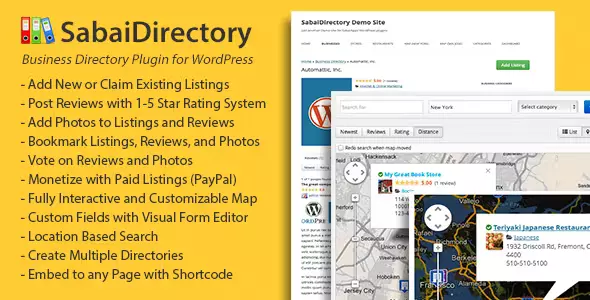
Sabai Directory Plugin for WordPress is a plugin designed to create advanced directories within a WordPress site. It allows you to organize listings of businesses, services, professionals, or resources, making it easier to search and navigate. For a physical store or business project, it provides a clear structure, an improved user experience, and greater visibility of key information.
General description
This type of plugin is used to build organized directories and listings within WordPress, allowing you to categorize content, display detailed information, and offer useful filters for visitors. Its main purpose is to transform a standard website into a platform for searching and querying structured information.
In professional projects, it's used to display listings of local businesses, suppliers, complementary products, specialized professionals, or other relevant resources. It's especially practical when users need to quickly find what they're looking for using filters, maps, ratings, or reviews integrated into the site itself.
What is the Sabai Directory Plugin for WordPress used for?
Sabai Directory Plugin for WordPress lets you create and manage a complete directory within your website, eliminating the need for external solutions or custom development. It helps solve the problem of presenting large volumes of information (businesses, services, products, ads) in a clear, filterable, and easily navigable way.
An online business can use it to create a parallel catalog of suppliers, franchisees, physical points of sale, or business partners. In e-commerce and membership sites, it's useful for grouping experts, downloadable resources, or featured services. On corporate websites and landing pages, it allows for offering listings of branches, partners, or success stories organized in a directory-style format.
Who is it ideal for?
- Companies, entrepreneurs, and agencies that need a structured directory of businesses, professionals, or services within their own domain, with organized information to improve their users' search experience.
- Online community projects, local portals, service marketplaces, or franchise networks that require listing multiple entities with individual listings, specific categories, filters, and exploration tools.
- Marketing teams, product managers, or content managers looking for a solution to centralize data, improve navigation, increase the visibility of key resources, and optimize the performance of campaigns that drive traffic to specific listings.
Key benefits
- It allows you to manage large listings efficiently, reducing manual work and facilitating the updating of records, categories, and information fields from a single interface within WordPress.
- It improves the end-user experience by offering clear views, filters, sorting options, and relevant details for each directory item, making it easier to find what you're looking for in fewer steps.
- It offers flexibility in content organization, allowing fields, categories, and presentation formats to be adapted to the specific needs of each project without having to resort to complex developments.
- It facilitates site scalability when many listings are added, as the content is structured in an organized database, designed to handle numerous elements without losing clarity.
- It reduces management time and the risk of errors by centralizing the administration of listings, avoiding duplication of information scattered across multiple pages and providing a more organized workflow.
Main features of Sabai Directory Plugin for WordPress
- It includes tools to create directory listings with custom fields, contact information, description, images, and other relevant data, so that each item has its own detailed page within the site.
- It usually incorporates advanced filtering and search systems, allowing visitors to locate listings by category, location, keyword, tags, or other criteria defined by the administrator.
- It offers options to organize content into hierarchical categories, maps, grid listings, or classic lists, helping to present information in an attractive and easy-to-understand way.
- It integrates workflows designed to allow administrators to add, review, and update listings in an orderly manner, with panels dedicated to managing directory entries.
- In many cases, it allows displaying ratings, comments, geographical data and other elements common in professional directories, helping users to make better-informed decisions.
- It adapts to the overall design of the active WordPress theme, leveraging existing styles and components to maintain visual consistency with the rest of the site, reducing the need for deep tweaking.
Use cases
- Case 1: An online store that wants to display a list of official distributors or physical collection points, organized by country, city or area, so that the end customer can quickly locate the nearest establishment.
- Case 2: A service portal that brings together professionals from different areas (lawyers, doctors, consultants, technicians) and needs a directory that can be filtered by specialty, location and type of service offered.
- Case 3: A WordPress project that centralizes resources, such as recommended tools, collaborating companies or strategic suppliers, and requires a clear system of cards and categories to avoid static pages that are difficult to maintain.
Frequently Asked Questions about Sabai Directory Plugin for WordPress
What types of sites benefit most from using this directory plugin?
It's especially useful in local portals, service marketplaces, corporate websites with many branches, franchise networks, and themed communities. Any project that needs to present many organized elements and search among them quickly can clearly benefit.
Can I adapt the fields of each directory record to my own business model?
This type of tool typically allows you to define custom fields and flexible structures, so you can display industry-specific data. This way, you can tailor each directory entry to the information that's truly relevant to your customers or users.
Is it suitable for projects that will grow to hundreds or thousands of listings?
Directory plugins are specifically designed to handle large volumes of entries. By centralizing information in a structured system, they are more suitable than static pages when sustained growth in listings, locations, or providers is anticipated.
Can it be integrated with the current aesthetic of my WordPress site?
In most projects, the plugin leverages the overall styles of the active theme and offers configurable presentation options. This makes it easy to maintain a consistent look and feel with the rest of the website by adjusting colors, templates, and element layout to suit the design requirements.
Is it useful for internal projects or corporate intranets?
Yes, this type of solution is also useful for internal directories, such as lists of employees, departments, internal resources, or key documents. It provides a central search engine and organized records, improving information retrieval within the organization.
Can it help improve my site's organic ranking?
A well-structured directory generates many pages with organized and relevant content, which is generally beneficial for search engine visibility. Furthermore, it allows for the creation of logical internal links between categories and listings, improving the information architecture of the WordPress project.
Conclusion
Sabai Directory Plugin for WordPress is a suitable solution for transforming a WordPress site into an organized and easy-to-manage directory. It facilitates the clear presentation of information, improves the user search experience, and contributes to a more structured and scalable content strategy for professional projects.
Last updated:

Written by: WPClub
With over seven years of experience curating, managing, and distributing GPL products, our content is based on hands-on experience, technical review, testing, and feedback from thousands of users. We aim to democratize and simplify the WordPress world so you can choose with confidence, speed, and ease.
Your Individual Purchase Includes:
- Lifetime updates.*
- Official product, ready to use.
- Immediate access to the product.
- Clean and virus-free files.
- GNU GPL V2/V3 License
- Technical support in Spanish and English.
* In the case of memberships, the period during which you will receive updates will depend on the type of membership purchased: monthly, annual, or lifetime.
Notify Update
We update products Monday through Friday. However, if the product you see is not yet updated, you can notify us so we can prioritize updating it whenever possible.
Get rid of your doubts here
Here you'll find answers to frequently asked questions about our service: how it works, what it includes, and how to get the most out of it.
How many websites can I use the products on?
You can use any product from our store on as many websites as you like.
Will I get updates?
Absolutely. If you buy an individual product, you'll get lifetime updates for that product.
On the other hand, if you purchase a membership, you will have updates until your membership expires.
What if I have a problem?
First of all, we want you to know that you can count on us. We will assist you and provide the necessary support, so you can rest assured.
On the other hand, it is important for you to know that, given the time difference between countries, your time and ours may not be the same, so we will be delayed accordingly.
Our opening hours start at 09 AM from Monday to Friday, UTC -3. We are open until around 18 PM.
Do you provide technical support?
Yes, and regarding time, it is usually on average within 24 to 48 business hours.
However, there are times when we have already provided a response and solution in less than a day depending on the case.
Are there download limits?
No. We don't believe in that format, so you can download as many times as you want. No problem. We pay for high-quality professional storage precisely to avoid problems.
Do you provide license keys?
No. Giving out the keys is not a viable option, as we have had experiences where they end up circulating everywhere and we can even lose the associated accounts.
That said, all products are original and, in cases where a license key is required to function, we will take care of pre-activating them for you.
Does my purchase include an invoice?
Yes. After paying, you will be able to immediately access your invoice in the “Purchases” section of your user account.
This is why it is important that you properly complete the information requested at the time of payment.
Is there a warranty?
Yes, of course. If there's a problem we can't resolve, or if there's an external issue that doesn't have a general solution, you'll receive support and, if necessary, a full refund. We have a 14-day refund policy from the date of purchase.
- It is worth noting that there is no guarantee if the product works well and simply was not what you wanted.
There have been times when a person buys a product, the product works perfectly, but they don't like it and want a refund, keeping the product. That is not appropriate.
Now, everything is evaluable and reasonable. Let's use the criteria together.
What is the attention hour?
Our opening hours are:
- Monday to Friday, from 09 a.m. to 18 p.m.
- Saturday and Sunday: No service.
UTC -3 time

Our Reputation on Trustpilot
Many thanks to those who take the time to give us a review. Trustpilot. Each of your comments is very helpful. We strive to provide a rewarding experience for each member of our community, always with respect and love. We will be here!






















WPClub Memberships
Access our entire catalog for a single payment. We offer three memberships: Monthly, Annual, and Lifetime (One-Time Payment).
- Save thousands of dollars
- No daily download limits
- No recurring payments
- Fast Downloads by AWS
- Quality service and support, validated since 2018
- We work with love for our community