



TranslatePress Pro Plugin is the most straightforward way to make any site multilingual with professional quality and without any friction. Unlike piecemeal workflows, we translate what we see, from the frontend, with immediate preview and detailed control over every text, button, form, or block. In our experience, “It's a powerful and one of the most comprehensive plugins available for translating and optimizing WordPress sites and making them multilingual.”.
The real value is in the mix of ease and control: real-time visual editing, support for multiple languages, compatibility with WooCommerce and page builders, and an optional machine translation engine with Google Translate and DeepL for speed, then hand-polishing. We love it because it speeds time to market without compromising SEO: slugs, metadata, hreflang, sitemaps and social tags are ready to position each language.
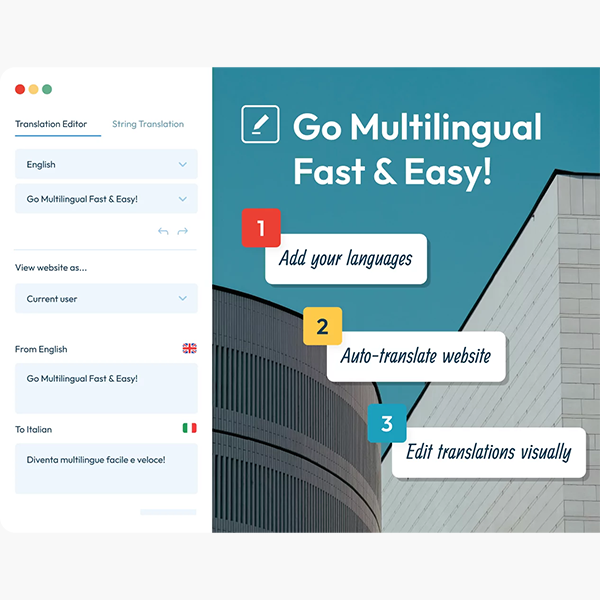
If you manage an e-commerce site, a blog with an international audience, or a corporate site that needs a presence in multiple countries, the TranslatePress Pro Plugin is a serious shortcut: you can deploy languages in hours, not weeks.You can easily and efficiently turn any site into a multilingual environment.”, and you can feel it from day one.
Real-time visual translation: work from the frontend without friction
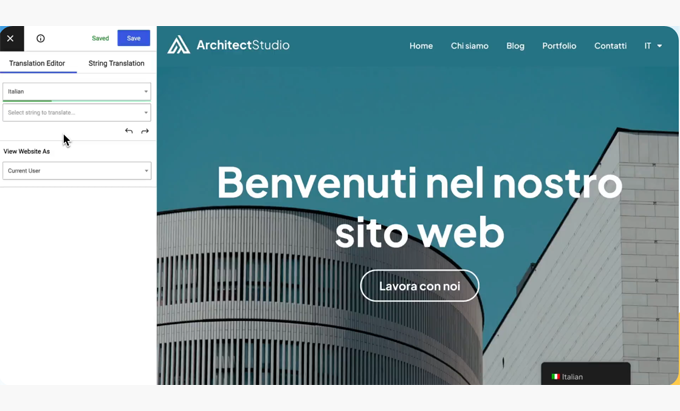
With the TranslatePress Pro Plugin, we open the editor and navigate the site just like any user would. We click on a text, translate, and see the change instantly. This visual flow avoids the classic back and forth between screens and reduces errors. It works with shortcodes, forms, widgets, and blocks; even theme or plugin strings (gettext).
In real-world projects, this approach allowed us to involve marketing teams and non-technical translators. They don't need to "search for strings" in the backend: they see it, translate it, and that's it. And because it's compatible with WooCommerce, we translate product names, attributes, variations, tags, and checkout microcopy without breaking the design.
The experience is as smooth as you described: “Owners can translate all content visually and in real time, making the experience seamless and frictionless.”This reduces training time and increases the quality of the final result.
Complete multilingual SEO: slugs, metadata, sitemaps, and language tags
TranslatePress Pro Plugin takes care of multilingual SEO from end to end:
URLs/Slugs by language: We position local keywords in the routes (e.g.,
/es/tienda,/fr/boutique).Translated metadata: title, meta description and Open Graph to improve CTR in each market.
hreflangand structure by language: We tell Google about regional variants to avoid duplicate content.Multilingual Sitemaps: We send search engines a clear map of all versions.
On an organic level, this translates into faster discovery and qualified traffic by country/language. We see it this way: the best content doesn't perform if it's not tagged and published correctly in each language. With the TranslatePress Pro Plugin, the technical part ceases to be a bottleneck and becomes a simple checklist. As you pointed out, “It’s SEO friendly, multilingual, and supports many languages.” and that gives us peace of mind in the long term.
Machine translation with AI: DeepL and Google to speed up, editing to perfect
For large sites or express launches, we enable automatic translation with DeepL or Google Translate from the TranslatePress Pro Plugin. We generate the first draft in minutes and then apply human post-editing to the most important pages (home, categories, top products, landing pages).
This hybrid strategy reduces costs and time without sacrificing quality. Additionally, when the project grows, we assign translator roles or access to collaborators to maintain an organized editorial flow. As you said, “It can be integrated with Google Translate and DeepL”We leverage that foundation to deliver value quickly and leave fine-tuning for later, with clear priorities.
Full compatibility: WooCommerce, builders and any type of website
The TranslatePress Pro Plugin is especially useful for businesses, bloggers, and online stores. In ecommerce, we don't just translate catalogs; we also fine-tune microcopy, stock messages, policies, and emails. With page builders (Gutenberg, Elementor, etc.), visual editing remains consistent. And if your theme includes custom components, the plugin allows you to capture strings and translate images or dynamic fields.
In multi-country corporate sites, we rely on the language selector Flexible (menu, shortcode, widget, floating), we customize flags/labels, and take care of accessibility. The result: a coherent multilingual site, with a native experience in each language and no technical surprises.It is especially suitable for businesses, bloggers, online stores, and practically any type of website..
Professional Workflow: Translator Accounts, Editorial Control, and Language Switching
To work seriously, we need processes. With the TranslatePress Pro Plugin:
Translators' accounts with specific permissions.
Review/editing centralized without touching the subject or the code.
Language switcher (switcher) customizable to guide the user to their version.
Image translation and dynamic chains to adapt visual pieces by culture/market.
This set allows us to operate multilingually as a living product, not a "one-time translated project." Each campaign enters the workflow and is correctly published in all languages.
Quick implementation guide (5 steps) and best practices
Define languages and structure. Choose priority markets and decide the URL format (
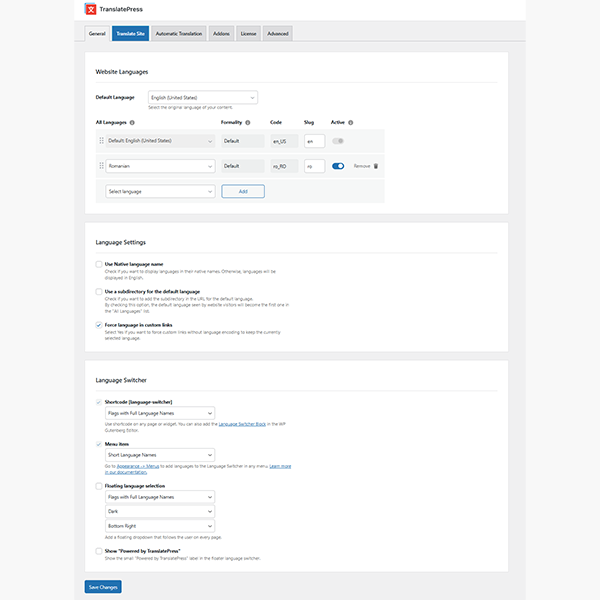
/es/, subdomains or folders).Install and configure TranslatePress Pro Plugin. Activate languages, selector and SEO rules (slugs/meta/hreflang/sitemap).
Automatic base loading (optional). Generate a first draft using Google Translate or DeepL; mark critical pages for post-editing.
Edit visually. Review the home page, categories, checkout, and landing pages. Adjust microcopy and images by language; assign reviewers.
Measure and optimize. Review language performance (impressions, CTR, conversions), correct slugs/metas, and strengthen local interlinking.
With this method, we fulfill what you told us: “can easily and efficiently make any site multilingual” without requiring complex technical profiles.
Conclusion
If you're looking for a quick-to-implement, easy-to-maintain, and SEO-friendly multilingual plugin, TranslatePress Pro Plugin is the natural choice. We've focused on three ideas we've tested in real-world projects: “real-time visual translation”, “multilingual SEO support” y “integration with Google Translate and DeepL”With that foundation, your WordPress speaks your customers' language, and your business scales seamlessly.























