
Wiloke Product Categories Elementor 1.0



- Secure Payment
- Support from Monday to Friday
- With you since 2018
$10.00 El precio original era: $10.00.$5.99El precio actual es: $5.99.
Quick summary
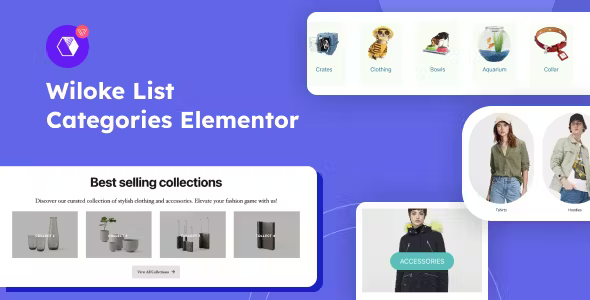
Wiloke Product Categories Elementor is an extension focused on displaying WooCommerce product categories within Elementor with greater visual and content control. It's designed for online stores that need to present their categories clearly, attractively, and consistently with the rest of the design. It's especially useful when the standard shop page doesn't effectively communicate the product catalog, product segments, or navigation paths that users need.
What problem does it help solve?
In WooCommerce, the category list often falls short when you want to build specific landing pages, showcase only certain product groups, or tailor the design to a brand's style. This happens when you want to highlight key collections, seasons, or product lines and end up using generic blocks that don't fit with the layout created in Elementor. The direct result is an unclear shop page with poorly visible categories, forcing visitors to click too many times to find what they're looking for.
If you've ever tried to design a sales-oriented homepage and discovered you can't properly control how WooCommerce categories appear within your Elementor sections, the problem isn't just aesthetic. This limitation impacts how users navigate your catalog, which products they discover first, and how they perceive the breadth of your offerings. Without a strategic presentation of categories, the site ends up functioning as a simple listing with no clear commercial purpose.
Why this solution makes a difference
Wiloke Product Categories Elementor focuses on one very specific point: helping you place product categories exactly where they make sense within your Elementor designs, with the layout and style your project requires. It doesn't aim to replace WooCommerce or Elementor, but rather to unite both worlds into a much more user-friendly workspace for designing conversion-oriented sections. By working with this approach, each category ceases to be a simple link and becomes a visually integrated element within your landing pages.
In real-world projects, this means you can plan your store architecture more precisely: featured categories on the homepage, specific collections on campaign pages, product groupings by interests or customer type—all displayed within a single visual environment. When you start noticing that your store is receiving traffic but users aren't exploring beyond the first page, it's usually because the catalog organization isn't well presented. This plugin breaks down that barrier by offering a more direct way to guide visitors through the category map.
Signs you need this product
- Your store's homepage displays all categories uniformly, and you fail to highlight the ones that actually generate sales or margin.
- You experience friction when trying to insert WooCommerce categories within custom Elementor layouts, especially in homepage sections or landing pages.
- You waste time creating manual solutions (images, boxes, buttons) to simulate categories, instead of using real catalog data.
- Your ecommerce site is growing in the number of categories and subcategories, and the standard shop page no longer clearly conveys the catalog structure.
When does it make sense to use it (and when doesn't)
It makes sense to incorporate Wiloke Product Categories into Elementor when your sales strategy relies on how you present product families. If you build pages focused on campaigns, collections, or customer segments and already use Elementor as your visual foundation, having a dedicated module for displaying categories allows you to design sections that are more consistent with the rest of your site and reduces improvisation. This is especially important when managing stores with many product lines or different category levels (parent, children, etc.).
On the other hand, if your store has very few products, you only manage one or two categories, and you're not creating custom pages with Elementor, this plugin isn't essential. In that context, the default WooCommerce store template is usually sufficient, and you won't see a significant difference by integrating it. It's also unnecessary in projects where the catalog is secondary and the website focuses almost entirely on informational content, without any intention of guiding the user through multiple product segments.
Who it fits best for
- Online store owners who already rely on Elementor to design their key pages and need a more flexible way to display WooCommerce categories within those layouts.
- Agencies and freelancers who build ecommerce sites for clients must control not only the overall design, but also how each group of products is presented on home pages, campaigns, and specific landing pages.
- Expanding businesses that are adding new product lines require a clear display of main categories, subcategories, and themed collections to prevent the catalog from appearing cluttered.
Practical benefits
- Real operational improvement by centralizing the management of how categories are displayed, avoiding having to manually recreate visual blocks every time you change the catalog.
- A more consistent user experience for the visitor, who finds category sections integrated with the overall design instead of abrupt jumps between standard templates and custom pages.
- Greater control and organization over the site's business hierarchy, as you can decide which categories are displayed, where they are placed, and with what priority within each page.
- Time savings when creating seasonal landing pages or specific campaigns, reusing visual structures that already integrate real categories without having to remake them from scratch.
- Error reduction by avoiding mixing static elements and catalog information, minimizing broken links or sections that no longer reflect the reality of your products.
How it fits within WordPress
Wiloke Product Categories Elementor integrates seamlessly into the workflow of anyone designing an e-commerce site in WordPress using Elementor. WooCommerce remains the core for managing products, prices, stock, and categories; Elementor continues as the visual builder for pages and sections. In this context, this plugin acts as a bridge, facilitating the integration of store categories into the design canvas without relying on generic blocks or impractical shortcuts. It allows you to work with catalog data from a visual environment while maintaining the site's WooCommerce logic.
Once you're used to planning pages by sections in Elementor, incorporating categories directly into those areas makes a difference in how you structure your information. You can define headings, featured areas, recommendation blocks, and navigation sections to product families without disrupting your visual flow. If you've ever had to adapt your design to the limitations of standard WooCommerce widgets, this plugin reverses that logic: it allows you to start with the design you need and then fit the categories into it.
Typical use cases
- Ecommerce sites that want a highly conversion-oriented homepage, where categories like “Stars”, “New Arrivals”, “Offers” or “Collections by Customer Type” stand out, each displayed as a visual block within the Elementor layout.
- A fashion store creates a seasonal landing page (e.g., "Spring-Summer") and wants to display only certain related categories, without showing the entire catalog, while maintaining the brand image and structure created in Elementor.
- B2B project where segmentation by product lines or sectors is key, using WooCommerce categories as entry points to specific catalogs from corporate pages designed with Elementor.
Frequently Asked Questions about Wiloke Product Categories Elementor
How is it different from using standard WooCommerce widgets within Elementor?
Standard WooCommerce widgets offer generic product or category listings, but with more limited customization options when integrated into complex Elementor layouts. Wiloke Product Categories Elementor focuses on displaying categories in a more controlled way within your layout sections, while maintaining the visual logic of the rest of the page. This allows you to build custom navigation blocks without relying on predefined structures or rigid layouts that restrict your design.
What types of catalog changes are reflected automatically?
By working directly with WooCommerce categories, any changes you make to the catalog structure (adding, renaming, or deactivating categories) are reflected in the blocks where you're using them. This reduces the need to manually update visual sections created to simulate categories. You continue to manage all product content from within WooCommerce, while the design of how those categories are presented is maintained in Elementor through the plugin, preventing discrepancies between the catalog and pages.
Is it useful for stores with many subcategories or only for simple structures?
This is especially useful in stores with extensive hierarchies, where you need to guide the user from general categories to more specific levels without overwhelming them. In these situations, having a dedicated category block within Elementor makes it easy to create tiered sections: first large categories, then subcategories or themed collections. It also works in simpler structures, but its value becomes more apparent as the catalog grows and the organization needs to be visible and consistent with the overall site design.
What happens to pages already designed in Elementor before incorporating it?
The pages you've already created with Elementor continue to function as before. The difference arises when you decide to enhance them by integrating WooCommerce categories more strategically. You can add new sections to your existing designs or replace manual blocks that simulated categories with modules that work with real data. This helps you streamline improvised structures and unify how you present product families without having to completely redesign your existing layout.
Does it make sense to use it if I barely create landing pages or campaign pages?
If your site relies almost exclusively on the general shop template and you don't build specific pages for collections, campaigns, or segments, the impact of this plugin will be limited. It's intended for projects that leverage Elementor to design custom layouts and want to insert WooCommerce categories consistently with those designs. If you plan to start working with pages targeted at specific audiences or seasons, then incorporating Wiloke Product Categories Elementor makes sense as part of that approach.
Conclusion
Wiloke Product Categories Elementor exists to solve a very specific need: displaying WooCommerce categories within Elementor-based layouts with a level of control more aligned with the site's business strategy. As the catalog grows and its presentation directly impacts user navigation, having a dedicated category block becomes crucial. If your store relies on Elementor and you need product families to be visually integrated into your key pages, this plugin helps connect design and catalog structure in a coherent and practical way.
Latest update:

Written by: WPClub
With over seven years of experience curating, managing, and distributing GPL products, our content is based on hands-on experience, technical review, testing, and feedback from thousands of users. We aim to democratize and simplify the WordPress world so you can choose with confidence, speed, and ease.
Your Individual Purchase Includes:
- Lifetime updates.*
- Official product, ready to use.
- Immediate access to the product.
- Clean and virus-free files.
- GNU GPL V2/V3 License
- Technical support in Spanish and English.
* In the case of memberships, the period during which you will receive updates will depend on the type of membership purchased: monthly, annual, or lifetime.
Notify Update
We update products Monday through Friday. However, if the product you see is not yet updated, you can notify us so we can prioritize updating it whenever possible.
Get your questions answered here
Here you'll find answers to frequently asked questions about our service: how it works, what it includes, and how to get the most out of it.
On how many websites can I use the products?
You can use any product from our store on any website you want.
Will I get updates?
Absolutely. If you buy an individual product, you'll get lifetime updates for that product.
On the other hand, if you purchase a membership, you will receive updates until your membership expires.
What if I have a problem?
First of all, we want you to know that you can count on us. We will assist you and provide the necessary support, so you can rest assured.
On the other hand, it is important for you to know that, given the time difference between countries, your time and ours may not be the same, so we will be delayed accordingly.
Our opening hours start at 9 AM from Monday to Friday, UTC -3. We are open until around 6 PM.
Do they provide technical support?
Yes, and regarding the time, it is usually on average within 24 to 48 business hours.
However, there are times when we have already provided an answer and solution in less than a day, depending on the case.
Are there download limits?
No. We don't believe in that format, so you can download as many times as you want. No problem. We pay for high-quality professional storage precisely to avoid problems.
Do they provide license keys?
No. Giving out the keys is not a viable option, as we have had experiences where they end up circulating everywhere and we can even lose the associated accounts.
That said, all products are original and, in cases where a license key is required to function, we will take care of pre-activating them for you.
Does my purchase include an invoice?
Yes. After payment, you will be able to access your invoice immediately in the "Purchases" section of your user account.
That is why it is important that you properly complete the information requested at the time of payment.
Is there a warranty?
Yes, of course. If there's a problem we can't resolve, or if there's an external issue that doesn't have a general solution, you'll receive support and, if necessary, a full refund. We have a 14-day refund policy from the date of purchase.
- It should be noted that there is no warranty if the product works well and it simply wasn't what you wanted.
There have been instances where someone buys a product, the product works perfectly, but they don't like it and want a refund, keeping the product. That's not right.
However, everything is evaluable and reasonable. Let's use judgment together.
What are the opening hours?
Our opening hours are:
- Monday to Friday, from 9 a.m. to 6 p.m.
- Saturday and Sunday: No service.
UTC -3 time

Our Reputation on Trustpilot
Many thanks to those who take the time to give us a rating on Trustpilot. Each and every one of your comments is very helpful to us. We strive to provide a rewarding experience for every member of our community, always with respect and care. We'll be here!






















WPClub Memberships
Access our entire catalog for a single payment. We offer three memberships: Monthly, Annual, and Lifetime (One-Time Payment).
- Save thousands of dollars
- Unlimited daily downloads
- No recurring payments
- Fast downloads by AWS
- Quality service and support, validated since 2018
- We work with love for our community