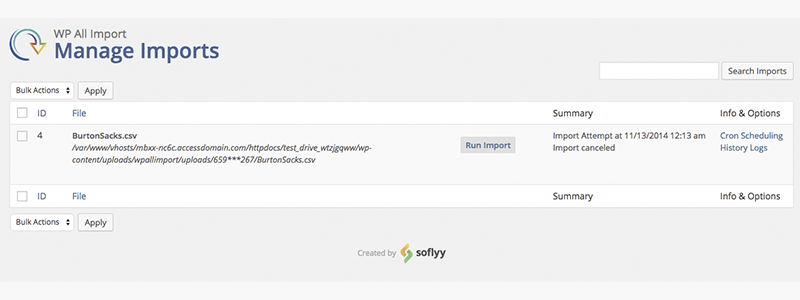


If you need to import or update WordPress content (posts, pages, CPTs) or WooCommerce catalogs (products, variations, attributes) in bulk, WP All Import Pro shines when the data comes in CSV, XML, or JSON format and you need to map it to standard and custom fields. WP All Import Pro is also ideal for syncing external inventories at regular intervals and consolidating data from multiple providers with disparate structures.
When to use WP All Import Pro
-
Medium or large catalogs with changing prices/stock.
-
Migrations from another store or ERP with exportable feeds.
-
Projects with custom fields (ACF) or complex taxonomies.
-
Need to import images from URLs and build galleries.
When not to use WP All Import Pro (or think of alternatives)
-
Inaccessible feeds or feeds with authentication that you cannot resolve at the server level.
-
"Dirty" data without reliable identifiers (SKU, external ID) or with serious inconsistencies.
-
Processes that require transactional validations at the order level (best via custom API).
-
Hosting is very limited in resources, where any medium-sized import exhausts memory/runtime.
WP All Import Pror Free vs WP All Import Pro In practice: what really changes
The free edition of WP All Import Pro allows you to test the import logic and cover simple use cases. The paid version, however, unlocks key add-ons (for example, for WooCommerce and ACF), advanced variation handling, more robust image support, conditional functions, scheduled updates, and greater control over deduplication.
What usually makes the difference
-
Full support for variable products and attributes.
-
Custom ACF fields and complex metafields.
-
Reliable re-imports and cron for continuous synchronization.
-
Greater control over conditional rules and custom functions.
Golden rule
If your case involves WooCommerce, ACF, or periodic synchronizations, professional editing reduces friction, time, and the risk of inconsistencies.
CSV/XML/JSON preparation: structure, encoding and cleaning
The quality of the import depends on the file. Make sure to:
-
UTF-8 encoding without BOM to avoid strange characters.
-
Consistent delimiters (comma, semicolon) and escaped quotation marks.
-
A stable identifier per product/entry (SKU or external ID).
-
Columns for taxonomies and attributes, separate and normalized.
-
Absolute and accessible URLs for images.
For XML/JSON, define clear paths to each field. If your feed contains nested structures (e.g., variations within a products node), map the parent elements first, then the children. Maintain a "column guide" from the provider: describe each field, its type, an example, and whether it's required, so you can debug without guessing.
Step-by-step field mapping: products, variations, and CPTs
Start with the essentials: title, content, slug, status, and author. In WooCommerce, add SKU (key), regular price, sale price, stock, and visibility. For variations:
-
Import the parent product with its variable type.
-
Use the parent identifier to relate the variations.
-
Map global attributes (color, size) exactly as they exist in the store (same spelling and slug).
-
Define combination of attributes per variation row and its unique SKU.
For CPTs, identify the expected metafields (key/meta_key) and map each column in the file. If your CPT relies on custom taxonomies, first create the taxonomies and their terms, or enable their creation during the import process.
Quality trick
Create a "test" import with 5–10 records covering the worst-case scenario (product with all combinations, CPT with complete metadata). This sample will help you detect mapping errors before launching the full batch.
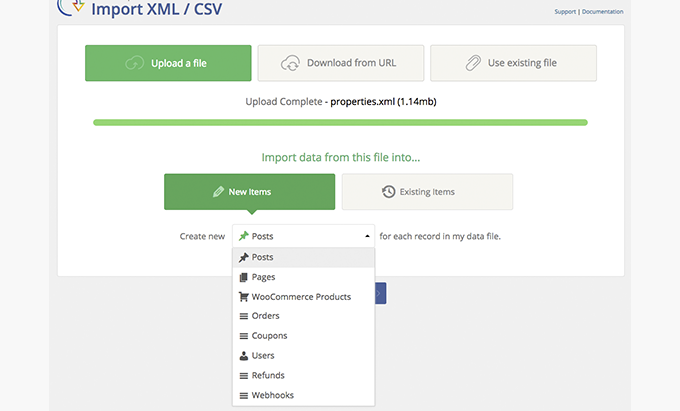
Images and galleries from URLs: how to avoid errors and duplicates
Good practices with WP All Import Pro
-
Use absolute and stable URLs (https). Avoid temporary parameters that expire.
-
Activate the option to download to the library and assign featured image/gallery.
-
Configure rules to detect duplicates by filename/MD5 when possible.
-
If the source server limits requests, split the import into batches and increase the maximum execution time.
Quick troubleshooting for WP All Import Pro
-
If an image is not attached, try the URL in the browser: if it returns 403/404, adjust the font.
-
If orphaned files are created, clean the library using date/project criteria after validating the import.
-
Standardize names (without spaces, without accents) to avoid conflicting paths.
Automation with cron: scheduled imports and differentials
Automation turns a one-off import into a synchronization flow. Define:
-
Frequency (every hour, twice a day, daily).
-
Differential strategy: re-import only if the price/stock has changed or if the feed has an update mark.
-
Add/delete rules: what happens if a SKU disappears from the feed (hide, mark out of stock, delete).
Safe operation
-
Run it first in staging with a copy of the real feed.
-
Enable logs and email/webhook notifications for errors.
-
Block overlaps: prevents a task from running if the previous one has not finished.
WP All Import Pro performance and scalability: timings, memory usage, and tips for large catalogs
Optimize the environment
-
Increase memory_limit and max_execution_time according to your volume.
-
Use updated PHP and MySQL and a hosting service with fast I/O.
-
Deactivate unnecessary plugins during the import.
Optimize the process
-
Batch import: divide the file into parts (for example, 2–5 thousand rows per batch).
-
Prioritize critical fields (SKU, stock, price) and leave secondary metadata for a second pass if necessary.
-
Index the database (postmeta by meta_key/meta_value) when working with intensive metafields.
-
Minimize images in the first run and attach them in a separate job if the bottleneck is the network.