



The WPForms Zapier Addon is the direct bridge between your form submissions and thousands of apps. It effectively turns every record into a meaningful action: creating a lead in your CRM, opening a task in your project manager, sending a text message, or notifying your team in real time. We chose the WPForms Zapier Addon because it reduces clicks, manual errors, and downtime; in other words, it turns forms into workflows that run automatically the first time.
When we first connected WPForms to Zapier, we saw a clear pattern: teams stopped copying and pasting and started reviewing results. In our case, each contact form submission feeds Salesforce and HubSpot instantly. Plus, WPForms Zapier formats fields exactly as the CRM expects, minimizing bounces and doubling the value of each lead.
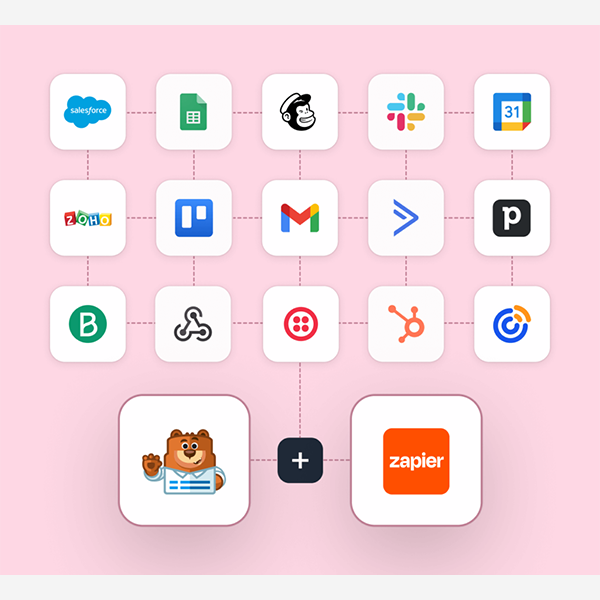
The versatility is real. With the WPForms Zapier Addon, we send rich notifications to Slack with critical data, trigger SMS reminders using Twilio, and, if the event is a course registration, the WPForms Zapier Addon automatically creates the follow-up task in Trello or Asana with a due date. For sales, marketing, support, and finance teams, this means fewer steps and more focus on what matters: closing sales and providing better customer service.
Requirements and up and running in minutes (no code)
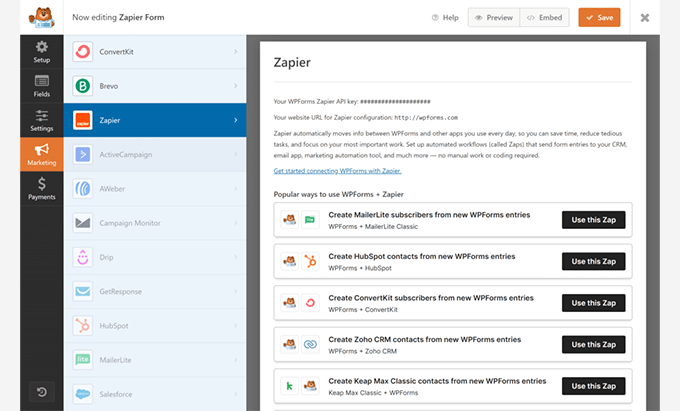
Implementing the WPForms Zapier Addon is a straightforward process. We followed this sequence and it works like a charm:
-
Activate the WPForms Zapier Addon from your WordPress installation.
-
Create (or identify) a form with at least one test submission.
-
In Zapier, choose “WPForms” as the trigger and link your site with a secure connection.
-
Test the trigger with a real input; validate that the correct fields arrive.
-
Define the action: CRM, Slack, Trello/Asana, Twilio, QuickBooks, FreshBooks, Google Contacts…
-
Map fields accurately and save the Zap.
-
Run an end-to-end test and publish.
When we tested the WPForms Zapier Addon on time-sensitive projects, the key was to prepare clean forms: clear field names, standardized options, and consistent labels. This way, the WPForms Zapier Addon "understands" the data right away. And a tip that saved us hours: creating a "lab" form to test Zaps without touching your production forms.
Ready recipes: from lead to customer in your CRM effortlessly
With the WPForms Zapier Addon, each submission can open a new lead or contact. Our favorite recipes:
-
Salesforce (Instant Lead): We mapped name, email, phone number, campaign source, and message. In our experience, with the WPForms Zapier Addon, we assigned an owner based on country and reduced response times.
-
HubSpot (Contact + Company): We duplicate the contact and company action in a single Zap. With the WPForms Zapier Addon, we apply lifecycle stage properties and tags to segment nurturing.
-
Google Contacts (Unified Address Book): When the form is for events or support, the WPForms Zapier Addon creates the contact and adds notes with the entry ID for traceability.
-
Automatic rating: We combine the WPForms Zapier Addon with an intermediate step (filters/formatters) and prioritize if the quote or company meets certain criteria.
When we connected the WPForms Zapier Addon for B2B sales, we went from delayed responses to "leads served within minutes." The difference in conversion is noticeable.
CRM best practices
-
Map required CRM fields and use default values when information is missing.
-
Avoid duplicates with previous searches (find or create) within the Zap.
-
Add the WPForms submission URL for auditing and team context.
Smart Operation: Automatic Notifications, Tasks, and Reminders
Team coordination is where the WPForms Zapier Addon shines on a daily basis:
-
Slack: Each email sends a message with the prospect's name, service of interest, and priority. We added buttons with links to the CRM file and the email response.
-
Trello/Asana: The WPForms Zapier Add-on creates cards/tasks with predefined checklists ("contact," "schedule demo," "send proposal") and a deadline + responsible party. In our case, we prevented leads from "falling" out of the funnel.
-
Twilio (SMS): After subscribing to a webinar, the WPForms Zapier Addon sends a confirmation SMS and another reminder the day before. When we enabled this, it increased actual attendance without adding any burden to the team.
Additionally, conditional paths allow Zaps to adapt: if the user selects “Demo,” WPForms Zapier creates a high-priority task; if they choose “Support,” it opens a ticket and notifies the appropriate channel.
Team template ready to copy
-
Slack channel for each key offer.
-
Trello board by funnel stage.
-
Priority fields in the form to route with WPForms Zapier Addon.
Finance on autopilot: invoices and customers from every shipment
The back office is often the bottleneck. With the WPForms Zapier Addon, we free up hours:
-
QuickBooks: We create the client with a name, email, phone number, and company; optionally, we open the quote.
-
FreshBooks: From the order form, the WPForms Zapier Addon generates the invoice with the correct service line and currency.
In our case, we automated pre-invoicing: Service request forms feed into QuickBooks and FreshBooks without intervention. With WPForms Zapier, the finance team receives clean records, ready for review and submission.
Frictionless accounting
-
Standardizes tax and currency formats on the form.
-
Use “find or create” to avoid duplicate clients.
-
Attach notes with the submission ID to track changes.
Clean data: field mapping, validations, and deduplication
Data quality defines the effectiveness of any automation. Here's how we leveraged the WPForms Zapier Addon:
-
Formatters: We standardize phone numbers (E.164), capitalize names, and validate emails.
-
Filters: We only process “valid” submissions (consent, minimum budget, target country).
-
Previous searches: With “find or create”, WPForms Zapier Addon prevents duplicates in CRM, accounting, or contacts.
When we adjusted these steps, support dropped dramatically: fewer errors, less manual intervention. And if a field arrives empty, the WPForms Zapier Add-on applies default values to keep the flow running.
Quality Checklist
-
Mandatory fields and clear placeholders.
-
Drop-down lists with closed options.
-
Format validations before sending to Zapier.
Security and reliability: SSL, trigger testing, and retries
Automation must be reliable. With the WPForms Zapier Addon, we follow this protocol:
-
SSL/HTTPS active on the site to protect the connection.
-
Trigger test with real data (not lorem) to anticipate edge cases.
-
Retries and logsIf an external app fails, Zap retries help prevent lost submissions; we keep key logs for auditing purposes.
-
Roles and permissions: We've limited who can edit critical Zaps or forms.
Thanks to this approach, WPForms Zapier Addon maintains stability even during traffic spikes and intense campaigns.
Quick Comparison: Zapier Addon vs Webhooks Addon
-
WPForms Zapier Addon: Ideal if you want to connect to thousands of no-code apps, with templates and ready-made paths. Perfect for non-technical teams that need speed, visibility, and immediate scalability.
-
Webhooks Addon: Preferable when you're looking for direct connections, lower latency, or custom integrations with your own endpoints. It requires more technical control and maintenance.
For many projects, we start with WPForms Zapier for speed and coverage; if volume or architecture demands it, we migrate critical workflows to specific webhooks and keep the WPForms Zapier Addon for everything else.
Conclusion
WPForms Zapier turns your forms into automated processes from start to finish. We implement it for sales, marketing, support, and finance with immediate results: CRM leads, helpful notifications, completed tasks, and accounting documents generated without intervention. If you're looking for a solution that scales quickly, reduces errors, and frees up your team for higher-value tasks, WPForms Zapier is the direct path to a more agile operation.























