quick summary
YITH WooCommerce Ajax Search is designed for WordPress online stores that want a fast and relevant product search engine. It displays real-time results as the user types, with suggestions for products that are easier to find. It's especially useful for medium to large catalogs where WooCommerce's native search results can lead to lost sales due to a lack of precision or speed in the results.
What problem does it help solve?
In many stores built with WooCommerce, the standard search function returns imprecise results, loads slowly, or displays entire pages instead of specific products. This leads to frustration: visitors type in an item name, reference, or brand and can't find what they need, even if it's listed in the catalog. When this happens during a purchase, every extra second increases the likelihood that they'll abandon the site.
This problem becomes more pronounced as the catalog grows. If you've ever had a customer tell you, "I can't find the product even though I know you sell it," the problem is usually a poorly optimized search. Shoppers don't want to browse through categories or manually filter each time; they expect to type two or three letters and see relevant results instantly. Without a dynamic search system, that seamless experience is lost, and users end up exploring fewer products than they could.
In real-world e-commerce projects, this directly impacts metrics such as time on page, bounce rate, and, above all, the number of products added to the cart. YITH WooCommerce Ajax Search comes into play precisely when you start to realize that your catalog is too extensive to rely solely on menus and categories, and you need the search function to work intelligently without adding complexity to the rest of your store.
Why this solution makes a difference
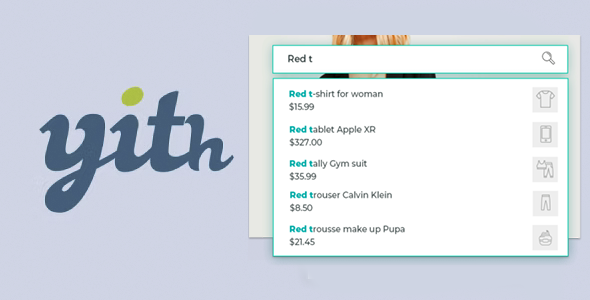
The main difference between YITH WooCommerce Ajax Search and native search is its immediacy. As the user types, they see product suggestions appear with a purchase-focused display, without reloading the entire page. This rapid response reduces friction in the search process and encourages further browsing, especially in catalogs with many similar items.
In day-to-day operations, this translates to fewer customer inquiries asking for direct links and less time wasted manually guiding them through categories. When you start noticing that users aren't reaching certain product pages or that some SKUs are barely getting any views, having a live search function helps to better showcase those "hidden" items within the store.
On the other hand, YITH WooCommerce Ajax Search's approach is specifically geared towards the WooCommerce context, not a generic content search. This means the search experience focuses on products, which are typically the core of an e-commerce site. Instead of displaying blog posts or irrelevant pages, visitors see items ready to add to their cart directly, eliminating intermediate steps that waste time and distract from the purchase.
Signs you need this product
- Customers write to you because they can't find products that you know are correctly listed within WooCommerce.
- Notes on friction in the internal use of WordPress: even you, managing the store, take time to find certain items from the front end.
- You start wasting time checking why some products have far fewer visits without a clear explanation due to price or quality.
- Your catalog has grown to the point where browsing by categories is no longer enough and the main menu has become too cluttered.
When does it make sense to use it (and when doesn't)
YITH WooCommerce Ajax Search delivers real value when your store relies on users quickly finding specific products: catalogs with dozens or hundreds of items, stores with similar variations, or customers searching by name, code, or part of a phrase. In these scenarios, a live search function helps recover sales that were being quietly lost due to difficulty finding the right item on your website.
It also makes sense in projects where the search engine becomes the main entry point, for example, when users already know your catalog and directly type the product name, or when your marketing strategy directs traffic to the homepage and you expect the customer to use the search bar to locate what they want without navigating too many sections.
However, this product isn't necessary for sites with very few items, such as stores with fewer than a dozen well-organized products on a single page. It's also not critical if your e-commerce site functions more like a closed catalog, where purchases are made via direct links to specific product pages and the search function is rarely used. In those cases, WooCommerce's native search is usually sufficient, and the impact on conversion will be minimal.
Who it fits best for
- WooCommerce store owners with medium or large catalogs who need their customers to quickly find what they are looking for without browsing through dozens of categories.
- Agencies and professionals that deliver conversion-oriented ecommerce projects, where the search bar is a central part of the user experience.
- Businesses with many similar products (fashion, spare parts, electronics, bookstores) where the customer often only knows part of the name, a brand, or a partial code.
Practical benefits
- Real operational improvement: Fewer sales support inquiries related to "I can't find this product," freeing up team time for higher-value tasks.
- Use experience: Visitors receive real-time suggestions, without full page reloads, giving a feeling of a streamlined and well-organized store.
- Control and organization: Product-focused search makes it easy to find key items just a click away, even if they're buried deep in subcategories.
- Time saving: Both the administrator and the buyer locate specific products in seconds, reducing unnecessary steps within the purchase flow.
- Error reduction: When you've already experienced customers adding the wrong items to their cart because they can't differentiate between options, a clear and direct search engine minimizes that confusion.
How it fits within WordPress
Within the WordPress ecosystem, YITH WooCommerce Ajax Search acts as a component focused on the user interaction layer of the store. It doesn't replace WooCommerce or the category structure, but rather leverages them to present results more directly. In practice, it integrates into the areas where shoppers expect a search field: headers, sidebars, shop pages, or strategic navigation sections.
When working with WordPress, it becomes another component of the purchase flow: the user enters, types a term into the search bar, sees live results with relevant products, and quickly proceeds to the product page or shopping cart. This logic fits especially well when the store's strategy focuses on minimizing distractions and guiding the buyer from initial intent to checkout with the fewest possible screens.
Common usage scenarios
- Fashion stores with extensive collections where the user searches by garment name or product type and needs immediate suggestions without reviewing all categories.
- Spare parts or component stores where the customer arrives with a partial code or reference model and the live search helps them find the exact part before leaving the website.
- Online bookstores or stores specializing in niche products, where visitors type in authors, titles, or specific keywords and expect quick, product-focused results.
Frequently Asked Questions about YITH WooCommerce Ajax Search
What differentiates YITH WooCommerce Ajax Search from the standard WooCommerce search engine?
WooCommerce's standard search relies on the WordPress system and displays results by loading a new page, sometimes mixing products with other types of content. YITH WooCommerce Ajax Search, on the other hand, focuses exclusively on locating store items and presents suggestions immediately as the user types. This reduces intermediate steps, improves the relevance of the displayed results, and makes it easier for shoppers to find the product they actually want to buy more quickly.
When will I start noticing real improvements with YITH WooCommerce Ajax Search?
The results are especially noticeable when the catalog is no longer manageable with just menus and categories. When you start noticing that some products receive few visits or that the native search returns unhelpful results, live search helps make more items visible. This is also reflected in user behavior: they spend less time wasted on irrelevant search results pages and more time on specific product pages, increasing the likelihood of adding items to their cart.
Is YITH WooCommerce Ajax Search useful if my customers search by reference or code?
Yes, this feature is particularly useful in stores where customers are part of a technical or professional sector and rely on partial references, models, or internal codes. In these contexts, visitors often type in a combination of letters and numbers directly. A live, product-oriented search system helps these matches appear quickly, reducing the need to browse through multiple categories to find the relevant item.
What impact does YITH WooCommerce Ajax Search have on the mobile experience of the store?
On mobile devices, the search bar serves as a quick access point to the catalog, especially when users don't want to navigate through lengthy dropdown menus. With YITH WooCommerce Ajax Search, suggestions appear as you type, taking up only the necessary space without forcing full page reloads. This improves usability on smaller screens and prevents shoppers from having to navigate back and forth between pages of results, which is more likely to lead to abandonment on mobile than on desktop.
Does it make sense to use YITH WooCommerce Ajax Search if my catalog is mixed with many similar products?
In mixed catalogs with very similar variations, such as sizes, flavors, or models, YITH WooCommerce Ajax Search helps to better differentiate what is shown to the user. When you've already experienced shoppers selecting the wrong variant or having trouble distinguishing between options, a real-time suggestion system allows you to present clearer and more segmented results. This way, visitors quickly identify the exact product they need, without confusing it with overly similar alternatives.
Conclusion
YITH WooCommerce Ajax Search addresses a very specific problem for WordPress stores: the difficulty of quickly finding relevant products as the catalog grows. By introducing live, item-focused search, it reduces friction, makes inventory more visible, and helps users find what they want to buy faster. For projects where the search bar is already a key part of customer behavior, it becomes a direct ally for daily conversions.