Boo...! LAST DAY > Memberships with 30% off. Use coupon: HWEEN30
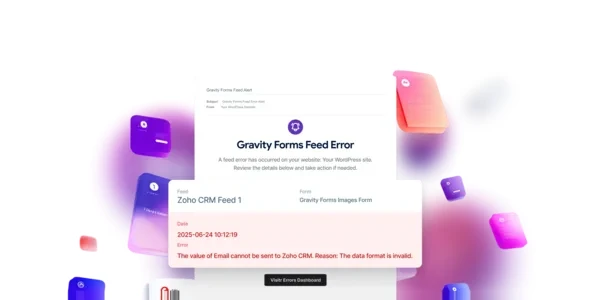
Gravity Forms Feed Error Alerts
Gravity Forms Feed Error Alerts and 6,514 more, with AutoUpdater and support.
For $4.21 more you get everything the Monthly membership includes
Choose my membershipThis product, with lifetime updates.
- Secure payment
- Spanish and English support
- With you since 2018
New version or an issue?
Description
Quick summary
Gravity Forms Feed Error Alerts is a Gravity Forms plugin that detects, logs, and notifies you when a feed fails or is completed with an error, ensuring no integration goes down without you knowing. It works with most official Gravity Forms feed plugins—such as those for Zoho, HubSpot, Slack, and Zapier—and centralizes all that information in a dedicated dashboard within your WordPress admin. Instead of discovering months later that a client lost leads because the CRM never received the data, the product alerts you immediately or through scheduled summaries, depending on your preferred method.
The concept is simple: once set up, it works in the background without adding extra steps to your workflow. It only appears when there's something to review, providing specific details about which input generated the error, in which feed it occurred, and when it happened.
What problem does it help solve?
Gravity Forms is a powerful tool for building forms, but when a feed fails, it often does so silently. There's no visible alert on the front end, the visitor doesn't notice anything unusual, and the form appears to have been submitted successfully. Meanwhile, on the other end, the data never reached the CRM, the Zapier automation never triggered, or the Slack message was never sent. The problem isn't just technical; it's one of visibility. Without a clear record of feed errors, you're relying on someone complaining that «the form didn't arrive» to start investigating, and by then enough time may have passed to lose a lead, a sale, or a customer's trust.
There are also even more subtle errors: an invalidly formatted email address or phone number that passes form validation but breaks the feed upon arrival, required integration fields that were left blank, or simply a third-party API that experienced a temporary outage or whose credentials expired. Any of these cases can cause the integration to fail without the form itself showing any symptoms.
Why this solution makes a difference
The difference lies in turning an invisible error into an actionable alert. Gravity Forms Feed Error Alerts doesn't just display a generic «something went wrong» message: it stores the details of each error in its own database table, designed for fast queries even with high submission volumes, and organizes that information by plugin, form, and error type. This allows you to detect patterns—for example, if the same feed repeatedly fails for the same reason—before they become a recurring problem that's difficult to track.
Another key difference is the control you have over how and when you receive notifications. Not every site needs an instant alert for every error; some prefer a daily or weekly summary. The product lets you choose between real-time alerts or summaries scheduled by the hour, day, week, or month, so the number of notifications matches the site's actual activity and doesn't lead to alert fatigue.
Signs you need this product
If you manage forms connected to a CRM, an email marketing platform, or tools like Slack or Zapier, and you've never manually verified whether those feeds are actually delivering the data, it's a sign of a blind spot in your workflow. It's also an early warning sign if a customer has ever told you, «I didn't receive your form,» and you had no quick way to confirm whether the problem was with the feed or another part of the process. Managing forms for third parties, where a silent failure can mean losing a lead forever, is another scenario where a lack of visibility becomes costly.
If you're manually checking entries one by one to confirm that integrations worked, or if you're simply assuming everything works because you've never seen a bug, it's probably time to have a system monitoring this for you instead of relying on luck.
When does it make sense to use it (and when doesn't)
This makes sense when your forms rely on feeds to external services and that connection is critical to the business: sales, support, lead generation, or any workflow where losing data has real consequences. It's also useful if you manage forms for multiple clients and need to detect errors before they notice them, thus protecting the relationship and the reputation of the work delivered.
On the other hand, if your forms don't have feeds configured—they only save entries or send a simple email notification—this product doesn't offer much, since its core function is precisely to monitor integrations with feed add-ons. It's also unnecessary if you exclusively use third-party plugins that don't utilize Gravity Forms' standard feed error logging feature, because automatic compatibility relies on that internal mechanism.
Who it fits best for
It's a particularly good fit for freelancers and agencies that build and maintain client forms, where the responsibility for ensuring data reaches its destination rests directly with the site's creator. It's also a great option for in-house marketing or sales teams that rely on frictionless lead flow into their CRM, and for any WordPress administrator managing multiple critical integrations who prefers to be alerted about a problem rather than receive a complaint.
Sites with simple forms, without relevant external integrations, probably do not need this additional layer of monitoring, since the value of the product grows in direct proportion to the quantity and criticality of the connected feeds.
Practical benefits
In day-to-day use, the most tangible benefit is no longer operating blindly regarding integrations. The details page for each post displays associated feed errors directly there, so you can review them and mark them as resolved without leaving the post's screen. The centralized dashboard, meanwhile, offers an overview organized by feed and form, with date, time, and direct links to the corresponding post, which significantly speeds up the process of investigating and correcting issues.
Email summaries eliminate the need to constantly log into your dashboard to check for issues: the information arrives directly in your inbox, providing enough context to decide whether immediate action is required or if it can wait. Additionally, the countdown timer in the WordPress admin bar serves as a quick indicator of pending tasks, without requiring you to access any dashboard to notice them.
How it fits within WordPress
The product integrates as an additional layer on top of Gravity Forms, leveraging the standard error logging feature used by most official feed add-ons. Thanks to this, compatibility with integrations like Zoho, HubSpot, Slack, and Zapier is usually automatic, requiring no additional manual configuration for each feed. Within the WordPress dashboard, it adds its own error panel and extends the Gravity Forms post details screen to display relevant information right where you're already working.
Errors are stored in a dedicated database table, separate from the standard Gravity Forms tables, which helps maintain performance even if the volume of submissions and errors grows over time. This separation also allows dashboard reports and filters to respond quickly without impacting the rest of the site.
Typical use cases
A typical example is an agency that manages dozens of contact forms connected to different CRMs for various clients: instead of manually reviewing each integration periodically, it sets up daily summaries and resolves issues as soon as they arise. Another common scenario is a sales team that relies on every lead arriving in their CRM without delay; here, instant alerts allow them to react the same day a problem occurs, rather than discovering it during a weekly review.
It's also common to find this on sites that use Zapier as a bridge to other tools, where a change in API credentials or a temporary service outage can disrupt the workflow without warning. In this context, having a central error log for each feed and form greatly simplifies diagnosis, instead of having to check each external platform separately to pinpoint the source of the problem.
Frequently Asked Questions about Gravity Forms Feed Error Alerts
Which feed plugins does it work with?
It works with most official Gravity Forms feed add-ons, as long as they use the standard error logging function of the corresponding class. This covers common integrations such as Zoho, HubSpot, Slack, and Zapier, among others.
Do I need to configure something different in each feed for errors to be detected?
No. Detection is automatically integrated with compatible add-ons once the product is added to the site, without additional steps for each individual feed.
Can I choose how I receive notifications?
Yes. You can choose instant alerts whenever an error occurs, or scheduled summaries by the hour, day, week, or month, depending on the site's workload.
Where can I check for errors that have already been detected?
There are two places: a centralized panel in the WordPress dashboard, organized by feed and form, and the detail screen of each post itself, where errors associated with that specific post are displayed.
Does it affect site performance?
It is designed to remain lightweight: it stores information in its own database table, separate from standard tables, and remains inactive in the background until there is something to display.
Conclusion
Silently failing feeds are one of the most costly blind spots for any site that relies on Gravity Forms to generate leads, sales, or requests. Gravity Forms Feed Error Alerts tackles this problem head-on, turning invisible failures into clear, traceable, and organized alerts without adding unnecessary complexity to daily workflows. For those managing mission-critical integrations, this visibility is no longer a luxury but a fundamental part of keeping the site running as expected.
Previous versions
If you have purchased this product, or have an active membership, you can download previous versions as we release them, without any limits or restrictions.
| Product name | Version | Size | Date | Download |
|---|---|---|---|---|
| No previous versions available. | ||||
No threats detected
File scanned with ClamAV before publishing
- File
- gf-feed-error-alerts-1.0.14.zip · 135 KB
- Files
- 33 scanned · 0 threats
- Engine
- ClamAV 1.5.3 · signatures v28189
- Verified on
- 11/21/2026
- SHA-256
- 5fedd9…ade282c
- SVG 51.5%
- PHP 15.2%
- CSS 9.1%
- JavaScript 9.1%
- Other 15.2%
Frequently Asked Questions
Here you'll find answers to frequently asked questions about our service: how it works, what it includes, and how to get the most out of it.
You can use any product from our store on any website you want.
Absolutely. If you buy an individual product, you'll get lifetime updates for that product.
On the other hand, if you purchase a membership, you will receive updates until your membership expires.
First of all, we want you to know that you can count on us. We will assist you and provide the necessary support, so you can rest assured.
On the other hand, it is important to know that, given the time difference between countries, your time and ours may not be the same, so we could be delayed because of this.
Our opening hours are Monday to Friday, from 09 to 18 hrs (UTC −3).
Yes, and regarding the time, it is usually on average within 24 to 48 business hours.
However, there are times when we have already provided an answer and solution in less than a day, depending on the case.
No. We don't believe in that format, so you can download as many times as you want. We pay for high-quality professional storage precisely to avoid any problems.
No. Giving out the keys is not a viable option, as we have had experiences where they end up circulating everywhere and we can even lose the associated accounts.
That said, all products are original and, in cases where a license key is required to function, we will take care of pre-activating them for you.
Yes. After payment, you will be able to access your invoice immediately in the «Purchases» section of your user account.
That's why it's important that you properly complete the information requested at the time of payment.
Yes, of course. If there's a problem we can't resolve, or an external issue that doesn't have a general solution, you'll receive support, if needed, and a full refund. We have a 7-day refund policy from the date of purchase.
- There is no warranty if the product works well and it simply wasn't what you wanted.
There have been instances where someone buys a product, the product works perfectly, but they don't like it and want a refund, keeping the product. That's not right.
However, everything is evaluable and reasonable. Let's use judgment together.
This guarantee applies to the purchase of individual products; memberships are not eligible for a refund.
Our opening hours are:
- Monday to Friday, from 9 a.m. to 6 p.m.
- Saturday and Sunday: no service.
UTC −3 time.

WPClub Team
GPL plugin and theme store since 2018. Every file is analyzed with ClamAV and its report is public; we keep previous versions and provide support in Spanish and English.
Gravity Forms Feed Error Alerts and 6,514 more, with AutoUpdater and support.
For $4.21 more you get everything the Monthly membership includes
Choose my membershipThis product, with lifetime updates.
- Secure payment
- Spanish and English support
- With you since 2018