Boo...! LAST DAY > Memberships with 30% off. Use coupon: HWEEN30
GravitySearch and 6,514 more, with AutoUpdater and support.
For $4.21 more you get everything the Monthly membership includes
Choose my membershipThis product, with lifetime updates.
- Secure payment
- Spanish and English support
- With you since 2018
New version or an issue?
Description
Quick summary
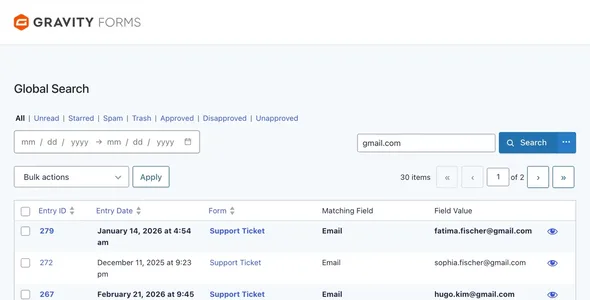
GravitySearch is a plugin for Gravity Forms that lets you search all form entries from a single screen, instead of checking each form individually. Each result displays the exact field that matched the search, making it easy to understand why an entry appeared. It includes a visual filter builder with AND/OR logic and grouping, a preview panel for reviewing entries without losing your place in the list, and bulk actions for marking entries as read, spam, starred, or trashed. It requires Gravity Forms to be running on your site, as it works directly with the form entries.
What problem does it help solve?
When a website has multiple active forms—contact forms, applications, surveys, orders—finding a specific entry can become a slow process: you have to open each form, review its entries one by one, and remember which one contained the data you're looking for. Without a centralized tool, this search ends up relying on exporting data to spreadsheets or seeking external help to cross-reference information. This product solves precisely that bottleneck: a single query scans all forms simultaneously and delivers clear results, without the need for exports or external tools.
Why this solution makes a difference
The main difference lies in the cross-cutting approach: instead of searching form by form, GravitySearch unifies that task into a single entry point. Furthermore, it doesn't just tell you which entry matched, but pinpoints the exact field and value that generated the result, eliminating the need to open the entire entry just to confirm the match. The visual filter builder adds another layer of precision: it allows you to combine conditions with AND and OR logic, nest groups of rules, and apply filters to form fields, dates, entry status, or payment data—all without writing any code.
Signs you need this product
If you manage multiple forms on the same site and are finding it increasingly difficult to remember where an entry is saved, it's a clear sign that a unified search function is needed. Another sign is relying on spreadsheet exports just to filter or cross-reference data that's already in the site's database. It's also time to consider a unified search function if reviewing entries has become a repetitive task of opening, closing, and reopening each record to compare information, or if you need to apply combined criteria—such as status, date, and field value—and the standard entries screen falls short.
When does it make sense to use it (and when doesn't)
It makes sense to implement this feature when the site handles multiple forms with Gravity Forms and the volume of entries justifies a centralized search, or when the team needs to apply more sophisticated filters than a simple keyword. It's also useful when reviewing and categorizing entries—marking them as read, starred, or spam—is done manually and repeatedly. However, if the site only has one form with a few occasional entries, the standard Gravity Forms screen is likely sufficient, and the product won't offer a significant advantage in that specific scenario.
Who it fits best for
It's a good fit for agencies and professionals who manage sites with multiple forms for different clients or departments, where each form may have its own data flow. It's also relevant for nonprofits that receive applications, requests, or donations through various forms. Customer service or administrative teams that process daily submissions and need to categorize them quickly also benefit from GravitySearch's approach, as do developers building custom solutions on top of Gravity Forms who are looking for a search and filtering layer without writing additional code.
Practical benefits
In daily use, the most direct benefit is the time saved by not having to open each form separately to locate an entry. The preview panel allows you to review the full content of an entry without leaving the results list, preventing constant switching between screens. Bulk actions—mark as read, spam, star, or send to trash—streamline the cleaning and organization of entries when there are several that meet the same criteria. The filter builder, meanwhile, allows you to create queries as simple or as detailed as needed, starting with a single condition and adding additional groups as greater precision is required.
How it fits within WordPress
The product integrates as an additional layer on top of Gravity Forms, so it doesn't replace its functionality but rather expands how you can query and manage the data already collected by that plugin. When added to the site, it integrates seamlessly within the admin panel alongside existing forms, eliminating the need for the team to learn a separate system. Because it works directly with stored entries, it doesn't require moving data to another tool or relying on external services for searches or filters.
Typical use cases
A typical scenario is a website with contact, job, and customer support forms running in parallel, where a manager needs to quickly locate a request submitted weeks ago but can't remember which form it was submitted on. Another common case is teams receiving a high volume of applications or orders who need to mark processed entries as reviewed, highlight priority entries, and delete irrelevant ones—all in batches. It's also common to use it to build combined filters, for example, entries from a specific date range with a particular payment status, when a specific report is needed without resorting to manual exports.
Frequently Asked Questions about GravitySearch
Does GravitySearch work without Gravity Forms?
No, the product relies on Gravity Forms because it works directly with the entries that this plugin stores. Gravity Forms must be running on the site before you can take advantage of its search and filtering features.
Can I search across multiple forms at once?
Yes, that's one of its core functions: a single search scans all form entries on the site at the same time, instead of having to check them one by one.
How do I know why an entry appears in the results?
Each result specifically shows the field and value that matched the search, so there's no need to open the entire entry to understand the reason for the match.
Do filters require writing code?
No. The filter builder is visual and allows you to combine conditions with AND and OR logic, as well as group rules, applying them to form fields, dates, entry status, or payment data without programming.
What bulk actions does it offer on tickets?
It allows you to mark entries as read, as spam, as starred, or send them to the trash in batches, directly from the results list, without having to open each one separately.
Conclusion
For sites that accumulate entries across multiple Gravity Forms, having a single point of search and filtering changes how that information is managed on a daily basis. GravitySearch is designed specifically for this scenario: it unifies search, explains each match, offers a no-code filter builder, and streamlines review with bulk actions and integrated preview. If managing entries scattered across different forms already feels like a repetitive task, it's worth evaluating how this tool fits into your existing workflow.
Previous versions
If you have purchased this product, or have an active membership, you can download previous versions as we release them, without any limits or restrictions.
| Product name | Version | Size | Date | Download |
|---|---|---|---|---|
| No previous versions available. | ||||
No threats detected
File scanned with ClamAV before publishing
- File
- gravitysearch-1.2.0.zip · 2.5 MB
- Files
- 957 scanned · 0 threats
- Engine
- ClamAV 1.5.3 · signatures v28191
- Verified on
- 11/23/2026
- SHA-256
- 16f50f…02322e5
- PHP 86.8%
- JavaScript 1.5%
- JSON 1.5%
- EXPECTED 1.5%
- Other 8.8%
Frequently Asked Questions
Here you'll find answers to frequently asked questions about our service: how it works, what it includes, and how to get the most out of it.
You can use any product from our store on any website you want.
Absolutely. If you buy an individual product, you'll get lifetime updates for that product.
On the other hand, if you purchase a membership, you will receive updates until your membership expires.
First of all, we want you to know that you can count on us. We will assist you and provide the necessary support, so you can rest assured.
On the other hand, it is important to know that, given the time difference between countries, your time and ours may not be the same, so we could be delayed because of this.
Our opening hours are Monday to Friday, from 09 to 18 hrs (UTC −3).
Yes, and regarding the time, it is usually on average within 24 to 48 business hours.
However, there are times when we have already provided an answer and solution in less than a day, depending on the case.
No. We don't believe in that format, so you can download as many times as you want. We pay for high-quality professional storage precisely to avoid any problems.
No. Giving out the keys is not a viable option, as we have had experiences where they end up circulating everywhere and we can even lose the associated accounts.
That said, all products are original and, in cases where a license key is required to function, we will take care of pre-activating them for you.
Yes. After payment, you will be able to access your invoice immediately in the «Purchases» section of your user account.
That's why it's important that you properly complete the information requested at the time of payment.
Yes, of course. If there's a problem we can't resolve, or an external issue that doesn't have a general solution, you'll receive support, if needed, and a full refund. We have a 7-day refund policy from the date of purchase.
- There is no warranty if the product works well and it simply wasn't what you wanted.
There have been instances where someone buys a product, the product works perfectly, but they don't like it and want a refund, keeping the product. That's not right.
However, everything is evaluable and reasonable. Let's use judgment together.
This guarantee applies to the purchase of individual products; memberships are not eligible for a refund.
Our opening hours are:
- Monday to Friday, from 9 a.m. to 6 p.m.
- Saturday and Sunday: no service.
UTC −3 time.

WPClub Team
GPL plugin and theme store since 2018. Every file is analyzed with ClamAV and its report is public; we keep previous versions and provide support in Spanish and English.
GravitySearch and 6,514 more, with AutoUpdater and support.
For $4.21 more you get everything the Monthly membership includes
Choose my membershipThis product, with lifetime updates.
- Secure payment
- Spanish and English support
- With you since 2018