Quick summary
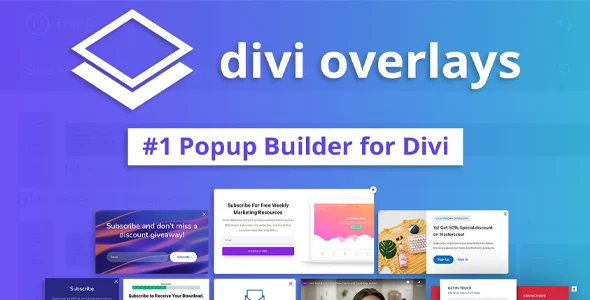
Divi Overlays is a specialized extension for Divi-built websites that lets you create pop-ups, full-screen menus, and overlay sections using the visual builder itself. It's designed for those who need to capture leads, highlight offers, display ads, or show forms without redesigning their website or relying on rigid layouts. If you already work with Divi and want precise control over what's displayed, when, and how, this tool focuses exactly on that.
What problem does it help solve?
When working with WordPress and Divi, there comes a point where fixed page sections fall short: you need to display an urgent notice, a quick contact form, a limited-time offer, or an alternative menu without disrupting the main design. Trying to do this with shortcodes, makeshift modules, or generic popup plugins often results in inconsistent designs that are difficult to maintain and nearly impossible to adapt to Divi's style.
If you've ever experienced an external popup that "doesn't look like the rest of your website"—with different fonts, colors that don't match the style guide, or strange behavior on mobile—the problem isn't just aesthetic: you're losing attention, clicks, and trust. In this context, Divi Overlays addresses a very specific need: reusing the same Divi builder to create advanced pop-up overlays, without having to learn a new interface or struggle with additional page builders.
Furthermore, when you start noticing that you need different messages depending on the page (for example, a specific legal notice at checkout, a quote request form in the services section, and a special offer just for the blog), managing all of this with elements embedded in the content becomes fragile. Changes get scattered, and updating a simple piece of text requires manually reviewing many pages. Divi Overlays centralizes these elements into reusable overlays, which are then triggered as needed.
Why this solution makes a difference
Divi Overlays makes a key difference because it integrates seamlessly with Divi's design and workflow. It doesn't add a separate page builder; instead, it transforms any design you create with Divi into an interactive overlay. This results in fewer visual breaks, less time spent adjusting styles, and greater consistency between what the user sees on the page and what appears in the popup.
In real-world projects, this reduces common errors: buttons that don't display correctly on mobile, misaligned forms, truncated text, or popups that look like they're from another website. Because you're working with the same modules, columns, and configurations you already know, the focus shifts to the content and the overlay's purpose (capturing data, informing, guiding the user), not struggling with the layout.
On the other hand, from a daily management perspective, having a dedicated area to control all your overlays gives you a clear view of which messages are active, where on the site they appear, and what you should update when your campaigns, pricing, or policies change. This prevents outdated ads from getting lost on some page, a common problem when everything is designed manually.
Signs you need this product
- Problem already present on the site: You have popups or ads created with other extensions that break the Divi design, load slowly, or look bad on mobile.
- Friction in WordPress or in the editing flow: Every time you want to change a pop-up message, you have to go into interfaces other than Divi, with options and styles that don't fit your way of working.
- Loss of control or time: You don't remember which pages display certain offers, you close campaigns but the overlays remain active, or you take too long to adjust visual details.
- Typical growth scenario: Your site starts to need specific forms, section-segmented ads, full-screen menus, or dynamic calls to action without redesigning entire templates.
When does it make sense to use it (and when doesn't)
Divi Overlays make sense when your website is built with Divi and you want pop-ups to be a natural part of the design, using the same builder. It's especially useful on landing pages where every design detail impacts conversion, on service sites that require contextual forms, or on blogs that display downloadable resources based on the content being read.
It's also ideal when managing various types of overlays: temporary legal notices, event announcements, subscription forms, or alternative menus. Instead of scattering these elements, you centralize them in a coherent system controlled from within the same Divi environment.
Conversely, this product isn't necessary if your site doesn't use Divi as its primary page builder, if you only need a very basic, static notice (for example, simple header text), or if you don't use pop-ups or overlapping sections in your strategy. On very simple personal websites, where you'll never display offers, modal forms, or full-screen menus, it's unlikely to provide any real benefit.
Who it fits best for
- Designers and developers who work with Divi: Professionals who want to maintain total control over the visual appearance of popups and menus, without abandoning the design environment they already master.
- Businesses that depend on lead generation: Agencies, consultants, trainers, or online stores that use forms and contextual calls to action to convert visits into leads or sales.
- Marketing managers with active campaigns: People who frequently adjust messages, launch temporary promotions, and need to create specific overlays for certain sections without constantly resorting to a developer.
Practical benefits
- Real operational improvement: By designing overlays with the same system of columns, modules, and styles as Divi, you reduce intermediate steps and ensure that everything responds consistently to global design changes.
- Consistent user experience: Visitors perceive the overlays as a natural part of the website, without abrupt style jumps or elements that seem foreign to the site.
- Control and organization: You have a clear space from which to manage which overlays exist, in which parts of the website they act and for what purpose they were created, which makes it easier to maintain order in growing projects.
- Time saving: You reuse Divi designs and layout cloning to create quick variations of the same message, without rebuilding each overlay from scratch.
- Error reduction: By avoiding mixing layout artists and styles, problems such as overlapping text, cut-off text, or elements that no longer look correct after global design changes are reduced.
How it fits within WordPress
Within the WordPress ecosystem, Divi Overlays serves as a dedicated layer for controlling pop-up and overlay content on Divi-based sites. It doesn't replace templates, themes, or builders; instead, it leverages your existing page builder to create independent layouts that appear as overlays on specific pages and sections.
By working this way, it integrates seamlessly into your usual workflow: you define the main page content with Divi, and when you need to capture attention at a key moment in the user journey, you connect an overlay that you've designed using the same visual style. This occurs, for example, when you want to display a form only after the user clicks a button or when they land on a specific URL with an active campaign.
In this way, it becomes another piece of your strategy within WordPress: base pages, posts, forms, menus and, on top of that, overlays visually controlled from Divi, without introducing additional technical layers that complicate the daily management of the site.
Typical use cases
- Real-world use in e-commerce or sales projects: Display a discount coupon in an overlay designed with Divi when the user enters a specific category, without altering the product or cart template.
- Specific case study: On a service site, when you click on "Request a quote", instead of sending the visitor to another page, an overlay opens with a complete form, consistent with the design of the rest of the website, which reduces friction and abandonment.
- Situation where it provides direct value: On a blog with downloadable resources, a subscription form overlay is activated only for specific key articles. This allows you to capture leads without cluttering the page with forms that are visible at all times.
Frequently Asked Questions about Divi Overlays
What differentiates Divi Overlays from a generic popup plugin?
Divi Overlays is designed specifically to work with Divi. Instead of offering pre-made templates, it lets you create your overlays using the builder itself, with the same modules, fonts, colors, and settings you already use on the rest of your site. This eliminates the need to learn a new interface, reduces visual inconsistencies, and ensures that any global style changes you make in Divi are reflected in your overlays without duplicate settings.
Can I reuse existing Divi layouts within my overlays?
One of the practical advantages of Divi Overlays is that it leverages layouts you're already familiar with. You can start with designs you use in other sections, replicate structures, and simply adapt the content to display them as overlays. This greatly speeds up the creation of pop-up forms, full-screen menus, or informational notices without having to rebuild everything from scratch, while also maintaining the same logic of rows, columns, and modules that you manage on your main site.
On what type of pages does it make the most sense to activate overlays created with Divi Overlays?
Divi Overlays make particular sense on pages where the user needs to make a decision: campaign landing pages, service sections, product pages, or articles that lead to a specific action. You can use them to display contact forms, highlight guarantees, offer downloadable resources, or show alternative menus without taking the visitor away from the page they're viewing. In very basic informational sections, where you don't expect additional interaction, you probably don't need overlays.
How do Divi Overlays help keep your site more organized in the long run?
By centralizing your overlays in a single system linked to Divi, it becomes easier to see which messages are active and where they're being used. When a campaign ends, you don't have to sift through dozens of pages manually searching for embedded forms; simply adjust or disable the corresponding overlay. This is especially valuable when working with growing websites, where the volume of pages and content makes any scattered embedded elements difficult to locate and update.
Does it make sense to use Divi Overlays if I just want one fixed message across the entire site?
If your intention is to display a single, very simple, global message, without specific design or variations depending on the page, a fixed bar or a standard section might suffice. Divi Overlays make sense when you need an extra level of control: different messages per section, contextual forms, special offers, or full-screen menus aligned with the Divi design. If your website doesn't include these kinds of advanced interactions, you're probably not getting the full value they can offer.
Conclusion
Divi Overlays exists to solve a very specific problem on sites built with Divi: creating overlays, popups, and menus that look and function exactly like the rest of the design. When you start noticing that your pop-up messages and your website are doing one thing, this extension allows you to unify visual and operational style. If your strategy involves displaying contextual content without taking the user away from the page, working with overlays designed directly in Divi becomes a clear advantage in your daily workflow.