
Aardvark Community Membership Theme 4.7.1


- Secure Payment
- Support from Monday to Friday
- With you since 2018
$69.00 El precio original era: $69.00.$5.99El precio actual es: $5.99.
Quick summary
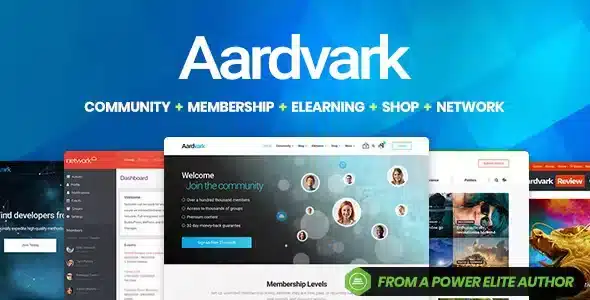
Aardvark Community Membership Theme is a WordPress theme specifically designed for creating online communities, membership sites, and private content areas without relying on generic designs. It allows you to combine user profiles, social interactions, and restricted content under a single, cohesive visual structure. It's ideal for academies, private clubs, e-learning projects, or niche communities that need more than just a simple blog or corporate portfolio.
What problem does it help solve?
When you try to build a community or membership site in WordPress using a standard theme, the result is often a disjointed mix of pages: a blog on one hand, a user area without a clear identity, and private areas that seem like haphazard additions. This leaves users confused about where everything is and how to interact with the site.
This happens when you try to integrate forums, groups, profiles, and paid content onto a design intended only for basic posts. You end up with cluttered menus, inconsistent templates, and navigation flows that confuse members. If you've already experienced users repeatedly asking "where is my course," "how do I log in to my account," or "where can I find my group," the problem isn't just with the content, but with how the theme structures the entire experience.
In real-world projects, the lack of a visual foundation designed for community creates constant friction: profile pages that don't fit with the rest of the site, disorganized member listings, sections that don't encourage participation, and a haphazard platform feel. The Aardvark Community Membership Theme addresses this by creating a structure designed from the ground up for community life, subscriptions, and segmented access.
Why this solution makes a difference
The Aardvark Community Membership Theme is more than just about "looking good"; it organizes how members navigate the site: how they find other users, where they access content, how they discover new sections, and what they see first upon logging in. This has a direct impact on retention, engagement, and project clarity.
In your day-to-day work, having a community-ready design reduces repetitive decisions. You don't have to create your profile page, membership area, or restricted content listings from scratch: you already have templates designed for those contexts. This translates into fewer visual adjustments, less "blind" testing, and more time to focus on your program, courses, or membership benefits.
On the other hand, working with WordPress means that all the main community and subscription sections share the same design language, preventing visual inconsistencies. Members perceive a professional, intuitive, and stable environment, which reduces support messages due to confusion and navigation errors. From a management perspective, you have a solid foundation for expanding sections without compromising site coherence.
Signs you need this product
- You already have a membership site or community on WordPress, but users get lost among disconnected pages and unclear menus.
- You notice friction when integrating user profiles, forums, courses, or groups into your current theme, with designs that don't fit together.
- You start wasting time creating specific templates for private areas, while you continue to receive inquiries like "I can't find my content".
- Your project is in a growth phase where you need to move from an informative blog or website to a community with its own identity and well-organized sections.
When does it make sense to use it (and when doesn't)
The Aardvark Community Membership Theme brings real value when your project revolves around people registering, interacting, and accessing content based on their membership level. If your focus includes forums, interest groups, recurring courses, exclusive benefits, or any community-centric approach, having a theme designed for this type of experience simplifies many decisions and reduces structural errors.
When you start noticing that your site mixes informational pages with private areas without a clear logic, this theme helps organize everything under a single visual architecture. It's especially useful for training academies, paid communities, professional clubs, recurring content platforms, or niche networks where membership and interaction are important.
However, this product isn't necessary if you only need a simple corporate website, a personal blog, or a one-off landing page for lead generation without a user area or segmented content. In that case, a generic theme focused on static pages will suffice and be less complex to manage. The Aardvark Community Membership Theme makes sense when ongoing relationships with members are central to the project.
Who it fits best for
- Managers of online academies that offer courses, study groups, and community spaces for active students.
- Creators who manage paid communities in specific niches (fitness, investment, marketing, music, technology) and need a cohesive membership environment.
- Agencies or developers that build membership platforms for clients and require a pre-designed visual foundation for profiles, member listings, and restricted content.
- Organizations, associations and clubs that want a digital space where partners and members can interact, access internal resources and maintain a sense of belonging.
Practical benefits
- Real operational improvement: the entire site structure is aligned with the community and membership model, avoiding improvised designs for each section.
- User experience: Members quickly understand where to log in, which areas are for them, and how to navigate between content, profiles, and groups.
- Control and organization: you can clearly define what is shown to guest users and what is reserved for members, keeping navigation organized.
- Time saving: instead of building complex templates for private areas from scratch, you take advantage of a base already designed for these scenarios.
- Error reduction: By working with consistent layouts, lost links, duplicate sections, and confusing structures that affect engagement are minimized.
How it fits within WordPress
Within the WordPress ecosystem, the Aardvark Community Membership Theme acts as the visual and structural layer that organizes everything related to community and memberships. It doesn't just "style" posts and pages; it provides a framework designed for user profiles, member lists, restricted areas, and sections for interaction between members.
In this context, your community, forum, or membership plugins rely on a design that already understands the logic of registration, access, and navigation through protected content. Instead of forcibly adapting a generic theme, you start from a foundation created specifically for these types of projects. This allows you to maintain a clear hierarchy in menus, headers, internal sections, and calls to action geared toward engagement and retention.
Typical use cases
- Membership sites with recurring content: for example, a business community where new classes are delivered every month, live sessions and discussion forums organized by access levels.
- Practical project: a training academy that offers recorded courses and cohort communities, where each group has its own space, but everything maintains the same visual style and consistent navigation.
- Direct value situation: a professional club that needs to showcase member directories, internal resources and exclusive member benefits, with clear access and an experience that reinforces membership.
Frequently Asked Questions about the Aardvark Community Membership Theme
How does Aardvark Community Membership Theme differ from a traditional WordPress theme?
The Aardvark Community Membership Theme is designed for projects where users register, interact, and access content based on their role or plan. A traditional theme focuses on displaying static pages and posts. Here, however, the visual layout prioritizes member-oriented menus, private areas, user lists, and sections that encourage participation. This way, you don't need to force a corporate design to fit an active community.
Is it suitable for an online academy with multiple membership levels?
Yes, it works particularly well when the academy combines content, groups, and different privileges according to each student's plan. The Aardvark Community Membership Theme provides a visual framework designed to distinguish free areas, member sections, and zones associated with higher plans, allowing users to understand what they should explore. This reduces confusion when navigating courses, resources, and interaction spaces associated with each level.
What if my community is already created but the current design isn't working?
If you already have users, content, and a dynamic community, but the visual structure is causing time wastage and confusion, the Aardvark Community Membership Theme can serve as a new graphic foundation. The idea is to transfer your existing community to a layout designed for these flows: a member-oriented homepage, featured sections, clear profiles, and consistent navigation. This way, you leverage what you've already built, but within a clearer and more functional environment.
Is it suitable for projects that combine community and public content?
The Aardvark Community Membership Theme is useful when you need to showcase a publicly accessible section (blog, sales page, free content) while maintaining a restricted-access internal area. Its approach makes it easy to visually differentiate these two layers of the project without them appearing as separate sites. This allows visitors to discover the public value and, as they progress, clearly understand the additional benefits of becoming a member.
When is it better to choose a different theme than the Aardvark Community Membership Theme?
It makes more sense to choose a different theme when your project doesn't rely on registered users or internal areas. For example, a website offering basic services, a blog without registration, or a highly targeted lead generation landing page can be better served by a design focused on static pages. In these cases, the Aardvark Community Membership Theme's community and membership structure would add unnecessary complexity, as you wouldn't be taking advantage of its primary focus on interaction and belonging.
Conclusion
Aardvark Community Membership Theme exists for projects where community, belonging, and memberships are the core, not an add-on. It provides a cohesive visual foundation so that profiles, restricted content, and internal areas function as a system designed from day one.
If your WordPress site is growing towards an active community model and you're starting to notice that your current theme is lacking in structure, this member-centric approach helps to organize, clarify, and strengthen the experience for all users involved.
Latest update:

Written by: WPClub
With over seven years of experience curating, managing, and distributing GPL products, our content is based on hands-on experience, technical review, testing, and feedback from thousands of users. We aim to democratize and simplify the WordPress world so you can choose with confidence, speed, and ease.
Your Individual Purchase Includes:
- Lifetime updates.*
- Official product, ready to use.
- Immediate access to the product.
- Clean and virus-free files.
- GNU GPL V2/V3 License
- Technical support in Spanish and English.
* In the case of memberships, the period during which you will receive updates will depend on the type of membership purchased: monthly, annual, or lifetime.
Notify Update
We update products Monday through Friday. However, if the product you see is not yet updated, you can notify us so we can prioritize updating it whenever possible.
Get your questions answered here
Here you'll find answers to frequently asked questions about our service: how it works, what it includes, and how to get the most out of it.
On how many websites can I use the products?
You can use any product from our store on any website you want.
Will I get updates?
Absolutely. If you buy an individual product, you'll get lifetime updates for that product.
On the other hand, if you purchase a membership, you will receive updates until your membership expires.
What if I have a problem?
First of all, we want you to know that you can count on us. We will assist you and provide the necessary support, so you can rest assured.
On the other hand, it is important for you to know that, given the time difference between countries, your time and ours may not be the same, so we will be delayed accordingly.
Our opening hours start at 9 AM from Monday to Friday, UTC -3. We are open until around 6 PM.
Do they provide technical support?
Yes, and regarding the time, it is usually on average within 24 to 48 business hours.
However, there are times when we have already provided an answer and solution in less than a day, depending on the case.
Are there download limits?
No. We don't believe in that format, so you can download as many times as you want. No problem. We pay for high-quality professional storage precisely to avoid problems.
Do they provide license keys?
No. Giving out the keys is not a viable option, as we have had experiences where they end up circulating everywhere and we can even lose the associated accounts.
That said, all products are original and, in cases where a license key is required to function, we will take care of pre-activating them for you.
Does my purchase include an invoice?
Yes. After payment, you will be able to access your invoice immediately in the "Purchases" section of your user account.
That is why it is important that you properly complete the information requested at the time of payment.
Is there a warranty?
Yes, of course. If there's a problem we can't resolve, or if there's an external issue that doesn't have a general solution, you'll receive support and, if necessary, a full refund. We have a 14-day refund policy from the date of purchase.
- It should be noted that there is no warranty if the product works well and it simply wasn't what you wanted.
There have been instances where someone buys a product, the product works perfectly, but they don't like it and want a refund, keeping the product. That's not right.
However, everything is evaluable and reasonable. Let's use judgment together.
What are the opening hours?
Our opening hours are:
- Monday to Friday, from 9 a.m. to 6 p.m.
- Saturday and Sunday: No service.
UTC -3 time

Our Reputation on Trustpilot
Many thanks to those who take the time to give us a rating on Trustpilot. Each and every one of your comments is very helpful to us. We strive to provide a rewarding experience for every member of our community, always with respect and care. We'll be here!






















WPClub Memberships
Access our entire catalog for a single payment. We offer three memberships: Monthly, Annual, and Lifetime (One-Time Payment).
- Save thousands of dollars
- Unlimited daily downloads
- No recurring payments
- Fast downloads by AWS
- Quality service and support, validated since 2018
- We work with love for our community