

- Secure payment
- Spanish and English support
- With you since 2018
KIDZ Baby Shop And Kids Store Theme 5.24
$27.00 El precio original era: $27.00.$5.99El precio actual es: $5.99.
Quick summary
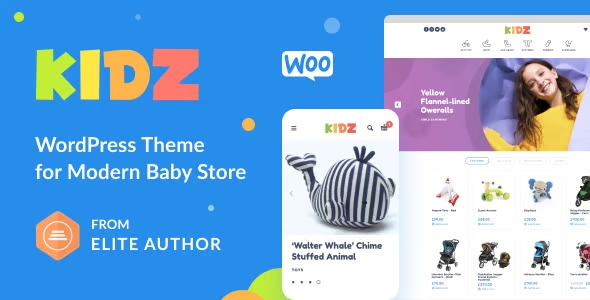
The KIDZ Baby Shop and Kids Store Theme is a WordPress template focused on stores selling clothing, toys, accessories, and products for babies and children. It's designed for those who want a polished, visually consistent, and easy-to-navigate children's e-commerce site without the hassle of generic designs. It helps present large catalogs in an organized way, highlight collections by age or category, and build trust with families who shop online.
What problem does it help solve?
When setting up an online store for babies and children on WordPress, the first real hurdle isn't the technical setup, but the design: cluttered templates, confusing menus, and poorly presented products that cause parents to abandon their purchases before completing a sale. When you mix sizes, ages, bundles, educational toys, and accessories in the same catalog, a generic theme ends up creating a chaotic, unclear, and low-converting experience.
The KIDZ Baby Shop and Kids Store Theme addresses precisely that clutter. It's designed for children's catalogs with multiple categories, where you need to showcase large photos, soft colors, clear messaging, and highly visible calls to action. If you've ever experienced your store looking "all jumbled up" and struggling to make it easy for users to quickly understand what you sell, this design offers a clean structure that guides them from the homepage to checkout with a logical flow.
In real-world projects, another common problem is that users don't distinguish between collections, age groups, or product types. This becomes apparent when you receive repeated questions like, "Is this product for a newborn or a 2-year-old?" or when they see many products but don't know where to start. This theme allows you to organize children's navigation into clear blocks, designed for families who often shop quickly and from their mobile devices.
Why this solution makes a difference
The KIDZ Baby Shop and Kids Store Theme is built specifically for the children's world, and this is evident in the structure of each page: spacious layouts, sections ready to highlight seasonal collections, areas for promotions, and blocks designed to inspire confidence (reviews, featured products, cross-recommendations). In day-to-day operations, this translates to less time spent struggling with improvised layouts and more focus on uploading products and improving descriptions.
When working with WordPress, one of the critical aspects is visual consistency between the homepage, categories, and product pages. With a generic theme, you end up manually adjusting each template, leading to visual errors, inconsistencies between sections, and an unprofessional feel. Here, every section is designed specifically for baby and kids' e-commerce: legible fonts, blocks for bundles, sections for featured collections, and clear navigation paths.
In your daily routine, this directly impacts conversion rates and management: fewer abandoned carts due to confusion, clearer categories, and a design that conveys care and security to parents shopping online. When you start noticing that "everything looks good, but no one completes their purchase," a layout specifically designed for children's stores makes a real difference.
Signs you need this product
- Your baby or children's store is set up on WordPress but visually it looks like a generic ecommerce site, without a childlike personality or sections designed for families.
- Users get lost among categories, ask questions that are already on the website, or take too long to find products by age, size, or type.
- You manage your catalog from WordPress, but you feel like you're wasting time redoing designs, reorganizing sections, and correcting layout errors.
- You are in a growth phase: you have gone from a few products to a large catalog and you need a structured design that can handle more traffic and more references without collapsing the experience.
When does it make sense to use it (and when doesn't)
The KIDZ Baby Shop and Kids Store Theme makes sense when your project is clearly focused on children's products: baby clothes, toys, maternity accessories, children's furniture, or stores specializing in newborn gifts. It's especially valuable when you want to convey a warm and approachable style, but with a robust e-commerce platform that allows users to filter, browse, and buy seamlessly, both on desktop and mobile.
It's a good choice when you already know WordPress will be the foundation of your business and you need a template that doesn't force you to reinvent the design of every page. It's also ideal when you work for clients (children's stores, kids' concept stores, small family businesses) and need a theme that allows them to recognize their brand in an environment visually tailored to their industry.
On the other hand, it's not necessary if your project has nothing to do with the world of babies or children, if you only sell a single product without variations, or if you're looking for a corporate website without a shop component. It's also not the best choice if you want a general magazine-style site or blog without a clear intention of selling directly; in that context, an editorial content theme would make more sense.
Who it fits best for
- Owners of physical children's clothing or toy stores who are making the leap to ecommerce and want an online presence consistent with their physical space.
- Digital entrepreneurs launching their own brand of baby products (organic clothing, educational toys, children's decor) need an organized and attractive catalog.
- WordPress agencies or freelancers working with children's businesses require a specialized theme to reduce design and review times.
Practical benefits
- Real operational improvement by having page templates designed to display children's categories, collections, and featured products without having to redesign everything from scratch.
- A clearer user experience for parents thanks to clean navigation, hierarchical sections, and visible calls to action throughout the purchase journey.
- Greater control and organization over your catalog, by being able to structure products by age, type or season within a design already adapted to that type of content.
- Daily time savings by not having to constantly correct visual problems or spend hours fixing pages that get torn with new photos or text.
- Reduction of common errors, such as confusing menus, misaligned blocks, illegible cards, or designs that become disorganized on mobile, which directly affect buyer confidence.
How it fits within WordPress
Within the WordPress ecosystem, the KIDZ Baby Shop And Kids Store Theme acts as the visual and structural foundation of your children's e-commerce site. It integrates seamlessly into your existing workflow: you create pages, define menus, and manage categories and products from the dashboard, all with templates already designed for baby and children's stores. In this context, your focus shifts to content (photos, text, prices, promotions) rather than solving design or layout problems.
When working with WordPress, this means that recurring tasks, such as launching new collections, adding sale sections, or highlighting seasonal products, rely on pre-made layouts. You don't have to improvise a new structure each time; instead, you can reuse sections that are consistent with a child-friendly aesthetic, maintaining a uniform look throughout the site.
Typical use cases
- An online clothing store for newborns and children up to 8 years old needs to visually separate product lines (basics, formal wear, gifts) to make shopping easier for families with little time.
- An e-commerce site for educational toys and children's books that wants to combine a catalog, age recommendations, and gift pack sections without overloading the interface.
- A project that starts from a neighborhood physical store specializing in babies, which wants to transfer its attention to detail to the digital environment and show confidence from the first visit.
Frequently Asked Questions about the KIDZ Baby Shop and Kids Store Theme
How does the KIDZ Baby Shop And Kids Store Theme differ from a generic online store theme?
The KIDZ Baby Shop and Kids Store Theme is designed with the children's world in mind from the ground up. It doesn't just change colors; it organizes information with parents' shopping habits in mind: large visual blocks, prominent sections for collections, space for emotional photos, and a content hierarchy that prioritizes clarity and trust. A generic theme, on the other hand, is usually designed for any type of store and forces you to adapt its structure and style.
Is it suitable for large catalogs of baby and children's products?
Yes, it's especially geared towards projects where the catalog isn't limited to just a few products. When you work with many children's items, you need a very clear organization: visible categories, easy ways to discover collections, and uncluttered product descriptions. The KIDZ Baby Shop And Kids Store Theme provides a structure that supports growth without losing order, which is useful when you frequently expand product lines or add new seasons.
Can I use the KIDZ Baby Shop And Kids Store Theme if my project combines children's and adult products?
It's possible, but the KIDZ Baby Shop And Kids Store Theme's visual identity is clearly focused on babies and children. It works best when the core of the business is children's products, because the entire design aligns with that idea: color palette, typography, section layout, and visual tone. If most of your catalog is for adults and you only have a small kids' section, you might want to consider a more neutral and general approach to avoid confusing other users.
What if I want to focus my store on just one line, such as toys or children's clothing?
The KIDZ Baby Shop and Kids Store Theme doesn't require a mixed product catalog; it's well-suited to stores specializing in a single product line, such as toys, organic clothing, children's shoes, or home decor. In these cases, the benefit lies in being able to use the pre-designed sections to highlight collections, age groups, or product types, adjusting text and images to your specific niche without losing the overall coherence of the children's theme throughout the site.
How does the KIDZ Baby Shop And Kids Store Theme help me if most of my visits come from mobile devices?
In baby and children's stores, a large portion of visits come from mobile devices belonging to parents with limited time. The KIDZ Baby Shop And Kids Store Theme prioritizes easy navigation on small screens, with well-separated blocks, clear action buttons, and easy-to-read product descriptions. This reduces the effort required for users to find their way around, improves quick access to key categories, and decreases the risk of abandonment due to complicated interfaces or poorly placed elements on mobile devices.
Conclusion
The KIDZ Baby Shop and Kids Store Theme is designed to solve a very specific problem: WordPress baby and children's stores that need order, clarity, and an aesthetic aligned with their target audience. If you feel your children's e-commerce site doesn't inspire confidence or is confusing for families, this theme provides a cohesive visual foundation, adapted to real catalogs and quick mobile checkouts. It allows you to focus your energy on the product and customer service, instead of struggling with your store's design every week.
Your individual purchase includes:
- Lifetime updates.*
- Product ready to use.
- Immediate access to the product.
- Clean and virus-free files.
- GNU GPL V2/V3 License
- Technical support in Spanish and English.
* In the case of memberships, the period during which you will receive updates will depend on the type of membership purchased: monthly, annual, or lifetime.
Get your questions answered here
Here you'll find answers to frequently asked questions about our service: how it works, what it includes, and how to get the most out of it.
On how many websites can I use the products?
You can use any product from our store on any website you want.
Will I get updates?
Absolutely. If you buy an individual product, you'll get lifetime updates for that product.
On the other hand, if you purchase a membership, you will receive updates until your membership expires.
What if I have a problem?
First of all, we want you to know that you can count on us. We will assist you and provide the necessary support, so you can rest assured.
On the other hand, it is important for you to know that, given the time difference between countries, your time and ours may not be the same, so we will be delayed accordingly.
Our opening hours start at 9 AM from Monday to Friday, UTC -3. We are open until around 6 PM.
Do they provide technical support?
Yes, and regarding the time, it is usually on average within 24 to 48 business hours.
However, there are times when we have already provided an answer and solution in less than a day, depending on the case.
Are there download limits?
No. We don't believe in that format, so you can download as many times as you want. No problem. We pay for high-quality professional storage precisely to avoid problems.
Do they provide license keys?
No. Giving out the keys is not a viable option, as we have had experiences where they end up circulating everywhere and we can even lose the associated accounts.
That said, all products are original and, in cases where a license key is required to function, we will take care of pre-activating them for you.
Does my purchase include an invoice?
Yes. After payment, you will be able to access your invoice immediately in the "Purchases" section of your user account.
That is why it is important that you properly complete the information requested at the time of payment.
Is there a warranty?
Yes, of course. If there's a problem we can't resolve, or if there's an external issue that doesn't have a general solution, you'll receive support and, if necessary, a full refund. We have a 14-day refund policy from the date of purchase.
- It should be noted that there is no warranty if the product works well and it simply wasn't what you wanted.
There have been instances where someone buys a product, the product works perfectly, but they don't like it and want a refund, keeping the product. That's not right.
However, everything is evaluable and reasonable. Let's use judgment together.
What are the opening hours?
Our opening hours are:
- Monday to Friday, from 9 a.m. to 6 p.m.
- Saturday and Sunday: No service.
UTC -3 time

Reviewed by the WPClub team
At WPClub, we carefully review each product before listing it. Our team evaluates its key features, compatibility, and performance to provide you with reliable, up-to-date, and helpful information when choosing and using each resource available in our store.
Download previous versions
If you have purchased this product, or have an active membership, you can download previous versions as we release them, without any limits or restrictions.
| Nombre del producto | Versión | Tamaño | Fecha | Descargar |
|---|---|---|---|---|
| No hay versiones anteriores registradas. | ||||

Our Reputation on Trustpilot
Many thanks to those who take the time to give us a rating on Trustpilot. Each and every one of your comments is very helpful to us. We strive to provide a rewarding experience for every member of our community, always with respect and care. We'll be here!






















WPClub Memberships
Access our entire catalog for a single payment. We offer three memberships: Monthly, Annual, and Lifetime (One-Time Payment).
- Save thousands of dollars
- Unlimited daily downloads
- No recurring payments
- Fast downloads by AWS
- Quality service and support, validated since 2018
- We work with love for our community