


If you're looking for a solution that doesn't limit you, QuadMenu Themes Developer Mega Menu is the navigation builder that lets you transform a basic menu into a conversion hub. The promise is clear: clean, fast mega menus with a top-notch mobile experience. What we value most in our daily work is that QuadMenu Themes Developer Mega Menu doesn't force us to redo the site's architecture; it integrates seamlessly with the hierarchy of pages, categories, and taxonomies, and gives us granular controls to break down silos and improve user flow to key products, services, or content.
When we tested it, we were surprised by how easy it is to set up: literally, drag and drop. This drag-and-drop functionality, along with the admin panel, significantly reduces the learning curve and prevents a front-end task from consuming hours of the team's time. Furthermore, QuadMenu Themes Developer Mega Menu looks great right out of the box: smooth spacing, fonts, and animations that don't require extensive "makeover." And best of all: it's responsive; the menu adapts columns, icons, and depth levels without breaking on tablets or mobile devices, something rarely seen in other mega menu plugins.
Another plus is its versatility. QuadMenu Themes Developer Mega Menu can operate in horizontal, vertical, or off-canvas layouts, allowing you to choose the pattern that best suits your theme's design. In our experience, it was also very stable: it didn't conflict with other plugins and worked with virtually any theme we used. For teams that rely on delivering projects on schedule, this reliability reduces risks and last-minute revisions. If your goal is to increase CTR for strategic categories, highlight promotions, or improve content discovery, QuadMenu Themes Developer Mega Menu becomes a direct business ally.
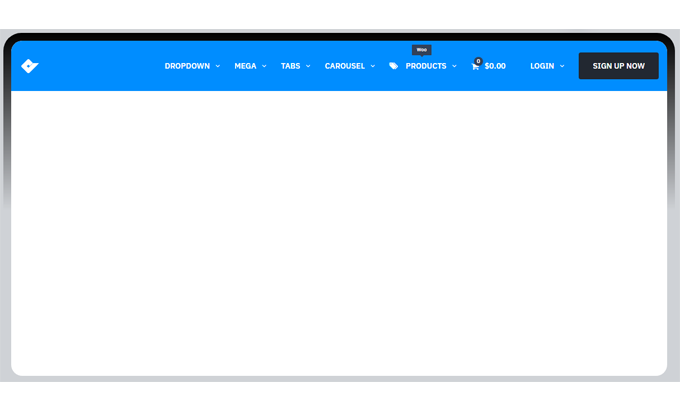
Immediate implementation with drag & drop and admin panel
Installing and having something solid up and running in minutes is possible. With QuadMenu Themes Developer Mega Menu, we start by creating groups and columns, then add standard elements (links, categories, pages), and, when needed, widgets or shortcodes. The thought process is to "build sections" and "populate" them, not to struggle with rigid templates. Thanks to the drag-and-drop functionality of the admin panel, moving blocks, reordering columns, or changing widths is effortless. And if we make a mistake, reverting it is just as easy. This speed of iteration is key when presenting progress to a client or when the marketing team wants to test different hierarchies.
Here's one of our practical tips: when we first tested QuadMenu Themes Developer Mega Menu, we were able to preview the menu directly within the menu itself; this saved us from publishing changes blindly. We also appreciate the plugin's visual flexibility: margins, colors, icons, and fonts adjust seamlessly, and the result looks professional. For collaborative environments, having a clear interface means that not everything has to go through the senior developer; designers and marketers can propose variations, and the developer simply approves them.
A helpful implementation tip for us: prepare an "architecture draft" on paper (or Figma) with a maximum of three layers per column, and place critical actions (CTAs, cart, search) at the bottom of the first column or on the right edge. QuadMenu Themes Developer Mega Menu allows us to implement this strategy without any complicated workarounds or hacks. And since the plugin didn't conflict with other plugins, keeping it in our stack was easy. QuadMenu Themes Developer Mega Menu performs exceptionally well for quick iterations or UX improvement sprints.
Mega Menu for e-commerce: categories, promos, and previews that convert
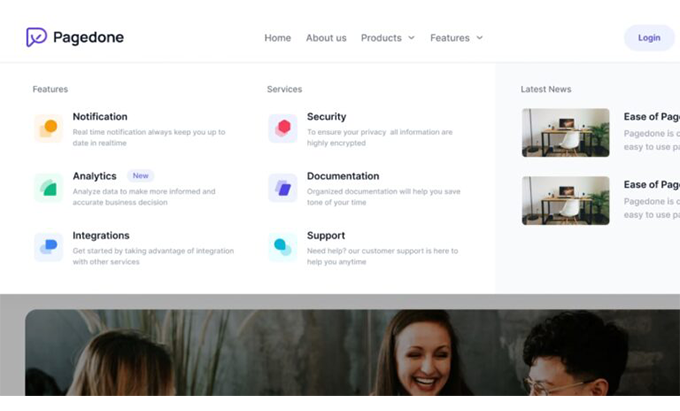
In online stores, the menu is like a shopping aisle. With QuadMenu Themes Developer Mega Menu, we designed shortcuts to product categories, top brands, and seasonal campaigns. In our experience with e-commerce, this proved to be a great solution because the mega menu supports clear previews upon expansion (thumbnails, "new" labels, seasonal promotions), which shortens decision-making time. Furthermore, the responsive design is consistent; mobile users don't feel penalized by a navigation system designed only for desktop.
A recipe that works for us: the first column with parent categories, the second with subcategories and popular filters (sizes, color, price), the third with featured promotions or collections, and the last with useful links (order tracking, help, contact). QuadMenu Themes Developer Mega Menu makes this 3-4 column pattern easy without compromising performance. Adding icons and concise copy to each column increases the CTR. And yes, we can confirm: it looks great without having to inject custom CSS from day one.
Another detail we value is its compatibility with themes and the rest of the stack. QuadMenu Themes Developer Mega Menu worked with virtually every theme we used and didn't cause any conflicts, which is invaluable when you have payment gateways, analytics, and shipping modules running simultaneously. In campaigns, being able to quickly activate a "Deals" or "Back to School" column within the mega menu reduces reliance on the homepage and drives qualified traffic to the categories that matter. If the goal is to increase AOV and reduce pogo-sticking, QuadMenu Themes Developer Mega Menu is a workhorse.

For developers: hooks, filters and layouts (horizontal, vertical, off-canvas)
For technical teams, the value lies in extending without breaking. QuadMenu Themes Developer Mega Menu offers a solid foundation for working with diverse layouts: horizontal for corporate sites, vertical for extensive catalogs, and off-canvas for mobile-first experiences. What's interesting is that, in our experience, the plugin allowed for extensive customization when needed, without conflicting with the core or blocking updates. Being able to modify classes, space columns, and adjust breakpoints allowed us to bring the design to the project's visual guide without creating a mega menu from scratch.
In implementations with icon libraries or custom fonts, aligning styles was straightforward. And because the panel is clear, documenting for the end client is also easier: we provide step-by-step guides with screenshots, and any content editor can keep the menu up to date. QuadMenu Themes Developer Mega Menu, being flexible, fits well in repositories with CI/CD; the risk of merge conflicts due to minor navigation changes is significantly reduced.
An additional point based on experience: the "relatively easy setup" claim we made isn't just marketing hype. When we integrated QuadMenu Themes Developer Mega Menu into a site with multiple active plugins, we didn't encounter the typical barrage of warnings, nor did we have to deactivate half the site to get it working. This saves time and reduces the margin of error, and it's part of why we consider it one of the most powerful Mega Menus on the market for WordPress.
Advanced customization without conflicts with your theme or plugins
Let's talk about look and feel. Our approach to customizing the QuadMenu Themes Developer Mega Menu starts with typography, contrast, and information density per column. The plugin allowed us to adjust sizes, weights, and spacing without breaking the theme's consistency. We added icons to guide the eye and microcopy in the first line of each block to explain the destination ("View all coats," "New collections"). When we need to highlight a campaign, we create a column with a different background color—always prioritizing accessibility—and a short CTA. All of this works seamlessly, something we verified in different environments and with several active plugins.
In terms of performance, our guideline is to limit the number of images within the menu and use SVG for iconography. QuadMenu Themes Developer Mega Menu handles these adjustments well; we didn't observe any FPS drops on hover or visual jumps during deployment. For mobile, we recommend switching to an accordion layout and maintaining semantic order: categories first, promotions next, and utilities last. This approach allows users to quickly find what they're looking for without getting lost.
Back to the real-world experience: beyond its visual appeal, what truly convinces us is QuadMenu Themes Developer Mega Menu's ability to facilitate experimentation. We tested A/B variations by changing the order of columns and headings, and it only took minutes. This ease of use empowers marketing teams to test UX hypotheses without requiring weeks of support from the technical team. And to reiterate: it didn't create any conflicts with other plugins, which is critical for maintaining a stable website ecosystem.
Integration with WooCommerce and page builders (Elementor, etc.)
When the stack includes WooCommerce, the mega menu isn't just for show; it's a revenue driver. QuadMenu Themes Developer's Mega Menu allowed us to include cart, search, and category links with excellent performance. We integrated product listings by brand or collection and reserved a column for delivery, exchange, and return messages, reducing friction in the checkout process. With page builders like Elementor, the integration is seamless: we designed the header in the builder and let the mega menu handle navigation without duplicating effort.
Practical recommendation: map high-converting URLs (star categories and campaign landing pages) within the first two columns. QuadMenu Themes Developer Mega Menu facilitates this ordering, and when we added tags ("-20%", "New"), we saw that the menu's engagement rate increased. Again, the flexibility allows us to customize without cluttering the DOM with extraneous classes, and maintaining consistency with the theme was straightforward.
On an operational level, the content team can update a "Promos" block daily without touching any templates. That's the kind of autonomy we value in production: QuadMenu Themes Developer Mega Menu transforms a development task into a controlled editorial process. And, just to be clear, we found it very stable; it worked with every theme we tested and didn't conflict with any other plugins.
Mobile performance and flawless touch UX
More than half of all traffic comes from mobile devices, so the mega menu needs to feel natural on small screens. QuadMenu Themes Developer Mega Menu offers smooth transitions and a well-configured hierarchy that reduces the time to first interaction. Our favorite mobile layout: a visible top level with 6–8 clear entries, accordions for sub-levels, and a prominent search bar at the top. With QuadMenu Themes Developer Mega Menu, this configuration is quick to implement, and the touch response is precise, with no ghost clicks or annoying delays.
We also integrated predictable gestures: a visible "X" to close, a generous tappable area, and scrolling within the panel when there are many options. The more obvious, the better. Here again, the responsive design shines; we didn't see any strange breaks when switching between landscape and portrait, and the breakpoints behaved as expected. Adding subtle micro-interactions (highlighting the focus, slightly different backgrounds for each column) allows the user to immediately understand their position.
From real-world experience, the conclusion is simple: QuadMenu Themes Developer Mega Menu feels solid on mobile. That "it's responsive" feature you mentioned is something we've confirmed project after project. And since it doesn't conflict with other plugins, we can maintain cache optimizations and minification without any headaches. If your goal is to increase mobile conversions, this is a short and sure way to do it.
Use cases and examples of winning structures
We like replicable playbooks. Here are some structures we repeat because they work with QuadMenu Themes Developer Mega Menu:
Fashion retail: Col.1 “Women/Men/Kids”, Col.2 subcategories (Coats, Denim, Footwear), Col.3 “Collections” (Sustainable, Premium), Col.4 “Offers” + size guide.
Electronics: Col.1 Main categories (TV, Audio, Gaming), Col.2 Brands, Col.3 Accessories and bundles, Col.4 Support/Warranties.
Education: Col.1 Careers, Col.2 Short courses, Col.3 Scholarships/Registrations, Col.4 Blog/Guidance.
Media: Col.1 Sections (News, Opinion), Col.2 Hot Topics, Col.3 Podcasts/Video, Col.4 Newsletter/Club.
All these mockups are quick to create thanks to drag and drop. In our daily work, QuadMenu Themes Developer Mega Menu allowed us to build, test, and adjust these variations without having to work with complex templates. If the site needs to highlight campaigns or seasons, we add a column with a different background and a short CTA. And, once again, we emphasize: "it's flexible and highly customizable," exactly what we need when branding is key.
Conclusion
QuadMenu Themes Developer Mega Menu is, in terms of features and real-world experience, a sure bet for scaling the navigation of a WordPress site. It allowed us to configure it quickly, customize it without reasonable limits, and, above all, improve the user experience on both desktop and mobile. If your goal is to increase sales, provide better guidance, or highlight content, choosing QuadMenu Themes Developer Mega Menu is a decision that has a direct and measurable impact.

Reviewed by the WPClub team
At WPClub, we carefully review each product before listing it. Our team evaluates its key features, compatibility, and performance to provide you with reliable, up-to-date, and helpful information when choosing and using each resource available in our store.






















