



When you change URLs, delete content, or restructure your site, every 404 error costs you traffic, sales, and authority. AIO SEO Redirection Manager turns that chaos into an organized process: it creates, manages, and audits redirects in WordPress without you having to touch any code. In our case, AIO SEO Redirection Manager automated redirects when changing slugs and deleting old pages, which stopped 404 errors from appearing from day one. If you're going to migrate, consolidate categories, or switch from HTTP to HTTPS, this manager is the safest way for users and Google to reach the correct destination.
What is AIO SEO Redirection Manager and why use it?
AIO SEO Redirection Manager is the redirection module from All in One SEO that lets you create 301/302/307/308 redirects and 410/451 responses, log 404 errors in real time, import bulk listings, and monitor the impact. Unlike manually editing the .htaccess file or relying on a hosting provider, you do it all from within WordPress using a clear interface, built-in priorities, and tests. When we used it for content cleanup, AIO SEO Redirection Manager prevented traffic loss by automatically redirecting users and bots from old URLs to new ones, while logging each hit to validate success.
Key advantages
Individual, bulk and pattern redirects (regex).
404 and redirect logs for auditing and improvement.
Import/export (CSV/other plugins) in seconds.
Parameter normalization (e.g., UTM) and trailing bar/uppercase options.
Automatic redirects when changing/deleting content.
Migration playbook: Mass 301s, testing and validation
Migrations fail due to a lack of methodology. With AIO SEO Redirection Manager, we follow a simple and robust playbook:
Checklist before/during/after
Before: Extracts all URLs (sitemap + crawl), defines the old→new map and classifies special cases (merges, 410).
During: Import the CSV file into AIO SEO Redirection Manager, activate priorities, and test batches (staging or low-traffic windows).
After: Review 404 logs, add exceptions, and fix strings/jumps.
In our case, we imported over 1,301 URLs into AIO SEO Redirection Manager, and with controlled testing, the 404 errors plummeted after the restructuring. The log showed us the top 404 errors that were missing, and we resolved them without touching the server.
Smart 404 cleanup: when to redirect and when to return 410s
Not every 404 redirect deserves a 301. If an equivalent exists, redirect; if the content has been removed without replacement (for example, an expired offer), a 410 redirect tells Google it won't be returning. With AIO SEO Redirection Manager, we apply this logic:
404 → 301 vs 410 (with examples)
301: “/blog/guide-2019” → “/blog/updated-guide”.
301: “/category/men's-shoes/” → “/men's-shoes/” (architecture change).
410: “/promo/black-friday-2022/” (campaign ended).
410: discontinued product sheets with no substitute.
By using AIO SEO Redirection Manager with this strategy, coverage reports improved and wasted crawling of dead URLs was reduced.
Power with regex and parameters: map directories and normalize UTM
The magic is in the patterns. AIO SEO Redirection Manager allows regex to transform complete paths and handle query parameters.
Useful examples
Complete directories:
^/blog/(.*)$→/resources/$1(301).Normalize end bar:
^/services$→/services/(308).Remove UTM:
^/landing-offer/?(\?.*)?$→/landing-offer/(preserves campaign in analytics without duplicating content).Uppercase/lowercase: forces lowercase for inconsistent URLs.
When we map entire categories with AIO SEO Redirection Manager, we avoid creating thousands of manual rules and keep the redirection history clean.
Useful automations: redirects when changing slugs or deleting content
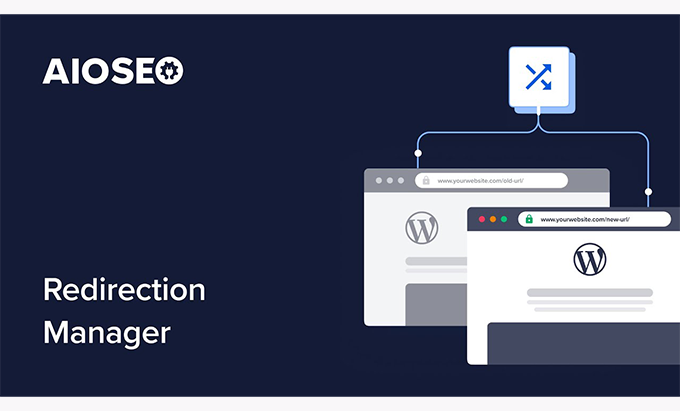
Human error happens. AIO SEO Redirection Manager creates automatic redirects when you change a post's slug, move content, or send it to the trash. In our case, AIO SEO Redirection Manager instantly generated a 301 redirect when we renamed a critical URL, preventing a 404 error spike after publication. You can also schedule the activation/deactivation of temporary redirects (302/307) for specific campaigns.
Import, export, and audit: CSV, other plugins, and logs
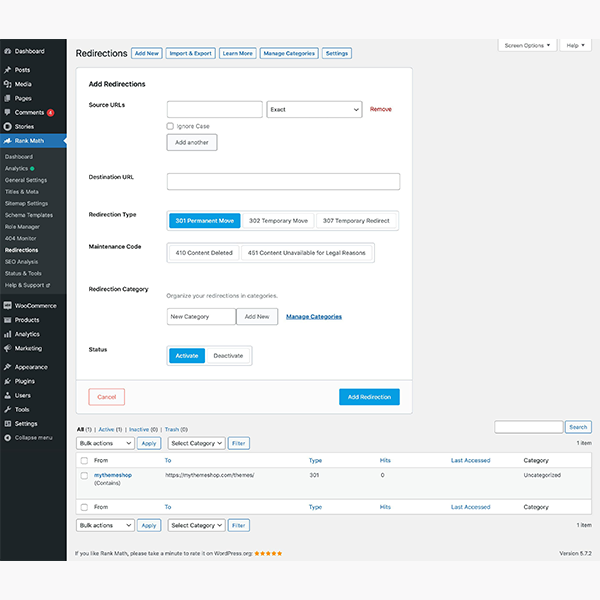
Migrating quickly requires automation. With AIO SEO Redirection Manager, we import CSV files with source/destination/code and priority columns; we also export for backup or auditing. The 404 and hit logs show you which URLs keep breaking and allow you to create the rule with a single click.
Mass import: old map→new in seconds.
Export: change control and backup.
LogsTop 404s, peaks by date, source, and final status.
In a major restructuring, AIO SEO Redirection Manager allowed us to iterate: we fixed the most frequent 404 errors first, and then long-tail errors.
Best practices: avoid chains, prioritize rules, and cache judiciously
A 301 redirect pointing to another 301 dilutes signals and slows things down. With AIO SEO Redirection Manager, we audit redirect strings and resolve them by pointing directly to the final destination. We also organize rules: specific rules at the top, regular expressions below; this prevents a pattern from capturing what a specific rule should handle. Regarding caching/CDNs: they cache pages, but No Do not cache the manager's critical paths or create loops with server rules.
Quick tips
Rewrite A → C (not A → B → C).
Establish priorities and document conventions (trailing slash, hyphens, slugify).
Review logs weekly and clean up obsolete rules.
Step-by-step implementation: from theory to your .htaccess (without touching code)
List all current URLs and the planned destination.
Create the CSV with code (301/302/410) and priority.
Import into AIO SEO Redirection Manager and validate in staging.
Publish and monitor 404/hit logs.
Corrects strings and adds exceptions.
Schedule temporary redirects for campaigns and deactivate them at closing time.
In our deployment, AIO SEO Redirection Manager was sufficient for the 100% of rules: we didn't touch .htaccess and the content team was able to manage changes without depending on development.
Conclusion
Whether you're preparing for a migration, cleaning up content, or changing your site's architecture, AIO SEO Redirection Manager is the tool that protects your SEO and user experience. In our case, we used AIO SEO Redirection Manager to import 301 redirects in bulk, automate slug changes, and clean up 404 errors with integrated logging; the result was retained traffic and more efficient crawling. Centralize, audit, and improve your redirects without touching the server.























