

- Secure payment
- Spanish and English support
- With you since 2018
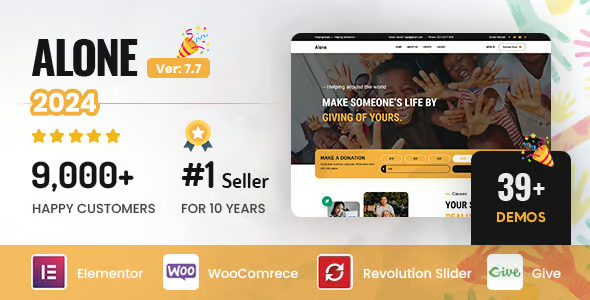
Alone Charity Non Profit Theme 7.9.8
$59.00 El precio original era: $59.00.$5.99El precio actual es: $5.99.
Quick summary
Alone Charity Non-Profit Theme is a WordPress theme specifically designed for non-profit organizations, foundations, NGOs, parishes, and charitable projects that need to clearly communicate their cause, impact, and donation methods. It solves the problem of confusing, unreliable websites with scattered messages, offering a structure ready for campaigns, donations, and volunteering. It is especially useful for teams with limited technical resources that need a professional presence without losing the human touch of the project.
What problem does it help solve?
In charitable projects, the website often takes a backseat and ends up being a patchwork of makeshift pages, external forms, and unclear messaging. When this happens in WordPress, donations are lost, potential volunteers don't understand how to contribute, and the story behind the cause isn't effectively conveyed. Furthermore, many organizations rely on generic designs that aren't conceived to showcase projects, specific needs, or measurable results.
The Alone Charity Non-Profit Theme addresses this scenario by organizing information logically for a social organization: active campaigns, ongoing projects, ways to help, real stories, testimonials, and financial transparency. If you've ever had interested people tell you, "I couldn't find how to donate on the website" or "I didn't quite understand what you do," the problem isn't the cause, it's the presentation. This theme focuses precisely on bridging that gap between intention and action.
Why this solution makes a difference
In the day-to-day operations of a non-profit organization, time is limited and the priority is on the ground, not web design. The Alone Charity Non-Profit Theme reduces this burden because its structure is designed for the actual workflow of a social project: communicating a story, explaining who is being helped, showcasing results, and facilitating financial or time contributions. It doesn't require creating sections from scratch or improvising navigation.
On the other hand, the visitor experience changes immediately. Instead of a confusing page, they find a clear path: first they understand the mission, then they see specific projects, then they discover how to get involved, and finally, they have direct ways to donate or sign up as a volunteer. When you start noticing that many people arrive at your website from social media but almost no one completes the process to collaborate, having a theme focused on charitable conversion makes all the difference.
Signs you need this product
- The problem is already on your site: You have scattered, duplicated, or outdated information about projects, and it's difficult to understand what you're doing when you land on the homepage.
- Friction within WordPress: You manage campaigns by creating isolated pages, without a clear structure to group, archive, or prioritize them, and you end up losing visual consistency with each new initiative.
- Time wasted on repetitive tasks: Every time you want to launch a new campaign, you have to redo sections, redesign from scratch, and adjust the layout to fit with the rest of the site.
- Growth scenario: Your organization is moving from a one-off project to several active programs, with different types of collaborators and donors, and you need a web presence that supports this expansion without becoming unmanageable.
When does it make sense to use it (and when doesn't)
The Alone Charity Non-Profit Theme makes sense when your priority is explaining a social mission and converting website visits into tangible support: donations, volunteering, memberships, or attendance at charity events. It's especially useful when you're already working with WordPress and lack a coherent visual structure and templates designed for campaigns, impact stories, and project presentations. In that context, it allows the team to focus on content, not design.
It's not necessary when your site only functions as a personal blog, a creative portfolio without a social focus, or a purely commercial corporate website. It's also not suitable if your organization only requires a minimal landing page with a button to an external fundraising platform and you don't need to showcase programs, team, transparency, or results. In those cases, a simple, generic theme may be sufficient and less complex to manage for a very small or one-off project.
Who it fits best for
- NGOs and foundations that require a clear website to present programs, annual results, funding needs and differentiated avenues for collaboration.
- Local associations, parishes and community projects They depend on donations and volunteers and need anyone to understand in a few seconds how they can help.
- Agencies or freelancers who develop websites for non-profit organizations and seek a pre-designed visual and structural foundation for campaigns, charity events, and social impact content.
Practical benefits
- Real operational improvement: You can organize projects, campaigns, and key sections (mission, team, transparency, impact) within a predefined framework for charitable organizations, avoiding having to redesign each section with each new initiative.
- Clear user experience for donors and volunteers: The visitor finds obvious paths to learn, be moved by the cause, and take action with the fewest possible clicks.
- Greater control over communication: You can prioritize what to show first (urgent campaigns, ongoing projects, recent achievements) without breaking the site's coherence, keeping the organization's narrative under control.
- Time savings in each new campaign: Instead of designing from scratch, you reuse structures designed for charitable causes and only change the text, images, and fundraising goals.
- Reduction of communication errors: Having defined sections to explain mission, context, impact, and ways to help reduces the risk of leaving key information unseen or causing confusion among those who want to collaborate.
How it fits within WordPress
Within the WordPress ecosystem, the Alone Charity Non-Profit Theme serves as the visual and structural foundation for your charitable project. Blog posts can be used for on-the-ground reports, news, and updates, while static pages are organized around campaigns, projects, team, and transparency. From the dashboard, you manage content just like with any other theme, but with templates designed to highlight causes, figures, and calls to action aligned with the organization's mission.
In real-world projects, this translates into a simpler workflow: you define the homepage as a showcase for the cause, create specific sections for projects, and use dedicated areas for donations or community engagement. When you start to notice your site has become a collage of disparate pages, this theme helps restore a clear narrative thread without sacrificing the flexibility that characterizes WordPress.
Typical use cases
- Official website of an expanding NGO: The organization is moving from a single project to several international programs and needs to present each one in detail, including objectives, progress, needs, and ways to collaborate.
- Ongoing fundraising campaign: A group launches regular initiatives (for example, food, health or education) and uses the theme to keep a homepage always up-to-date with the priority campaign and shortcuts to the others.
- Community-led solidarity project: A group of neighbors, a parish, or a cultural association decides to formalize its social activity and requires a website to explain the history of the project, show how donations are used, and facilitate the registration of new volunteers.
Frequently Asked Questions about the Alone Charity Non-Profit Theme
How does the Alone Charity Non-Profit Theme differ from a generic corporate theme?
The Alone Charity Non-Profit Theme is built around the needs of a charitable organization, not a commercial enterprise. The structure prioritizes campaigns, projects, human stories, and ways to collaborate, rather than services, portfolios, or product sales. This is evident in the way the sections are organized, the types of calls to action, and the way the content is presented. The result is a website aligned with the social mission, not with a traditional sales pitch.
Is it suitable for small associations without communication equipment?
Yes, it's specifically designed for teams that don't have a design or marketing department. By working with pre-designed templates for presenting mission, projects, and impact, the effort is focused on writing the content and choosing representative images. If you've ever experienced your website being neglected because no one knows "how to make it look good," this theme helps maintain a consistent look with fewer technical decisions and less reliance on third parties for every minor change.
Can I use the Alone Charity Non-Profit Theme if my project combines social activity and charity events?
The "Alone Charity Non-Profit Theme" is useful when the social aspect is the main focus and charity events are a tool to support that mission. In this scenario, you can present the events as part of the fundraising or awareness strategy, integrated into a broader narrative about your programs. If your activity focuses almost exclusively on commercial events, a specific events theme might be a better fit, but for charitable projects with one-off fundraising actions, this approach works well.
How does the Alone Charity Non-Profit Theme help communicate transparency and impact?
The structure makes it easy to create clear sections to showcase results, key figures, and resource usage, without mixing that information with promotional content. You can separate the organization's story from the data on how donations are allocated, who is being helped, and what has been achieved. This clarity allows visitors to quickly understand the real impact, reducing mistrust and increasing confidence when contributing. In social projects, this perception of transparency is crucial.
Does it make sense to use the Alone Charity Non Profit Theme if I only need a basic informational website?
If your project only requires a simple page with contact information, a brief description, and an external donation link, the Alone Charity Non-Profit Theme might be more structured than necessary. Its value becomes apparent when you have multiple campaigns, impact stories, a volunteer program, or a need to explain processes in an organized way. If you anticipate growth in the number of initiatives and public communication, adopting it from the start allows you to scale without having to redesign the entire site later.
Conclusion
The Alone Charity Non-Profit Theme exists to solve a specific problem: transforming a cluttered or generic website into a clear space where the social mission is quickly understood and people know how to help. On a daily basis, it allows teams with limited resources to maintain a consistent digital presence, focused on campaigns and real impact. If your project thrives on people's trust and commitment, having a structure designed for the charitable sector becomes a key part of your strategy.
Your individual purchase includes:
- Lifetime updates.*
- Product ready to use.
- Immediate access to the product.
- Clean and virus-free files.
- GNU GPL V2/V3 License
- Technical support in Spanish and English.
* In the case of memberships, the period during which you will receive updates will depend on the type of membership purchased: monthly, annual, or lifetime.
Get your questions answered here
Here you'll find answers to frequently asked questions about our service: how it works, what it includes, and how to get the most out of it.
On how many websites can I use the products?
You can use any product from our store on any website you want.
Will I get updates?
Absolutely. If you buy an individual product, you'll get lifetime updates for that product.
On the other hand, if you purchase a membership, you will receive updates until your membership expires.
What if I have a problem?
First of all, we want you to know that you can count on us. We will assist you and provide the necessary support, so you can rest assured.
On the other hand, it is important for you to know that, given the time difference between countries, your time and ours may not be the same, so we will be delayed accordingly.
Our opening hours start at 9 AM from Monday to Friday, UTC -3. We are open until around 6 PM.
Do they provide technical support?
Yes, and regarding the time, it is usually on average within 24 to 48 business hours.
However, there are times when we have already provided an answer and solution in less than a day, depending on the case.
Are there download limits?
No. We don't believe in that format, so you can download as many times as you want. No problem. We pay for high-quality professional storage precisely to avoid problems.
Do they provide license keys?
No. Giving out the keys is not a viable option, as we have had experiences where they end up circulating everywhere and we can even lose the associated accounts.
That said, all products are original and, in cases where a license key is required to function, we will take care of pre-activating them for you.
Does my purchase include an invoice?
Yes. After payment, you will be able to access your invoice immediately in the "Purchases" section of your user account.
That is why it is important that you properly complete the information requested at the time of payment.
Is there a warranty?
Yes, of course. If there's a problem we can't resolve, or if there's an external issue that doesn't have a general solution, you'll receive support and, if necessary, a full refund. We have a 14-day refund policy from the date of purchase.
- It should be noted that there is no warranty if the product works well and it simply wasn't what you wanted.
There have been instances where someone buys a product, the product works perfectly, but they don't like it and want a refund, keeping the product. That's not right.
However, everything is evaluable and reasonable. Let's use judgment together.
What are the opening hours?
Our opening hours are:
- Monday to Friday, from 9 a.m. to 6 p.m.
- Saturday and Sunday: No service.
UTC -3 time

Reviewed by the WPClub team
At WPClub, we carefully review each product before listing it. Our team evaluates its key features, compatibility, and performance to provide you with reliable, up-to-date, and helpful information when choosing and using each resource available in our store.
Download previous versions
If you have purchased this product, or have an active membership, you can download previous versions as we release them, without any limits or restrictions.
| Nombre del producto | Versión | Tamaño | Fecha | Descargar |
|---|---|---|---|---|
| No hay versiones anteriores registradas. | ||||

Our Reputation on Trustpilot
Many thanks to those who take the time to give us a rating on Trustpilot. Each and every one of your comments is very helpful to us. We strive to provide a rewarding experience for every member of our community, always with respect and care. We'll be here!






















WPClub Memberships
Access our entire catalog for a single payment. We offer three memberships: Monthly, Annual, and Lifetime (One-Time Payment).
- Save thousands of dollars
- Unlimited daily downloads
- No recurring payments
- Fast downloads by AWS
- Quality service and support, validated since 2018
- We work with love for our community