
 Boo...! LAST DAY > Memberships with 30% off. Use coupon: HWEEN30
BuddyBoss Sharing and 6,514 more, with AutoUpdater and support.
For $4.21 more you get everything the Monthly membership includes
Choose my membershipThis product, with lifetime updates.
- Secure payment
- Spanish and English support
- With you since 2018
New version or an issue?
Description
Quick summary
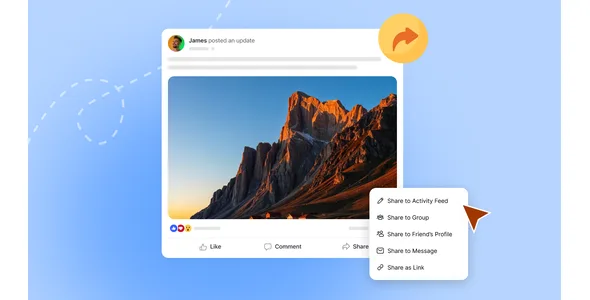
BuddyBoss Sharing is a plugin for the BuddyBoss Platform that allows community members to reshare activity posts to their own timeline, a group, a friend's profile, or via private message. They can also share these posts on social networks like Facebook, Messenger, WhatsApp, LinkedIn, and X with Open Graph previews, or simply copy the link. This feature can be configured in BuddyBoss > Settings > Activity, and its functionality depends on the site already having BuddyBoss Platform active. The idea is simple: member-generated content is no longer confined to a single feed and can be shared in spaces where it truly adds value.
What problem does it help solve?
In an active community, the best conversations often get lost among dozens of new posts. A member asks a helpful question in the main feed, but no one in the right group sees it. Another shares a valuable resource that deserves to reach a particular friend, but there's no direct way to do so without manually copying text or taking screenshots. This manual work discourages sharing and causes potentially valuable content to languish in a corner of the site. The product directly addresses this bottleneck: it offers internal and external routes for any post to find the audience that needs it, without added friction for the sharer.
Why this solution makes a difference
The difference lies in combining two distribution channels that are typically managed separately. On the one hand, there's internal reach: a post can jump from the main feed to a specific group, from one group to another related group, or land directly on a friend's profile or in a private conversation. On the other hand, there's external reach: the same content can leave the site and be shared on Facebook, WhatsApp, LinkedIn, X, or Messenger with a polished presentation thanks to Open Graph previews. BuddyBoss Sharing allows both paths to coexist while respecting existing privacy settings, so private content remains private and public content gains real visibility, both within and outside the community.
Signs you need this product
If your community members are already sharing content in an ad-hoc way—copying text, taking screenshots, or asking permission to repost content in another group—it's a clear sign that there's no formal way to do so. This also applies when you notice that valuable posts in the general feed never reach the themed groups where they would make the most sense, or when you want your members to act as a distribution channel to social media without relying on an administrator to manually share every update. If you also use the BuddyBoss mobile app, the lack of a forwarding feature is even more noticeable, because users expect to be able to share from any device with the same ease.
When does it make sense to use it (and when doesn't)
It makes sense to install it when the site already runs on the BuddyBoss Platform and there's real activity with posts, groups, and messaging between members: that's where internal and external forwarding provides immediate value. It's also useful if the growth strategy depends in part on users amplifying content to their personal networks. However, it doesn't add much in very small, low-activity communities where everyone already sees the same posts, or on sites that don't use the BuddyBoss Platform as their social foundation, because the plugin relies entirely on that infrastructure to function.
Who it fits best for
It fits particularly well in communities organized around thematic groups, where content relevant to one member might interest another. It's also useful in spaces focused on networking, professional development, or peer support, where sharing something directly on a friend's profile conveys a personal recommendation that carries more weight than an algorithm. Community administrators who want their members to become natural content ambassadors to external networks also find this a direct tool, eliminating the need for manual distribution processes.
Practical benefits
The most obvious benefit is time savings: no one needs to copy text or take screenshots for a post to reach another space. Forwarding to your own feed works similarly to reposting, and if you enable custom messages in Activity Sharing settings, each member can add their own perspective before sharing, turning a simple repost into an active endorsement. Forwarding to groups allows questions or discussions to reach experts without the noise of other conversations. Forwarding to friends' profiles generates an immediate notification and a personal touch. And forwarding to private messages provides a discreet way to handle sensitive topics or coordinate with specific people. In addition, Open Graph previews make shared links to external networks look complete and professional instead of appearing as plain text.
How it fits within WordPress
The plugin integrates as an additional layer on top of the BuddyBoss Platform, so it doesn't replace any existing features but rather extends the activity system that members are already familiar with. General settings are accessed from the administration panel, under BuddyBoss > Settings > Activity, where you can control, among other things, whether custom messages are allowed when forwarding content. Because it's a plugin designed specifically for this ecosystem, its functionality is intended to remain consistent with the privacy settings and the existing group, profile, and messaging structure of the site.
Typical use cases
A typical example is a technical question posted in the general feed that someone forwards to a specialized group, where it receives more precise answers. Another common scenario is a member finding a job posting or relevant resource and sending it directly to a friend's profile, rather than waiting for them to discover it on their own. It's also common to use private messaging to share sensitive content that shouldn't be discussed publicly, or to coordinate with a small team before bringing a topic to the general group. Externally, BuddyBoss Sharing allows a member who is happy with a post to share it directly to their LinkedIn or other account with a curated preview, helping the community gain visibility beyond its own boundaries.
Frequently Asked Questions about BuddyBoss Sharing
Does BuddyBoss Sharing work independently or does it require another active product?
The site needs to already have BuddyBoss Platform running, as it relies on its activity, groups, profiles, and messaging system to operate. It's not intended as a standalone tool.
What destinations can a member choose when forwarding a post?
You can send it to your own activity feed, to a group, to a friend's profile, or to a private message within the community, as well as being able to share it externally on Facebook, Messenger, WhatsApp, LinkedIn, and X, or copy the link directly.
Is it possible to add your own comment when forwarding content?
Yes, if the corresponding option is enabled in the Activity Sharing settings, members can write a custom message when forwarding a post to the feed, adding context or their own opinion to the original content.
Where are the options for this add-on configured?
All behavior is adjusted from the administration panel, under the path BuddyBoss > Settings > Activity, without needing to touch code or site files.
Does it respect the privacy of the content when sharing it?
Yes, both internal and external reach work while respecting the privacy settings already established in the community: private content remains private and only public content gains additional visibility.
Conclusion
Communities that generate valuable content every day need a way to circulate that content, instead of it getting stuck in the first feed where it appeared. BuddyBoss Sharing offers exactly that solution, combining internal routes to groups, profiles, and private messages with external routes to the most popular social networks, all configured from a single dashboard while respecting the site's existing privacy settings. For communities built on the BuddyBoss Platform, it's a tool that turns every member into another distribution channel, without requiring manual processes or improvised solutions.
Previous versions
If you have purchased this product, or have an active membership, you can download previous versions as we release them, without any limits or restrictions.
| Product name | Version | Size | Date | Download |
|---|---|---|---|---|
| No previous versions available. | ||||
No threats detected
File scanned with ClamAV before publishing
- File
- buddyboss-sharing-2.1.3.zip · 398 KB
- Files
- 178 scanned · 0 threats
- Engine
- ClamAV 1.5.3 · signatures v28191
- Verified on
- 11/23/2026
- SHA-256
- df0bf3…0c3c77b
- PHP 79.8%
- CSS 6.7%
- JavaScript 4.5%
- SVG 2.8%
- Other 6.2%
Frequently Asked Questions
Here you'll find answers to frequently asked questions about our service: how it works, what it includes, and how to get the most out of it.
You can use any product from our store on any website you want.
Absolutely. If you buy an individual product, you'll get lifetime updates for that product.
On the other hand, if you purchase a membership, you will receive updates until your membership expires.
First of all, we want you to know that you can count on us. We will assist you and provide the necessary support, so you can rest assured.
On the other hand, it is important to know that, given the time difference between countries, your time and ours may not be the same, so we could be delayed because of this.
Our opening hours are Monday to Friday, from 09 to 18 hrs (UTC −3).
Yes, and regarding the time, it is usually on average within 24 to 48 business hours.
However, there are times when we have already provided an answer and solution in less than a day, depending on the case.
No. We don't believe in that format, so you can download as many times as you want. We pay for high-quality professional storage precisely to avoid any problems.
No. Giving out the keys is not a viable option, as we have had experiences where they end up circulating everywhere and we can even lose the associated accounts.
That said, all products are original and, in cases where a license key is required to function, we will take care of pre-activating them for you.
Yes. After payment, you will be able to access your invoice immediately in the «Purchases» section of your user account.
That's why it's important that you properly complete the information requested at the time of payment.
Yes, of course. If there's a problem we can't resolve, or an external issue that doesn't have a general solution, you'll receive support, if needed, and a full refund. We have a 7-day refund policy from the date of purchase.
- There is no warranty if the product works well and it simply wasn't what you wanted.
There have been instances where someone buys a product, the product works perfectly, but they don't like it and want a refund, keeping the product. That's not right.
However, everything is evaluable and reasonable. Let's use judgment together.
This guarantee applies to the purchase of individual products; memberships are not eligible for a refund.
Our opening hours are:
- Monday to Friday, from 9 a.m. to 6 p.m.
- Saturday and Sunday: no service.
UTC −3 time.

WPClub Team
GPL plugin and theme store since 2018. Every file is analyzed with ClamAV and its report is public; we keep previous versions and provide support in Spanish and English.
BuddyBoss Sharing and 6,514 more, with AutoUpdater and support.
For $4.21 more you get everything the Monthly membership includes
Choose my membershipThis product, with lifetime updates.
- Secure payment
- Spanish and English support
- With you since 2018



