
BuildPress Multi-purpose Construction Theme 5.9.2


- Secure Payment
- Support from Monday to Friday
- With you since 2018
$99.00 El precio original era: $99.00.$5.99El precio actual es: $5.99.
Quick summary
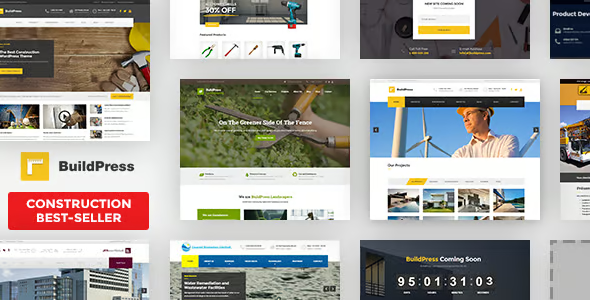
BuildPress is a multipurpose theme for construction, renovation, architecture, and related trades companies using WordPress. It helps present technical services clearly, professionally, and in a way that leads to real leads: quotes, site visits, and inquiries. It's designed for studios, construction companies, and professionals who need to showcase projects, describe construction processes, and guide visitors from the first impression to the contact form without losing credibility or wasting time on complex layouts.
What problem does it help solve?
On many construction websites built with WordPress, the problem isn't just the "pretty" design, but the lack of structure to explain actual projects. Disorganized pages, mixed services, poorly organized projects, and hidden forms ultimately breed distrust. When you start noticing few quote requests despite high traffic, it's usually related to a website that doesn't convey professionalism or clarity in its value proposition.
BuildPress addresses this issue through design and content architecture: it focuses on how to showcase different types of services (new construction, renovations, maintenance), how to present past projects with information that is easy for the end client to understand, and how to guide them toward making contact. If you've ever had clients tell you "I didn't quite understand everything you do" despite having all the information on the website, the problem lies in how WordPress presents that content.
Furthermore, real-world construction projects often involve a lot of technical data, large images, and sections such as "work process," "warranties," "certifications," and "service areas." Implementing all of this with a generic theme requires readjusting templates, redoing sections, and struggling with layouts not designed for this type of business. BuildPress reduces this friction because it's already tailored to these specific needs.
Why this solution makes a difference
BuildPress's difference lies not only in its aesthetics, but also in how it organizes content for the end user seeking a reliable construction company. Each visual block is designed to answer typical questions: what you do, where you work, what projects you've completed, and how to request a quote. This directly impacts daily operations because it reduces the time spent explaining via email what could be easily explained online.
When working with WordPress, having a theme that already fits your industry's logic eliminates the need to correct details on every new page. In this context, BuildPress offers layouts designed to showcase projects, testimonials, technical team, areas of expertise, and messages of trust (years of experience, certifications, guarantees). This reduces communication errors, enhances the perception of professionalism, and allows visitors to navigate the website with less visual and content friction.
In construction projects, time is limited and the website often gets pushed aside. BuildPress helps you move faster: there's no need to reinvent the wheel for how to design a project information sheet, how to highlight an emergency service, or how to differentiate between residential and commercial work. The result is an online presence that's more consistent with your offline activities, with less improvisation and greater clarity for those making the decision to contact you.
Signs you need this product
- Your current WordPress site displays construction services in a generic way, and visitors ask you for things that are already published but not easily found.
- You notice friction when trying to create new service pages, projects, or areas of activity because your current theme doesn't offer structures designed for construction companies.
- You spend too much time adjusting sections, icons, and blocks to make your website convey professionalism, losing control over the design and consistency between pages.
- Your business is growing, you're expanding teams or service lines, and your current theme falls short of displaying everything in an organized, scalable, and understandable way for new customers.
When does it make sense to use it (and when doesn't)
BuildPress makes sense if your main activity is related to construction, renovations, architecture, engineering, facility maintenance, interior design, or similar technical services. If you need a site to showcase projects with photos, detail work stages, explain types of services, and facilitate quote requests, this theme offers a foundation designed precisely for that purpose. It's especially useful when you want to move from a basic website to a more corporate and structured presence without relying on complex custom designs.
On the other hand, it's not the right option if your project has nothing to do with construction or technical trades. For personal blogs, general online academies, or stores focused on digital products, BuildPress's visual approach and section structure aren't a good fit. It's also unnecessary if you already have a highly customized, custom-built design for your construction company that perfectly meets your presentation needs and you're only looking for minor content tweaks.
Who it fits best for
- Construction companies that work with small and medium-sized projects need a clear website to attract local bids and showcase recent work.
- Architecture, engineering, or interior design studios that require a more visual presentation, with project galleries and sections detailing processes and methodologies.
- Independent professionals (renovations, installations, carpentry, electricians, advanced plumbing) who want to move away from generic templates and project a more solid image without spending months on design.
Practical benefits
- Real operational improvement: By using templates designed for technical services and projects, you can organize your content once and replicate the structure without restarting each page.
- User experience: The visitor quickly understands what you do, how you work, and what results you offer, which increases the likelihood of contact and reduces repetitive questions.
- Control and organization: The specific sections for services, projects, and equipment allow you to keep the information organized, avoiding cluttered pages and confusing menus.
- Time saving: You don't need to experiment with improvised designs; the key pages for the construction business already have a layout that you can adapt with your content and images.
- Error reduction: By following a structure designed for this sector, it is less likely to forget important blocks such as guarantees, estimated timeframes, coverage areas, or clear contact forms.
How it fits within WordPress
Within the WordPress ecosystem, BuildPress acts as the visual and structural foundation of your construction website. It doesn't compete with the content management system (CMS) but rather leverages it to organize specific pages, posts, and sections. Instead of building a website with a generic theme and then forcing the layout to resemble a construction company's site, you start with a design aligned with your business. This impacts the entire workflow: from creating the homepage to developing specialized sections such as "featured projects," "services by type of work," or "technical FAQs.".
When working with WordPress, incorporating BuildPress means your decisions focus on what to say and what images to display, not on struggling with layouts to make your website reflect your business. In this context, the theme integrates as the piece that organizes headings, text blocks, calls to action, and galleries, maintaining a consistent identity across all pages of the site.
Typical use cases
- A construction company wants to showcase separate residential and commercial projects, with individual listings for each project, photographs, a brief description, and a call to request a similar quote.
- An architecture studio needs a homepage that combines a clear value proposition message, a selection of iconic projects, and direct access to a new client inquiry form.
- A comprehensive renovation company that works by geographical areas is looking for a web structure to explain services by type of space (kitchens, bathrooms, commercial premises) with real examples and customer reviews.
Frequently Asked Questions about the BuildPress Multi-purpose Construction Theme
What type of content is best leveraged with BuildPress in a construction company?
BuildPress works especially well when you have completed projects to showcase, clear construction processes, and different service lines. You can group projects by type (homes, offices, warehouses), detail work phases, and highlight warranties or certifications. When you upload before-and-after photos, brief descriptions, and specific data, the theme helps everything look organized and focused on building trust with potential clients who are visiting your site for the first time.
How does BuildPress help increase quote requests or contacts?
BuildPress's approach is geared towards guiding visitors from information to action. The sections allow you to explain services and projects without overwhelming the user, while still keeping buttons or links to forms visible. This is especially important when you have many visits but few inquiries: the pages don't clearly lead to the next step. With layouts designed to showcase project results, testimonials, and messages of trust, users better understand what you offer and find it easier to request a quote.
Is BuildPress suitable if I work with both individual clients and businesses?
Yes, because the design allows you to separate services and cases by client type. You can create distinct sections for residential projects and corporate projects, with messages tailored to each profile. For example, one page for homeowners and another for facility managers or purchasing managers. This avoids mixing content that appeals to very different audiences and helps each visitor connect with real-world examples, timelines, and work methods that are most relevant to them.
What if I already have content created in another theme and I want to move to BuildPress?
When migrating from a generic theme, the challenge is often reorganizing the information to take advantage of the new design. With BuildPress, existing content can be relocated into clearer sections: separate services, projects with specific pages, and dedicated pages for processes or warranties. The change isn't about redoing everything, but rather restructuring what you already have so visitors can more quickly understand what you offer. The result is usually more logical navigation and a better presentation of previous work.
Does it make sense to use BuildPress if I offer few services and have hardly any projects to show?
In that case, it's worth considering whether you really need a theme so focused on visual projects. If you only offer one or two very specific services and don't yet have documented work, you can stick with a simpler template until you have photos and success stories. BuildPress looks and adds more value when there's a variety of services, completed projects, and a brand message you want to reinforce. If you're just starting out, it might be better to prepare to make the leap when you have more content to showcase.
Conclusion
BuildPress is designed for companies and professionals in the construction sector who need a WordPress website focused on showcasing their services, projects, and work processes clearly and professionally. If you've already experienced your current site failing to convey the quality of your work or generate quote requests, this theme offers a structure aligned with your daily operations. By focusing on providing high-quality content and real-world examples, presentation and visual consistency are ensured with a foundation specifically designed for this type of business.
Latest update:

Written by: WPClub
With over seven years of experience curating, managing, and distributing GPL products, our content is based on hands-on experience, technical review, testing, and feedback from thousands of users. We aim to democratize and simplify the WordPress world so you can choose with confidence, speed, and ease.
Your Individual Purchase Includes:
- Lifetime updates.*
- Official product, ready to use.
- Immediate access to the product.
- Clean and virus-free files.
- GNU GPL V2/V3 License
- Technical support in Spanish and English.
* In the case of memberships, the period during which you will receive updates will depend on the type of membership purchased: monthly, annual, or lifetime.
Notify Update
We update products Monday through Friday. However, if the product you see is not yet updated, you can notify us so we can prioritize updating it whenever possible.
Get your questions answered here
Here you'll find answers to frequently asked questions about our service: how it works, what it includes, and how to get the most out of it.
On how many websites can I use the products?
You can use any product from our store on any website you want.
Will I get updates?
Absolutely. If you buy an individual product, you'll get lifetime updates for that product.
On the other hand, if you purchase a membership, you will receive updates until your membership expires.
What if I have a problem?
First of all, we want you to know that you can count on us. We will assist you and provide the necessary support, so you can rest assured.
On the other hand, it is important for you to know that, given the time difference between countries, your time and ours may not be the same, so we will be delayed accordingly.
Our opening hours start at 9 AM from Monday to Friday, UTC -3. We are open until around 6 PM.
Do they provide technical support?
Yes, and regarding the time, it is usually on average within 24 to 48 business hours.
However, there are times when we have already provided an answer and solution in less than a day, depending on the case.
Are there download limits?
No. We don't believe in that format, so you can download as many times as you want. No problem. We pay for high-quality professional storage precisely to avoid problems.
Do they provide license keys?
No. Giving out the keys is not a viable option, as we have had experiences where they end up circulating everywhere and we can even lose the associated accounts.
That said, all products are original and, in cases where a license key is required to function, we will take care of pre-activating them for you.
Does my purchase include an invoice?
Yes. After payment, you will be able to access your invoice immediately in the "Purchases" section of your user account.
That is why it is important that you properly complete the information requested at the time of payment.
Is there a warranty?
Yes, of course. If there's a problem we can't resolve, or if there's an external issue that doesn't have a general solution, you'll receive support and, if necessary, a full refund. We have a 14-day refund policy from the date of purchase.
- It should be noted that there is no warranty if the product works well and it simply wasn't what you wanted.
There have been instances where someone buys a product, the product works perfectly, but they don't like it and want a refund, keeping the product. That's not right.
However, everything is evaluable and reasonable. Let's use judgment together.
What are the opening hours?
Our opening hours are:
- Monday to Friday, from 9 a.m. to 6 p.m.
- Saturday and Sunday: No service.
UTC -3 time

Our Reputation on Trustpilot
Many thanks to those who take the time to give us a rating on Trustpilot. Each and every one of your comments is very helpful to us. We strive to provide a rewarding experience for every member of our community, always with respect and care. We'll be here!






















WPClub Memberships
Access our entire catalog for a single payment. We offer three memberships: Monthly, Annual, and Lifetime (One-Time Payment).
- Save thousands of dollars
- Unlimited daily downloads
- No recurring payments
- Fast downloads by AWS
- Quality service and support, validated since 2018
- We work with love for our community