

- Secure payment
- Spanish and English support
- With you since 2018
Card Elements Pro for Elementor 1.1.2
$14.00 El precio original era: $14.00.$5.99El precio actual es: $5.99.
Quick summary
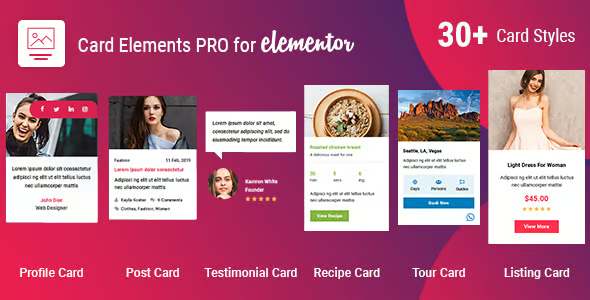
Card Elements Pro for Elementor is an extension for designers and website builders who need to present content in card format within Elementor with greater visual control and consistency. It addresses the problem of having scattered, inconsistent, or limited cards when working with service listings, products, reviews, or articles. It is especially useful for projects where cards are the foundation of navigation or conversion.
What problem does it help solve?
In many Elementor projects, cards become the central element: they showcase services, plans, properties, courses, featured posts, or even products from a store. The problem arises when, in trying to maintain a consistent style, the cards become misaligned, with disorganized information, or with unclear designs that don't guide the user to the click that matters.
If you've ever experienced cards ending up with different sizes, buttons at varying heights, or images cropped haphazardly, you know how unprofessional and confusing the experience becomes. In that situation, manually adjusting each card in every section becomes a repetitive, time-consuming task that encourages errors. Card Elements Pro for Elementor is designed precisely to streamline this visual and functional layer without requiring you to rebuild designs from scratch on every page.
Why this solution makes a difference
Card Elements Pro for Elementor focuses on a single aspect of WordPress design: how cards are displayed and structured within the page builder. By concentrating on this specific component, it allows you to create repeatable blocks with a consistent look and a clear information hierarchy, directly impacting how visitors read and interact with your page.
In real-world projects, this means moving away from manually adjusting padding, alignment, and content for each card and adopting a more systematic approach. Visual variations are controlled from a single location, which helps maintain consistency when working in a team or when the site grows with new sections. Furthermore, by having cards designed to highlight titles, calls to action, and key prices or descriptions, the reading flow is clearer and improves the click-through rate to the important steps in your sales funnel.
Signs you need this product
- Problem already present on the site: Your service cards, plans, courses, or tickets all look different from each other, with irregular sizes or misaligned elements, and each new section requires manual adjustments to fit with the rest.
- Friction in WordPress or WooCommerce: When designing lists with Elementor, you feel that the cards don't quite guide the user to the button or link they should click, which weakens the navigation within the page.
- Loss of control or time: When you start noticing that you're redoing the same card structure on different pages, changing colors and sizes individually, the hours invested multiply and the risk of visual inconsistencies increases.
- Typical growth scenario: The project evolves from a simple website to a broader catalog of content or products, and cards become the dominant pattern; keeping them organized and aligned ceases to be an aesthetic detail and becomes a usability requirement.
When does it make sense to use it (and when doesn't)
Card Elements Pro for Elementor makes sense when cards are a key design component: service listings, plan comparisons, post grids, portfolios, structured testimonials, or offer blocks. In these cases, having card elements specifically designed for Elementor makes it easier to ensure each block looks uniform and has a clear reading order, without resorting to haphazard combinations of columns and loose widgets.
This comes into play when you want a change in the style of your business cards to be seamlessly replicated across all relevant sections, maintaining a consistent visual style throughout the site. It's also useful if you work with clients who demand more polished designs and expect the presentation of each service or product to have a repeatable structure.
On the other hand, Card Elements Pro for Elementor isn't really necessary if your site is based almost entirely on text pages with few visual block sections, if you don't use cards as a recurring element, or if your needs are limited to a couple of very static sections that can be manually laid out with Elementor's basic elements without any expectation of growth.
Who it fits best for
- Designers who work with Elementor daily: They need to maintain a consistent visual style across projects and save time creating card grids for services, portfolios, and content listings.
- Agencies that manage sites with many listings: Medium-sized ecommerce sites, corporate websites with multiple lines of business, online academies with numerous courses, or internal directories where cards are the dominant pattern.
- Professionals who depend on conversions from landing pages: Marketers, consultants, and digital businesses that structure their pages in blocks of cards to present benefits, bonuses, packages, or testimonials need the design to reinforce the message without visual clutter.
Practical benefits
- Real operational improvement: You reduce the repetitive work of rebuilding cards over and over again in different sections, centralizing the design criteria and simplifying future adjustments in grid or list layouts.
- User experience: The cards appear aligned, with a clear visual hierarchy and key elements (image, title, text, button) in predictable positions, helping the visitor quickly understand what they are seeing and where to click.
- Control and organization: You maintain a consistent visual pattern throughout the entire site, which is especially useful when multiple people are working on the project and it's advisable to limit improvisation in card layout.
- Time saving: By using card structures already designed to function as repeatable blocks, listing pages are assembled faster and testing design variations requires fewer iterations.
- Error reduction: By relying less on manual combinations of columns, separators, and loose widgets, the spacing, font, and size mismatches that often occur when duplicating sections in large projects are reduced.
How it fits within WordPress
Within the standard WordPress workflow, Card Elements Pro for Elementor sits in the visual layout layer, precisely where you define how your content is presented on pages created with Elementor. It doesn't replace WordPress or the page builder, but rather expands the repertoire of elements you have for structuring information in card format, something the core doesn't specifically address.
When working with WordPress, its function is to act as a set of card-oriented blocks that you can incorporate into existing templates, archive sections, sales pages, or featured areas of the homepage. The rest of the content management (posts, products, custom types) continues as usual, while Card Elements Pro for Elementor handles how those pieces are displayed once they reach the visual layer.
Typical use cases
- Real-world use in ecommerce or projects: Stores that want to showcase collections, categories, or featured products with consistent cards, where image, name, price, and button appear in a clear and repeatable order throughout the website.
- Specific case study: An online academy that displays its courses as cards with title, level, duration and registration button; by adopting a consistent card pattern, it improves quick comparison between courses and facilitates the user's decision.
- Situation where it provides direct value: Corporate websites that present their services, success stories, and team members in card format; by unifying that design with Card Elements Pro for Elementor, the site conveys a more organized and professional image without multiplying the layout effort.
Frequently Asked Questions about Card Elements Pro for Elementor
How does Card Elements Pro for Elementor differ from using Elementor's basic columns and widgets?
With basic columns and widgets, you can manually create cards, but each new section can end up with unwanted variations in spacing, size, or alignment. Card Elements Pro for Elementor focuses on providing pre-designed structures as complete cards, with a logical order of elements and grouped configurations. This allows you to maintain a consistent visual pattern without rebuilding each block from scratch, which is crucial as your website grows in the number of pages and listings.
Does Card Elements Pro for Elementor work if I only have a few cards on the whole site?
If your site only has a couple of sections with very specific cards and no plans to expand, you probably don't need Card Elements Pro for Elementor and the basic page builder will likely suffice. This plugin becomes truly useful when cards are a recurring element on different pages or when you plan to scale the content. In those cases, it helps you maintain a consistent visual style without repeating manual work.
How does Card Elements Pro for Elementor help me maintain design consistency in large projects?
In large projects, the challenge isn't creating a beautiful card once, but rather repeating that pattern dozens of times without compromising the design. Card Elements Pro for Elementor lets you start with pre-designed card elements that are reusable and consistent. When you begin to notice that each landing page ends up with slightly different cards, this extension provides a structured framework for centralizing style criteria and applying style changes more effectively across the site.
Is Card Elements Pro for Elementor useful if I work in a team with other designers or editors?
Yes, especially in environments where multiple people access the same pages. By providing predefined card elements, Card Elements Pro for Elementor reduces improvisation and guides editors and designers toward a consistent visual style. This way, even if different people are creating the layout, the cards tend to maintain their structure, hierarchy, and style, reducing the need for constant revisions to correct visual inconsistencies between sections.
What if I want to change the style of all my cards at once later?
When cards are built from consistent patterns, style changes become much more manageable. With Card Elements Pro for Elementor, cards share a common structural foundation, making it easy to update fonts, sizes, colors, or visual layout without having to correct each block individually. This is especially relevant if you've ever experienced a minor branding adjustment resulting in hours of manual editing across multiple pages.
Conclusion
Card Elements Pro for Elementor exists to solve a very specific problem for Elementor websites: the difficulty of maintaining consistent, clear, and action-oriented cards as the project grows. If your pages rely on lists and blocks in card format, having a specialized set to structure them will help you gain order, save time, and reduce visual inconsistencies in your daily WordPress workflow.
Your individual purchase includes:
- Lifetime updates.*
- Product ready to use.
- Immediate access to the product.
- Clean and virus-free files.
- GNU GPL V2/V3 License
- Technical support in Spanish and English.
* In the case of memberships, the period during which you will receive updates will depend on the type of membership purchased: monthly, annual, or lifetime.
Get your questions answered here
Here you'll find answers to frequently asked questions about our service: how it works, what it includes, and how to get the most out of it.
On how many websites can I use the products?
You can use any product from our store on any website you want.
Will I get updates?
Absolutely. If you buy an individual product, you'll get lifetime updates for that product.
On the other hand, if you purchase a membership, you will receive updates until your membership expires.
What if I have a problem?
First of all, we want you to know that you can count on us. We will assist you and provide the necessary support, so you can rest assured.
On the other hand, it is important for you to know that, given the time difference between countries, your time and ours may not be the same, so we will be delayed accordingly.
Our opening hours start at 9 AM from Monday to Friday, UTC -3. We are open until around 6 PM.
Do they provide technical support?
Yes, and regarding the time, it is usually on average within 24 to 48 business hours.
However, there are times when we have already provided an answer and solution in less than a day, depending on the case.
Are there download limits?
No. We don't believe in that format, so you can download as many times as you want. No problem. We pay for high-quality professional storage precisely to avoid problems.
Do they provide license keys?
No. Giving out the keys is not a viable option, as we have had experiences where they end up circulating everywhere and we can even lose the associated accounts.
That said, all products are original and, in cases where a license key is required to function, we will take care of pre-activating them for you.
Does my purchase include an invoice?
Yes. After payment, you will be able to access your invoice immediately in the "Purchases" section of your user account.
That is why it is important that you properly complete the information requested at the time of payment.
Is there a warranty?
Yes, of course. If there's a problem we can't resolve, or if there's an external issue that doesn't have a general solution, you'll receive support and, if necessary, a full refund. We have a 14-day refund policy from the date of purchase.
- It should be noted that there is no warranty if the product works well and it simply wasn't what you wanted.
There have been instances where someone buys a product, the product works perfectly, but they don't like it and want a refund, keeping the product. That's not right.
However, everything is evaluable and reasonable. Let's use judgment together.
What are the opening hours?
Our opening hours are:
- Monday to Friday, from 9 a.m. to 6 p.m.
- Saturday and Sunday: No service.
UTC -3 time

Reviewed by the WPClub team
At WPClub, we carefully review each product before listing it. Our team evaluates its key features, compatibility, and performance to provide you with reliable, up-to-date, and helpful information when choosing and using each resource available in our store.
Download previous versions
If you have purchased this product, or have an active membership, you can download previous versions as we release them, without any limits or restrictions.
| Nombre del producto | Versión | Tamaño | Fecha | Descargar |
|---|---|---|---|---|
| No hay versiones anteriores registradas. | ||||

Our Reputation on Trustpilot
Many thanks to those who take the time to give us a rating on Trustpilot. Each and every one of your comments is very helpful to us. We strive to provide a rewarding experience for every member of our community, always with respect and care. We'll be here!






















WPClub Memberships
Access our entire catalog for a single payment. We offer three memberships: Monthly, Annual, and Lifetime (One-Time Payment).
- Save thousands of dollars
- Unlimited daily downloads
- No recurring payments
- Fast downloads by AWS
- Quality service and support, validated since 2018
- We work with love for our community