

- Secure payment
- Spanish and English support
- With you since 2018
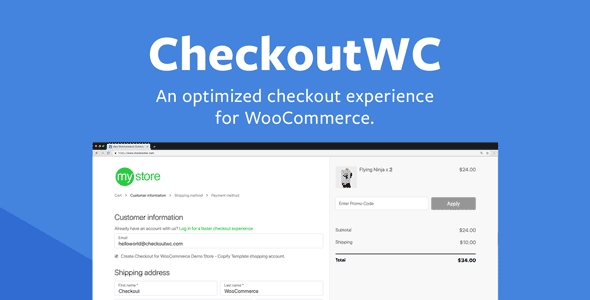
CheckoutWC (Checkout for WooCommerce)
$149.00 El precio original era: $149.00.$5.99El precio actual es: $5.99.
Quick summary
Checkoutwc is a WooCommerce-optimized checkout system that replaces the standard checkout page with a clearer, faster, and more conversion-oriented flow. It's designed for stores that receive traffic but have low conversion rates at the final step. If you've experienced users adding products to their cart only to have them abandon their cart just before checkout, this plugin helps reduce that loss and better guides the shopper to order completion.
What problem does it help solve?
In many WooCommerce stores, the real bottleneck isn't the catalog or the homepage design, but the checkout page. The form is long, unintuitive, and forces the user to make too many decisions at the most critical moment. When you start noticing a high percentage of abandoned carts even with good traffic, the standard WooCommerce checkout becomes a real obstacle to sales.
In real-world projects, this manifests when you receive messages from customers confused by the fields, when your customer service line is flooded with questions about how to complete an order, or when analytics shows that many users reach the checkout but don't complete the process. Checkoutwc specifically addresses this friction: it reorganizes the payment flow, displays relevant information in clear steps, and reduces the mental load for the shopper so they can complete the order in fewer clicks and with fewer distractions.
Why this solution makes a difference
Checkoutwc doesn't just "makeover" the checkout page; it restructures the shopping experience so that the user understands at every step what they need to do and what comes next. Instead of a flat form with all the fields jumbled together, it presents the process in an organized way, with a visual layout designed to keep the shopper focused on completing the order, not on deciphering the interface.
In day-to-day operations, this translates to fewer repetitive questions, fewer errors when filling out data, and fewer abandoned carts due to confusion. Furthermore, the WordPress dashboard becomes more predictable: you know what the user sees at checkout and how the payment flow behaves, making it easier to optimize copy, review conversions, and make data-driven decisions. If you've ever changed your website's overall design but sales didn't increase, focusing on the checkout with a structure specifically designed for sales represents a significant leap forward in your e-commerce operations.
Signs you need this product
- Problem already present on the site: You have visitors, the shopping cart is used, but a significant portion of users abandon their carts just before paying, with no apparent problems in the rest of the store.
- Friction in WordPress or WooCommerce: You receive feedback from customers who don't understand the purchase form, get lost when entering their data, or ask about steps you considered obvious.
- Loss of control or time: You spend hours answering very basic questions about how to complete the order, or you manually review incomplete orders that are left unfinished at checkout.
- Typical growth scenario: Your store has gone from a few occasional sales to a more consistent volume, and every lost conversion point is starting to show up in your monthly revenue.
When does it make sense to use it (and when doesn't)
Checkoutwc is especially useful when your WooCommerce store is already live, you're receiving a reasonable flow of traffic, and the checkout process has become the point where conversions stall. It provides real value if you're interested in optimizing the user journey to payment, improving the clarity of fields, highlighting key order information, and reducing micro-blocks that aren't immediately visible but negatively impact sales.
It's also a good choice when managing paid traffic campaigns, where every click has a cost. In that context, a confusing checkout page means money wasted on ads with no return. Streamlining the checkout process helps you make better use of your budget and makes your campaign performance more predictable.
It's not as necessary if you're setting up a small project with few monthly sales, no marketing investment, and where the main goal is simply to validate an idea. In that initial scenario, the default WooCommerce checkout might be sufficient until you clearly identify friction issues or decide to scale your order volume. Checkoutwc makes sense when the checkout page ceases to be a simple technical procedure and becomes a strategic component of your business.
Who it fits best for
- Online store managers: ecommerce managers who review metrics, analyze conversions, and seek a clearer checkout flow to increase orders without changing the entire site.
- WordPress agencies and developers: Professionals who deliver online stores to end customers need a clean, understandable, and visually consistent checkout system without having to build it from scratch for each project.
- Businesses with active campaigns: Projects that invest in advertising or customer acquisition strategies and want each user who reaches the checkout to experience the least possible friction when completing the purchase.
Practical benefits
- Real operational improvement: The payment process is simplified, the stages are clear, and the team spends less time resolving issues related to the purchase form.
- User experience: The customer sees a more organized payment environment, with understandable blocks, logical steps, and a structure that conveys confidence during the transaction.
- Control and organization: Having a structured checkout makes it easier to detect where users get stuck, adjust copy, reorganize fields, and follow a consistent approach throughout the store.
- Time saving: Messages like "I don't know how to complete my order", last-minute calls, and manual reviews of errors in shipping or billing data are reduced.
- Error reduction: By presenting the information clearly, incorrectly filled fields, skipped steps, and logistical issues arising from confusing forms are minimized.
How it fits within WordPress
Within the WordPress ecosystem, Checkoutwc directly impacts the final stage of the WooCommerce checkout flow: the page where the user enters their information and confirms payment. It doesn't replace the catalog, shopping cart, or order management logic, but rather focuses on the user experience at the critical moment of converting a visit into a sale. In this context, it becomes a specific component of the conversion funnel, where design, usability, and clarity are just as important as the product offering.
Working with WordPress allows you to keep your existing theme, extensions, and content structure while fine-tuning the checkout process to better meet today's shoppers' expectations. The result is a site that retains its identity but enhances the checkout experience with an interface designed to guide users more directly from reviewing their cart to confirming their order.
Typical use cases
- Real-world use in ecommerce or projects: Fashion stores, digital products, online training or subscriptions where the volume of clicks to the "Complete purchase" button is high and every small increase in conversion has a direct impact on revenue.
- Specific case study: A business with active campaigns noticed in its reports that many users reached the checkout page from ads but didn't complete the payment. After implementing Checkoutwc, the process became clearer and the completion rate improved by eliminating confusing fields and hidden steps.
- Situation where it provides direct value: projects that have redesigned the website several times without seeing improvements in sales and that, upon reviewing the entire process, discover that the main obstacle was not in the home page or the product pages, but in the cluttered checkout screen.
Frequently Asked Questions about Checkoutwc
How does Checkoutwc differ from leaving the standard WooCommerce checkout?
WooCommerce's default checkout page works, but it's very generic and has a poorly optimized field structure. Checkoutwc completely reorganizes this section, prioritizing user clarity and a logical sequence of steps. This way, it not only "looks different," but it also guides the shopper with less friction, makes important order information more visible, and facilitates a smoother, distraction-free checkout process.
When will I start to see a real impact from using Checkoutwc in my store?
The effect is especially noticeable in stores that already have regular traffic and orders. If your WooCommerce store receives consistent visits and a steady volume of initiated shopping carts, any improvement to the checkout process directly impacts the conversion rate. By simplifying the checkout experience, Checkoutwc reduces confusing steps and micro-blocks, resulting in more completed orders with the same number of users reaching the checkout page.
Does Checkoutwc replace other design elements in my theme?
No. Checkoutwc focuses on the checkout page, not your entire site design. Your theme still controls headers, footers, content pages, and product pages. Checkoutwc's goal is to take control only of the checkout process to offer a clearer, more conversion-focused experience. This way, you maintain the overall visual identity of your project while improving the specific moment when the user enters their information and confirms the order.
Is Checkoutwc useful if my store is small or just starting out?
If you're in the early stages with few sales and no clear customer acquisition strategy, you can manage for a while with the standard WooCommerce checkout. Checkoutwc starts to make sense when you measure conversions, compare traffic sources, and focus on ensuring that every visitor who reaches the checkout has the highest possible chance of completing a purchase. In projects aiming to scale revenue, optimizing the checkout ceases to be merely an aesthetic detail and becomes a business driver.
What kind of changes can I make to the checkout flow with Checkoutwc?
Checkoutwc is designed to reorganize the checkout page, making the user journey clearer and more predictable. Within this framework, you can customize how the steps are displayed, the layout of the blocks, and the visibility of relevant order information. This allows you to tailor the checkout experience to how your customers shop, without having to build all the logic from scratch or relying solely on the rigid structure of WooCommerce's native checkout.
Conclusion
Checkoutwc exists to solve a very specific problem within WooCommerce: a confusing checkout process that converts less than it could. By focusing exclusively on the checkout experience, it transforms this weak point into a streamlined, clear process that's more aligned with actual buyer behavior. If your store is already receiving traffic and you're concerned about too many abandoned carts, specifically improving the checkout process is no longer an optional upgrade but a strategic decision for your e-commerce business.
Your individual purchase includes:
- Lifetime updates.*
- Product ready to use.
- Immediate access to the product.
- Clean and virus-free files.
- GNU GPL V2/V3 License
- Technical support in Spanish and English.
* In the case of memberships, the period during which you will receive updates will depend on the type of membership purchased: monthly, annual, or lifetime.
Get your questions answered here
Here you'll find answers to frequently asked questions about our service: how it works, what it includes, and how to get the most out of it.
On how many websites can I use the products?
You can use any product from our store on any website you want.
Will I get updates?
Absolutely. If you buy an individual product, you'll get lifetime updates for that product.
On the other hand, if you purchase a membership, you will receive updates until your membership expires.
What if I have a problem?
First of all, we want you to know that you can count on us. We will assist you and provide the necessary support, so you can rest assured.
On the other hand, it is important for you to know that, given the time difference between countries, your time and ours may not be the same, so we will be delayed accordingly.
Our opening hours start at 9 AM from Monday to Friday, UTC -3. We are open until around 6 PM.
Do they provide technical support?
Yes, and regarding the time, it is usually on average within 24 to 48 business hours.
However, there are times when we have already provided an answer and solution in less than a day, depending on the case.
Are there download limits?
No. We don't believe in that format, so you can download as many times as you want. No problem. We pay for high-quality professional storage precisely to avoid problems.
Do they provide license keys?
No. Giving out the keys is not a viable option, as we have had experiences where they end up circulating everywhere and we can even lose the associated accounts.
That said, all products are original and, in cases where a license key is required to function, we will take care of pre-activating them for you.
Does my purchase include an invoice?
Yes. After payment, you will be able to access your invoice immediately in the "Purchases" section of your user account.
That is why it is important that you properly complete the information requested at the time of payment.
Is there a warranty?
Yes, of course. If there's a problem we can't resolve, or if there's an external issue that doesn't have a general solution, you'll receive support and, if necessary, a full refund. We have a 14-day refund policy from the date of purchase.
- It should be noted that there is no warranty if the product works well and it simply wasn't what you wanted.
There have been instances where someone buys a product, the product works perfectly, but they don't like it and want a refund, keeping the product. That's not right.
However, everything is evaluable and reasonable. Let's use judgment together.
What are the opening hours?
Our opening hours are:
- Monday to Friday, from 9 a.m. to 6 p.m.
- Saturday and Sunday: No service.
UTC -3 time

Reviewed by the WPClub team
At WPClub, we carefully review each product before listing it. Our team evaluates its key features, compatibility, and performance to provide you with reliable, up-to-date, and helpful information when choosing and using each resource available in our store.
Download previous versions
If you have purchased this product, or have an active membership, you can download previous versions as we release them, without any limits or restrictions.
| Nombre del producto | Versión | Tamaño | Fecha | Descargar |
|---|---|---|---|---|
| CheckoutWC | 11.2.0 | 16.3 MB | 07/14/2026 | Unirse ahora |

Our Reputation on Trustpilot
Many thanks to those who take the time to give us a rating on Trustpilot. Each and every one of your comments is very helpful to us. We strive to provide a rewarding experience for every member of our community, always with respect and care. We'll be here!






















WPClub Memberships
Access our entire catalog for a single payment. We offer three memberships: Monthly, Annual, and Lifetime (One-Time Payment).
- Save thousands of dollars
- Unlimited daily downloads
- No recurring payments
- Fast downloads by AWS
- Quality service and support, validated since 2018
- We work with love for our community