
Delete Duplicate Posts Pro 5.0.1


- Secure Payment
- Support from Monday to Friday
- With you since 2018
$59.00 El precio original era: $59.00.$5.99El precio actual es: $5.99.
Quick summary
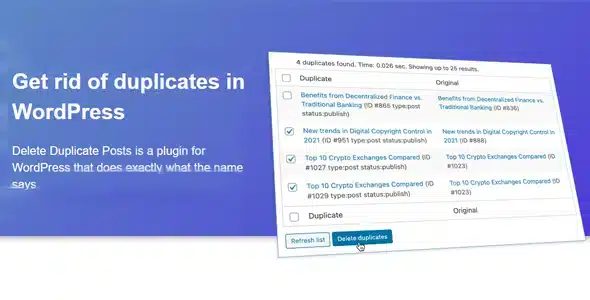
Delete Duplicate Posts is a WordPress extension designed to safely and securely remove duplicate posts. It's ideal for websites with a lot of content, frequent imports, multi-author sites, or projects where copies are unintentionally generated. If your blog, online store, or news site has ever become cluttered with duplicate posts, this tool helps you restore order, clean data, and clearer content management.
What problem does it help solve?
In WordPress, duplicate posts appear due to bulk imports, poorly executed migrations, content automation, or human error when copying and recreating posts. When you start noticing that some articles are repeated with the same title, same content, or slight variations, the dashboard becomes confusing, internal searches become unreliable, and editors waste time checking which version is correct.
In real-world projects, this creates chaos: inflated statistics, internal links pointing to the wrong copy, difficulty maintaining a consistent editorial line, and uncertainty when updating important information. If you've ever had the same article appear multiple times in your own site's search results or editorial calendar, you know how quickly the mess accumulates and how difficult it is to manually untangle.
Furthermore, duplicate content negatively impacts the perception of professionalism. A user who finds the same entry repeated with only slight differences in the title is suspicious of the information. In this context, having a specific way to systematically locate and delete duplicates becomes key to maintaining a clean, consistent, and manageable publication database.
Why this solution makes a difference
Delete Duplicate Posts focuses on a single goal: identifying duplicate posts and allowing you to delete them using clear criteria. It doesn't spread itself across dozens of unrelated functions, but rather concentrates on resolving the clutter that duplicates create in your WordPress database. This specialization simplifies daily work, transforming a tedious and risky task into a guided and controlled process.
In your day-to-day work, the difference is noticeable in the time you no longer spend manually reviewing the list of publications or manually searching for redundant entries. Furthermore, by maintaining a single "official" version of each piece of content, you reduce editing errors, avoid publishing changes to the wrong copy, and improve traceability of modifications. When your team gets used to finding only one post per topic, editorial management becomes much smoother.
Another practical impact is the clarity of metrics. With duplicate entries eliminated, visitor statistics, most-read content reports, and internal links reflect reality, not copies. This allows for data-driven marketing and content decisions, eliminating the need to mentally filter out which posts are "real" and which are remnants of a previous import or error.
Signs you need this product
- You find several entries with the same or very similar titles and you're unsure which is the current version.
- After importing content from another website or CMS, your site displays exact or almost identical copies of many posts.
- WordPress's internal search returns the same news, guide, or product in several variations that confuse your team.
- You manage a multi-author blog and cloned posts appear because several editors started from the same draft.
- Your database is growing uncontrollably, and you've already detected that some of that growth is due to repeated posts.
- You've had to manually delete dozens of similar entries and you're afraid of accidentally deleting the one you really need to keep.
When does it make sense to use it (and when doesn't)
Delete Duplicate Posts is invaluable when you work with a significant amount of content and duplicates have already appeared, or you know they will be generated by automated processes, restored backups, or migrations. If you've ever experienced a single import leaving your database full of clones, having a dedicated system to clean them up saves you hours and reduces the risk of accidentally deleting something essential.
It's also useful when you need clear documentation of what's been removed and want to maintain editorial control. On news sites, tech blogs, digital magazines, or online stores with complex descriptions, using a tool to locate duplicate entries saves the team time comparing posts line by line to figure out what to keep.
On the other hand, this product isn't necessary for very small or newly created websites with minimal content and no import or automation processes. If your site has few posts and you manage them manually, without complex histories or migrations, you can review and delete any duplicates directly from the post list. In that case, adding a dedicated duplicate solution doesn't offer any real benefit.
Who it fits best for
- WordPress site administrators with extensive blogs, online magazines, or news portals who work with intensive editorial calendars.
- Content marketing managers who manage campaigns, funnels, and informational articles where it is critical to maintain a single official version of each piece.
- Agencies and consultants migrating sites from other CMSs to WordPress need a reliable way to clean up duplicates after imports.
- Owners of online stores with large catalogs where the blog or resources section has been duplicated by replicating products or content templates.
- Multi-author teams in which several editors work on similar topics and there is a risk of creating cloned posts from shared drafts.
Practical benefits
- Real operational improvement: you reduce repetitive manual tasks of searching and removing duplicate posts, freeing up time to create new content.
- More organized user experience: Your WordPress dashboard displays a cleaner list of posts, making it easier to quickly find what you need to edit.
- Control and organization: You maintain a clear content structure, preventing multiple copies of the same topic from getting mixed up in categories and tags.
- Time saving: instead of reviewing hundreds of posts one by one after a migration, you focus the process on detecting and debugging duplicates.
- Error reduction: You minimize the risk of editing or linking incorrect versions of the same publication, which is critical in technical guides, product sheets, or legal documents.
How it fits within WordPress
Delete Duplicate Posts integrates seamlessly into your WordPress content management workflow, acting as a dedicated layer of control over your posts. It doesn't replace the editor or category system, but rather sits between content creation and database maintenance. By working with your existing posts, it becomes an additional step in your editorial review and cleanup tasks.
When managing campaigns, reorganizing your blog, or performing a migration, you can incorporate this extension into your maintenance checklist: you review duplicates, make decisions about what to keep, and ensure your final post repository is clean. This way, WordPress remains the core of your project, and Delete Duplicate Posts functions as a specialized module that reinforces the consistency of that core.
Typical use cases
- An ecommerce business with a corporate blog has imported content from another platform and needs to remove duplicate entries so that buying guides do not appear two or three times with slight variations.
- A digital media outlet that has merged several websites into a single WordPress site has encountered duplicate old news, which distorts statistics and confuses the editorial team when updating information.
- An online training project where courses and lessons have been cloned to create new versions, generating very similar posts; Delete Duplicate Posts helps to locate unnecessary repetitions and keep only the current editions.
- A technical blog managed by several authors in which, after years of activity, there are almost identical articles on the same topic; by removing duplicates, the site becomes clearer and the authority of each piece of content increases.
Frequently Asked Questions about Delete Duplicate Posts
How does Delete Duplicate Posts detect which entries are considered duplicates?
Delete Duplicate Posts focuses on comparing key information from your posts to identify actual duplicates. In practice, it considers elements such as titles, content, and other internal data that reveal whether two posts are copies of the same piece. The goal is to group these matches so you can review which elements are redundant and make informed decisions, without having to manually inspect each suspected duplicate entry.
Is Delete Duplicate Posts useful if I work with a large team of editors?
When you manage a large team, the risk of duplication increases: several authors may write about the same topic, start from the same draft, or recreate previously published content. In this context, Delete Duplicate Posts helps you maintain order in your article repository. If you've already experienced two writers publishing almost the same news item or guide, having a system that identifies these repetitions allows you to unify editorial criteria without relying solely on the team's memory.
What happens to statistics and internal links when you remove duplicates?
By cleaning up duplicate entries, your goal is to keep only one valid version of the content. This directly impacts your metrics: visits, clicks, and conversions are concentrated in a single post, making analysis easier. Regarding internal links, by carefully deciding which version to keep, you can maintain a logical navigation structure. The ultimate benefit is more reliable data and an internal linking network without redundant paths to outdated copies.
Does it make sense to use Delete Duplicate Posts on websites with automatically generated content?
On sites that generate posts from feeds, automations, or external integrations, duplicates are common. Delete Duplicate Posts helps control this scenario, acting as a debugging step for what automations have created. If your workflow involves importing news, products, or articles from third parties, incorporating a duplicate review step allows you to keep content volume under control and avoid an inflated archive of unnecessary copies.
What differentiates Delete Duplicate Posts from simply deleting posts from the WordPress list?
Deleting posts from the standard WordPress list involves detecting them one by one, which is time-consuming and increases the chances of making a mistake when selecting items. Delete Duplicate Posts differs in that it organizes the process around the concept of "duplicate": it groups, filters, and presents duplicates so you can make informed decisions. Instead of searching manually, you work based on a specific diagnostic tool, which streamlines maintenance and reduces cleanup errors.
Conclusion
Delete Duplicate Posts exists to solve a very specific problem in WordPress: the clutter and loss of control caused by duplicate posts. If your site has already gone through migrations, imports, or years of intensive publishing and you're starting to notice content repetition, incorporating a specialized tool will bring clarity and reduce manual tasks.
By maintaining a single valid version of each post, you improve your internal organization, simplify daily editing, and work with more reliable data. This tool is designed for those who value a clean, structured, and manageable content repository within WordPress in the long term.
Latest update:

Written by: WPClub
With over seven years of experience curating, managing, and distributing GPL products, our content is based on hands-on experience, technical review, testing, and feedback from thousands of users. We aim to democratize and simplify the WordPress world so you can choose with confidence, speed, and ease.
Your Individual Purchase Includes:
- Lifetime updates.*
- Official product, ready to use.
- Immediate access to the product.
- Clean and virus-free files.
- GNU GPL V2/V3 License
- Technical support in Spanish and English.
* In the case of memberships, the period during which you will receive updates will depend on the type of membership purchased: monthly, annual, or lifetime.
Notify Update
We update products Monday through Friday. However, if the product you see is not yet updated, you can notify us so we can prioritize updating it whenever possible.
Get your questions answered here
Here you'll find answers to frequently asked questions about our service: how it works, what it includes, and how to get the most out of it.
On how many websites can I use the products?
You can use any product from our store on any website you want.
Will I get updates?
Absolutely. If you buy an individual product, you'll get lifetime updates for that product.
On the other hand, if you purchase a membership, you will receive updates until your membership expires.
What if I have a problem?
First of all, we want you to know that you can count on us. We will assist you and provide the necessary support, so you can rest assured.
On the other hand, it is important for you to know that, given the time difference between countries, your time and ours may not be the same, so we will be delayed accordingly.
Our opening hours start at 9 AM from Monday to Friday, UTC -3. We are open until around 6 PM.
Do they provide technical support?
Yes, and regarding the time, it is usually on average within 24 to 48 business hours.
However, there are times when we have already provided an answer and solution in less than a day, depending on the case.
Are there download limits?
No. We don't believe in that format, so you can download as many times as you want. No problem. We pay for high-quality professional storage precisely to avoid problems.
Do they provide license keys?
No. Giving out the keys is not a viable option, as we have had experiences where they end up circulating everywhere and we can even lose the associated accounts.
That said, all products are original and, in cases where a license key is required to function, we will take care of pre-activating them for you.
Does my purchase include an invoice?
Yes. After payment, you will be able to access your invoice immediately in the "Purchases" section of your user account.
That is why it is important that you properly complete the information requested at the time of payment.
Is there a warranty?
Yes, of course. If there's a problem we can't resolve, or if there's an external issue that doesn't have a general solution, you'll receive support and, if necessary, a full refund. We have a 14-day refund policy from the date of purchase.
- It should be noted that there is no warranty if the product works well and it simply wasn't what you wanted.
There have been instances where someone buys a product, the product works perfectly, but they don't like it and want a refund, keeping the product. That's not right.
However, everything is evaluable and reasonable. Let's use judgment together.
What are the opening hours?
Our opening hours are:
- Monday to Friday, from 9 a.m. to 6 p.m.
- Saturday and Sunday: No service.
UTC -3 time

Our Reputation on Trustpilot
Many thanks to those who take the time to give us a rating on Trustpilot. Each and every one of your comments is very helpful to us. We strive to provide a rewarding experience for every member of our community, always with respect and care. We'll be here!






















WPClub Memberships
Access our entire catalog for a single payment. We offer three memberships: Monthly, Annual, and Lifetime (One-Time Payment).
- Save thousands of dollars
- Unlimited daily downloads
- No recurring payments
- Fast downloads by AWS
- Quality service and support, validated since 2018
- We work with love for our community