Boo...! LAST DAY > Memberships with 30% off. Use coupon: HWEEN30
GravityBoard and 6,514 more, with AutoUpdater and support.
For $4.21 more you get everything the Monthly membership includes
Choose my membershipThis product, with lifetime updates.
- Secure payment
- Spanish and English support
- With you since 2018
New version or an issue?
Description
Quick summary
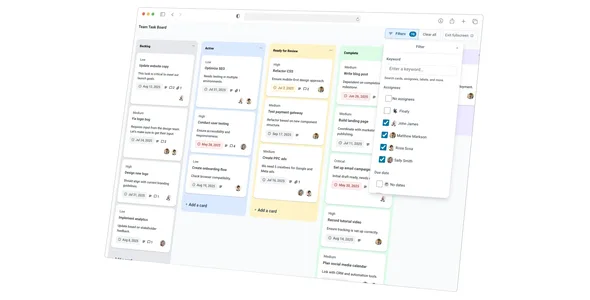
GravityBoard is a GravityKit plugin that transforms Gravity Forms entries into Trello-style Kanban boards, with drag-and-drop cards for visually organizing work. It allows you to assign users to each card, add notes mentioning colleagues, and receive automatic notifications when something changes. Access is controlled by role-based permissions, and all data remains hosted on your own site, without relying on external applications. It requires Gravity Forms to be active, as it directly pulls data from the forms you're already using.
What problem does it help solve?
Many teams receive valuable information through forms—support requests, internal orders, applications, tasks—but this information often gets buried in a list of entries without visual context or status tracking. The usual result is exporting data to another external tool, duplicating work, and losing traceability between what comes in through the form and what is actually managed afterward. This product addresses precisely that issue: it takes what already comes in through Gravity Forms and transforms it into a dashboard where each entry becomes a card that moves through columns, without needing to copy data anywhere else.
Why this solution makes a difference
The main difference compared to using an external board is that there's no need to manually sync anything: cards are generated directly from Gravity Forms entries, so there's only one data source. GravityBoard keeps everything hosted on the site itself, which avoids sending sensitive information to third-party services and simplifies compliance with internal privacy policies. Furthermore, by leveraging existing WordPress roles and capabilities, it doesn't require creating a separate permissions system: it simply extends what the site already understands about who can see or edit what.
Signs you need this product
If your team receives requests via forms and then manages them manually in spreadsheets, chats, or loose notes, it's a clear sign that a visual tracking layer is missing. This also applies when multiple people need to know the status of each request without having to directly ask the person handling it. If you already use Gravity Forms to capture information but feel that the entries are piling up without anyone providing organized follow-up, the product is designed precisely to fill that gap between capturing data and turning it into manageable work.
When does it make sense to use it (and when doesn't)
It makes sense when you're already using Gravity Forms as your data capture engine and need to add a visual management layer without adding another application to your workflow. It fits well in processes like handling requests, coordinating internal tasks, or tracking opportunities submitted through forms. It doesn't make sense if your site doesn't use Gravity Forms, as it's a prerequisite for it to function, or if your team already has a well-established project management system that doesn't benefit from an additional tracking layer.
Who it fits best for
It's a perfect fit for web agencies, support teams, non-profit organizations, and freelancers who already rely on Gravity Forms to capture customer or user information. It's also useful for developers building custom solutions for third parties, as it allows them to deliver a visual tracking system without writing custom code. GravityBoard is designed for those who value keeping their data within their own infrastructure rather than relying on an external task management service.
Practical benefits
In day-to-day use, the most visible benefit is being able to see at a glance what stage each request is at, thanks to customizable columns and cards that can be moved with a simple drag. Assigning responsibilities to each card helps to clearly distribute workloads and prevents requests from being left unattended. Notes with mentions centralize the conversation around each task, so you don't have to jump between email, team chat, and the original form to understand the context. Automatic notifications alert you when there are relevant comments, assignments, or changes, reducing the need to manually check each board.
How it fits within WordPress
As a complement to Gravity Forms, GravityBoard integrates seamlessly into the WordPress admin panel without requiring an external management platform. It leverages existing WordPress roles and capabilities to determine who can view, edit, or manage each board, making it easy to adjust permissions based on your team's structure. For those needing further customization, the product offers developer-focused extensions, allowing you to adapt it to specific workflows without leaving the WordPress ecosystem.
Typical use cases
A typical scenario is a support team receiving requests through a form and needing to move them through columns like «New,» «In Progress,» and «Resolved,» with a responsible party assigned to each case. Another common use is managing internal tasks within an agency, where each client request becomes a card that the project team progresses through and comments on. It also works well for organizations managing applications or tenders, where each form entry represents a case that must go through various review stages before a final decision.
Frequently Asked Questions about GravityBoard
Is it necessary to have Gravity Forms for it to work?
Yes, it's an essential requirement. The product takes existing Gravity Forms inputs and transforms them into board cards, so it won't function as a standalone tool without that foundation.
Is the data stored on external services?
No. All content from boards, cards, and notes remains hosted on your own WordPress site and is not sent to third-party platforms.
Can tasks be assigned to different team members?
Yes, each card can be assigned to one or more users, which helps to divide the work and make it clear who is responsible for each case within the board.
How do you control who can view or modify a dashboard?
Access is managed through WordPress roles and capabilities combined with Gravity Forms' own permissions, allowing you to precisely define who can view, edit, or manage each board.
Is it useful for anything other than managing support requests?
Yes, any flow that starts with a form can become a dashboard: from coordinating internal projects to tracking applications or orders, as long as the information comes from Gravity Forms.
Conclusion
For teams already relying on Gravity Forms and needing visual tracking of incoming forms, this plugin offers a direct solution without adding external applications or duplicating data. The combination of draggable cards, assigning responsibilities, collaborative notes, and WordPress role-based permissions covers much of what a team needs to keep track of its processes. Those looking to maintain control of their data within their own infrastructure will find GravityBoard an organized way to transform forms into manageable work.
Previous versions
If you have purchased this product, or have an active membership, you can download previous versions as we release them, without any limits or restrictions.
| Product name | Version | Size | Date | Download |
|---|---|---|---|---|
| No previous versions available. | ||||
No threats detected
File scanned with ClamAV before publishing
- File
- gravityboard-1.5.0.zip · 2.9 MB
- Files
- 955 scanned · 0 threats
- Engine
- ClamAV 1.5.3 · signatures v28191
- Verified on
- 11/23/2026
- SHA-256
- 46bad3…8d38894
- PHP 86.7%
- CSS 1.9%
- JavaScript 1.8%
- EXPECTED 1.5%
- Other 8.2%
Frequently Asked Questions
Here you'll find answers to frequently asked questions about our service: how it works, what it includes, and how to get the most out of it.
You can use any product from our store on any website you want.
Absolutely. If you buy an individual product, you'll get lifetime updates for that product.
On the other hand, if you purchase a membership, you will receive updates until your membership expires.
First of all, we want you to know that you can count on us. We will assist you and provide the necessary support, so you can rest assured.
On the other hand, it is important to know that, given the time difference between countries, your time and ours may not be the same, so we could be delayed because of this.
Our opening hours are Monday to Friday, from 09 to 18 hrs (UTC −3).
Yes, and regarding the time, it is usually on average within 24 to 48 business hours.
However, there are times when we have already provided an answer and solution in less than a day, depending on the case.
No. We don't believe in that format, so you can download as many times as you want. We pay for high-quality professional storage precisely to avoid any problems.
No. Giving out the keys is not a viable option, as we have had experiences where they end up circulating everywhere and we can even lose the associated accounts.
That said, all products are original and, in cases where a license key is required to function, we will take care of pre-activating them for you.
Yes. After payment, you will be able to access your invoice immediately in the «Purchases» section of your user account.
That's why it's important that you properly complete the information requested at the time of payment.
Yes, of course. If there's a problem we can't resolve, or an external issue that doesn't have a general solution, you'll receive support, if needed, and a full refund. We have a 7-day refund policy from the date of purchase.
- There is no warranty if the product works well and it simply wasn't what you wanted.
There have been instances where someone buys a product, the product works perfectly, but they don't like it and want a refund, keeping the product. That's not right.
However, everything is evaluable and reasonable. Let's use judgment together.
This guarantee applies to the purchase of individual products; memberships are not eligible for a refund.
Our opening hours are:
- Monday to Friday, from 9 a.m. to 6 p.m.
- Saturday and Sunday: no service.
UTC −3 time.

WPClub Team
GPL plugin and theme store since 2018. Every file is analyzed with ClamAV and its report is public; we keep previous versions and provide support in Spanish and English.
GravityBoard and 6,514 more, with AutoUpdater and support.
For $4.21 more you get everything the Monthly membership includes
Choose my membershipThis product, with lifetime updates.
- Secure payment
- Spanish and English support
- With you since 2018