




- Secure payment
- Spanish and English support
- With you since 2018
Learndash Dashboard Addon 6.5.0
$99.00 El precio original era: $99.00.$9.99El precio actual es: $9.99.
Quick summary
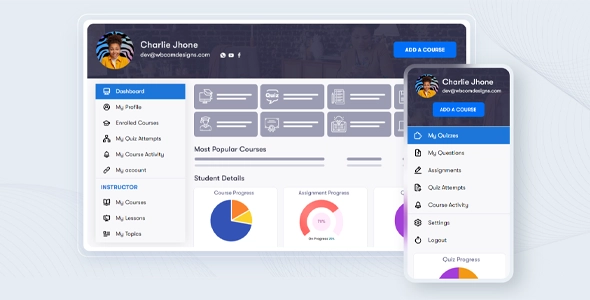
The LearnDash Dashboard Addon is a dedicated extension for learning websites built with LearnDash on WordPress. It consolidates key information for students, instructors, and administrators into a single dashboard, allowing them to manage courses, progress, and activities without getting lost in multiple menus. It's especially useful as the platform grows, the number of courses increases, and manually reviewing everything within the standard LearnDash dashboard becomes impractical.
What problem does it help solve?
In online training projects based on LearnDash, the native dashboard often falls short for daily tasks. You have courses, lessons, quizzes, users with different roles, and scattered metrics. When you start noticing that you need to open multiple screens to understand what's happening with a student or a course, management becomes slow, confusing, and prone to errors.
This happens when you expand from a few courses to a larger catalog or when you have multiple active instructors. Students ask about their progress, tutors need to quickly see who's stuck, and you need a clear view of the overall health of the academy. Without a centralized dashboard, you end up working with external spreadsheets, manual exports, and one-to-one revisions within WordPress.
The LearnDash Dashboard Addon addresses precisely that bottleneck: it organizes key LearnDash information into structured dashboards tailored to each user type, preventing daily tasks from becoming a data hunt within the WordPress backend. If you've ever found yourself spending more time searching for information than making decisions, this extension comes to the rescue, bringing order to that chaos.
Why this solution makes a difference
The LearnDash Dashboard Addon doesn't replace LearnDash; it builds upon it to offer much clearer and more functional views. Instead of adding more layers of complexity, it consolidates the essentials so that each user can work from a single point. For an administrator, this translates to fewer clicks to review results, fewer steps to understand course progress, and more focus on improving content and marketing, not on repetitive tasks.
In real-world projects, the impact is noticeable in the daily routine: instructors access their dashboard and immediately see students, recent activity, and relevant statistics; students find their progress and active courses without getting lost among WordPress menus; you gain a consolidated view that reduces the possibility of overlooking inactive students, outdated courses, or lessons with a low completion rate.
Furthermore, by working with dashboards designed for LearnDash, the risk of errors in user management or course assignment is reduced. It's not just about "viewing data," but about organizing the digital academy so that every action is just a few clicks away, from a familiar and focused environment. If you've ever experienced a student losing access due to an oversight, or a tutor not being able to properly view their group's status, this add-on helps close those operational gaps.
Signs you need this product
- Problem already present on the site: You struggle to keep track of student progress without accessing each student's profile individually within WordPress, and you end up using external spreadsheets to monitor who has completed what.
- Friction in WordPress: Instructors get lost in the classic panel, constantly ask "where to see" their courses or students, and you can tell that the LearnDash structure, as it comes out of the box, is not comfortable for them.
- Loss of control or time: Reviewing statistics, detecting inactive students, or seeing which courses need attention takes too much time, delaying business decisions such as launching new training programs or updating content.
- Typical growth scenario: You've gone from a couple of courses to an academy with several training paths, different teachers and groups, and the lack of a centralized dashboard is hindering your ability to scale your educational project.
When does it make sense to use it (and when doesn't)
The LearnDash Dashboard Addon makes sense when your LearnDash learning site has grown beyond a small footprint and you need a clear overview to manage engagement, tracking, and daily activity. It provides real value when multiple users with different roles are working within the system and you require customized dashboards that simplify decision-making. It's especially useful for academies, online schools, educational memberships, and internal training projects with multiple courses and active cohorts.
However, if you only have one or two courses with few active students and you manage the entire platform yourself, this extension might not be necessary yet. In those cases, the native LearnDash dashboard and standard WordPress screens are usually sufficient for checking enrollments and progress on an as-needed basis. The value of the LearnDash Dashboard Addon becomes clear when the amount of information starts to overwhelm the traditional menus and you need dashboards designed for day-to-day use, not just for the technical configuration of the courses.
Who it fits best for
- Owners of online academies: Platform managers who need quick control over students, courses, and performance without relying on scattered reports or extensive manual reviews.
- Internal instructors and trainers: Professionals who manage groups, correct activities, or supervise the progress of their students require a clear space where they can see all the relevant information without navigating the entire WordPress backend.
- Corporate training teams: HR or training departments that use LearnDash for internal training and are looking for dashboards that facilitate employee tracking, training paths, and compliance with learning processes.
Practical benefits
- Real operational improvement: It centralizes key LearnDash information in a clear environment, reducing menu hopping and avoiding the need to open multiple tabs to understand the academy's status.
- User experience: Students and instructors find what they need on role-oriented dashboards, reducing recurring questions about where to view progress, active courses, or pending activities.
- Control and organization: It allows you to see in a structured way which courses are active, which users require attention and how the platform is being used, which improves the planning of new content or cohorts.
- Time saving: It reduces repetitive tasks associated with manually tracking students and courses. What previously required reviewing profiles one by one is now concentrated in more accessible and clear dashboards.
- Error reduction: It minimizes confusion in accessing courses and tracking progress by presenting information in an organized and focused way, which reduces the likelihood of leaving students unsupervised or poorly managed groups.
How it fits within WordPress
The LearnDash Dashboard Addon acts as an organizational layer over the LearnDash ecosystem within WordPress. It doesn't replace course creation or basic content management, but rather leverages your existing setup to provide clearer dashboards for each type of user. In this context, it becomes the primary entry point for reviewing what's happening in the academy, while the rest of the WordPress dashboards remain focused on configuration, editing, and technical maintenance.
By working with this add-on, your workflow shifts from "searching" for information in different sections to "accessing the dashboard" and taking action from there. This seamlessly integrates into your daily routine: administrators use it to monitor activity, instructors to track their groups, and students to guide their own learning. LearnDash remains the core of the system; the LearnDash Dashboard Addon is the interface designed for the everyday use of that structure.
Typical use cases
- Online course academy with multiple instructors: Each teacher accesses their panel to view their courses, associated students, and recent activity, without having to navigate the entire WordPress backend or interpret menus that are not designed for their role.
- Educational membership with a wide catalog: When you offer dozens of subscription-based courses, the dashboard allows you to understand which training courses are being completed, which users are inactive, and where to focus efforts to improve retention and engagement.
- Internal training in companies: Training managers use the dashboards to monitor team progress, identify employees who do not complete required modules, and plan reminders or new training paths.
Frequently Asked Questions about the Learndash Dashboard Addon
How does the LearnDash Dashboard Addon differ from the standard LearnDash dashboard?
The LearnDash Dashboard Addon focuses on providing views organized by role and daily use, while the standard LearnDash dashboard is geared towards the technical configuration and administration of courses, lessons, and quizzes. With this addon, students, instructors, and administrators access spaces designed for their daily work, with more condensed and accessible information. It doesn't replace content creation or editing options, but rather simplifies how data generated by the learning platform is viewed and interacted with.
How does it help instructors who are not used to using WordPress?
In many projects, instructors aren't advanced WordPress users and often feel lost among menus and sections they don't need. The LearnDash Dashboard Addon reduces this friction by offering more straightforward dashboards where they can easily find their courses, groups, and essential data without having to learn the entire backend structure. This makes onboarding new instructors easier and reduces the time you spend explaining how to navigate the platform, as their daily interaction is concentrated in a specific and much more intuitive environment.
Does this add-on replace the need for advanced reports in LearnDash?
The LearnDash Dashboard Addon enhances how you view and manage daily information, but it's not designed to replace in-depth analytical reporting tools or external reports. Its focus is on operational monitoring: viewing the academy's progress, activity, and status from more user-friendly dashboards. If you need complex statistical analysis, advanced data cross-referencing, or reporting for financial departments, this add-on will support your daily work, but it doesn't replace dedicated analytics solutions or detailed data export capabilities.
When is it appropriate to incorporate it into a training project with LearnDash?
It's a good idea to incorporate the LearnDash Dashboard Addon when your project moves from the initial phase to a scenario with a larger volume of students, instructors, or courses. If you've already noticed that the standard dashboard doesn't clearly show who's progressing, which content requires attention, or which groups are active, it's a good time to integrate it. When you start to realize that a large part of your time is spent searching for data instead of acting on it, a centralized dashboard like this makes a real difference in your daily management capabilities.
If I only manage a few courses, does it make sense to use the Learndash Dashboard Addon?
If you manage a small number of courses with a small student base and handle everything yourself, the immediate value might be less. In that case, the native LearnDash dashboard and basic WordPress options usually cover your daily needs. The LearnDash Dashboard Addon truly makes sense when you have more resources, multiple roles involved, or a clear need for consolidated views of your activity. You can start without it and add it later, when project growth justifies more organized and efficient management.
Conclusion
The LearnDash Dashboard Addon is designed to streamline the daily operations of a learning platform built with LearnDash on WordPress. It centralizes key information in clear dashboards, tailored to different user roles, so tracking progress, identifying issues, and making decisions no longer require endless navigation through the backend.
If your online academy is growing and you already feel that management is becoming cumbersome and disorganized, this extension helps you regain control and clarity over what is happening within your site, allowing you to dedicate more time to improving training and less to "chasing" scattered data.
Your individual purchase includes:
- Lifetime updates.*
- Product ready to use.
- Immediate access to the product.
- Clean and virus-free files.
- GNU GPL V2/V3 License
- Technical support in Spanish and English.
* In the case of memberships, the period during which you will receive updates will depend on the type of membership purchased: monthly, annual, or lifetime.
Get your questions answered here
Here you'll find answers to frequently asked questions about our service: how it works, what it includes, and how to get the most out of it.
On how many websites can I use the products?
You can use any product from our store on any website you want.
Will I get updates?
Absolutely. If you buy an individual product, you'll get lifetime updates for that product.
On the other hand, if you purchase a membership, you will receive updates until your membership expires.
What if I have a problem?
First of all, we want you to know that you can count on us. We will assist you and provide the necessary support, so you can rest assured.
On the other hand, it is important for you to know that, given the time difference between countries, your time and ours may not be the same, so we will be delayed accordingly.
Our opening hours start at 9 AM from Monday to Friday, UTC -3. We are open until around 6 PM.
Do they provide technical support?
Yes, and regarding the time, it is usually on average within 24 to 48 business hours.
However, there are times when we have already provided an answer and solution in less than a day, depending on the case.
Are there download limits?
No. We don't believe in that format, so you can download as many times as you want. No problem. We pay for high-quality professional storage precisely to avoid problems.
Do they provide license keys?
No. Giving out the keys is not a viable option, as we have had experiences where they end up circulating everywhere and we can even lose the associated accounts.
That said, all products are original and, in cases where a license key is required to function, we will take care of pre-activating them for you.
Does my purchase include an invoice?
Yes. After payment, you will be able to access your invoice immediately in the "Purchases" section of your user account.
That is why it is important that you properly complete the information requested at the time of payment.
Is there a warranty?
Yes, of course. If there's a problem we can't resolve, or if there's an external issue that doesn't have a general solution, you'll receive support and, if necessary, a full refund. We have a 14-day refund policy from the date of purchase.
- It should be noted that there is no warranty if the product works well and it simply wasn't what you wanted.
There have been instances where someone buys a product, the product works perfectly, but they don't like it and want a refund, keeping the product. That's not right.
However, everything is evaluable and reasonable. Let's use judgment together.
What are the opening hours?
Our opening hours are:
- Monday to Friday, from 9 a.m. to 6 p.m.
- Saturday and Sunday: No service.
UTC -3 time

Reviewed by the WPClub team
At WPClub, we carefully review each product before listing it. Our team evaluates its key features, compatibility, and performance to provide you with reliable, up-to-date, and helpful information when choosing and using each resource available in our store.
Download previous versions
If you have purchased this product, or have an active membership, you can download previous versions as we release them, without any limits or restrictions.
| Nombre del producto | Versión | Tamaño | Fecha | Descargar |
|---|---|---|---|---|
| No hay versiones anteriores registradas. | ||||

Our Reputation on Trustpilot
Many thanks to those who take the time to give us a rating on Trustpilot. Each and every one of your comments is very helpful to us. We strive to provide a rewarding experience for every member of our community, always with respect and care. We'll be here!






















WPClub Memberships
Access our entire catalog for a single payment. We offer three memberships: Monthly, Annual, and Lifetime (One-Time Payment).
- Save thousands of dollars
- Unlimited daily downloads
- No recurring payments
- Fast downloads by AWS
- Quality service and support, validated since 2018
- We work with love for our community