



When an LMS needs true traceability, a "just courses and quizzes" approach falls short. The LearnDash Tin Canny Reporting Plugin fills that gap with an all-in-one solution: detailed reports, an uploader for authoring packages (Storyline, Rise, iSpring, Captivate), and a local LRS that captures Tin Can/xAPI events within WordPress. In our experience, the leap is immediate: we go from superficial metrics to understanding what each user sees, when, how far they progress, and where they get stuck, both at the site level and by group and individual user.
More than just an add-on, the LearnDash Tin Canny Reporting Plugin is an observability layer for LearnDash. It integrates native LearnDash records with xAPI and SCORM, and allows for SCORM-to-xAPI conversion to unify the learning history. This means reports display LearnDash courses, lessons, and topics alongside granular detail from external modules. When implemented, pedagogical decisions become data-driven: what content to retain, what activities to adjust, and which cohorts to prioritize.
Furthermore, the LearnDash Tin Canny Reporting Plugin addresses typical compliance requirements: CSV/XLSX export, "Mark Complete" blocking until module completion, date range filters, and specific visibility for Group Leaders. With this foundation, your LMS gains accuracy, your teams reduce guesswork, and your audience receives clearer learning paths.

What we achieved with Tin Canny (real experience)
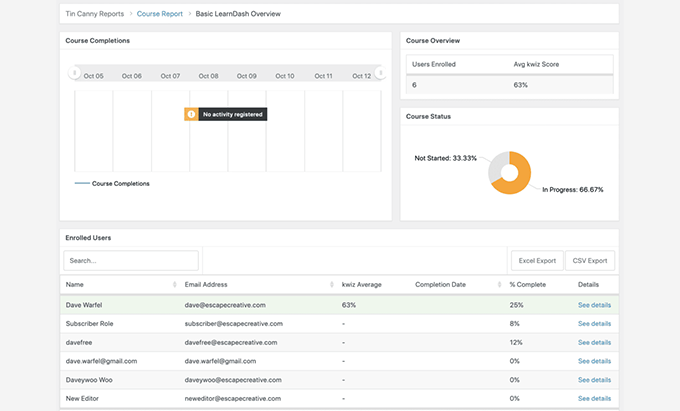
Our goal with the LearnDash Tin Canny Reporting Plugin is simple: actionable visibility. In our experience, the first impact comes with the drill-down: from the overall course view, we open the details for each user, seeing attempts, time, and status for each package. The second impact is operational: with the integrated uploader, uploading a Storyline or Rise is no longer an obstacle course. We upload, assign, and that's it; the system captures the xAPI events without any additional scripts.
The third impact is pedagogical. With the Learndash Tin Canny Reporting Plugin, we identify questions with high error rates, screens that cause students to drop out, and sequences that need micro-reinforcements. When applied to cohorts, Group Leaders can view their group's progress on the front end, download reports, and provide concrete feedback. This isn't just a "nice-to-have": it translates into higher course completion rates, less support, and evidence-based communication with students.
Finally, there's the impact on compliance. If your organization requires traceability for audits, the LearnDash Tin Canny Reporting Plugin documents who did what, when, and how. We combine filters, exports, and standardized naming conventions to deliver reports that Accounting, HR, or Quality understand at a glance. The result is an LMS that not only teaches: demonstrates.
Integrated uploader: Seamless Storyline, Rise, iSpring, and Captivate
Uploading authored content shouldn't disrupt your workflow. With the LearnDash Tin Canny Reporting Plugin, the uploader seamlessly accepts packages from Articulate Storyline, Rise, iSpring, and Adobe Captivate. In our practice, we define a clear naming convention (course-module-version), upload the zip file, verify responsiveness in the iFrame, and associate the module with the corresponding lesson. If an update is later released, we replace the package without losing history and document the change in an internal changelog.
The uploader also simplifies bulk mapping: when working with large catalogs, we prepare the LearnDash structure (courses, lessons, topics) and map each package to its corresponding location. With the LearnDash Tin Canny Reporting Plugin, xAPI tracking is unified; we no longer struggle with multiple plugins or scattered endpoints. This saves hours and, more importantly, reduces linking errors that cost support.
Do you use mixed resources (interactive video, H5P, simulators)? We maintain visual consistency and verify that key events (completion, scoring, duration) are triggered correctly. The result is a clean front end and a data-rich back end. Yeah They are used to make decisions.
Local LRS in WordPress: xAPI data where you need it
The LearnDash Tin Canny Reporting Plugin's local LRS is the piece that transforms isolated events into actionable insights. It captures xAPI statements (actor, verb, object, context) and stores them within WordPress, bridging the gap between data and decision-making. In our experience, this speeds up iterations: we detect that a module is "confusing" not because someone says so, but because the data shows abandonment rates on the same screen.
The local LRS also facilitates privacy and control. We define retention periods (e.g., 24 months), roles with permissions (admin, reporting, Group Leader), and export protocols for audits. If you need to interoperate with another external LRS, we plan the synchronization without duplicating data loads. With the LearnDash Tin Canny Reporting Plugin, xAPI data ceases to be a "black hole" and becomes part of the course improvement cycle.
From the team's perspective, the value lies in not having to leave the LMS to consult: an instructor can review reports, adjust a module, and remeasure without switching platforms. Less friction, more learning.
SCORM within LearnDash: conversion to xAPI and progress control
Many legacy catalogs are SCORM 1.2/2004. The LearnDash Tin Canny Reporting Plugin allows for SCORM integration and, where appropriate, conversion to xAPI to unify traceability. In our experience, this avoids maintaining two parallel systems. The learner navigates a single flow, and we see all events in the same reporting dashboard.
The other key is progress control. To maintain the integrity of the route, we configure it so that "Mark Complete" cannot be enabled until the user finishes the package. If your policy requires a minimum time or specific attempts, we document and test it in real-world scenarios. The result: credible certifications and metrics that accurately reflect what happened.
Before going live, we ran a battery of tests: attempts with different profiles, simulated disconnections, session resumption, and compatibility checks on key browsers. This helped us avoid surprises with large cohorts.
Reports for admins and Group Leaders: from a global view to user-specific details
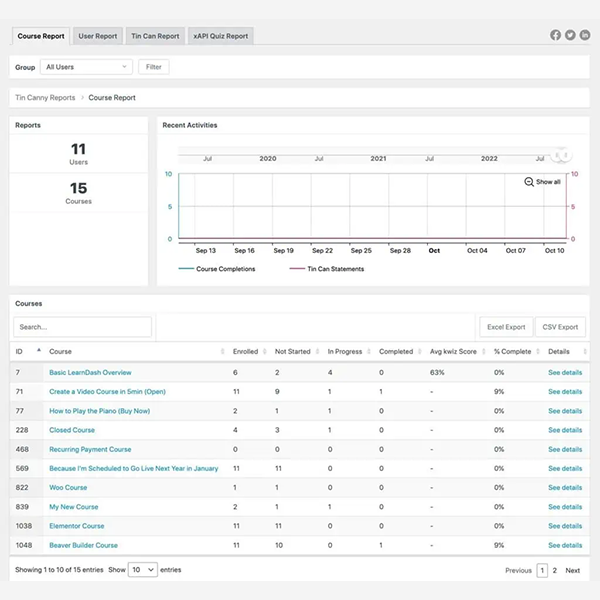
Reports are at the heart of the LearnDash Tin Canny Reporting Plugin. We offer four practical views:
Course Report: progress, time, completion rate and course hotspots.
User Report: individual history with attempts, scores and pending modules.
Tin Can/xAPI Report: granular events per package/screen.
Quiz/Question Analysis: performance per question to isolate problematic items.
In our experience, the Group Leader view on the front end is a game-changer: group leaders can access their cohort without logging into the back end, download CSV/XLSX files, filter by dates or courses, and take immediate action (reminders, reinforcements). The LearnDash Tin Canny Reporting Plugin makes tracking a routine and autonomous task, not an occasional administrator effort.
We combined these reports with simple KPIs: completion rate, median time, items with the most errors, and modules with the highest abandonment rates. Based on this data, we iterated on content with greater impact.
Exports and compliance: CSV/XLSX, filters and auditing
Without exporting, there's no compliance. With the LearnDash Tin Canny Reporting Plugin, we define filters by course, user, group, date, and status, and export to CSV/XLSX with standardized fields (IDs, timestamps, scores, duration). In our experience, this reduces the time spent on monthly closings and audits because Accounting/HR receives exactly what it needs, in the correct format.
For regulated organizations, we establish nomenclatures (e.g.: course-module-vX.YWe also implemented package versioning and a change log. Additionally, we documented the retention policy and access permissions for the local LRS to align legal and security requirements. The goal is to make reporting a routine task, not a chore.
If you work with multiple catalogs or vendors, we create custom views for each line of business and automate regular downloads. Again: less manual work, more control.
Our implementation process in your LMS
Audit and objectives: LearnDash structure, catalogs (SCORM/xAPI), KPIs and roles.
Installation and uploader: we configured Learndash Tin Canny Reporting Plugin, nomenclature and loading of pilot packages.
LRS and privacy: retention policy, roles and export flows.
SCORM→xAPI and progress: “Mark Complete” rules, timings, and restart tests.
Views and KPIsDashboards for admins and Group Leaders, with useful filters.
QA and go-live: stress test, browsers, devices; final checklist.
Handover: short manuals and sessions for your team to iterate without depending on us.
In our experience, this method reduces tickets, accelerates improvements, and gives your team real autonomy over the data.
Best practices: naming conventions, responsive QA, and data privacy
Standardized nomenclature:
course-topic-module-vX.Y, dates and change notes.QA responsive: Test on iOS/Android, iPad/Chromebook, multiple browsers and network conditions.
Privacy and security: minimal access required to the LRS, encryption in transit, PII cleansing on exports.
Maintainability: replace packages without breaking links, preserve history, and document changes.
Data-based pedagogyReview KPIs every sprint and adjust items with a high error or abandonment rate.
These practices make Learndash Tin Canny Reporting Plugin not "just another plugin", but the backbone of your measurement.
Conclusion
The LearnDash Tin Canny Reporting Plugin transforms LearnDash into an LMS with true traceability: upload packages, capture xAPI/SCORM data, block premature updates, and export what matters. With clear data, your courses are optimized, your teams make informed decisions, and your organization meets requirements seamlessly. If you want a LearnDash that teaches and demonstrates, this is the way. We'll make it ready to scale.























