

- Secure payment
- Spanish and English support
- With you since 2018
Mapper Interactive World Map for Elementor 1.0.4
$12.00 El precio original era: $12.00.$5.99El precio actual es: $5.99.
Quick summary
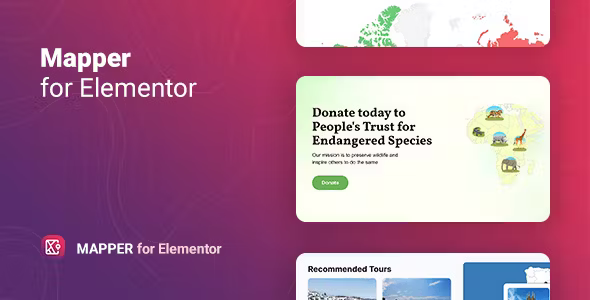
Mapper Interactive World Map for Elementor is a visual plugin for designing interactive world maps directly within Elementor. It's designed for projects that need to display clear and actionable geographic information: businesses with an international presence, schools, NGOs, media outlets, and agencies. It solves the typical problem of unclear static maps, allowing you to highlight countries, regions, or specific points with visual interactions that help users better understand your scope, data, or content.
What problem does it help solve?
On many WordPress sites, information related to countries, offices, international projects, or markets is presented in long lists, difficult-to-read tables, or embedded external maps that feel out of place in the design. This makes it hard for users to understand at a glance where you operate, what area you cover, or what data corresponds to each region. When you start noticing visitors getting lost in lengthy texts trying to find their country or city, the map has ceased to be helpful and has become an obstacle.
Mapper Interactive World Map for Elementor addresses precisely that point: it transforms geolocation into a native visual element of the design. Instead of forcing the user to read blocks of text, it allows them to explore the map, hover over each area, view additional information, and, if appropriate, click to go to specific pages. If you've ever been asked which countries you work in even though it's already "explained" in several sections, then a clear and centralized visualization is missing, and this type of map solves that problem.
Why this solution makes a difference
The key difference is that Mapper Interactive World Map for Elementor integrates seamlessly into Elementor's existing design workflow. It's not a generic map tacked on with a shortcode, but a visual widget that you can customize using the same panel, controls, and logic you use for the rest of your page. This reduces setup time, avoids style jumps, and allows you to maintain consistency in colors, fonts, and visual effects.
In real-world projects, this directly impacts your daily work: you can modify featured countries with just a few clicks, change styles without touching the code, and adapt the map to new campaigns or business expansions without having to redo the entire page. Furthermore, you minimize common errors such as broken links, confusing legends, or misaligned maps that disorient the user. Everything remains within the same working environment, with an immediate preview of how the map will look in the final layout.
Signs you need this product
- Your site includes information by country or region (offices, branches, projects, partners) and users take a long time to find their location within texts or tables.
- When working with WordPress and Elementor, you find yourself copying static maps or screenshots that don't fit the design or allow for real interaction.
- You start wasting time manually updating geographic lists across multiple pages every time you change markets, add a country, or open a new location.
- You are in a scenario of international growth where the map goes from being a decorative detail to a key piece to explain your global presence, and the current approach falls short.
When does it make sense to use it (and when doesn't)
Mapper Interactive World Map for Elementor makes sense when the geographic dimension is relevant to your communication or data. If you need to highlight service coverage, delivery zones, active projects by country, travel routes, or any content where location is part of the message, an interactive map integrated into Elementor provides clarity and reduces the effort required to explain. It's especially useful when users need to visually filter their area and access associated information with a simple click or hover.
On the other hand, if your project is purely local and you only work in one city or a very limited area, a world map with detailed interaction doesn't add real value. In that context, a simple address with a map of a single location might suffice. It's also unnecessary if your content isn't location-dependent, for example, a personal blog or a landing page without a geographical component. In these cases, adding an interactive map would only add visual elements without improving the user's understanding.
Who it fits best for
- Marketing and communication teams that manage corporate websites with an international presence and need to visually display branches, distributors or clients by country.
- NGOs, educational institutions and impact projects that showcase projects, students, scholarships or actions spread around the world and require the user to quickly understand the global reach.
- Agencies and developers who build Elementor sites for brands operating in multiple markets and want to offer an integrated, design-consistent, and editable map without relying on third-party external services.
Practical benefits
- Real operational improvement: You centralize all geographic information on an editable map, avoiding duplicating data in different listings and reducing maintenance when locations or countries change.
- User experience: The visitor understands at a glance where you work and how your activity is distributed, exploring the map intuitively instead of repeatedly reading blocks of text.
- Control and organization: You maintain a clear panel within Elementor to manage which areas are highlighted, what information appears when interacting, and how each region links to internal pages.
- Time saving: Setting up or adjusting the map takes less effort than manually assembling tables or charts, and changes are applied to a single visual element rather than several scattered sections.
- Error reduction: Inconsistencies between maps, lists, and descriptions are reduced, since the main reference is the interactive map itself integrated into the Elementor template.
How it fits within WordPress
Within your WordPress workflow, Mapper Interactive World Map for Elementor behaves like any other element in the page design you create with Elementor. In practice, you decide which section of your landing page, company page, or projects area to include the map in, insert it as a widget, and begin customizing its appearance and content. You don't need to leave the editor to configure styles, colors, or visual behavior, making it easy to maintain consistency between the map and the rest of the blocks.
In projects where content is organized using Elementor templates, the map integrates seamlessly without disrupting the existing structure. You can replicate sections containing the map across different pages, create variations for specific campaigns, and experiment with various ways to present geographic information without having to redo everything from scratch. In this context, the map ceases to be an isolated addition and becomes an integral part of the overall site design.
Typical use cases
- An ecommerce site with international shipping that visually displays which countries it reaches, with zones differentiated by service type, delivery times or conditions, making it easy for the customer to quickly locate their region.
- An educational organization that presents its network of campuses, programs, or alumni in different countries, using the map so that each visitor can go directly to the information for their geographic area.
- A consulting or B2B services company that wants to demonstrate a global presence and expertise in specific markets, using the map to highlight offices, local partners, and success stories by area.
Frequently Asked Questions about Mapper Interactive World Map for Elementor
How does Mapper Interactive World Map for Elementor differ from using an external embedded map?
The main difference is that Mapper Interactive World Map for Elementor integrates seamlessly into the Elementor editor as a core design element. You're not working with an isolated iframe, but with a map that you can visually adapt to the rest of the page: colors, layout, spacing, and consistency with your branding. Furthermore, it's designed to display information by country or region, not just specific addresses, which is ideal when your goal is to visualize the global reach or geographic distribution of projects.
When does it make more sense to use Mapper Interactive World Map for Elementor instead of a simple list of countries?
Mapper Interactive World Map for Elementor makes the most sense when location is an essential part of the message and a simple list of countries isn't enough to convey it. For example, if you want users to immediately appreciate your international expansion, identify priority service areas, or feel represented by seeing their region highlighted. In these cases, an interactive map transforms information that would be cumbersome in text into a quick and easy-to-understand visual experience, reducing the effort required to find their country.
Is Mapper Interactive World Map for Elementor useful for projects that frequently change countries or regions?
Yes, it's especially valuable when your operational areas are updated frequently. Instead of modifying separate listings across multiple pages, you consolidate the geographic information on the map and manage changes from a single location within Elementor. This is useful for projects with gradual expansion, changing travel routes, seasonal campaigns by region, or growing partner networks. The map becomes the primary reference point for reflecting your current geographic reality.
Does Mapper Interactive World Map for Elementor display data or only locations?
Mapper Interactive World Map for Elementor doesn't just mark abstract locations; its value lies in associating each country or region with information relevant to the user. In an educational context, it can display campuses or programs; in a business, offices and services by area; in an NGO, active projects. The key is that the map acts as a visual gateway: the user locates their area on the map and accesses texts, figures, links, or details that are already organized within your content structure.
What if I have different types of audiences who need to see different maps on the same site?
In projects with diverse audiences, Mapper Interactive World Map for Elementor allows you to create specific sections within your Elementor pages. You can design a landing page for end customers with a map focused on service areas, and another for partners or distributors with a map focused on business opportunities by region. Because it works as an Elementor widget, you have the flexibility to reuse styles, adapt messages, and display different maps in different parts of the site without duplicating complex structures.
Conclusion
Mapper Interactive World Map for Elementor exists to solve a specific problem: the difficulty of explaining geographic reach and international presence using only text, lists, or maps unrelated to the design. By integrating directly into Elementor, it transforms that information into a clear visual element, consistent with your brand and easy to maintain. If your project depends on users understanding your location and reach, a well-integrated interactive map makes a tangible difference in how your site is perceived.
Your individual purchase includes:
- Lifetime updates.*
- Product ready to use.
- Immediate access to the product.
- Clean and virus-free files.
- GNU GPL V2/V3 License
- Technical support in Spanish and English.
* In the case of memberships, the period during which you will receive updates will depend on the type of membership purchased: monthly, annual, or lifetime.
Get your questions answered here
Here you'll find answers to frequently asked questions about our service: how it works, what it includes, and how to get the most out of it.
On how many websites can I use the products?
You can use any product from our store on any website you want.
Will I get updates?
Absolutely. If you buy an individual product, you'll get lifetime updates for that product.
On the other hand, if you purchase a membership, you will receive updates until your membership expires.
What if I have a problem?
First of all, we want you to know that you can count on us. We will assist you and provide the necessary support, so you can rest assured.
On the other hand, it is important for you to know that, given the time difference between countries, your time and ours may not be the same, so we will be delayed accordingly.
Our opening hours start at 9 AM from Monday to Friday, UTC -3. We are open until around 6 PM.
Do they provide technical support?
Yes, and regarding the time, it is usually on average within 24 to 48 business hours.
However, there are times when we have already provided an answer and solution in less than a day, depending on the case.
Are there download limits?
No. We don't believe in that format, so you can download as many times as you want. No problem. We pay for high-quality professional storage precisely to avoid problems.
Do they provide license keys?
No. Giving out the keys is not a viable option, as we have had experiences where they end up circulating everywhere and we can even lose the associated accounts.
That said, all products are original and, in cases where a license key is required to function, we will take care of pre-activating them for you.
Does my purchase include an invoice?
Yes. After payment, you will be able to access your invoice immediately in the "Purchases" section of your user account.
That is why it is important that you properly complete the information requested at the time of payment.
Is there a warranty?
Yes, of course. If there's a problem we can't resolve, or if there's an external issue that doesn't have a general solution, you'll receive support and, if necessary, a full refund. We have a 14-day refund policy from the date of purchase.
- It should be noted that there is no warranty if the product works well and it simply wasn't what you wanted.
There have been instances where someone buys a product, the product works perfectly, but they don't like it and want a refund, keeping the product. That's not right.
However, everything is evaluable and reasonable. Let's use judgment together.
What are the opening hours?
Our opening hours are:
- Monday to Friday, from 9 a.m. to 6 p.m.
- Saturday and Sunday: No service.
UTC -3 time

Reviewed by the WPClub team
At WPClub, we carefully review each product before listing it. Our team evaluates its key features, compatibility, and performance to provide you with reliable, up-to-date, and helpful information when choosing and using each resource available in our store.
Download previous versions
If you have purchased this product, or have an active membership, you can download previous versions as we release them, without any limits or restrictions.
| Nombre del producto | Versión | Tamaño | Fecha | Descargar |
|---|---|---|---|---|
| No hay versiones anteriores registradas. | ||||

Our Reputation on Trustpilot
Many thanks to those who take the time to give us a rating on Trustpilot. Each and every one of your comments is very helpful to us. We strive to provide a rewarding experience for every member of our community, always with respect and care. We'll be here!






















WPClub Memberships
Access our entire catalog for a single payment. We offer three memberships: Monthly, Annual, and Lifetime (One-Time Payment).
- Save thousands of dollars
- Unlimited daily downloads
- No recurring payments
- Fast downloads by AWS
- Quality service and support, validated since 2018
- We work with love for our community