

- Secure payment
- Spanish and English support
- With you since 2018
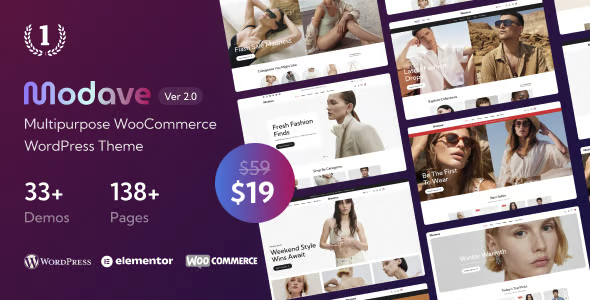
Modave Multipurpose WooCommerce Theme 2.1.0
$19.00 El precio original era: $19.00.$6.99El precio actual es: $6.99.
Quick summary
Modave Multipurpose WooCommerce Theme is a WordPress theme designed to create modern and versatile online stores without relying on rigid designs. It's ideal for those managing various types of products or projects who need a consistent, clean look and feel adaptable to different niches. It helps solve the problem of cluttered, unclear, and difficult-to-navigate stores by providing a structured visual foundation for e-commerce that promotes conversion and a seamless shopping experience.
What problem does it help solve?
In many WooCommerce stores, design ends up being an obstacle: cluttered product pages, categories without a clear hierarchy, confusing menus, and product pages that don't guide the user to the purchase button. When you start noticing that you have visits but few sales, the problem often lies in a weak visual presentation, not in the quality of your products or your pricing strategy.
The Modave Multipurpose WooCommerce Theme addresses precisely that issue: how content is displayed. In real-world WordPress projects, it's common for administrators to install extensions and make minor design tweaks, and after a few months, the site starts to look inconsistent. This affects the perception of professionalism and breeds distrust. If you've ever had a client comment, "I can't find what I'm looking for" or "I don't understand where to click," the problem lies in the visual architecture and the layout of key e-commerce elements.
This topic focuses on organizing the store, catalog, product pages, shopping cart, and checkout within a clear structure for the end user, with blocks designed to highlight relevant information (price, variants, availability, calls to action) and minimize everything that distracts from the main objective: that the visitor moves through the purchase journey without getting lost.
Why this solution makes a difference
In the day-to-day running of an online store, the most time-consuming task is correcting scattered visual details: buttons that look bad on mobile, misaligned text, sections that change style between pages, or banners that disrupt the design on some screens. Modave Multipurpose WooCommerce Theme reduces this burden by offering a unified design scheme for the entire purchase flow, from the homepage to the completed order.
On the other hand, the multipurpose structure makes it easy to work with different types of catalogs within the same site: fashion, digital products, services, physical products, or subscriptions. In this context, having a layout designed to highlight featured products, collections, and specific offers avoids having to redo layouts from scratch every time a new line of business is launched. This translates into fewer manual changes, fewer visual revisions, and a stable, professional appearance even as the content grows.
When you need to make quick changes (new categories, campaign landing pages, temporary collections), you don't have to improvise designs; you can use sections already aligned with the rest of the store. This reduces the risk of visual errors that can break user trust, especially on sensitive pages like the shopping cart and checkout, where any distraction or style inconsistency will affect the abandonment rate.
Signs you need this product
- Your WooCommerce store is growing, and the current design makes categories, filters, and products look cluttered or unclear.
- You notice friction when navigating your own site: it's hard to reach key products, the menu doesn't accurately reflect your catalog, or the product page doesn't highlight the purchase button.
- You waste time adjusting individual styles (buttons, fonts, banners) because each section of the website seems to belong to a different site.
- You've gone from having few products to a larger catalog, and this appears when you start to notice that the current structure can no longer handle the number of categories, collections, or active promotions.
When does it make sense to use it (and when doesn't)
The Modave Multipurpose WooCommerce Theme makes sense when your priority is selling from a professional-looking online store that's adaptable to different product types and has a consistent design across pages. It's especially useful if you manage several business niches or expect to grow your catalog frequently, as it eliminates the need to restructure the design every few months. It's also a good fit when you want to maintain visual control without relying entirely on custom layouts for each section.
However, this theme isn't necessary if your WordPress site is used solely as an informational blog, without a shopping cart or product catalog, or if your e-commerce site is extremely simple, with few static articles and no intention of scaling. It also doesn't offer significant value when your project is based on a single minimalist landing page managed by a visual page builder, where almost all the content is contained on a single page and the store isn't the main focus.
Who it fits best for
- Online store owners who need a solid and consistent look and feel to sell across different sectors within the same site, without having to change the theme each time.
- Agencies and freelancers who create ecommerce projects for clients and are looking for a flexible design foundation that can be adapted to fashion stores, digital products, accessories, beauty, or other niches.
- Professionals who already use WooCommerce in production have seen how the current design limits them from launching new categories, seasonal collections, or special campaigns without breaking visual consistency.
Practical benefits
- Real operational improvement: a template structure focused on catalog, product, cart and checkout reduces the amount of visual tweaks and manual revisions each time new products are published.
- Clearer user experience: the user sees menus, listings and product sheets in a recognizable order, which shortens the time needed to find what they want and make the purchase decision.
- Control and organization: By working with a multipurpose but coherent design, all store content (promotions, collections, featured products) is integrated into the same visual language.
- Time savings: Instead of rebuilding pages for each campaign, you reuse sections and styles already aligned with the rest of the site, which speeds up the launch of new products and offers.
- Error reduction: By having a design specifically created for WooCommerce, problems such as hidden buttons, overlapping text, or unbalanced layouts on critical pages are reduced.
How it fits within WordPress
In the WordPress ecosystem, the role of the Modave Multipurpose WooCommerce Theme is to define the visual foundation and overall structure of your store, while plugins handle specific functionalities such as payment methods, shipping, and marketing automation. In this context, the theme acts as the framework within which products, categories, content pages, and promotional sections are displayed, ensuring that everything adheres to a consistent design aesthetic.
When working with WordPress, many business decisions end up being reflected in content changes: new categories, new landing pages, new collections. The Modave Multipurpose WooCommerce Theme integrates seamlessly into this workflow, providing a coherent layer for these variations. This ensures that even with frequent content changes, the store maintains a recognizable image for the end customer. It doesn't replace WooCommerce functionalities; rather, it enhances their visibility and usability through a polished presentation.
Typical use cases
- Fashion or accessories store that needs to showcase multiple collections, product variations, and seasonal campaigns without losing clarity in navigation, filters, and product listings.
- Ecommerce with a combination of physical and digital products (for example, physical material plus downloadable guides) where it is key that the user clearly distinguishes product types and delivery methods.
- A growing project that started from a simple site and already receives constant traffic; when you start to notice that the original theme falls short in organizing categories, child categories and promotional sections, Modave Multipurpose WooCommerce Theme provides a structure designed for that volume.
Frequently Asked Questions about the Modave Multipurpose WooCommerce Theme
How does Modave Multipurpose WooCommerce Theme differ from a generic theme for online stores?
The Modave Multipurpose WooCommerce Theme is designed from the perspective of a catalog that can change frequently and encompass different niches within the same installation. Instead of focusing solely on a visually appealing demo, it prioritizes content organization: how categories are displayed, how product pages are structured, and how everything connects to the cart and checkout. This is especially useful when you plan to add new product lines without redesigning the site from scratch.
Is it suitable for projects that combine ecommerce with corporate websites or blogs?
Yes, it's designed for stores that not only sell but also need informational pages, brand sections, and editorial content. With the Modave Multipurpose WooCommerce Theme, you can maintain a consistent style between the catalog and the rest of the site, making the transition between the blog, company information, and the shop feel seamless. This helps build trust because users perceive a coherent visual identity from the moment they arrive until they complete their order.
What does it offer in projects with large catalogs compared to a project focused on a few products?
In large catalogs, clear navigation and visual consistency are critical. The Modave Multipurpose WooCommerce Theme focuses on maintaining order in listings, filters, and category hierarchies, preventing the store from becoming a maze of pages with different styles. As the number of products increases, it becomes crucial that the archive and product templates maintain a recognizable pattern for the user, so they always understand where they are and how to proceed to purchase.
Is it useful if I work with seasonal campaigns and collections on a recurring basis?
For stores that frequently change their window displays, the Modave Multipurpose WooCommerce Theme makes it easy to create dedicated sections for seasonal collections, special offers, and featured products without disrupting the overall design. You can organize these campaigns within pre-designed structures that capture attention without creating visual clutter. If you've ever experienced a well-thought-out campaign getting lost because the design doesn't highlight it, a theme focused on clearly presenting collections makes a real difference in your results.
Does it make sense to use Modave Multipurpose WooCommerce Theme if I only sell a few fixed products?
If your project relies on a few static products, with no intention of expanding your catalog or launching new categories, you might not be fully leveraging the potential of a multipurpose approach. However, if those products require careful presentation, emphasizing description, benefits, and building trust, the approach still adds value through a structure of product pages and listings that guide the user toward a purchase. The key lies in your growth plan: the more dynamic your catalog, the more noticeable the difference will be.
Conclusion
The Modave Multipurpose WooCommerce Theme exists to solve a specific problem: WordPress stores that grow in products and content, but not in visual clarity or shopping experience. Its multipurpose approach makes it easy to maintain order, consistency, and a professional presentation even as your catalog becomes more complex. If your e-commerce site is starting to show signs of clutter, this theme offers a design foundation built to ensure that growth doesn't negatively impact how your customers find and purchase your products.
Your individual purchase includes:
- Lifetime updates.*
- Product ready to use.
- Immediate access to the product.
- Clean and virus-free files.
- GNU GPL V2/V3 License
- Technical support in Spanish and English.
* In the case of memberships, the period during which you will receive updates will depend on the type of membership purchased: monthly, annual, or lifetime.
Get your questions answered here
Here you'll find answers to frequently asked questions about our service: how it works, what it includes, and how to get the most out of it.
On how many websites can I use the products?
You can use any product from our store on any website you want.
Will I get updates?
Absolutely. If you buy an individual product, you'll get lifetime updates for that product.
On the other hand, if you purchase a membership, you will receive updates until your membership expires.
What if I have a problem?
First of all, we want you to know that you can count on us. We will assist you and provide the necessary support, so you can rest assured.
On the other hand, it is important for you to know that, given the time difference between countries, your time and ours may not be the same, so we will be delayed accordingly.
Our opening hours start at 9 AM from Monday to Friday, UTC -3. We are open until around 6 PM.
Do they provide technical support?
Yes, and regarding the time, it is usually on average within 24 to 48 business hours.
However, there are times when we have already provided an answer and solution in less than a day, depending on the case.
Are there download limits?
No. We don't believe in that format, so you can download as many times as you want. No problem. We pay for high-quality professional storage precisely to avoid problems.
Do they provide license keys?
No. Giving out the keys is not a viable option, as we have had experiences where they end up circulating everywhere and we can even lose the associated accounts.
That said, all products are original and, in cases where a license key is required to function, we will take care of pre-activating them for you.
Does my purchase include an invoice?
Yes. After payment, you will be able to access your invoice immediately in the "Purchases" section of your user account.
That is why it is important that you properly complete the information requested at the time of payment.
Is there a warranty?
Yes, of course. If there's a problem we can't resolve, or if there's an external issue that doesn't have a general solution, you'll receive support and, if necessary, a full refund. We have a 14-day refund policy from the date of purchase.
- It should be noted that there is no warranty if the product works well and it simply wasn't what you wanted.
There have been instances where someone buys a product, the product works perfectly, but they don't like it and want a refund, keeping the product. That's not right.
However, everything is evaluable and reasonable. Let's use judgment together.
What are the opening hours?
Our opening hours are:
- Monday to Friday, from 9 a.m. to 6 p.m.
- Saturday and Sunday: No service.
UTC -3 time

Reviewed by the WPClub team
At WPClub, we carefully review each product before listing it. Our team evaluates its key features, compatibility, and performance to provide you with reliable, up-to-date, and helpful information when choosing and using each resource available in our store.
Download previous versions
If you have purchased this product, or have an active membership, you can download previous versions as we release them, without any limits or restrictions.
| Nombre del producto | Versión | Tamaño | Fecha | Descargar |
|---|---|---|---|---|
| No hay versiones anteriores registradas. | ||||

Our Reputation on Trustpilot
Many thanks to those who take the time to give us a rating on Trustpilot. Each and every one of your comments is very helpful to us. We strive to provide a rewarding experience for every member of our community, always with respect and care. We'll be here!






















WPClub Memberships
Access our entire catalog for a single payment. We offer three memberships: Monthly, Annual, and Lifetime (One-Time Payment).
- Save thousands of dollars
- Unlimited daily downloads
- No recurring payments
- Fast downloads by AWS
- Quality service and support, validated since 2018
- We work with love for our community