



Cuando necesitas pasar de una hoja de cálculo a un sitio real con membresías activas, PMPRO Import Users from CSV es nuestra vía rápida. Este complemento para Paid Memberships Pro carga usuarios desde un archivo CSV y les asigna automáticamente niveles, fechas de inicio y vencimiento, roles y metadatos. En nuestro caso, PMPRO Import Users from CSV nos permitió cargar miles de miembros con su nivel y expiración en una sola pasada; además, utilizamos el modo de actualización para respetar usuarios existentes y solo ajustar su membresía. Si tu objetivo es migrar sin fricción y sin escribir código, PMPRO Import Users from CSV hace el trabajo pesado por ti.
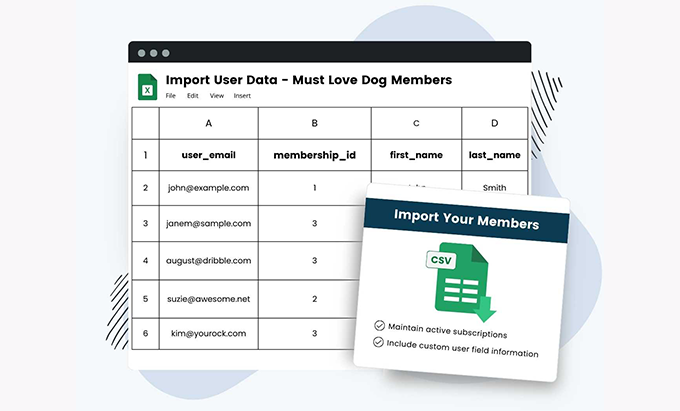
¿Qué es PMPRO Import Users from CSV y por qué usarlo?
PMPRO Import Users from CSV es un importador especializado que entiende la lógica de Paid Memberships Pro. A partir de un CSV estándar (valores separados por comas) crea o actualiza usuarios, asigna membership levels, establece startdate y enddate, aplica status (activo, cancelado, expirado), define roles y guarda usermeta (nombre, apellidos, campos de facturación, etc.). Cuando lo implementamos, PMPRO Import Users from CSV convirtió un excel desordenado en un padrón limpio y activo en minutos.
Key advantages
Altas y actualizaciones masivas sin tocar base de datos.
Mapeo claro de columnas para niveles, fechas y estado.
Control de contraseñas y emails de bienvenida.
Reprocesos seguros con logs y validación previa.
Compatible con multisitio y flujos de PMPro existentes.
Estructura del CSV: columnas mínimas y avanzadas (niveles, fechas, status, usermeta)
Un buen CSV es 80% del éxito. PMPRO Import Users from CSV admite columnas básicas de WordPress y columnas específicas de PMPro.
Ejemplos de filas
Sugerencias:
Usa UTF-8 y separador coma.
Fechas en formato ISO (YYYY-MM-DD) y zona horaria consistente.
Si vas a incluir usermeta extra, añade columnas con el nombre meta (ej.:
billing_phone,company).
En nuestro flujo, validamos el encoding UTF-8 y el separador para evitar columnas corridas; PMPRO Import Users from CSV importó todo sin sobresaltos.
Crear vs actualizar: estrategias seguras sin romper credenciales
PMPRO Import Users from CSV puede crear usuarios nuevos o actualizar existentes. Lo crítico es decidir qué sobrescribir.
Flags para no tocar lo que no corresponde
Contraseñas: no las reescribas salvo que sea parte del plan (puedes forzar reset por email).
Roles: define una regla por nivel (ej.: Gold →
pmpro_member + subscriber).Membership: si ya tiene una activa, decide si reemplazas, extiendes fechas o añades un nuevo nivel (si usas múltiples niveles).
Nosotros usamos PMPRO Import Users from CSV en modo actualización: respetó credenciales y solo corrigió niveles y vencimientos.
Playbook de migración: antes, durante y después (staging incluido)
Minimiza riesgos con un proceso controlado. Así operamos con PMPRO Import Users from CSV:
Validación previa, lotes y rollback
Antes: limpia correos duplicados, normaliza dominios, define el diccionario de niveles.
Staging: prueba con 50–100 filas y revisa que PMPRO Import Users from CSV asigne niveles y fechas como esperas.
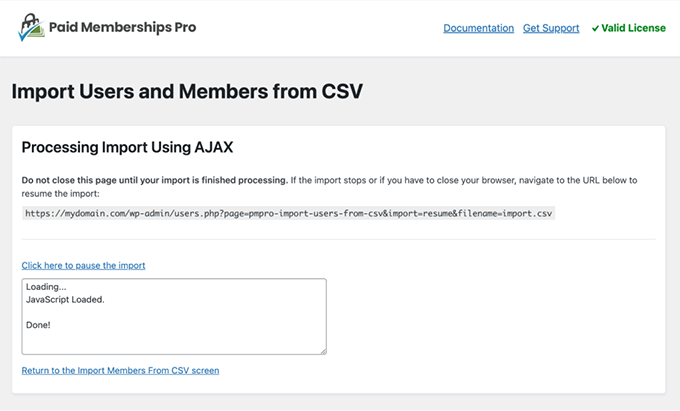
Durante: importa por lotes (p. ej., 5k por tanda), monitorea tiempos de servidor y registros.
Después: exporta una muestra del padrón final, verifica fechas, status y acceso a contenido; si algo falla, reimporta con el CSV corregido.
En nuestro caso, PMPRO Import Users from CSV procesó miles de registros en tandas y mantuvo coherencia entre niveles y fechas.
Emails y contraseñas: bienvenida, restablecimiento y notificaciones
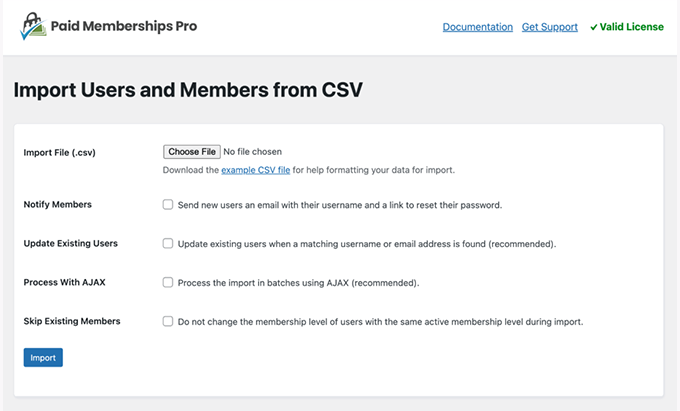
Una migración no termina hasta que el usuario puede entrar. Con PMPRO Import Users from CSV decides si enviar email de bienvenida, restablecer contraseñas o mantener las actuales.
Bienvenida: mensaje con enlace de acceso y política de contraseñas.
Reset: fuerza cambio de contraseña al primer login si importaste valores temporales.
Segmentación: envía mensajes distintos por membership_level.
Nos funcionó enviar primero un email informativo y, 24 horas después, el reset de contraseña; PMPRO Import Users from CSV dejó preparados los perfiles para que cada usuario completara el proceso sin soporte.
Troubleshooting: encoding UTF-8, separadores, comillas y formatos de fecha
Los errores típicos tienen solución rápida:
Caracteres raros: guarda el CSV en UTF-8 sin BOM.
Columnas desalineadas: revisa comas dentro de textos; encapsula con comillas dobles.
Fechas incorrectas: usa ISO
YYYY-MM-DD; evita formatos locales.Correos duplicados: deduplica antes; PMPRO Import Users from CSV detiene filas inválidas.
Timezones: si hay sedes en varios países, normaliza todo a UTC y deja que PMPro muestre en local.
Cuando aparecieron fallos puntuales, reexportamos solo esas filas y PMPRO Import Users from CSV las corrigió sin rehacer todo el lote.
Multisitio y roles: asignaciones masivas y excepciones
En redes WordPress, define si el alta va al site principal o a un subsitio. PMPRO Import Users from CSV permite asignar roles por defecto y excepciones por nivel.
site_id en redes y reglas de rol
Importa al site_id correcto (si tu setup lo requiere).
Mapea niveles a roles complementarios (acceso a foros, soporte, cursos).
Para excepciones, añade una columna
role_override.
Con PMPRO Import Users from CSV dejamos consolidado el acceso en el sitio principal y permisos específicos en subsitios de cursos.
Implementación paso a paso: de la plantilla CSV al éxito
Arma tu template CSV con columnas mínimas (login, email, level, start, end, status).
Limpia duplicados y valida correos.
Prueba con 50 filas en staging usando PMPRO Import Users from CSV.
Ajusta mapeos (roles, usermeta) y vuelve a probar.
Importa por lotes en producción con PMPRO Import Users from CSV.
Envía emails de bienvenida/reset según tu estrategia.
Audita accesos a contenido restringido por nivel.
Documenta el proceso para la siguiente actualización masiva.
Este guion con PMPRO Import Users from CSV nos redujo tickets de soporte y aceleró el go-live de la membresía.
Conclusion
Si vas en serio con tu membresía, necesitas datos limpios y accesos correctos desde el día uno. PMPRO Import Users from CSV convierte tus hojas de cálculo en usuarios reales con niveles y fechas válidas, sin scripts ni horas de trabajo manual. En nuestra migración, PMPRO Import Users from CSV cargó miles de miembros, respetó credenciales y dejó todo listo para que el equipo se enfocara en ventas y soporte, no en planillas.























