
Point of Sale for WooCommerce 6.4.0



- Secure Payment
- Support from Monday to Friday
- With you since 2018
$199.00 El precio original era: $199.00.$5.99El precio actual es: $5.99.
Quick summary
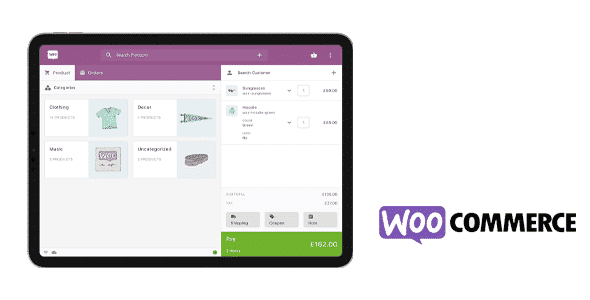
Point of Sale for WooCommerce connects your online store to a direct physical point of sale in WordPress, designed for businesses that sell both online and in-store. It allows you to manage in-person payments using your WooCommerce catalog, without spreadsheets or disconnected external systems. It's especially useful when you need to keep inventory, sales, and customers synchronized in a single database, eliminating duplicate work between your website and physical store.
What problem does it help solve?
The problem arises when your WooCommerce online store starts to coexist with in-person sales, and everything becomes disorganized. On one hand, you receive orders online. On the other, you sell in the physical store using a cash register, a separate POS system, or even by taking notes on paper. The result is always the same: outdated inventory, fragmented reports, and difficulty understanding your actual daily sales figures.
If you've ever sold a product in your physical store only to find it's still listed as available online, you know the consequences: frustrated customers, returns, and a loss of trust. In this context, Point of Sale for WooCommerce eliminates this double management, allowing you to record in-store sales directly within the same system that manages your e-commerce platform, with products, taxes, and prices already configured in WordPress.
It also solves the lack of visibility. Without a connected point of sale, it's difficult to know how much revenue each channel generates, which items sell best in physical stores, which discounts are most effective, or which employee handles the most transactions. With this integrated system, every receipt becomes a WooCommerce order, with centralized data ready for analysis and informed decision-making.
Why this solution makes a difference
Point of Sale for WooCommerce doesn't just add a checkout screen; it transforms how you manage your day-to-day operations between your physical and online stores. Instead of importing and exporting lists, your cashiers work directly with the product catalog you already know in WooCommerce, complete with variations, taxes, and defined prices. This reduces steps and prevents errors when typing product codes or prices.
In real-world projects, this means that any changes you make in WordPress (such as updating a product's price, marking it as out of stock, or adding a new item) are reflected in the point of sale without any parallel processes. The result is less time spent managing and more time selling. Furthermore, by recording each in-person sale as a WooCommerce order, you can maintain a unified history of customers, purchases, and stock movements without relying on external systems.
When you start to notice that inventory control is becoming a tedious daily task, this integrated approach brings clarity: you see your stock on a single screen, understand turnover by channel, and reduce instances of selling out-of-stock products. The real impact is a more consistent workflow, where those at the front of house work in alignment with what's happening in the online store.
Signs you need this product
- You're already selling both in your physical store and on WooCommerce, and the inventory never matches between the two.
- Your team uses WordPress to manage products, but in the store they still operate with a separate cash register or system that does not communicate with the website.
- You waste time every week manually checking and updating stock after in-person sales.
- Sales reports are scattered: one in the point-of-sale system and another in WooCommerce, without a consolidated view.
- You have had problems with online orders for products that had already been sold at the physical point of sale.
- You are in a growth phase where you need to prepare more checkouts or payment points using the same WooCommerce catalog.
- This comes up when you start opening new counters, pop-up stores, or events and you want everything to go through the same sales system.
When does it make sense to use it (and when doesn't)
Point of Sale for WooCommerce makes sense when you manage a business that combines online sales with in-store service and you want both to operate under the same database. It's especially well-suited for brick-and-mortar stores with a pre-built WooCommerce catalog that need to quickly record in-person payments and maintain centralized inventory without additional manual processes. It's also useful for businesses that organize trade shows, markets, or booths and want to continue using their WooCommerce inventory as their primary reference.
On the other hand, it's unnecessary if your project is solely online and you don't make in-person sales, nor do you plan to. It also doesn't add real value to informational websites without e-commerce, or to sites where physical sales are minimal and managed sporadically and under strict control. In those cases, the effort of setting up a point of sale on WooCommerce isn't worthwhile compared to simply registering a few very occasional transactions.
Who it fits best for
- Owners of physical stores who already use WooCommerce as a catalog and want to unify online and in-store sales.
- Businesses with multiple employees that need a clear billing environment, based on the same products configured in WordPress.
- Shops that sell at fairs, events or temporary markets and want to continue discounting stock from the same system that manages the website.
- Agencies or professionals who implement ecommerce for local businesses and are looking for a way to integrate the point of sale with WooCommerce in a single flow.
- Projects in the expansion phase that plan to open a second location, corners or mobile points of sale connected to the same online catalog.
Practical benefits
- Real operational improvement: All sales, both online and in-person, are recorded as WooCommerce orders, simplifying cash register closings, counts, and billing analysis by day, product, or channel.
- User experience: Store staff work with an interface designed to quickly process payments, locate products, and apply adjustments without having to navigate through the entire WordPress administration panel.
- Control and organization: Inventory is deducted from a single source, avoiding duplicates and reducing stock mismatches that end up affecting online orders.
- Time saving: The need to manually reconcile data between a separate point-of-sale system and WooCommerce is eliminated. Each receipt is generated directly within the e-commerce environment.
- Error reduction: By working with the existing WooCommerce catalog, manual entry of references, prices, or taxes is minimized, avoiding confusion in ticket issuance and stock control.
How it fits within WordPress
Within the WordPress ecosystem, Point of Sale for WooCommerce acts as the operational bridge between your WooCommerce dashboard and the reality of your physical store. It doesn't replace WooCommerce; it builds upon it. All the work of adding products, configuring taxes, managing stock, and setting pricing rules is still done where you already know: in the WordPress admin panel.
When working with WordPress, this point-of-sale system becomes a natural extension of your usual workflow: you create a product in WooCommerce and it's automatically available for in-store sale; you change a price and that change is ready for the next in-store sale. This eliminates the need for separate catalogs, separate external dashboards, and centralizes your business management in a single admin interface.
Typical use cases
- A clothing store with WooCommerce decides to enable a digital checkout counter based on the same catalog, so that each garment sold in the store deducts stock in real time and is reflected in the dashboard reports.
- A bookstore that sells online and frequently participates in book fairs. It uses Point of Sale for WooCommerce to process payments at its booth using tablets or laptops, without losing control of the central inventory managed through WordPress.
- A gourmet food business that starts with a physical store and then opens its online channel wants counter staff to use a checkout screen connected to WooCommerce to avoid overselling and have combined statistics from both channels.
Frequently Asked Questions about Point of Sale for WooCommerce
How does Point of Sale for WooCommerce differ from using a separate traditional checkout?
The key lies in the direct connection with WooCommerce. With a traditional point-of-sale system, in-store sales are recorded in a separate system, requiring manual reconciliation of stock and revenue. With Point of Sale for WooCommerce, every in-store sale is saved as an order within your online store, using the same catalog, taxes, and stock levels. This reduces data duplication, simplifies inventory control, and provides unified reporting across all channels without any additional integration work.
What happens to the stock when I sell from the point of sale connected to WooCommerce?
When you process a sale through Point of Sale for WooCommerce, orders are recorded that affect the same inventory you use for your online store. Each unit sold at the counter is deducted from the product's stock in WooCommerce, keeping the available quantity up-to-date for future online orders. This way, if you serve a customer in your physical store, you won't have to remember to manually deduct stock in your WordPress dashboard, preventing overselling and inventory discrepancies.
Does it make sense to use Point of Sale for WooCommerce if I only make a few in-person sales per month?
In cases with very few in-store sales per month, you might not need a connected point of sale system. If those transactions are occasional and easy to manually record in WooCommerce, a full point-of-sale system doesn't make much of a difference. Point of Sale for WooCommerce becomes relevant when in-store sales increase, when there are dedicated cashiers, or when stock errors begin to affect the online shopping experience and internal organization.
How does Point of Sale for WooCommerce help my physical store team on a daily basis?
The front-line team gets an interface specifically designed for sales: quick product search, access to variations, applying discounts or adjustments, and issuing tickets directly from the WooCommerce catalog. They don't need to navigate the entire WordPress dashboard or search through administrative sections. This reduces the learning curve, streamlines operations, and allows them to focus on customer service, while you maintain control from the WooCommerce dashboard with all transactions recorded.
Is Point of Sale for WooCommerce suitable for businesses with multiple physical points of sale?
Point of Sale for WooCommerce is especially useful when you start managing more than one store or location connected to the same catalog. Since everything runs on WooCommerce, you can manage products and prices from a single dashboard and reflect changes across all points of sale. Furthermore, by recording each transaction as an order, you gain a consolidated view of sales by channel and can analyze the performance of each location without relying on separate systems that would then need to be manually integrated.
Conclusion
Point of Sale for WooCommerce exists to solve a very specific problem: the disconnect between your WordPress online store and your day-to-day in-store sales. By integrating the point of sale with WooCommerce, it unifies inventory, orders, and customer data into a single management layer.
If your business is already experiencing friction between what happens at the counter and what is displayed on the web, this approach allows you to align both channels and work with real-time information, without duplicate processes or difficult-to-maintain parallel inventories.
Latest update:

Written by: WPClub
With over seven years of experience curating, managing, and distributing GPL products, our content is based on hands-on experience, technical review, testing, and feedback from thousands of users. We aim to democratize and simplify the WordPress world so you can choose with confidence, speed, and ease.
Your Individual Purchase Includes:
- Lifetime updates.*
- Official product, ready to use.
- Immediate access to the product.
- Clean and virus-free files.
- GNU GPL V2/V3 License
- Technical support in Spanish and English.
* In the case of memberships, the period during which you will receive updates will depend on the type of membership purchased: monthly, annual, or lifetime.
Notify Update
We update products Monday through Friday. However, if the product you see is not yet updated, you can notify us so we can prioritize updating it whenever possible.
Get your questions answered here
Here you'll find answers to frequently asked questions about our service: how it works, what it includes, and how to get the most out of it.
On how many websites can I use the products?
You can use any product from our store on any website you want.
Will I get updates?
Absolutely. If you buy an individual product, you'll get lifetime updates for that product.
On the other hand, if you purchase a membership, you will receive updates until your membership expires.
What if I have a problem?
First of all, we want you to know that you can count on us. We will assist you and provide the necessary support, so you can rest assured.
On the other hand, it is important for you to know that, given the time difference between countries, your time and ours may not be the same, so we will be delayed accordingly.
Our opening hours start at 9 AM from Monday to Friday, UTC -3. We are open until around 6 PM.
Do they provide technical support?
Yes, and regarding the time, it is usually on average within 24 to 48 business hours.
However, there are times when we have already provided an answer and solution in less than a day, depending on the case.
Are there download limits?
No. We don't believe in that format, so you can download as many times as you want. No problem. We pay for high-quality professional storage precisely to avoid problems.
Do they provide license keys?
No. Giving out the keys is not a viable option, as we have had experiences where they end up circulating everywhere and we can even lose the associated accounts.
That said, all products are original and, in cases where a license key is required to function, we will take care of pre-activating them for you.
Does my purchase include an invoice?
Yes. After payment, you will be able to access your invoice immediately in the "Purchases" section of your user account.
That is why it is important that you properly complete the information requested at the time of payment.
Is there a warranty?
Yes, of course. If there's a problem we can't resolve, or if there's an external issue that doesn't have a general solution, you'll receive support and, if necessary, a full refund. We have a 14-day refund policy from the date of purchase.
- It should be noted that there is no warranty if the product works well and it simply wasn't what you wanted.
There have been instances where someone buys a product, the product works perfectly, but they don't like it and want a refund, keeping the product. That's not right.
However, everything is evaluable and reasonable. Let's use judgment together.
What are the opening hours?
Our opening hours are:
- Monday to Friday, from 9 a.m. to 6 p.m.
- Saturday and Sunday: No service.
UTC -3 time

Our Reputation on Trustpilot
Many thanks to those who take the time to give us a rating on Trustpilot. Each and every one of your comments is very helpful to us. We strive to provide a rewarding experience for every member of our community, always with respect and care. We'll be here!






















WPClub Memberships
Access our entire catalog for a single payment. We offer three memberships: Monthly, Annual, and Lifetime (One-Time Payment).
- Save thousands of dollars
- Unlimited daily downloads
- No recurring payments
- Fast downloads by AWS
- Quality service and support, validated since 2018
- We work with love for our community