

Polylang Pro is the multilingual plugin we choose when we need to expand a site to multiple languages without compromising performance or SEO. Unlike solutions that add complex layers, Polylang Pro integrates with the WordPress core and respects its architecture: languages are treated as just another dimension of the content, without strange tables or shortcuts that later cost extra. The goal is clear: for users to switch languages seamlessly and for the team to publish with the same fluidity as in a monolingual project.
In our experience, when migrating a corporate blog to Polylang, the editorial workflow remained identical; the only change was the ability to "multiply" posts and pages by language with a single click, while maintaining clear relationships between translations. Polylang Pro offers clean URLs per language (subdirectories, subdomains, or domains), an accessible language switcher, and fine-grained control over what gets translated and what gets synced. From day one, we noticed that Polylang Pro avoids bloat and works well with caching and optimization tools.
When we're looking to scale into new markets, we prioritize a simple and fast stack; that's why Polylang Pro is our standard: less technical friction, more focus on content and growth. If you need a solid foundation to internationalize your WordPress site, Polylang Pro lets you get started quickly and grow without surprises.

DeepL + human editing: the fastest way to translate with quality
Speed without quality is useless. That's why we combine machine translation with editorial review. With Polylang Pro, we activate DeepL to generate a first draft that respects context and tone; then our team edits headlines, CTAs, and SEO fields to ensure accuracy and brand consistency. When we connect Polylang Pro with DeepL in a store with 800+ products, we create initial versions in two new languages in days, not weeks.
This automated system allowed us to focus on what really makes a difference: adapting microcopy, benefits, and local search semantics. Polylang Pro centralizes the process: the translation appears linked to its original, and field-by-field mapping is maintained. Furthermore, with Polylang Pro, we can export/import XLIFF files when the project requires reviewing texts in external tools or with partner translators. A trick we often use: we launch with DeepL + above-the-fold editing (hero, H1, CTA) and leave the long tail of content in a prioritized list; this way, Polylang Pro allows the site to already attract international traffic while we continue polishing.
The result is a much shorter time-to-market without sacrificing quality. If your goal is to validate markets quickly, the Polylang Pro + DeepL + human review combo is the fast track we recommend.
Duplication and synchronization: scale content in minutes
Maintaining consistency across languages can be a pain without clear guidelines. Polylang Pro solves this with intelligent duplication and synchronization. We duplicate a page or template as a base and define which metadata, taxonomies, and custom fields are copied or kept unique. In our experience, when we launched a new "Success Stories" section in three languages, Polylang Pro allowed us to clone the layout, on-page SEO, and taxonomies; we only replaced market-specific text and images.
Polylang's synchronization prevents mismatches: if the original changes a slug or category, the translations follow suit according to defined rules. This is key for dynamic sites with constant iterations. We also use Polylang Pro to synchronize multilingual menus and widgets, ensuring consistent navigation and messaging across all languages. The competitive advantage? Less manual work, fewer errors, and a streamlined versioning system that any editor can understand. Integrating Polylang Pro with approval workflows gives you a clear pipeline: duplicate, assign review, translate required fields, and publish with a single click.
Synchronization rules (metas, taxonomies, fields)
Our practice with Polylang Pro: synchronize global taxonomies (blog categories, shared content types) and leave market-sensitive elements (prices in texts, legal disclaimers) unsynchronized. This way we maintain a common structure with local flexibility.
Slugs, hreflang, and language-specific structure: International SEO done right
A multilingual project only succeeds if its technical SEO is flawless. Polylang Pro automatically manages hreflang, aligns canonical tags, and allows you to translate slugs so that the URLs sound natural in each language. Our rule: choose a URL structure from the start and don't change it. With Polylang Pro, we usually opt for subdirectories (/es, /en, /fr) for ease of maintenance and clear signals to search engines. When we relaunched a B2B services site with Polylang Pro, we translated key slugs and adjusted meta titles/descriptions by country; within weeks, we started seeing impressions for local queries that hadn't existed before.
Polylang Pro also works well with multilingual sitemaps; we link each translation to its equivalent, making it easier for search engine bots to discover. Another useful feature is the ability to exclude pages that shouldn't be duplicated (specific legal pages, temporary landing pages), preventing cannibalization. If you're migrating from another plugin, Polylang offers streamlined paths to preserve SEO signals. To complete the picture, we add consistent structured data in each language; with Polylang, mapping by post type is straightforward. Clean international SEO starts with architecture and consistency, and Polylang provides a solid foundation for that.
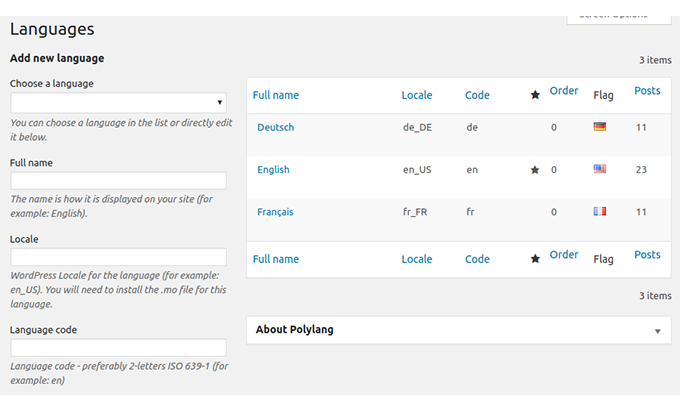
Subdirectories vs subdomains vs domains by language
With Polylang Pro, our default recommendation is subdirectories for operational simplicity. We opt for subdomains or language-specific domains when there are branding, geolocation, or infrastructure reasons. Whatever the option, Polylang Pro manages it seamlessly.
Integration with ACF Pro and Elementor: everything aligned, without breaking designs
The reality for many websites is that they rely on custom fields and visual builders. Polylang Pro understands this. With ACF Pro, we define which fields are translatable and which need to be synchronized across languages (IDs, toggles, relationships). Polylang Pro respects this configuration so that layouts don't break. On a content portal with complex listings, Polylang Pro + ACF Pro allowed us to translate only the text fields and maintain stable relationships (people, categories). With Elementor, Polylang Pro integrates with templates, widgets, and strings: we translate titles, buttons, and dynamic text without duplicating designs from scratch.
In our experience, the ideal workflow with Polylang is: create the master template, set translatable fields in ACF, duplicate content with synchronization, and then edit only what requires localization. The result: visual consistency, fast loading, and less rework. For non-technical teams, Polylang Pro maintains a familiar interface; translating feels like editing any other page, just with language tabs. This reduces the learning curve and accelerates internal adoption.
Flow with ACF (translatable and non-translatable fields)
We use Polylang Pro to mark text fields as translatable and keep those that control structure (switches, selectors, relationships) synchronized. This prevents misalignment and maintains consistent templates across all languages.
Performance and compatibility: multilingual “bloat-free”
More languages shouldn't mean a slower site. Polylang Pro proves that you can grow without bloating the foundation. By not creating its own heavy tables or loading unnecessary resources, Polylang Pro works seamlessly with caching, optimizers, and CDNs. In our projects, we combine Polylang Pro with performance plugins (caching, minification, lazy loading) without conflicts; the result is stable metrics even with dozens of translated templates. Furthermore, Polylang Pro keeps administration agile: editors work with the same dashboard and don't feel like "the CMS has changed.".
When we tested high-traffic scenarios, Polylang Pro remained consistent: per-language caching, intelligent purging, and content served without language mix-ups. This bloat-free approach also makes debugging easier: fewer exotic components, fewer hard bugs. In terms of compatibility, our rule is to test payment methods, internal search engines, and forms in every language; Polylang Pro respects standard hooks and filters, reducing surprises. If you want internationalization that doesn't eat up your Core Web Vitals, Polylang Pro is the pragmatic choice.
Polylang Pro for WooCommerce: Multilingual products, categories, and emails
Multilingual eCommerce demands precision: products, variations, attributes, categories, shopping cart, checkout, and communications must all be aligned. With Polylang Pro, we organize the catalog by language, translate product and category slugs, and control which metadata is synchronized (SKUs, attributes, dimensions) to avoid inventory corruption. In our experience, when internationalizing a store with 1,500 SKUs, Polylang allowed us to maintain unified stock levels while translating titles, descriptions, and benefits for each market.
The result was a consistent catalog with clean URLs and filters that work in every language. For transactional emails, Polylang Pro ensures that customers receive messages in the language of their order, and that legal and after-sales texts respect the local context. We also took care of SEO: translated breadcrumbs, consistent rich snippets, and sitemaps for each language. If your goal is to sell in multiple countries with a single product database, Polylang gives you the control to do so without costly refactoring or workarounds.
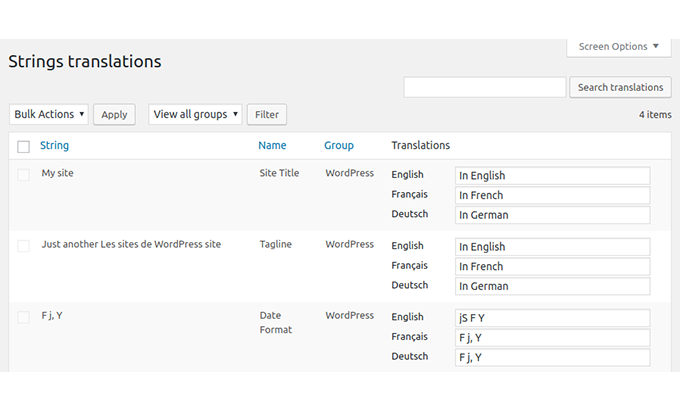
Quick guide: create languages, configure switcher and publish your first translation
-
Define URL strategy (default subdirectories) and activate Polylang Pro
-
Create languages and assign default language
-
Configure the language switcher in the menu and/or header (accessible and visible)
-
Duplication: Clone a key page with Polylang Pro and synchronize essential metadata
-
Translate slugs, titles, goals, and ACF fields marked as translatable
-
Review hreflang, canonical tags, and sitemap by language
-
Publish and test navigation, forms, cart/checkout (if applicable)
-
Establish an editorial workflow: review, approval, and publication by language.
With this workflow, you can have an initial version in a second language in a single day. Then you continue with the content queue and ongoing optimization. Polylang makes each step seamless within WordPress itself.
Real-world use cases and tips to avoid common mistakes
-
Phased launches: we start with the highest-impact sections (home, services, contact) and leave blog/resources for the second wave. Polylang Pro makes it easy to prioritize without losing relationships.
-
Tactical localization: it's not all literal translation; we adapt benefits and social proof for each market. Polylang maintains the structure while we refine the message.
-
Quality control: checklist by language (menus, breadcrumbs, slugs, forms). Polylang allows us to browse translations side-by-side to detect inconsistencies.
-
Errors we avoid: mixing languages in the same content, duplicating without checking slugs, forgetting hreflang or sitemaps; with Polylang we solve it from the initial configuration.
When we apply these practices, Polylang becomes a growth multiplier: more international organic visibility, better conversion rates due to clarity, and a simple editorial operation.
Conclusion
If you want to internationalize your WordPress site with a reliable stack, Polylang Pro is the most balanced foundation of speed, control, and SEO. With DeepL for acceleration, duplication and synchronization for scalability, slugs and hreflang for ranking, and integrations with ACF/Elementor to maintain your design, you have everything you need to open new markets without rebuilding your site. Tell us which languages you want to expand into, and we'll set up the architecture, rules, and editorial workflow with Polylang Pro so you can start attracting international traffic and clients as soon as possible.

Reviewed by the WPClub team
At WPClub, we carefully review each product before listing it. Our team evaluates its key features, compatibility, and performance to provide you with reliable, up-to-date, and helpful information when choosing and using each resource available in our store.






















