
Progress Map WordPress Plugin 5.8


- Secure Payment
- Support from Monday to Friday
- With you since 2018
$59.00 El precio original era: $59.00.$5.99El precio actual es: $5.99.
Quick summary
Progress Map WordPress Plugin is a tool designed to display your website's content on interactive maps. It allows you to represent listings of places, properties, businesses, or points of interest on Google Maps or similar maps, making it easier for users to find what they're looking for and improving the browsing experience in real WordPress and WooCommerce projects.
Overview
Progress Map WordPress Plugin is a plugin designed to create and manage geolocated listings within WordPress. Its purpose is to display posts, products, ads, or other content items on a map, typically integrated into listing or search pages, so visitors can quickly see the location of each item.
This type of plugin is used in projects where location is relevant: local directories, real estate portals, accommodation bookings, stores with pickup points, businesses with branches, and more. It provides a clear and easy-to-understand visual layer, allowing users to interact with bookmarks, filter results, and navigate content more intuitively.
What is the Progress Map WordPress Plugin used for?
The Progress Map WordPress plugin transforms traditional listings into map-based visual experiences. Instead of simply displaying a list of entries, it allows you to represent each item as a geolocated marker, helping users quickly identify which option best suits their location or preferences.
For e-commerce sites, it can display physical stores, collection points, or official distributors. On membership websites or directories, it allows you to locate members, partner businesses, or events. On corporate websites or landing pages, it makes it easy to highlight offices, franchises, or service areas. Overall, it helps transform data into a clear geographic representation that improves user decision-making.
Who is it ideal for?
- Businesses that manage listings of places, such as real estate portals, business directories, travel guides, tourist agencies or accommodation bookings, need to display each entry on a map along with its basic information.
- WordPress projects that combine editorial content with location, such as tourism blogs, local review sites, marketplaces for in-person services, or stores with branches, where geolocation improves the visitor experience.
- Marketing teams and project managers who want to offer a visual search engine for their users, optimize the navigation journey, reduce friction when finding points of sale, and strengthen their conversion strategy with well-organized interactive maps.
Key benefits
- It allows for more efficient management of geolocated listings, avoiding scattered manual processes and centralizing the visualization on maps, which simplifies the daily administration of location-based content.
- It improves the user experience by offering a visual and intuitive search: visitors can quickly see what items are nearby, explore bookmarks, and access the details of each entry with fewer clicks.
- It offers flexible display options, combining maps with lists, grids, or other common WordPress layouts, so you can tailor the display to your site style and design needs.
- It scales well on sites with many elements, allowing you to handle large listings of properties, ads or points of interest without losing visual clarity, thanks to filters, grouping of markers or navigation options on the map.
- Save time by automating part of the workflow: entering coordinates, displaying markers, and keeping everything synchronized with your posts, reducing common errors such as incorrectly represented addresses or outdated listings.
Main features of Progress Map WordPress Plugin
- It allows you to associate each WordPress post with a specific location, usually using an address or coordinates, and then display that content directly on a map integrated into your pages.
- It usually includes a visitor-focused usability approach, combining an interactive map with a parallel list, filters, or navigation controls that make it easier to find the right content in less time.
- It offers tools to better organize the presentation of your geolocated information, defining what data is shown in the markers, how the pop-up information is displayed, and how the elements are ordered on the map.
- It typically works by linking content types (posts, products, ads) and location fields, automatically generating markers and updating the map when entries are created, edited, or deleted in WordPress.
- In many cases, it allows you to configure map styles, zoom levels, and interaction behaviors, as well as integrate the map into key pages of your site, such as the archive page, custom templates, or specific landing sections.
Use cases
- Case 1: An online store that has collection points, distributors or physical stores and wants to show all locations on a single map, so that the customer can easily locate the nearest place.
- Case 2: A real estate portal that publishes properties in different areas and wants users to explore the listings directly on a map, filtering by location and accessing the details of each property from the markers.
- Case 3: A WordPress project that offers a guide to local restaurants, hotels, activities, or services and seeks to transform a static listing into an interactive experience, allowing users to discover businesses through map navigation.
Frequently Asked Questions about the Progress Map WordPress Plugin
What type of content can I display with the Progress Map WordPress Plugin?
The Progress Map WordPress plugin is typically used to display posts, products, ads, or custom content types that include location data. It's useful for properties, local businesses, offices, events, service points, or anything that would benefit from appearing on an interactive map within your site.
Do I need advanced knowledge to configure the maps?
Most projects use this type of plugin without requiring advanced programming. It's typically managed through the WordPress dashboard, linking each post to a location and choosing how the map will be displayed on your pages. Even so, a basic understanding of WordPress administration is recommended.
Can I combine maps with traditional content listings?
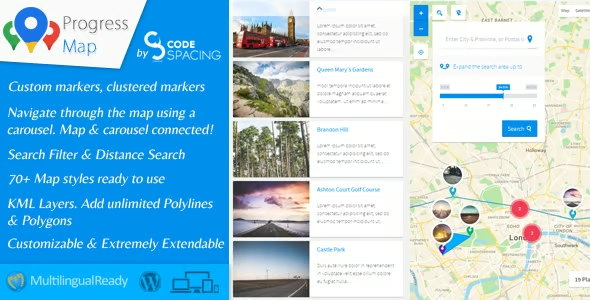
Yes, this type of tool is designed precisely to combine maps and lists. It typically displays a map with markers and, to one side or below, a list of results that the user can browse. By interacting with the map or the list, the visitor can access details about each item.
Is it suitable for sites with many locations or properties?
The Progress Map WordPress plugin is especially useful when dealing with many geolocated items. Its organization, navigation, and filtering options help keep a large number of places easy to explore, both on the map and in the associated listing.
Can I customize the appearance of the scoreboards and the information displayed?
This type of plugin typically offers settings to customize what information appears when a marker is clicked and how it is presented. Many projects configure titles, featured images, excerpts, and links, adapting the map's design to the site's visual identity and specific needs.
What type of projects is this plugin best suited for?
It is especially useful in local directories, real estate portals, tourism websites, marketplaces for in-person services, branch maps, and any project where location is a key decision criterion. In these contexts, a dynamic map offers the user a clear and very easy-to-interpret view.
Conclusion
Progress Map WordPress Plugin is a solution designed to transform content listings into clear and navigable geolocated experiences. By integrating interactive maps into your WordPress project, it makes it easier for users to find what they need based on their location, improving usability, information organization, and the overall site strategy.
Latest update:

Written by: WPClub
With over seven years of experience curating, managing, and distributing GPL products, our content is based on hands-on experience, technical review, testing, and feedback from thousands of users. We aim to democratize and simplify the WordPress world so you can choose with confidence, speed, and ease.
Your Individual Purchase Includes:
- Lifetime updates.*
- Official product, ready to use.
- Immediate access to the product.
- Clean and virus-free files.
- GNU GPL V2/V3 License
- Technical support in Spanish and English.
* In the case of memberships, the period during which you will receive updates will depend on the type of membership purchased: monthly, annual, or lifetime.
Notify Update
We update products Monday through Friday. However, if the product you see is not yet updated, you can notify us so we can prioritize updating it whenever possible.
Get your questions answered here
Here you'll find answers to frequently asked questions about our service: how it works, what it includes, and how to get the most out of it.
On how many websites can I use the products?
You can use any product from our store on any website you want.
Will I get updates?
Absolutely. If you buy an individual product, you'll get lifetime updates for that product.
On the other hand, if you purchase a membership, you will receive updates until your membership expires.
What if I have a problem?
First of all, we want you to know that you can count on us. We will assist you and provide the necessary support, so you can rest assured.
On the other hand, it is important for you to know that, given the time difference between countries, your time and ours may not be the same, so we will be delayed accordingly.
Our opening hours start at 9 AM from Monday to Friday, UTC -3. We are open until around 6 PM.
Do they provide technical support?
Yes, and regarding the time, it is usually on average within 24 to 48 business hours.
However, there are times when we have already provided an answer and solution in less than a day, depending on the case.
Are there download limits?
No. We don't believe in that format, so you can download as many times as you want. No problem. We pay for high-quality professional storage precisely to avoid problems.
Do they provide license keys?
No. Giving out the keys is not a viable option, as we have had experiences where they end up circulating everywhere and we can even lose the associated accounts.
That said, all products are original and, in cases where a license key is required to function, we will take care of pre-activating them for you.
Does my purchase include an invoice?
Yes. After payment, you will be able to access your invoice immediately in the "Purchases" section of your user account.
That is why it is important that you properly complete the information requested at the time of payment.
Is there a warranty?
Yes, of course. If there's a problem we can't resolve, or if there's an external issue that doesn't have a general solution, you'll receive support and, if necessary, a full refund. We have a 14-day refund policy from the date of purchase.
- It should be noted that there is no warranty if the product works well and it simply wasn't what you wanted.
There have been instances where someone buys a product, the product works perfectly, but they don't like it and want a refund, keeping the product. That's not right.
However, everything is evaluable and reasonable. Let's use judgment together.
What are the opening hours?
Our opening hours are:
- Monday to Friday, from 9 a.m. to 6 p.m.
- Saturday and Sunday: No service.
UTC -3 time

Our Reputation on Trustpilot
Many thanks to those who take the time to give us a rating on Trustpilot. Each and every one of your comments is very helpful to us. We strive to provide a rewarding experience for every member of our community, always with respect and care. We'll be here!






















WPClub Memberships
Access our entire catalog for a single payment. We offer three memberships: Monthly, Annual, and Lifetime (One-Time Payment).
- Save thousands of dollars
- Unlimited daily downloads
- No recurring payments
- Fast downloads by AWS
- Quality service and support, validated since 2018
- We work with love for our community