



If you use WooCommerce, you know the standard checkout process has too many steps: product → cart → checkout → payment. Every extra click is an opportunity for the customer to abandon their purchase. That's where QuadLayers WooCommerce Direct Checkout PRO comes in: a plugin designed to reduce those steps, skip the cart page when it makes sense, and get the customer to the checkout page as quickly as possible.
In our experience, it's a tool for online stores using WooCommerce designed precisely for that purpose: to streamline the checkout process by simplifying or even eliminating the shopping cart page, and allowing the customer to go directly from the "add to cart" button to the checkout page. That small change has a huge impact: greater efficiency, fewer distractions, more completed orders, and fewer abandoned carts.
Throughout this page we tell you what QuadLayers WooCommerce Direct Checkout PRO does, what it adds over the free version, what features it brings to your checkout and when it makes sense to use it as a key piece of your conversion strategy.
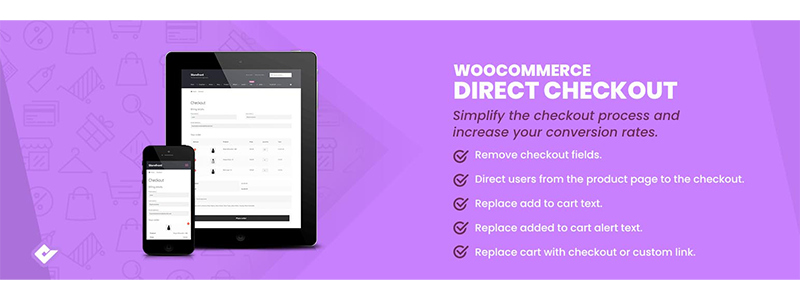
What is QuadLayers WooCommerce Direct Checkout PRO and what problem does it solve?
QuadLayers WooCommerce Direct Checkout PRO is a plugin specializing in the most critical step of the online store: checkout. It's designed to shorten the path between "I want to buy" and "order completed," reducing unnecessary steps and simplifying intermediate screens.
Instead of settling for the standard WooCommerce flow, QuadLayers WooCommerce Direct Checkout PRO lets you control where the user goes after clicking "add to cart", how the cart behaves, and how long or short the checkout page is.
The standard WooCommerce checkout and why it's slowing down your sales
By default, WooCommerce sends the customer to the cart, then to checkout, and, if all goes well, completes the payment. The real problem is that things can go wrong at each step: tabs closing, distractions, doubts, pages taking a long time to load.
This flow is fine for well-considered purchases, but in many stores (simple products, promotions, cold or hot traffic campaigns) so much back and forth only adds friction. And friction translates into shopping cart abandonment.
How QuadLayers WooCommerce Direct Checkout PRO simplifies or eliminates the cart page
This is where QuadLayers WooCommerce Direct Checkout PRO is a game-changer: you can either skip the cart page entirely or integrate it into a single checkout view, so the customer can browse products and pay on the same screen.
In our experience, the most powerful feature is being able to send the user directly from "add to cart" to checkout, without showing them the cart page unless you choose to. This makes the flow feel much more natural: the customer decides, clicks, and proceeds to payment, without any hassle.
Key Features of QuadLayers WooCommerce Direct Checkout PRO
QuadLayers WooCommerce Direct Checkout PRO is not just "another button"; it brings a set of features specifically designed to make the checkout process faster, clearer, and more flexible.
Send the customer directly from the "add to cart" button to the checkout page
The standout feature: transforming the "add to cart" button into a step that leads almost directly to a sale. The plugin allows you to redirect the user to the checkout page instead of the cart, right after they click the button.
This fits perfectly with what we look for in many stores: customers have already decided what to buy, so it makes sense for them to proceed to payment as soon as possible.
One-page checkout: shopping cart and payment on a single screen
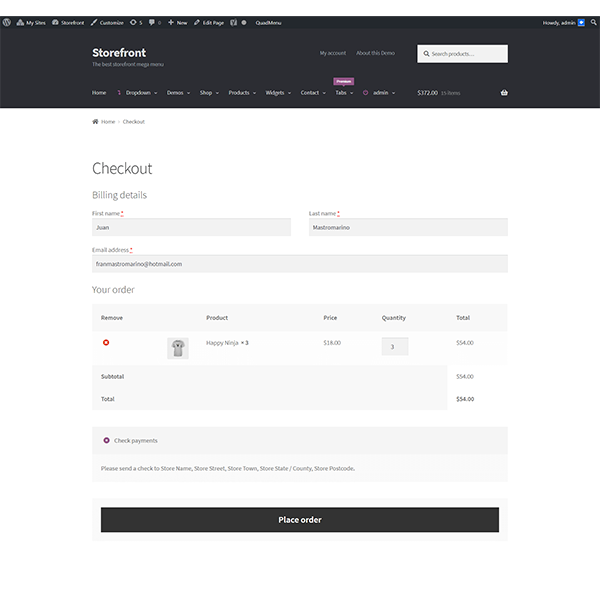
QuadLayers WooCommerce Direct Checkout PRO allows you to create a one page checkout, That is, a page where the customer views products, can adjust quantities and complete payment details all in one place.
In practice, this feels like the customer has everything at hand: order summary, data form and final purchase button, without any additional clicks or URL changes.
Quick purchase button for one-click orders
Another very useful feature of QuadLayers WooCommerce Direct Checkout PRO is the quick checkout button: an extra button that appears next to "add to cart" and takes you directly to the checkout, skipping the normal flow.
This button is ideal for impulse or recurring purchase products: the customer already knows what they want, so an extra click that sends them to an intermediate page is just a nuisance.
Ajax add to cart without reloading the page
The plugin allows you to use ajax add to cart on product pages: the customer adds the product to the cart without the page reloading.
This makes the experience much smoother, especially on mobile, where every page reload is an opportunity for the user to get tired and leave.
Remove fields from the checkout for a more streamlined process
QuadLayers WooCommerce Direct Checkout PRO also helps clean up the checkout form: you can remove fields you don't need (such as order notes, extra fields, long policy texts, etc.) so the user only fills in the essentials.
In our experience, when you shorten the form to what's really necessary, the customer feels that the process is shorter and more direct, and that shows in the percentage of completed orders.
Differences between the free version and QuadLayers WooCommerce Direct Checkout PRO
The free version, Direct Checkout for WooCommerce, already simplifies the checkout process considerably, but QuadLayers WooCommerce Direct Checkout PRO unlocks the full potential of the plugin.
What you can do with just Direct Checkout for WooCommerce (free version)
With the free version you can:
Redirect customers from “add to cart” directly to checkout.
Change the text and link of the "added to cart" notification.
Enable AJAX add to cart on product pages.
It's a good starting point for reducing steps, especially if your current checkout is very basic and you just want to test what skipping the shopping cart entails.
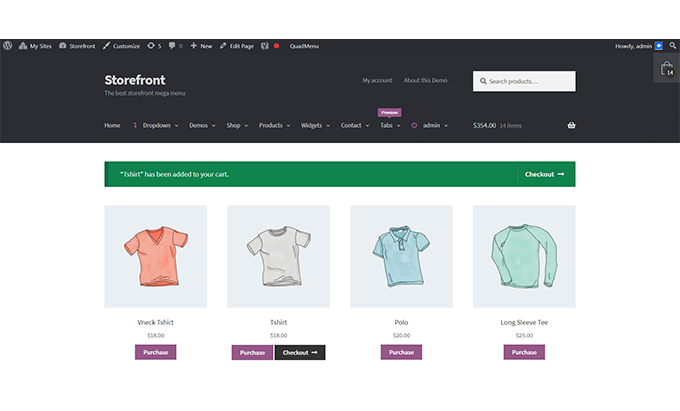
What do you unlock when you upgrade to QuadLayers WooCommerce Direct Checkout PRO?
QuadLayers WooCommerce Direct Checkout PRO goes a step further and adds features geared towards stores that want to get the most out of the checkout process:
One-page checkout, with integrated cart and payment.
Configurable quick buy button.
More control over redirects and the behavior of the "add to cart".
Advanced options to remove fields from the checkout and adjust the form.
In our experience, it makes sense to work with the free version to validate the idea of a shorter checkout and, when you see the impact on sales, make the jump to QuadLayers WooCommerce Direct Checkout PRO to have full control of the flow.
How QuadLayers WooCommerce Direct Checkout PRO impacts your conversions
The real goal of QuadLayers WooCommerce Direct Checkout PRO is not to "decorate" the checkout, but to improve business metrics: conversions, cart abandonment, and mobile performance.
Fewer steps, less friction, and less cart abandonment
Every time a customer moves from one page to another, there's a risk: loading time, distractions, confusion. By using QuadLayers WooCommerce Direct Checkout PRO to eliminate the cart step or integrate it into a one-page checkout, you simplify the process and reduce points of disengagement.
In our experience, going directly from the "add to cart" button to checkout makes the process feel natural and quick, especially for simple purchases. This translates into fewer abandoned carts and more completed orders.
Better mobile shopping experience
On mobile, user patience is very limited. Jumping from product to cart, from cart to checkout, and then filling out a long form is asking too much. QuadLayers WooCommerce Direct Checkout PRO helps with precisely that: fewer screens, less scrolling, and fewer reloads.
When you combine direct checkout, ajax add to cart, and a streamlined form, the mobile flow feels much lighter, which boosts conversion rates in campaigns from social media or ads.
Examples of optimized checkout flows with QuadLayers WooCommerce Direct Checkout PRO
Some typical flows you can set up with QuadLayers WooCommerce Direct Checkout PRO:
Product → “buy now” → one-page checkout.
Campaign landing page → purchase button → direct checkout with the product already loaded.
Product list → “add to cart” button with immediate redirection to checkout.
In all these cases, the goal is the same: for the customer to go from "I'm interested" to "order confirmed" with the fewest possible steps.
Use cases where QuadLayers WooCommerce Direct Checkout PRO shines
QuadLayers WooCommerce Direct Checkout PRO adapts well to almost any store, but there are situations where it really shines.
Stores with simple products and impulse buying
If you sell simple products (T-shirts, accessories, tickets, coupons, simple digital products), the customer usually decides quickly. For these cases, QuadLayers WooCommerce Direct Checkout PRO allows for an almost "one-click" flow: choose the product, click, and pay.
Campaigns and landing pages that require almost immediate payment
When you drive traffic from ads to a sale landing page, you want the customer to complete the purchase without any extra steps. A lengthy checkout process kills conversions. QuadLayers WooCommerce Direct Checkout PRO is perfect for this, as it allows you to create links or buttons that lead directly to the checkout page with the correct product already loaded.
Businesses with many repeat orders that prioritize speed above all else
In stores where customers frequently purchase the same items (consumables, top-ups, recurring products), speed is paramount. A direct checkout flow with minimal fields, powered by QuadLayers WooCommerce Direct Checkout PRO, makes repeat orders incredibly easy.
How to get started with QuadLayers WooCommerce Direct Checkout PRO step by step
Although the installation itself is the same as any WordPress plugin, it's advisable to follow a small plan to introduce QuadLayers WooCommerce Direct Checkout PRO without surprises.
Basic requirements in WordPress and WooCommerce
Before activating QuadLayers WooCommerce Direct Checkout PRO, make sure to:
Have WordPress and WooCommerce updated.
Having a theme compatible with WooCommerce.
Having tested the standard checkout and having it working without errors.
We also usually review the configuration of payment gateways and emails, to ensure that when accelerating the flow we don't forget the operational side.
Activate the plugin and configure the checkout redirects
Once QuadLayers WooCommerce Direct Checkout PRO is installed and activated, the next step is to access the plugin's dashboard (within WooCommerce) and decide:
If you want to redirect the customer to the checkout directly when adding to the cart.
Whether you're going to keep the cart page or skip it.
How will the quick buy buttons behave?.
In our experience, the most effective approach is usually to start with soft redirects (for example, from the "added to cart" notification) and then gradually adjust towards more direct flows.
What to test before launching the new payment flow to your customers
Before deploying the new checkout to production with QuadLayers WooCommerce Direct Checkout PRO, test:
The complete workflow on desktop and mobile.
Purchases with different payment methods.
Simple products, variable products, and, if you have them, grouped products.
This ensures that the simplified flow actually works reliably for your customers.
Best practices when using QuadLayers WooCommerce Direct Checkout PRO
QuadLayers WooCommerce Direct Checkout PRO is very powerful, but like any conversion tool, it should be used judiciously.
Which fields can you delete without losing important information?
Although the plugin allows you to remove fields from the checkout, it's not about stripping it down to the bare minimum without thinking. As a general rule, with QuadLayers WooCommerce Direct Checkout PRO we usually clean up:
Order comments.
Campaign fields or secondary data that are not used.
Coupons if they are not part of your strategy.
And we maintain everything related to billing, shipping, and legal compliance.
How to balance purchase speed and clarity for the customer
The goal of QuadLayers WooCommerce Direct Checkout PRO is to streamline, not confuse. Some practical ideas:
Make sure the order summary is clear at checkout.
Keep the total amount due visible at all times.
Don't hide key information such as shipping costs or taxes.
In our experience, when the customer fully understands what they are paying for and the process is short, the combination of clarity and speed multiplies the likelihood of closing the deal.
Conclusion: When does it make sense to opt for QuadLayers WooCommerce Direct Checkout PRO
QuadLayers WooCommerce Direct Checkout PRO makes sense when you want to transform the WooCommerce checkout into a much more direct flow, without unnecessary steps and focused on maximizing conversions. The plugin allows you to skip the cart page, send the customer directly from the "add to cart" button to the checkout, use one-page checkout, activate quick buy buttons, and clean up the payment form by removing fields that only get in the way.
In our experience, it's especially useful for stores with simple products, aggressive sales campaigns, businesses with recurring orders, and any project where every extra click results in cart abandonment. If you feel your standard checkout process is too long, QuadLayers WooCommerce Direct Checkout PRO is one of the most direct ways to turn that bottleneck into a strength for your store.























