
 Boo...! LAST DAY > Memberships with 30% off. Use coupon: HWEEN30
ShopMagic Webhooks Addon and 6,514 more, with AutoUpdater and support.
For $4.21 more you get everything the Monthly membership includes
Choose my membershipThis product, with lifetime updates.
- Secure payment
- Spanish and English support
- With you since 2018
New version or an issue?
Description
Quick summary
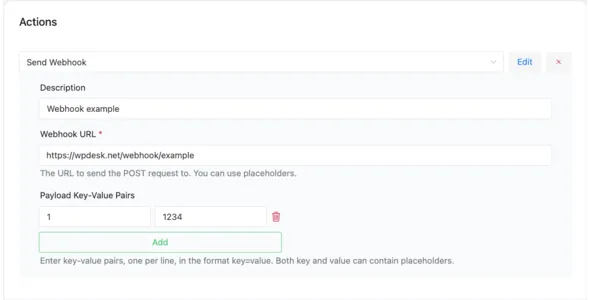
The ShopMagic Webhooks Addon is a plugin for ShopMagic, the marketing automation tool for WooCommerce, that adds a «Send Webhook» action to existing automations. This action allows you to transmit order data, email addresses, and form submissions to external applications or REST endpoints without requiring additional development. Users define the key-value pairs of the content to be sent, and can include ShopMagic placeholders to ensure the information is up-to-date and contextualized. Furthermore, it allows you to configure multiple webhooks within a single automation, providing the flexibility to connect different services simultaneously. To function, the ShopMagic plugin must be active on your website.
What problem does it help solve?
Many WooCommerce stores need information generated by orders, customers, or forms to be sent to external systems such as CRMs, spreadsheets, reporting dashboards, or email marketing services. Without a direct path, this is often achieved through manual exports or custom integrations, which are time-consuming and resource-intensive. This plugin resolves this blind spot by allowing events captured by automations to be automatically transmitted outward as they occur, without repeated manual intervention.
Why this solution makes a difference
Unlike generic cross-application solutions, this product is specifically designed to work within the ShopMagic workflow. This means there's no need to learn an additional external tool: sending data is configured just like any other action within an existing automation. By using placeholders, the payload content is dynamically built with real data from each order, email, or form, preventing static configurations that become outdated over time.
Signs you need this product
If your team manually copies order data to a CRM or spreadsheet, if you need new customer emails to be sent directly to an external mailing service without any intermediaries, or if you want to centralize sales statistics from multiple stores in a single dashboard, these are clear signs that automating data transfer via webhooks can simplify your daily work. This also applies if you receive contact or feedback forms and want that information to feed into another customer service application.
When does it make sense to use it (and when doesn't)
It makes sense to use the ShopMagic Webhooks Addon when you're already working with ShopMagic automations and need some of that information to be sent from your site to another system, whether for reporting, store synchronization, or CRM data. It's not the right option if you're not using ShopMagic as your foundation, since the addon depends entirely on that plugin to function. It also doesn't address internal WordPress automation needs that don't involve communication with external services.
Who it fits best for
It's especially well-suited for WooCommerce stores that already manage campaigns and automations with ShopMagic and are looking to take it a step further by connecting those processes with external analytics, customer service, or sales management tools. It's also useful for agencies that manage multiple stores and need to centralize sales information in one place, or for businesses that rely on an external CRM to track their customers.
Practical benefits
In day-to-day use, the product automates tasks that previously required manual data export and import. Orders can feed into external reports without anyone having to generate them manually, email addresses are sent directly to a mailing service as they are captured, and form submissions reach the application the team uses to manage comments or requests. The ability to use multiple webhooks within the same automation eliminates the need to duplicate workflows for each different destination.
How it fits within WordPress
The plugin integrates seamlessly into the ShopMagic dashboard, appearing as an additional action when building an automation. It doesn't introduce separate screens or parallel workflows; everything is managed from the same place where the plugin's usual triggers and actions are already defined. This makes adding and implementing it a natural step for those already familiar with ShopMagic's logic, requiring no significant additional learning curve.
Typical use cases
Among the most common scenarios are sending WooCommerce order data to an external CRM for sales tracking, synchronizing sales information across multiple stores sharing a single dashboard, and sending new customer email addresses to an email marketing service to nurture campaigns. It's also used to store sales statistics or abandoned cart data for later analysis, to collect form feedback to improve customer service, and to transmit subscription, booking, or membership data to external applications that rely on that information.
Frequently Asked Questions about the ShopMagic Webhooks Addon
Do I need to have ShopMagic installed for this plugin to work?
Yes, the add-on depends directly on the base ShopMagic plugin and adds an additional action within the automations. Without ShopMagic active on the site, this action is unavailable.
What type of data can I send using webhooks?
You can send data related to WooCommerce orders, email addresses of users or customers, and content from form submissions, always building the payload with manually defined key-value pairs.
Can I use placeholders within the content I send?
Yes, key-value pairs can include ShopMagic placeholders, so that the content sent is automatically populated with real information from each event, such as order data or the customer involved.
Is it possible to send data to more than one external service from the same automation?
Yes, the ShopMagic Webhooks Addon allows you to add multiple webhooks within the same automation, making it easy to send the same information or variations of it to different destinations without creating separate flows.
What type of external integrations does this plugin support?
It serves to connect the store with external systems such as CRMs, mailing services, sales reporting dashboards or form management applications, among others, as long as those systems can receive information through a REST endpoint.
Conclusion
For stores already using ShopMagic automations that need information to flow seamlessly to other systems without manual steps, the ShopMagic Webhooks Addon offers a direct and flexible way to achieve this. By leveraging an integrated action within the existing workflow, it reduces the friction of connecting the store to CRMs, email services, or reporting dashboards, allowing data to move automatically as relevant events occur.
Previous versions
If you have purchased this product, or have an active membership, you can download previous versions as we release them, without any limits or restrictions.
| Product name | Version | Size | Date | Download |
|---|---|---|---|---|
| No previous versions available. | ||||
No threats detected
File scanned with ClamAV before publishing
- File
- shopmagic-webhooks-1.0.14.zip · 320 KB
- Files
- 194 scanned · 0 threats
- Engine
- ClamAV 1.5.3 · signatures v28191
- Verified on
- 11/23/2026
- SHA-256
- 360a5f…859bd48
- PHP 81.4%
- JSON 6.7%
- PNG 3.1%
- JavaScript 2.6%
- Other 6.2%
Frequently Asked Questions
Here you'll find answers to frequently asked questions about our service: how it works, what it includes, and how to get the most out of it.
You can use any product from our store on any website you want.
Absolutely. If you buy an individual product, you'll get lifetime updates for that product.
On the other hand, if you purchase a membership, you will receive updates until your membership expires.
First of all, we want you to know that you can count on us. We will assist you and provide the necessary support, so you can rest assured.
On the other hand, it is important to know that, given the time difference between countries, your time and ours may not be the same, so we could be delayed because of this.
Our opening hours are Monday to Friday, from 09 to 18 hrs (UTC −3).
Yes, and regarding the time, it is usually on average within 24 to 48 business hours.
However, there are times when we have already provided an answer and solution in less than a day, depending on the case.
No. We don't believe in that format, so you can download as many times as you want. We pay for high-quality professional storage precisely to avoid any problems.
No. Giving out the keys is not a viable option, as we have had experiences where they end up circulating everywhere and we can even lose the associated accounts.
That said, all products are original and, in cases where a license key is required to function, we will take care of pre-activating them for you.
Yes. After payment, you will be able to access your invoice immediately in the «Purchases» section of your user account.
That's why it's important that you properly complete the information requested at the time of payment.
Yes, of course. If there's a problem we can't resolve, or an external issue that doesn't have a general solution, you'll receive support, if needed, and a full refund. We have a 7-day refund policy from the date of purchase.
- There is no warranty if the product works well and it simply wasn't what you wanted.
There have been instances where someone buys a product, the product works perfectly, but they don't like it and want a refund, keeping the product. That's not right.
However, everything is evaluable and reasonable. Let's use judgment together.
This guarantee applies to the purchase of individual products; memberships are not eligible for a refund.
Our opening hours are:
- Monday to Friday, from 9 a.m. to 6 p.m.
- Saturday and Sunday: no service.
UTC −3 time.

WPClub Team
GPL plugin and theme store since 2018. Every file is analyzed with ClamAV and its report is public; we keep previous versions and provide support in Spanish and English.
ShopMagic Webhooks Addon and 6,514 more, with AutoUpdater and support.
For $4.21 more you get everything the Monthly membership includes
Choose my membershipThis product, with lifetime updates.
- Secure payment
- Spanish and English support
- With you since 2018


