

- Secure payment
- Spanish and English support
- With you since 2018
Silvuple Invitations Maker for Elementor 1.0.1
$29.00 El precio original era: $29.00.$5.99El precio actual es: $5.99.
Quick summary
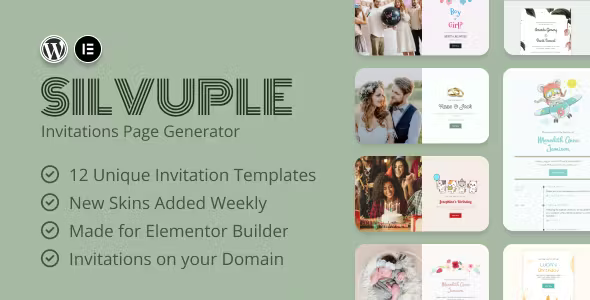
Silvuple Invitations Maker for Elementor is a template kit designed to create elegant digital invitations within WordPress using Elementor. It's geared towards events such as weddings, birthdays, baby showers, product launches, or corporate meetings. It solves the problem of having to design each invitation from scratch, offering ready-to-customize pages that are consistent with each other and focused on presenting all the event information clearly and attractively.
What problem does it help solve?
On many WordPress sites, creating online invitations often ends up being a haphazard collection of pages: some text on a random page, an image uploaded to the library, and a link sent via email or WhatsApp. The result is unclear, difficult to reuse for future events, and, above all, not at all memorable for guests. This is especially noticeable when the event is important and you want the digital experience to match the quality of the offline event.
If you've ever found yourself spending more time struggling with the design than actually defining the event details, the problem isn't your design skills, but rather the lack of a structure specifically designed for invitations. In WordPress, many event pages are built using generic landing page templates, forcing you to cram very specific information (RSVP, date, time, location, dress code, agenda) into sections not designed for that purpose.
Silvuple Invitations Maker for Elementor addresses precisely this issue: it eliminates the need to reinvent the layout each time, reduces communication errors (such as obscure dates, confusing calls to action, and scattered location information), and delivers a presentation that aligns with the event's tone, without requiring a designer for every occasion. In real-world projects, this makes a direct difference in how your guests perceive the event from the very first click.
Why this solution makes a difference
When working with WordPress and Elementor, the usual approach is to start with a generic template and adapt it. The problem is that each modification involves design decisions, spacing, typography, and visual hierarchy. Silvuple Invitations Maker for Elementor eliminates this hassle by offering a coherent set of pre-designed invitation sections: event cover, agenda details, RSVP block, gallery, practical information, and thank you messages.
In day-to-day operations, this translates to less time spent setting up the structure and more time dedicated to crafting the text, photography, and overall guest experience. Furthermore, by maintaining a consistent visual style across all event pages, you avoid abrupt style changes that confuse users and create a sense of improvisation. When you start to notice that each new event on your site is a project from scratch, this kit restores control and rhythm to your workflow.
The practical difference lies not only in "looking good," but also in clarity: key data highlighted, RSVP prompts without distractions, and sections designed to answer common guest questions. Fewer steps to build, fewer design adjustments, and less risk of leaving important information misplaced or difficult to see.
Signs you need this product
- You have a WordPress site where you publish events, and each new invitation forces you to design it from scratch with Elementor.
- You've sent digital invitations where guests get lost, can't find the information properly, or don't know where to confirm attendance.
- You feel like you're wasting hours adjusting fonts, margins, and colors to make the event page look consistent with the identity you're aiming for.
- You manage weddings, private celebrations, corporate events, or recurring product launches and want a repeatable model that you can adapt in minutes.
- This appears when your event calendar grows and you notice that each new invitation becomes more of an operational burden than an opportunity to communicate effectively.
When does it make sense to use it (and when doesn't)
Silvuple Invitations Maker for Elementor makes sense when your event communications require a polished look, when the invitation page is a key part of the experience, and when you rely on Elementor as your primary design editor. It's especially useful if you value visual consistency across multiple events, need to reduce layout time, and want layouts specifically designed for inviting, informing, and confirming attendance.
It's also suitable for projects that create individual, personalized invitations for clients: wedding planners, agencies that manage private events, entrepreneurs who run regular workshops, or brands preparing selective product launches. In this context, reusing proven templates allows you to maintain a consistent aesthetic level without starting from scratch each time.
However, this kit isn't particularly necessary if you only publish occasional events and a blog post or a very simple page with text and an image is sufficient. It also doesn't offer real value if you don't work with Elementor or if you prefer to delegate the design of each invitation to a studio that builds fully customized templates from scratch for each case.
Who it fits best for
- Wedding and social event planners: Individuals or teams who need elegant, consistent, and easy-to-reuse digital invitations for different celebrations.
- Agencies and studios that work with WordPress + Elementor: projects that manage recurring events for multiple clients and require an invitation system that adapts to different styles without losing structure.
- Companies with regular corporate events: internal launches, meetings with clients, product presentations or conferences where the online invitation is part of the brand image.
- Entrepreneurs by training and experience: Coaches, trainers, or creators who organize retreats, workshops, or face-to-face meetings want each invitation to convey the value of the event from the very first impression.
Practical benefits
- Real operational improvement: You go from building invitation pages from scratch to using pre-organized templates designed for events, reducing steps and improvised decisions.
- Guest user experience: A clear structure, prioritized information, and visible calls to action make it easy for everyone to understand what the event is, when it happens, and how to confirm attendance.
- Visual control and organization: You maintain a consistent design across different invitations, which strengthens your brand and avoids random combinations of blocks and styles in Elementor.
- Time saving: By not having to design the entire layout from scratch, you can concentrate on adapting texts, images, and specific details of the event, shortening the total preparation time.
- Error reduction: By reusing already ordered structures, the probability of forgetting key sections such as maps, schedules, special instructions, or response forms decreases.
How it fits within WordPress
Within WordPress, Silvuple Invitations Maker for Elementor acts as a visual foundation for your invitation pages, leveraging the Elementor builder as your editing environment. It doesn't replace any content management or event functionality; instead, it integrates seamlessly into your existing page creation workflow. You create a new page, load the design kit, and then customize the pre-built blocks with your specific information.
In real-world projects, this allows the content, marketing, or events team to work within familiar structures, rather than facing a blank page every time. When working with WordPress, your publishing and distribution workflow (email, social media, direct links) remains the same; what changes is the quality and consistency of the content your visitors arrive at when they click.
Typical use cases
- Wedding invitations with complementary pages: Main event cover, section with the couple's story, logistical details (location, accommodation, transport) and block to confirm attendance, all maintaining the same style.
- Private corporate events: Pages for product presentations, annual meetings, or meetings with key clients, where the digital invitation reflects the professional tone of the brand and centralizes all the important information.
- Special celebrations and themed parties: Birthdays, anniversaries, baby showers, or family gatherings where you want the digital experience to be part of the memory of the event and not just a brief message with the date and time.
Frequently Asked Questions about Silvuple Invitations Maker for Elementor
What differentiates Silvuple Invitations Maker for Elementor from a generic landing page template?
Silvuple Invitations Maker for Elementor is designed specifically for invitations, not for all types of web pages. Its structure prioritizes event information: a clear presentation, date and time, location, RSVP block, and sections for additional details such as dress code or agenda. This eliminates the need to adapt sales templates or corporate pages to a social or event context, reducing redesign effort and improving clarity for your guests.
Can I reuse the kit for multiple different events without them looking the same?
Yes, Silvuple Invitations Maker for Elementor focuses on providing a structured foundation that you can customize in terms of style, images, and content. You maintain the same logical architecture (organized sections and a clear visual hierarchy), but you can vary color palettes, fonts, photos, and optional blocks depending on the event. This way, the same template set can be adapted to an elegant wedding, a casual birthday party, or a sophisticated corporate event, without repeating the same aesthetic.
At what point in the event project is it most useful to incorporate Silvuple Invitations Maker for Elementor?
The best time to introduce Silvuple Invitations Maker for Elementor is when you've already defined the type of event, the date, the location, and the tone you want to convey, but haven't yet designed the page layout. This way, you can select the kit design that best suits your desired style and focus on adjusting the text and visual elements. If you're trying to finalize the design at the last minute, when everything is rushed, having a clear and proven structure is invaluable.
What if I'm only organizing a one-off event? Will this kit offer me any benefits?
If it's a one-off event and you're not particularly concerned about design, a simple page or even a blog post will suffice. Silvuple Invitations Maker for Elementor makes sense when you want the online invitation to be a polished extension of the event or when you plan to organize more similar occasions in the future. In those cases, having a consistent page system helps you maintain a uniform visual style without having to redo the layout work each time.
How does Silvuple Invitations Maker for Elementor help me avoid communication errors with guests?
Silvuple Invitations Maker for Elementor organizes information into blocks designed to address specific guest questions: what the event is, when and where it's being held, how to get there, what's expected of them, and how to RSVP. By using templates that already reserve space for this information, you're less likely to forget important details or place them in inconspicuous areas. If you've ever had someone struggle to find the address or the correct time, having a clear structure significantly reduces these errors.
Conclusion
Silvuple Invitations Maker for Elementor is designed to give every digital invitation on your WordPress site a structure tailored for events, not just generic pages. It brings clarity, visual consistency, and a more streamlined workflow every time you prepare a new celebration, wedding, or corporate event. If your goal is for the guest experience to begin with a polished and easy-to-understand page, this kit aligns the design with that expectation from the very start.
Your individual purchase includes:
- Lifetime updates.*
- Product ready to use.
- Immediate access to the product.
- Clean and virus-free files.
- GNU GPL V2/V3 License
- Technical support in Spanish and English.
* In the case of memberships, the period during which you will receive updates will depend on the type of membership purchased: monthly, annual, or lifetime.
Get your questions answered here
Here you'll find answers to frequently asked questions about our service: how it works, what it includes, and how to get the most out of it.
On how many websites can I use the products?
You can use any product from our store on any website you want.
Will I get updates?
Absolutely. If you buy an individual product, you'll get lifetime updates for that product.
On the other hand, if you purchase a membership, you will receive updates until your membership expires.
What if I have a problem?
First of all, we want you to know that you can count on us. We will assist you and provide the necessary support, so you can rest assured.
On the other hand, it is important for you to know that, given the time difference between countries, your time and ours may not be the same, so we will be delayed accordingly.
Our opening hours start at 9 AM from Monday to Friday, UTC -3. We are open until around 6 PM.
Do they provide technical support?
Yes, and regarding the time, it is usually on average within 24 to 48 business hours.
However, there are times when we have already provided an answer and solution in less than a day, depending on the case.
Are there download limits?
No. We don't believe in that format, so you can download as many times as you want. No problem. We pay for high-quality professional storage precisely to avoid problems.
Do they provide license keys?
No. Giving out the keys is not a viable option, as we have had experiences where they end up circulating everywhere and we can even lose the associated accounts.
That said, all products are original and, in cases where a license key is required to function, we will take care of pre-activating them for you.
Does my purchase include an invoice?
Yes. After payment, you will be able to access your invoice immediately in the "Purchases" section of your user account.
That is why it is important that you properly complete the information requested at the time of payment.
Is there a warranty?
Yes, of course. If there's a problem we can't resolve, or if there's an external issue that doesn't have a general solution, you'll receive support and, if necessary, a full refund. We have a 14-day refund policy from the date of purchase.
- It should be noted that there is no warranty if the product works well and it simply wasn't what you wanted.
There have been instances where someone buys a product, the product works perfectly, but they don't like it and want a refund, keeping the product. That's not right.
However, everything is evaluable and reasonable. Let's use judgment together.
What are the opening hours?
Our opening hours are:
- Monday to Friday, from 9 a.m. to 6 p.m.
- Saturday and Sunday: No service.
UTC -3 time

Reviewed by the WPClub team
At WPClub, we carefully review each product before listing it. Our team evaluates its key features, compatibility, and performance to provide you with reliable, up-to-date, and helpful information when choosing and using each resource available in our store.
Download previous versions
If you have purchased this product, or have an active membership, you can download previous versions as we release them, without any limits or restrictions.
| Nombre del producto | Versión | Tamaño | Fecha | Descargar |
|---|---|---|---|---|
| No hay versiones anteriores registradas. | ||||

Our Reputation on Trustpilot
Many thanks to those who take the time to give us a rating on Trustpilot. Each and every one of your comments is very helpful to us. We strive to provide a rewarding experience for every member of our community, always with respect and care. We'll be here!






















WPClub Memberships
Access our entire catalog for a single payment. We offer three memberships: Monthly, Annual, and Lifetime (One-Time Payment).
- Save thousands of dollars
- Unlimited daily downloads
- No recurring payments
- Fast downloads by AWS
- Quality service and support, validated since 2018
- We work with love for our community