Smart Cleanup Tools Plugin 5.3

More than: Codecanyon

El precio original era: $30.00.El precio actual es: $5.99.

Publication Date: 22/01/2024
Version: 5.3
Category:
Author's Website: Go to Site

] css=».vc_custom_1629733467375{margin-right: 15px !important;padding-top: 30px !important;padding-right: 30px !important;padding-bottom: 30px !important;padding-left: 30px !important;background-color: #f4f4f4 !important;border-radius: 5px !important;}» width=»1/1″ mobile_bg_img_hidden=»no» tablet_bg_img_hidden=»no» woodmart_parallax=»0″ woodmart_sticky_column=»false» parallax_scroll=»no» mobile_reset_margin=»no» tablet_reset_margin=»no»]_text woodmart_inline=»no» text_larger=»no»]

Smart Cleanup Tools Plugin

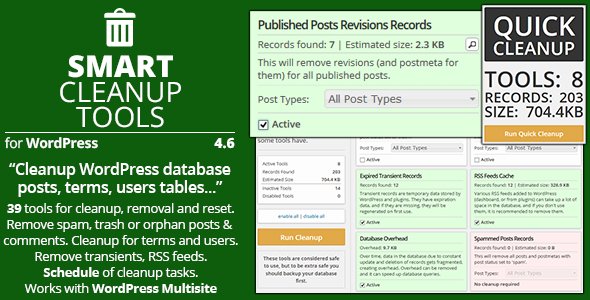
Smart Cleanup Tools is a powerful and easy-to-use database cleanup plugin with a total of 37 cleaning, reset, and deletion tools. With this plugin, you can remove data that is no longer in use or needed.

Additionally, it can help alleviate database overload and speed up database operations. The plugin is compatible with WordPress multisite and includes a few tools designed for network administration.

Quick cleaning: complete cleaning with one click

The Smart Cleanup Tools main panel displays the Quick Cleanup tool with an overview of active tools, logs found for deletion, and the estimated size to be recovered. Quick Cleanup utilizes all cleaning tools. To review everything before cleaning, open the Cleanup panel for a list of all available tools.

Cleaning tools:

Smart Cleanup Tools contains 21 cleanup tools that can remove most obsolete or orphaned data from your WordPress database. You can see the estimated number of records each tool will delete. You can also disable each tool from the plugin's settings panel.

List of cleaning tools

  • Remove WooCommerce sessions from the options table (v4.5)
  • Delete orphaned term records (v3.2)
  • Remove oEmbed postmeta cached records (v3.1)
  • Delete orphaned relationship records (v3.0)
  • Delete expired transient records (also in multisite mode) (v2.5)
  • Delete automatic draft posting records
  • Delete records of discarded posts
  • Delete spam post records
  • Delete records of reviews of published publications
  • Delete orphaned publication review records
  • Delete discarded comment records
  • Delete spam comment logs
  • Remove orphaned postmeta records
  • Remove orphaned comment meta records
  • Delete orphaned comment records
  • Clear RSS feed cache
  • Delete empty user meta records
  • Delete transient logs (also in multisite mode)
  • Eliminate database overhead (also in multisite mode)

Removal tools:

Smart Cleanup Tools' deletion tools can remove data that may still be in use but is no longer needed. You can delete attachments, posts, comments, or terms based on various criteria. Always have a backup ready before using these tools.

List of removal tools

  • Delete unapproved comment records (4.7)
  • Remove postmeta records with no value (v4.4)
  • Remove meta records of comments with no value (v4.4)
  • Delete draft publication records (v4.3)
  • Delete attachments with missing files (v4.0)
  • Remove attachments with missing main posts (v4.0)
  • Remove attachments that are not attached (v4.0)
  • Remove missing post types (v4.0)
  • Remove missing taxonomy terms (v4.0)
  • Remove missing unassigned taxonomy terms (v4.0)
  • Remove all missing available taxonomy terms (v4.0)
  • Delete Akismet comment logs (v2.5)
  • Remove user agent data for all comments
  • Delete pingback comments

Reset tools: 

With Smart Cleanup Tools' reset features, you can delete some data from the database, and it will be recreated with default values. Removing widgets from sidebars is helpful when changing themes, and updating rewrite rules is useful when having problems with permalinks.

Reset tools list

  • Remove all post-edit locks (v4.1)
  • Reset all sidebars
  • Reset rewrite rules
  • Reset plugin data and statistics (also in multisite mode)

Other features of the Smart Cleanup Tools Plugin

  • WordPress toolbar menu with quick access and cleanup options
  • Tools for exporting and importing plugin configurations and scheduled jobs
  • Disable the tools you don't want to use from the Cleanup and Reset panels
  • Record all SQL queries executed during the cleanup log in the file
  • Record all SQL queries executed during the cleanup run in the file
  • Work log with normal and scheduled executions
  • Collect statistical data for each tool used
  • Collects global statistics for the saved database space
  • Use AJAX to perform the cleanup operation
  • Supports translation and includes POT file


Get Smart Cleanup Tools Plugin Now! woodmart_gradient_switch=»no» row_reverse_mobile=»0″ row_reverse_tablet=»0″ woodmart_disable_overflow=»0″] css=».vc_custom_1629733167411{background-color: #f4f4f4 !important;border-radius: 5px !important;}» mobile_bg_img_hidden=»no» tablet_bg_img_hidden=»no» woodmart_parallax=»0″ woodmart_sticky_column=»false» parallax_scroll=»no» mobile_reset_margin=»no» tablet_reset_margin=»no»]_text woodmart_inline=»no» text_larger=»no»]

The products listed on the site are distributed under license. GPL / GNU. Always remember to check our Terms of Use y Privacy Policy.

[/vc_column_text][/vc_column][/vc_row]

Latest update

22/01/2024
Picture of Escrito por: WPClub

Written by: WPClub

With over seven years of experience curating, managing, and distributing GPL products, our content is based on hands-on experience, technical review, testing, and feedback from thousands of users. We aim to democratize and simplify the WordPress world so you can choose with confidence, speed, and ease.

Your Individual Purchase Includes:

* In the case of memberships, the period during which you will receive updates will depend on the type of membership purchased: monthly, annual, or lifetime.

Notify Update

We update products Monday through Friday. However, if the product you see is not yet updated, you can notify us so we can prioritize updating it whenever possible.

Notify Update

Get your questions answered here

Here you'll find answers to frequently asked questions about our service: how it works, what it includes, and how to get the most out of it.

You can use any product from our store on any website you want.

Absolutely. If you buy an individual product, you'll get lifetime updates for that product.

On the other hand, if you purchase a membership, you will receive updates until your membership expires.

First of all, we want you to know that you can count on us. We will assist you and provide the necessary support, so you can rest assured. 

On the other hand, it is important for you to know that, given the time difference between countries, your time and ours may not be the same, so we will be delayed accordingly.

Our opening hours start at 9 AM from Monday to Friday, UTC -3. We are open until around 6 PM.

Yes, and regarding the time, it is usually on average within 24 to 48 business hours.

However, there are times when we have already provided an answer and solution in less than a day, depending on the case.

No. We don't believe in that format, so you can download as many times as you want. No problem. We pay for high-quality professional storage precisely to avoid problems.

No. Giving out the keys is not a viable option, as we have had experiences where they end up circulating everywhere and we can even lose the associated accounts.

That said, all products are original and, in cases where a license key is required to function, we will take care of pre-activating them for you.

Yes. After payment, you will be able to access your invoice immediately in the "Purchases" section of your user account.

That is why it is important that you properly complete the information requested at the time of payment.

Yes, of course. If there's a problem we can't resolve, or if there's an external issue that doesn't have a general solution, you'll receive support and, if necessary, a full refund. We have a 14-day refund policy from the date of purchase.

  • It should be noted that there is no warranty if the product works well and it simply wasn't what you wanted.

There have been instances where someone buys a product, the product works perfectly, but they don't like it and want a refund, keeping the product. That's not right.

However, everything is evaluable and reasonable. Let's use judgment together.

Our opening hours are:

  • Monday to Friday, from 9 a.m. to 6 p.m.
  • Saturday and Sunday: No service.

UTC -3 time

trustpilot_logo_reviews

Our Reputation on Trustpilot

Many thanks to those who take the time to give us a rating on Trustpilot. Each and every one of your comments is very helpful to us. We strive to provide a rewarding experience for every member of our community, always with respect and care. We'll be here!

WPClub Memberships

Access our entire catalog for a single payment. We offer three memberships: Monthly, Annual, and Lifetime (One-Time Payment). 

Review the details of each membership below

$ 17 30 days of access to:
Themes, Plugins and Elementor Template Kits
Yaymail Addons, Fonts and Resources
Access to Secret Vault
Updates
Support from Monday to Friday
$ 67 365 days of access to:
Themes, Plugins and Elementor Template Kits
Yaymail Addons, Fonts and Resources
Access to Secret Vault
Updates
Original Elementor Pro License
Original Imagify Infinite License
Support from Monday to Friday
$ 97 Lifetime Access to:
Themes, Plugins and Elementor Template Kits
Yaymail Addons, Fonts and Resources
YITH. Moodle and Scripts
Prestashop, Joomla and Shopify
Access to Secret Vault
Updates
Original Elementor Pro License
Original Imagify Infinite License
Private Download Area
Support from Monday to Friday