
Smart Manager Pro WordPress Plugin 8.92.0


- Secure Payment
- Support from Monday to Friday
- With you since 2018
$249.00 El precio original era: $249.00.$7.99El precio actual es: $7.99.
Quick summary
Smart Manager Pro for WordPress is designed for those who manage WooCommerce stores with many products, orders, or customers and find themselves limited by the standard dashboard. It allows you to review, filter, and update large volumes of data from a spreadsheet-like view, reducing hours of repetitive work. It's especially well-suited for growing online stores, agencies managing multiple catalogs, and projects where bulk editing and operational control are critical.
What problem does it help solve?
In WooCommerce, the default dashboard works well when you're only managing a few products, variations, and orders. The problem arises when you need to change prices on hundreds of items, update stock levels after a new shipment, or quickly correct data in order runs. Doing this one by one, by accessing each product page, multiplies clicks, increases the chances of error, and turns any adjustment into a morning-consuming task.
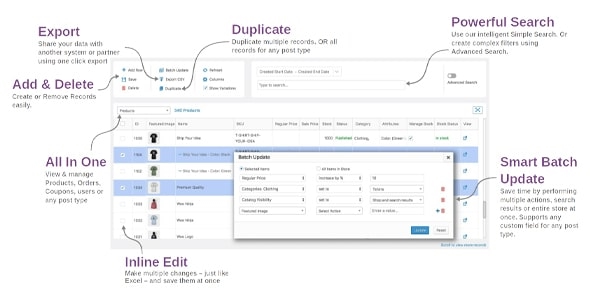
If you've ever found yourself delaying important catalog changes simply because "it takes too long to do it through WooCommerce," that's where the real bottleneck lies. It's not that it can't be done, it's that it becomes unmanageable. In this context, Smart Manager Pro acts as a centralized dashboard where you can view, filter, and modify products, orders, coupons, and other elements as if you were working in a spreadsheet, but within WordPress.
Why this solution makes a difference
The main difference isn't just speed, but how you organize your daily work. With Smart Manager Pro, you stop jumping between screens to review data and instead have a single view where you can sort columns, apply filters, and make bulk changes. In real-world projects, this means shifting from spending hours maintaining the catalog to investing those same resources in optimizing campaigns, improving product listings, or analyzing sales results.
On the other hand, the table-based editing format reduces many errors caused by constantly navigating between individual tabs. When you start to lose track of so many open browser tabs, or struggle to remember which products you've already reviewed, a panel like the one offered by Smart Manager Pro brings clarity to your workflow: you see everything at once, apply specific criteria, and update without losing context.
Signs you need this product
- You have a large catalog in WooCommerce and changing a price or attribute on many products becomes a task you constantly postpone.
- You feel friction every time you manage orders because you need to filter, review, or correct data, and the standard panel forces you to go order by order.
- Notes wasted time performing simple operational tasks: updating stock, modifying the status of multiple orders, or adjusting discounts on a set of items.
- Your ecommerce business is growing, more variations, product types and customers are appearing, and the current administration structure is no longer convenient for maintaining control.
When does it make sense to use it (and when doesn't)
Smart Manager Pro makes sense when the volume of information in your online store exceeds what you can efficiently handle from the standard WooCommerce interface. If you make recurring changes to prices, inventory, order statuses, or customer-related data, needing a consolidated and editable view becomes almost essential to maintain agility and reduce human error in repetitive tasks.
Conversely, if you manage a very small store with few products and occasional sales, you might not see a clear improvement in your day-to-day operations. In that scenario, the default WooCommerce dashboard is sufficient, and an advanced bulk editing environment won't make a significant difference. Smart Manager Pro truly shines when management starts to take up a lot of your time and you need an organized and efficient way to work with many records simultaneously.
Who it fits best for
- Managers of growing stores: People responsible for the daily maintenance of the catalog and orders who want to reduce the time spent on repetitive changes without losing data accuracy.
- Agencies and freelance professionals: Those who manage multiple client stores and need a more efficient way to handle large product listings and transactions from a single working environment within each project.
- Operations and logistics teams: Profiles that work with stock, preparation statuses, shipments or bulk updates and value being able to control and clean information quickly, without depending on opening each individual item in WooCommerce.
Practical benefits
- Real operational improvement: By having a spreadsheet-like view of products, orders, and other data, tasks that previously required multiple steps are concentrated on a single screen, with fewer clicks and a more direct workflow.
- Clearer user experience: Extensive lists become more understandable when you can sort columns, apply specific filters, and quickly locate the information you need to modify, without navigating through multiple menus.
- Control and organization: When you start to notice that you no longer remember which elements you have updated or what changes are still pending, centralizing editing in a structured panel helps you plan, review, and validate the status of your store with greater confidence.
- Time saving: Tasks such as updating seasonal prices, adjusting stock levels after inventory, or reviewing groups of orders are done in blocks, which translates into hours recovered each month to dedicate to strategic business actions.
- Error reduction: By simultaneously viewing multiple rows and columns with key information, it becomes easier to detect inconsistencies, duplicates, or outdated data and correct them within the same workflow.
How it fits within WordPress
Within WordPress, Smart Manager Pro acts as an advanced administration panel specifically designed for managing WooCommerce data. It doesn't replace the original dashboard, but rather integrates as an alternative view for working with large volumes of information in a more organized way. In this context, it complements the standard product and order screens with a layer of bulk management that is especially useful during periods of growth or when there are recurring changes to the catalog.
In your actual workflow, you can continue creating products, configuring payment methods, or designing pages from the standard WordPress area, and reserve Smart Manager Pro for when you need to review, filter, and modify extensive lists of data. This way, you maintain the system's usual logic but with a dedicated tool for the most repetitive and voluminous part of your daily operations.
Typical use cases
- An online fashion store that manages hundreds of variations by size and color and must update seasonal prices for entire collections in a short time, without accidentally leaving products outdated.
- A B2B ecommerce platform where order lists are regularly reviewed to detect issues, correct billing data, or adjust statuses, and where quick access to large lists makes it easy to detect patterns and act on specific groups.
- An agency that manages several client stores needs an efficient method to keep extensive catalogs aligned, control stock, and make global adjustments following changes in business strategy or agreements with suppliers.
Frequently Asked Questions about Smart Manager Pro
What kind of tasks are actually streamlined with Smart Manager Pro?
Smart Manager Pro streamlines tasks involving large lists within WooCommerce. For example, updating prices for many products, checking stock levels after an inventory count, modifying attributes of product groups, or adjusting the status of multiple orders simultaneously. With a spreadsheet-like interface, these operations are concentrated on a single screen, reducing clicks, time spent, and the likelihood of overlooking something in the process.
At what stage of my store's growth does it become useful?
This becomes especially relevant when your catalog becomes unmanageable with occasional manual updates. If you've ever found yourself needing to block out half a day for changes that simply involve updating prices, stock levels, or order statuses, you're at the point where an advanced dashboard like Smart Manager Pro offers a significant boost in efficiency. It's not about the exact number of products or orders, but rather how frequently you need to make major adjustments to your data.
Does Smart Manager Pro replace the standard product and order dashboard?
It doesn't replace it, it complements it. The classic WooCommerce area remains the place to create products, configure specific options, or review individual details. Smart Manager Pro comes into play when you need to work with many elements together: reviewing entire listings, applying advanced filters, sorting by columns, and making bulk changes from a central view. This way, you use each environment for what best suits your daily workflow.
What happens if I continue managing everything directly from WooCommerce without using it?
If your store is small, nothing significant happens, and the default dashboard will suffice. However, as the volume of data grows, continuing with the same approach means taking increasingly longer to manage and a greater likelihood of errors due to fatigue or oversights. This happens when you can no longer update important changes quickly and end up maintaining outdated information in the catalog or orders because the operational effort is too high.
Is it suitable for stores with frequent price changes or promotions?
Yes, one of the contexts where it adds the most value is in stores that use dynamic pricing, recurring promotions, or seasonal adjustments. Instead of modifying each product individually, you can quickly locate a group of items that share a characteristic, view them together in a table-like format, and apply consistent changes in a structured way. This reduces the risk of excluding products from a promotion or maintaining prices that are outdated compared to the current business strategy.
Conclusion
Smart Manager Pro exists to solve a very specific problem: the cumbersome and slow management of large volumes of data in WooCommerce. As your catalog size and order volume grow, having an organized and editable bulk view makes all the difference between a dashboard that holds you back and a system that keeps pace with your business.
If your daily routine is already dominated by repetitive WordPress update tasks, incorporating a bulk administration layer like the one offered by Smart Manager Pro helps you regain time, clarity, and operational control over your online store.
Latest update:

Written by: WPClub
With over seven years of experience curating, managing, and distributing GPL products, our content is based on hands-on experience, technical review, testing, and feedback from thousands of users. We aim to democratize and simplify the WordPress world so you can choose with confidence, speed, and ease.
Your Individual Purchase Includes:
- Lifetime updates.*
- Official product, ready to use.
- Immediate access to the product.
- Clean and virus-free files.
- GNU GPL V2/V3 License
- Technical support in Spanish and English.
* In the case of memberships, the period during which you will receive updates will depend on the type of membership purchased: monthly, annual, or lifetime.
Notify Update
We update products Monday through Friday. However, if the product you see is not yet updated, you can notify us so we can prioritize updating it whenever possible.
Get your questions answered here
Here you'll find answers to frequently asked questions about our service: how it works, what it includes, and how to get the most out of it.
On how many websites can I use the products?
You can use any product from our store on any website you want.
Will I get updates?
Absolutely. If you buy an individual product, you'll get lifetime updates for that product.
On the other hand, if you purchase a membership, you will receive updates until your membership expires.
What if I have a problem?
First of all, we want you to know that you can count on us. We will assist you and provide the necessary support, so you can rest assured.
On the other hand, it is important for you to know that, given the time difference between countries, your time and ours may not be the same, so we will be delayed accordingly.
Our opening hours start at 9 AM from Monday to Friday, UTC -3. We are open until around 6 PM.
Do they provide technical support?
Yes, and regarding the time, it is usually on average within 24 to 48 business hours.
However, there are times when we have already provided an answer and solution in less than a day, depending on the case.
Are there download limits?
No. We don't believe in that format, so you can download as many times as you want. No problem. We pay for high-quality professional storage precisely to avoid problems.
Do they provide license keys?
No. Giving out the keys is not a viable option, as we have had experiences where they end up circulating everywhere and we can even lose the associated accounts.
That said, all products are original and, in cases where a license key is required to function, we will take care of pre-activating them for you.
Does my purchase include an invoice?
Yes. After payment, you will be able to access your invoice immediately in the "Purchases" section of your user account.
That is why it is important that you properly complete the information requested at the time of payment.
Is there a warranty?
Yes, of course. If there's a problem we can't resolve, or if there's an external issue that doesn't have a general solution, you'll receive support and, if necessary, a full refund. We have a 14-day refund policy from the date of purchase.
- It should be noted that there is no warranty if the product works well and it simply wasn't what you wanted.
There have been instances where someone buys a product, the product works perfectly, but they don't like it and want a refund, keeping the product. That's not right.
However, everything is evaluable and reasonable. Let's use judgment together.
What are the opening hours?
Our opening hours are:
- Monday to Friday, from 9 a.m. to 6 p.m.
- Saturday and Sunday: No service.
UTC -3 time

Our Reputation on Trustpilot
Many thanks to those who take the time to give us a rating on Trustpilot. Each and every one of your comments is very helpful to us. We strive to provide a rewarding experience for every member of our community, always with respect and care. We'll be here!






















WPClub Memberships
Access our entire catalog for a single payment. We offer three memberships: Monthly, Annual, and Lifetime (One-Time Payment).
- Save thousands of dollars
- Unlimited daily downloads
- No recurring payments
- Fast downloads by AWS
- Quality service and support, validated since 2018
- We work with love for our community