



Smart Slider 3 Pro is the professional shortcut to building sliders, carousels, and visual blocks that elevate the aesthetics and conversion rates of any WordPress site. In our experience, it's an advanced WordPress plugin that allows you to efficiently create and manage sliders in a customized way, without strange dependencies or design-breaking tricks. We adopted it because Smart Slider 3 Pro combines an intuitive interface with a wide range of features: layers, timelines, animations, dynamic content, and production-ready templates. Everything flows smoothly: drag, drop, adjust, and publish.
While the free plugin covers the basics, Smart Slider 3 Pro is the premium version of the popular Smart Slider 3 and takes its capabilities to the next level: more slider types (carousels, blocks, and full-width), greater control over layers and events, and integration with dynamic sources (posts, products, categories, custom fields) to display automatically updating content. In our experience, this plugin makes it easy to incorporate dynamic visuals that truly enhance the user experience and brand perception.
We use Smart Slider 3 Pro when the goal is to deliver professional results without slowing down the site: layered visual editing, reusable presets, granular animations, and true responsiveness at every breakpoint. If you're an agency, freelancer, or marketing manager, Smart Slider 3 Pro eliminates friction: less time wrestling with CSS and more time refining messaging and micro-interactions. And if you're a less technical user, Smart Slider 3 Pro guides you with a user-friendly learning curve: templates, consistent styles, and clear controls so you don't get lost among the options.
In short, Smart Slider 3 Pro is a robust and flexible solution that democratizes the creation of professional sliders and puts your team in creative control — without touching the core theme or bothering the server.
Benefits you'll notice from day one
- Production speed. With Smart Slider 3 Pro, you can go from a blank canvas to a functional slider in minutes. Templates provide a solid foundation, and layers allow for precise adjustments (fonts, spacing, shadows, overlays). In our operation, "import → adapt → publish" became a repeatable workflow that cuts hours per landing page.
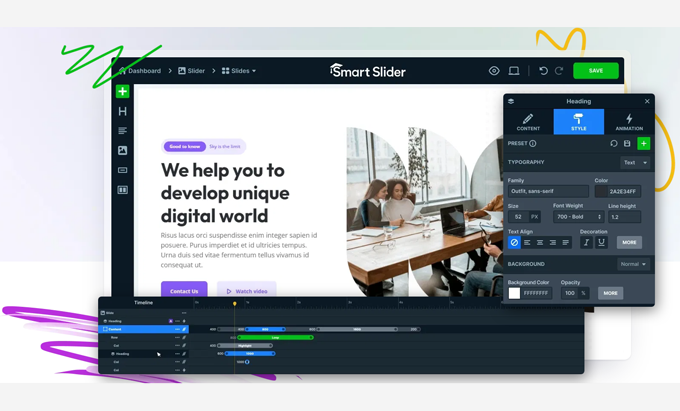
- Creative control without complex code. Smart Slider 3 Pro works with layers (text, images, video, icons, buttons, shapes) and a timeline to orchestrate animations. The result: elegant micro-interactions that tell a story without cluttering the page. When we need an extra touch, we can adjust advanced properties, but most cases can be resolved with the visual editor.
- Lively and relevant content. Smart Slider 3 Pro's dynamic content connects with posts, products, and taxonomies so your slider always showcases the newest or best-selling items. In our experience, this flexibility eliminates manual updates and keeps your homepage, categories, and key pages fresh.
- Performance and SEO in mind. Smart Slider 3 Pro offers options for lazy loading, image sizes, fonts, and breakpoints. The key is to configure it wisely: use only what's necessary, optimize assets, and avoid excessive animations. When done this way, Smart Slider 3 Pro coexists seamlessly with Core Web Vitals.
- Brand consistency. With global styles and presets, Smart Slider 3 Pro ensures visual consistency across pages, campaigns, and seasons. In our day-to-day work, this means fewer revisions and more focus on conversion.
- Less reliance on individual plugins. Where we used to install 2-3 plugins for galleries, carousels and effects, today we solve it within Smart Slider 3 Pro, with fewer points of failure and an interface that the team understands.
How it works: from canvas to published slider
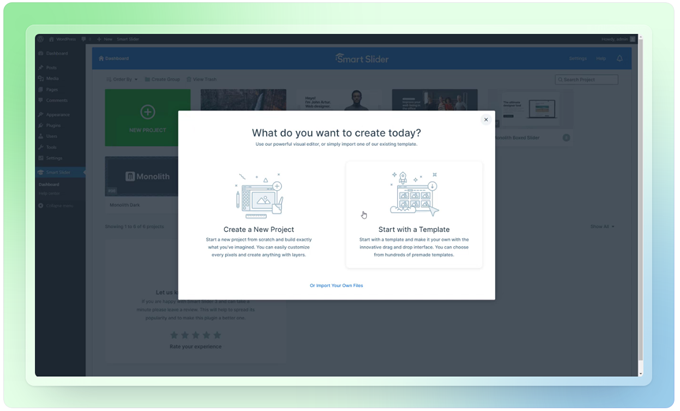
Smart Slider 3 Pro feels natural from the first click: choose a template or start blank, add layers, define animations, and adjust responsiveness for each device. The editor is truly WYSIWYG, so you see exactly what you'll get.
Drag-and-drop editor and animation timeline
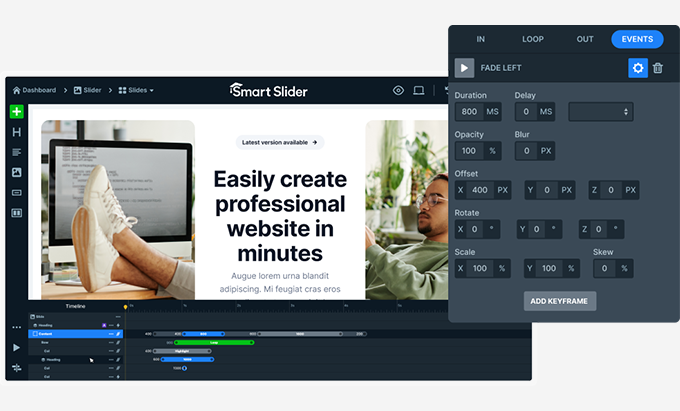
Smart Slider 3 Pro's layered canvas lets you position text, images, buttons, and shapes using intelligent guides. The timeline orchestrates entrances, exits, and delays to create subtle rhythms: a headline fades in, an image slides smoothly, a button comes into focus without being distracting. In our experience, Smart Slider 3 strikes the perfect balance between control and speed: you don't need After Effects to tell a story tastefully.
Carousels, blocks, and full-page layouts
Beyond the traditional slider, Smart Slider 3 Pro shines in product carousels, full-screen hero blocks, and intermediate sections that set the reading pace. When we need a carousel with 3–5 items and flawless touch responsiveness, Smart Slider 3 Pro delivers. For hero videos or backgrounds with subtle parallax, the plugin maintains fluidity and clearly displays the call to action.
Dynamic content (posts, products, categories)
Smart Slider 3 Pro connects with blog posts, WooCommerce, and CPTs to automatically populate a carousel of "new arrivals" or "best sellers." You configure filters (categories, tags, stock, price), sorting (date, popularity), and limits. In our experience, Smart Slider 3 has become a "smart showcase" module: we set it up to connect to the correct source, and the content team only needs to publish.
Performance, SEO and accessibility
Smart Slider 3 Pro offers power, but the key is piloting it well. Here's how:
- Light load and lazy load. Enable lazy loading for images and backgrounds; define fixed dimensions to prevent jumps (CLS). Smart Slider 3 Pro allows specific sizes per breakpoint, keeping the layout stable.
- Optimized images. Export in WebP/AVIF format whenever possible and limit the size per slide; Smart Slider 3 Pro can't help you if you upload very large images. We define a maximum size per section type (e.g., hero ≤ 250 KB per image, intermediate ≤ 150 KB).
- Responsible animations. Use short transitions (200–400 ms) and avoid chaining too many effects together. Smart Slider 3 Pro shines when the animation complements the content, not when it steals the show.
- Real responsive. Adjust fonts, heights, and spacing for each device. Smart Slider 3 Pro allows for specific rules that prevent the classic "text being cropped on mobile" issue.
- Accessibility. Ensure color contrast, visible focus on buttons, and correct ARIA roles on interactive elements. Smart Slider 3 Pro offers fields for alt text and labels; always use them.
- SEO friendly. Intentional headlines, concise descriptions, and links that enhance the user journey. A slider can guide the user to the next step if you use clear copy and well-placed buttons.
In our experience, applying these practices with Smart Slider 3 keeps LCP and CLS in the green, even on landing pages with intense visual storytelling.
Quick Start Guide (Checklist)
- Plan the message. Define the slider's objective (storytelling, catalog, offer). With Smart Slider 3 Pro, everything is possible, but each layer must serve the objective.
- Choose the right base. Start with a template that closely matches your goal to save time. Smart Slider 3 Pro includes structures that already incorporate typography, hierarchies, and spacing.
- Layered model. Add titles, subtitles, images, buttons, and embellishments. In Smart Slider 3 Pro, each layer must have a clear name so the team understands what it's playing.
- Encourage in moderation. Configure the timeline: smooth entrances, discreet exits. With Smart Slider 3 Pro, less is more; prioritize readability and focus on the CTA.
- Connect dynamic content. If the slider displays new products or updates, link it to the source. Smart Slider 3 Pro automates updates and reduces manual work.
- Optimize assets. Compress images, use modern formats, and define sizes by breakpoint. Smart Slider 3 Pro respects what you give it; if you feed it well, it performs better.
- Check responsiveness and accessibility. Adjust fonts and spacing on mobile/tablet. In Smart Slider 3 Pro, you can change layer visibility per device if something doesn't work.
- Test and publish with rollback. Test in staging environments, measure LCP/CLS, and prepare a preview in case you need to revert. With Smart Slider 3 Pro, exporting/importing gives you peace of mind.
We apply this workflow to every project, and it saves us from rework. Smart Slider 3 fits perfectly into team processes: designers propose, copywriters refine, developers review, and everyone speaks the same editor language.
Call to action
Ready for a leap forward? Activate Smart Slider 3 Pro, import a template, connect your dynamic content, and publish your first optimized slider today. We use it because it speeds things up, organizes, and feels professional from the very first minute.
Conclusion
Smart Slider 3 Pro combines creative power with technical control: layers, timelines, carousels, and dynamic content in an editor that anyone can understand. In our experience, Smart Slider 3 Pro is the tool that delivers professional sliders without sacrificing performance or accessibility. If you're looking to elevate aesthetics, tell stories, and drive users to action, Smart Slider 3 Pro is the right choice.























