
 Boo...! LAST DAY > Memberships with 30% off. Use coupon: HWEEN30
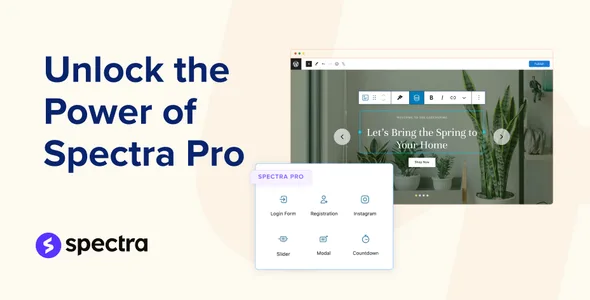
Spectra Blocks Pro and 6,514 more, with AutoUpdater and support.
For $4.21 more you get everything the Monthly membership includes
Choose my membershipThis product, with lifetime updates.
- Secure payment
- Spanish and English support
- With you since 2018
New version or an issue?
Description
Quick summary
Spectra Blocks Pro is a WordPress block editor add-on that extends the functionality of the free Spectra plugin with advanced blocks, global styles, animations, pop-ups, and dynamic content tools. It's designed for those who build websites directly within the native editor without relying on external code or heavyweight builders. With this product, you can create complete pages, user login forms, content loops, and visual effects while maintaining high performance and clean code.
What problem does it help solve?
Many teams working with block editors encounter a clear limitation: basic blocks aren't enough to build complex designs, elaborate dropdown menus, countdown timers, or interactive galleries. This gap often leads to adding several separate plugins, each with its own style and resource footprint, ultimately impacting loading speed and visual consistency. This product addresses that problem by bundling the design blocks and features that would normally require half a dozen different tools into a single package.
Why this solution makes a difference
Unlike page builders that impose their own interface, Spectra Blocks Pro works within the native WordPress editor, so there's no additional learning curve or reliance on cumbersome external scripts. The code is loaded dynamically, block by block, meaning a page only downloads what it actually uses. This technical decision results in shorter load times and better website experience metrics, which search engines value when ranking a site.
Signs you need this product
If you notice your site accumulating plugins to handle specific tasks—a countdown timer here, a slider there, a registration form somewhere else—it's a sign that you should consolidate those functions. This also applies when your site's styles start to look inconsistent because each section was designed with different tools, or when you need to display personalized content based on the user, category, or custom field data, and the standard blocks don't allow it.
When does it make sense to use it (and when doesn't)
It makes sense to add it as your project grows in complexity: pages with animations, pop-ups with trigger conditions, content loops based on custom queries, or custom-designed login forms. However, if your site is a very simple landing page with two or three static sections, the editor's free blocks will likely suffice, and you won't need the full suite of advanced features this package offers.
Who it fits best for
Spectra Blocks Pro is a great fit for designers who want to build visually appealing websites without writing code, marketing teams that need to publish search engine optimized pages, and developers looking for advanced customization options within the native editor. It's also useful for agencies that deliver projects to multiple clients and for small businesses that want to get online quickly with integrated design and marketing tools.
Practical benefits
Among the most concrete advantages is the ability to define global styles once and reuse them across the entire site, maintaining a consistent design without manually repeating adjustments. The content loop allows you to create lists of articles, products, or reviews based on your own criteria, while pop-ups can be configured to appear based on scrolling, time spent on the page, or exit intent. Entrance animations and block-free positioning provide the flexibility to achieve layouts that would normally require development expertise.
How it fits within WordPress
The product integrates seamlessly as an extension of the block editor, without imposing a separate interface or relying on cumbersome external libraries. This means it works without conflicts with other plugins and most themes, as its code adheres to current WordPress standards. Thanks to this integration, Spectra Blocks Pro can be combined with custom field plugins like ACF, Pods, or Meta Box to display dynamic content, and with login and registration forms that adapt to the overall site design.
Typical use cases
A typical example is a store or service website that needs to display a countdown timer for a seasonal promotion, combined with a pop-up window that captures emails before the offer ends. Another common scenario is a blog or digital magazine that builds sections of related articles using the content loop, filtering by categories or tags. It's also common to use it to create login and registration pages with their own visual identity, instead of relying on the generic WordPress form, or to build elaborate dropdown menus that improve navigation on sites with many sections.
Frequently Asked Questions about Spectra Blocks Pro
Does it completely replace a traditional page builder?
It does not seek to replace those types of tools, but to expand what the native WordPress editor already offers with additional blocks and design functions, while maintaining the editor logic you already know.
Does it affect the site's loading speed?
By dynamically loading resources and only for the blocks that are actually used on each page, the impact on performance remains low compared to adding several independent plugins.
Does it work to display personalized content based on the user?
Yes, it connects with custom field plugins like ACF, Pods, and Meta Box to display dynamic information tailored to each visitor or content type.
What happens if I decide to stop using it later?
When working within the native editor with standard blocks, the created content tends to maintain its basic structure, although some advanced styles depend on the plugin remaining active.
Does it include support if questions arise during the design process?
Yes, access to the product comes with expert support from a team familiar with WordPress, as well as materials and tutorials to answer specific questions.
Conclusion
For teams already comfortable working within the WordPress block editor but needing to go beyond the basics, this package offers a direct path to adding advanced blocks, animations, and dynamic content without sacrificing speed. The combination of lightweight code with features designed for design, marketing, and development makes it a sensible choice when the goal is to build complete sites without leaving the standard WordPress workflow.
Previous versions
If you have purchased this product, or have an active membership, you can download previous versions as we release them, without any limits or restrictions.
| Product name | Version | Size | Date | Download |
|---|---|---|---|---|
| No previous versions available. | ||||
No threats detected
File scanned with ClamAV before publishing
- File
- spectra-blocks-pro-1.0.6.zip · 3.5 MB
- Files
- 882 scanned · 0 threats
- Engine
- ClamAV 1.5.3 · signatures v28168
- Verified on
- 10/30/2026
- SHA-256
- 4f9d34…e92aaf9
- PHP 37.9%
- JavaScript 20.5%
- CSS 15.5%
- JSON 14.3%
- Other 11.8%
Frequently Asked Questions
Here you'll find answers to frequently asked questions about our service: how it works, what it includes, and how to get the most out of it.
You can use any product from our store on any website you want.
Absolutely. If you buy an individual product, you'll get lifetime updates for that product.
On the other hand, if you purchase a membership, you will receive updates until your membership expires.
First of all, we want you to know that you can count on us. We will assist you and provide the necessary support, so you can rest assured.
On the other hand, it is important to know that, given the time difference between countries, your time and ours may not be the same, so we could be delayed because of this.
Our opening hours are Monday to Friday, from 09 to 18 hrs (UTC −3).
Yes, and regarding the time, it is usually on average within 24 to 48 business hours.
However, there are times when we have already provided an answer and solution in less than a day, depending on the case.
No. We don't believe in that format, so you can download as many times as you want. We pay for high-quality professional storage precisely to avoid any problems.
No. Giving out the keys is not a viable option, as we have had experiences where they end up circulating everywhere and we can even lose the associated accounts.
That said, all products are original and, in cases where a license key is required to function, we will take care of pre-activating them for you.
Yes. After payment, you will be able to access your invoice immediately in the «Purchases» section of your user account.
That's why it's important that you properly complete the information requested at the time of payment.
Yes, of course. If there's a problem we can't resolve, or an external issue that doesn't have a general solution, you'll receive support, if needed, and a full refund. We have a 7-day refund policy from the date of purchase.
- There is no warranty if the product works well and it simply wasn't what you wanted.
There have been instances where someone buys a product, the product works perfectly, but they don't like it and want a refund, keeping the product. That's not right.
However, everything is evaluable and reasonable. Let's use judgment together.
This guarantee applies to the purchase of individual products; memberships are not eligible for a refund.
Our opening hours are:
- Monday to Friday, from 9 a.m. to 6 p.m.
- Saturday and Sunday: no service.
UTC −3 time.

WPClub Team
GPL plugin and theme store since 2018. Every file is analyzed with ClamAV and its report is public; we keep previous versions and provide support in Spanish and English.
Spectra Blocks Pro and 6,514 more, with AutoUpdater and support.
For $4.21 more you get everything the Monthly membership includes
Choose my membershipThis product, with lifetime updates.
- Secure payment
- Spanish and English support
- With you since 2018


