
StreamTube Video Streaming WordPress Theme 4.17


- Secure Payment
- Support from Monday to Friday
- With you since 2018
$58.00 El precio original era: $58.00.$6.99El precio actual es: $6.99.
Quick summary
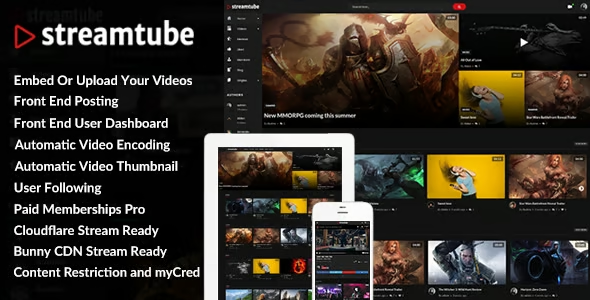
StreamTube Video Streaming WordPress Theme is designed for projects that want to function as a professional video platform within WordPress: from YouTube or Vimeo-style portals to course sites or premium content providers. It solves the challenge of organizing, displaying, and consuming large video catalogs in a clear, fast, and engaging way. It's a foundation ideal for content creators, academies, digital media outlets, and brands that rely on video to generate real business.
What problem does it help solve?
When you try to build a video site with a generic WordPress theme, the workarounds begin: templates that don't fit, makeshift playlists, unclear video detail pages, and navigation that leaves users confused. This is noticeable, for example, when you have to manually paste embeds into each post, create categories with no clear connection, and check that everything looks "more or less" okay on mobile.
If you've ever had visitors watch a video, finish it, and then leave the page because they can't easily find what to watch next, the problem isn't the content, but the structure. In this context, StreamTube focuses on solving the complete video consumption experience: pages designed for intuitive viewing, filtering, sequencing, and discovering new content, without you having to create a complex design from scratch.
Furthermore, when you manage a large number of videos, organizing thumbnails, titles, descriptions, and channels becomes a daily task. A theme that isn't specialized for this type of project forces you to use many different plugins, with inconsistent results. StreamTube orients the site from the start to the audiovisual format, reducing clutter and giving you back control over how each piece is presented.
Why this solution makes a difference
In real-world video projects, the difference between a generic theme and one designed for audiovisual platforms is evident in the time it takes to publish and how users behave on the site. StreamTube organizes the structure so that each video has a coherent environment: a portal-style homepage, thematic sections, visual listings, headers optimized for thumbnails, and modules that encourage the next click.
In day-to-day operations, this means less time spent reinventing layouts and more time creating content. When you start noticing that each new video involves a repetitive sequence of design adjustments, StreamTube relieves that burden by establishing a pre-defined presentation model. It also improves the experience on mobile devices and large screens without requiring you to tweak each page. From the user's perspective, navigating between videos, collections, or categories becomes seamless, increasing dwell time and the likelihood of converting visits into registrations, leads, or customers.
Signs you need this product
- Your current video site looks like a traditional blog with loose entries, without clear blocks of recommendations, lists, or thematic sections.
- Users write to you because they can't easily find the latest videos, series, or most important categories.
- Every time you upload new audiovisual content, you have to modify the design, widgets, or templates to make it fit with the rest.
- You started with a few videos, but the catalog is growing and the current structure falls short of organizing channels, programs or collections.
- This comes up when you want your video project to look like a professional platform and not just a blog with scattered embeds.
When does it make sense to use it (and when doesn't)
StreamTube is a good fit when video is the core of your digital project. It makes sense for streaming portals, free or freemium content platforms, academies that deliver training almost exclusively in audiovisual format, media outlets that publish video news, and brands that want to create their own content hub without relying solely on external platforms. In these cases, starting with a specialized theme accelerates launch and establishes a clear visual standard.
It's also useful when your priority is the browsing experience among many videos: listings, filtering, discovery of related content, and detail pages focused on keeping the user engaged for as long as possible. If your business relies on metrics like views, time on page, or sequential consumption, designing with StreamTube helps you build a logical playback flow.
On the other hand, this approach isn't necessary when your website only features occasional videos embedded in informational pages, simple landing pages, or a corporate blog where the main content remains text. In projects like these, a multipurpose theme is sufficient and more streamlined in terms of structure. It's also not the best option if you're looking for a static catalog-style website with infrequent updates, where video is merely decorative and not the core of the project.
Who it fits best for
- Content creators and streamers who want their own platform where they can organize their live streams, recordings, themed playlists and compilations without relying solely on social media.
- Online academies and trainers who base their courses on video and need a clear environment to present lessons, modules, and related content that facilitates continued learning.
- Media outlets and news portals who produce video reports or news programs and want a "digital TV channel" type site with well-structured sections, programs and historical archives.
- Marketing agencies and teams that manage brand projects based on video series, recurring campaigns and recurring content to build audience loyalty.
- Companies and organizations that require an organized video library for internal training, corporate communication, or public content segmented by areas or departments.
Practical benefits
- Real operational improvement: The visual structure and templates designed for video drastically reduce layout time for each new piece of content, even with large catalogs.
- Clear user experience: Visitors quickly identify what to see, where to continue, and how to navigate between categories, which reduces bounces and a feeling of "disorder".
- Control and organization: The way the videos are listed, grouped, and presented makes it easy to maintain a consistent visual style as the site grows and diversifies.
- Time saving: When working with WordPress, having a video-centric theme avoids having to reconfigure blocks, sidebars, and headers in each section, freeing up hours that you can dedicate to producing content.
- Error reduction: Stopping the improvisation of different templates for each type of video reduces design flaws, broken links between sections, and visibility problems on different devices.
How it fits within WordPress
Within the WordPress ecosystem, StreamTube acts as the visual and structural foundation of a streaming site. It doesn't just change colors or fonts; it establishes a specific framework for homepages, listings, thumbnail grids, and individual video pages, designed to make the audiovisual content the star. From there, you can integrate your usual marketing, analytics, or membership tools, but the starting point is already aligned with the type of project.
In this context, it functions as the layer that organizes the navigation flow: from the homepage to thematic collections, passing through featured sections, recommendations, and logical consumption paths. When you've already experienced each plugin adding its own style and the final result resembling a collage, relying on a theme designed for video brings uniformity and makes everything feel like a solid and coherent platform.
Typical use cases
- An entertainment portal with weekly programs, sections by genre and on-demand videos, where users access from mobile and TV and expect an experience similar to a streaming service.
- An online school that organizes courses by level, playlists by topic, and learning paths, with the need to quickly show what lesson each student is following and what related content they have at hand.
- A digital media outlet that aims to separate news reports, interviews, and features, highlighting the latest without losing access to the historical archive, and encouraging users to view more than one piece per visit.
Frequently Asked Questions about StreamTube Video Streaming WordPress Theme
What differentiates StreamTube from other blog or magazine-oriented themes?
StreamTube isn't designed like a traditional blog with an emphasis on text, but rather as a platform where thumbnails, players, and video collections take center stage. This influences the homepage design, how categories are presented, and how related content is highlighted. While a magazine theme prioritizes headlines and blocks of text, StreamTube organizes the site to facilitate the continuous consumption of audiovisual content.
Is StreamTube suitable for a video course platform?
StreamTube is a good fit when courses are primarily video-based and you need students to easily find the next lesson, related content, or grouped modules. The theme's approach makes it easy to organize lessons as part of collections or visual learning paths. It doesn't replace learning management systems, but it does provide a user-friendly interface for navigating audiovisual training catalogs integrated into your WordPress site.
What practical advantages does it offer for creators who publish many times a week?
For those who upload videos frequently, every minute saved on layout is valuable. StreamTube offers a consistent visual foundation for new posts, eliminating the need to redesign pages with each release. Furthermore, the way the latest content, themed playlists, and recommendations are displayed allows the newest videos to take center stage without crowding out the rest of the catalog, keeping your platform vibrant and organized even with a high volume of posts.
Is StreamTube useful if I already have a YouTube channel or another external platform?
StreamTube is especially useful when you want to complement your external channel with your own platform, where you control the design, navigation, and presentation of your collections. You can organize content according to your brand's logic and create viewing paths that aren't as clear on the external platform. This way, your WordPress site acts as a central hub, while the external channel continues to function as a distribution channel and audience acquisition tool.
What types of business projects benefit most from StreamTube?
Companies that consistently produce audiovisual content find StreamTube an ideal platform for centralizing it. This includes companies with educational video series, customer testimonials, product demonstrations, or recurring internal communications. In these cases, the platform makes it easy to organize content by business line, country, or language, maintaining a structured video library. This allows employees, clients, or partners to quickly locate the material they need without wasting time navigating through confusing lists.
Conclusion
The StreamTube Video Streaming WordPress Theme exists to fill a very specific need: transforming your WordPress site into an organized, clear, and focused video platform that keeps users engaged with the content. When the volume of video content grows and the standard blog structure becomes ineffective, this streaming-centric approach makes a real difference in navigation, organization, and the overall professional image of your project. Choosing this theme makes sense when video is the heart of your site, not just a visual addition.
Latest update:

Written by: WPClub
With over seven years of experience curating, managing, and distributing GPL products, our content is based on hands-on experience, technical review, testing, and feedback from thousands of users. We aim to democratize and simplify the WordPress world so you can choose with confidence, speed, and ease.
Your Individual Purchase Includes:
- Lifetime updates.*
- Official product, ready to use.
- Immediate access to the product.
- Clean and virus-free files.
- GNU GPL V2/V3 License
- Technical support in Spanish and English.
* In the case of memberships, the period during which you will receive updates will depend on the type of membership purchased: monthly, annual, or lifetime.
Notify Update
We update products Monday through Friday. However, if the product you see is not yet updated, you can notify us so we can prioritize updating it whenever possible.
Get your questions answered here
Here you'll find answers to frequently asked questions about our service: how it works, what it includes, and how to get the most out of it.
On how many websites can I use the products?
You can use any product from our store on any website you want.
Will I get updates?
Absolutely. If you buy an individual product, you'll get lifetime updates for that product.
On the other hand, if you purchase a membership, you will receive updates until your membership expires.
What if I have a problem?
First of all, we want you to know that you can count on us. We will assist you and provide the necessary support, so you can rest assured.
On the other hand, it is important for you to know that, given the time difference between countries, your time and ours may not be the same, so we will be delayed accordingly.
Our opening hours start at 9 AM from Monday to Friday, UTC -3. We are open until around 6 PM.
Do they provide technical support?
Yes, and regarding the time, it is usually on average within 24 to 48 business hours.
However, there are times when we have already provided an answer and solution in less than a day, depending on the case.
Are there download limits?
No. We don't believe in that format, so you can download as many times as you want. No problem. We pay for high-quality professional storage precisely to avoid problems.
Do they provide license keys?
No. Giving out the keys is not a viable option, as we have had experiences where they end up circulating everywhere and we can even lose the associated accounts.
That said, all products are original and, in cases where a license key is required to function, we will take care of pre-activating them for you.
Does my purchase include an invoice?
Yes. After payment, you will be able to access your invoice immediately in the "Purchases" section of your user account.
That is why it is important that you properly complete the information requested at the time of payment.
Is there a warranty?
Yes, of course. If there's a problem we can't resolve, or if there's an external issue that doesn't have a general solution, you'll receive support and, if necessary, a full refund. We have a 14-day refund policy from the date of purchase.
- It should be noted that there is no warranty if the product works well and it simply wasn't what you wanted.
There have been instances where someone buys a product, the product works perfectly, but they don't like it and want a refund, keeping the product. That's not right.
However, everything is evaluable and reasonable. Let's use judgment together.
What are the opening hours?
Our opening hours are:
- Monday to Friday, from 9 a.m. to 6 p.m.
- Saturday and Sunday: No service.
UTC -3 time

Our Reputation on Trustpilot
Many thanks to those who take the time to give us a rating on Trustpilot. Each and every one of your comments is very helpful to us. We strive to provide a rewarding experience for every member of our community, always with respect and care. We'll be here!






















WPClub Memberships
Access our entire catalog for a single payment. We offer three memberships: Monthly, Annual, and Lifetime (One-Time Payment).
- Save thousands of dollars
- Unlimited daily downloads
- No recurring payments
- Fast downloads by AWS
- Quality service and support, validated since 2018
- We work with love for our community