



When a project needs a calendar that can scale seamlessly, The Events Calendar Pro is often our first choice. In our experience, it's one of the top event and calendar plugins because it combines power, stability, and a customization layer that adapts to both small sites and high-traffic implementations. The free version covers the essentials, but The Events Calendar Pro unlocks what truly drives results: advanced recurring events, additional views that enhance the browsing experience, custom fields, and support for shortcodes and blocks to build custom layouts.
One thing we really appreciate about The Events Calendar Pro is its easy learning curve: we can start with minimal setup and have professional-level features ready when the project demands it. When we first implemented The Events Calendar Pro, we appreciated the flexibility to display the calendar exactly how we needed it, whether on a monthly agenda page, a landing page with a photo view, or an event category page with specific filters. Furthermore, time zone support reduces confusion for global audiences, and the option to subscribe to the calendar ensures users always have events visible in Google Calendar or iCal.
In short: The Events Calendar Pro gives us complete control over presentation and recurrence. With it, we don't just publish dates; we build a discovery and attendance experience that converts. That's why, when our goal is to increase registrations, improve attendance, and simplify management, The Events Calendar Pro ends up being the most direct path.
Recurring Events and Views that multiply attendance
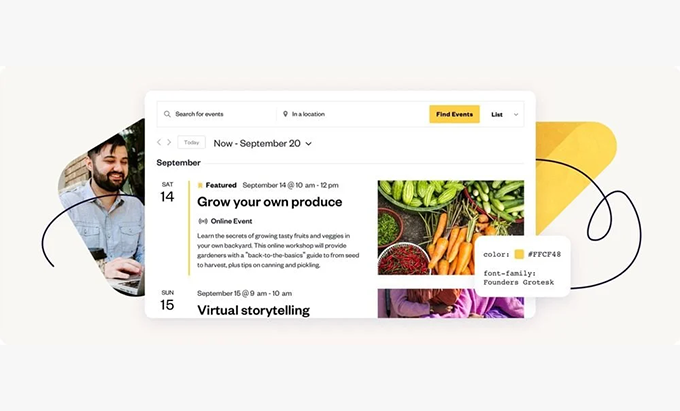
Recurring events are at the heart of The Events Calendar Pro. We can create weekly, monthly, or custom series (for example, "the first Monday of every month"), edit individual instances without breaking the series, and display only upcoming occurrences to keep the calendar lightweight. In our experience, moving from "copied and pasted" events to true recurrence reduced errors, saved editorial time, and improved data accuracy.
The Events Calendar Pro's additional views—such as Week, Photo, Map, and Summary—are game-changers for conversion. The Week view is ideal for busy schedules (academies, coworking spaces, cultural centers); Photo highlights the visual component and boosts CTR when images are part of the appeal; Map works perfectly for in-person events with multiple locations; and Summary streamlines consumption on blogs or news sections. We select the view that best matches the user's intent and combine it with categories and tags so finding the right event takes just seconds.
True customization with shortcodes and blocks
The Events Calendar Pro's block and shortcode compatibility allows us to insert calendars, lists, and widgets anywhere on the site, whether within a visual builder, a campaign landing page, or a blog post. This means we're not limited to a single "Calendar" page: we can place events in the appropriate context (for example, displaying only the "Workshops" category at the end of a training page). In our experience, this contextual approach increases relevance, time on page, and ultimately, conversions.
How your calendar looks: choose the view that converts
Selecting the right view isn't just about aesthetics; it's a business decision. With The Events Calendar Pro, we design a customized event catalog tailored to your audience.
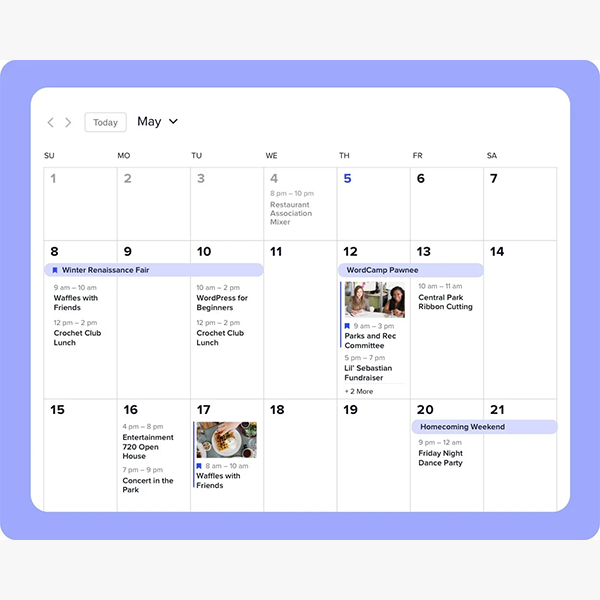
The Month view is a classic that works well when users plan ahead; it helps identify patterns and locate key dates. The Week view highlights density and detailed schedules, excellent for calendars with multiple daily activities. With Photo, The Events Calendar Pro transforms into a showcase; if the value of your event is visual (conferences with renowned speakers, festivals, exhibitions), this view increases interest and encourages clicks for details. Map, meanwhile, answers the question "what's happening near me?" and avoids logistical friction at in-person events. And if you publish many events, Summary and List reduce clutter and prioritize upcoming events, improving navigation on mobile devices.
In our typical implementation, we combine The Events Calendar Pro with hierarchical categories (e.g., “Workshops,” “Talks,” “Networking”) and thematic tags. This allows for targeted landing pages with pre-designed views and filters: users land on a page curated to their interests, which increases the registration rate. Furthermore, The Events Calendar Pro makes it easy to switch views without losing context, helping users explore alternative options and dates when the first one doesn't work.
Week, Photo and Map (when to use them)
WeekIntensive schedules (schools, gyms, coworking spaces). Shows precise availability by day and time.
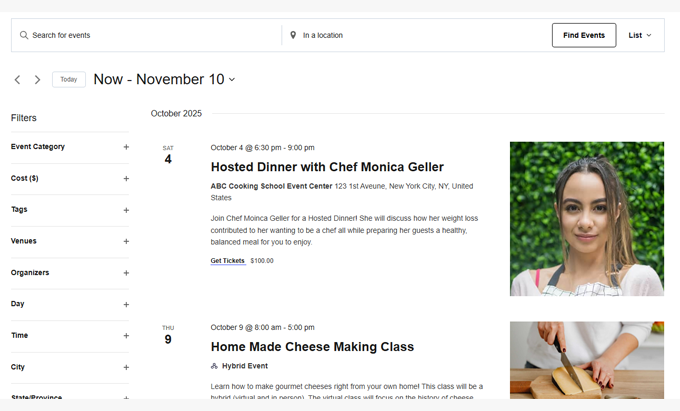
PhotoHigh visual impact (festivals, exhibitions, fairs). Encourages discovery and close-up viewing.
MapMultiple venues or distributed audiences. Reduces uncertainty about location and travel time.
Summary and List for high-volume agendas
For sites with dozens or hundreds of events, The Events Calendar Pro shines with its List and Summary views. Both condense information and prioritize chronology, perfect for internal newsletters, "Coming Soon" pages, or blog listings. In our experience, these views reduce bounce rates on mobile devices and facilitate quick scanning.
Subscriptions and time zones for global audiences
The Events Calendar Pro allows any user to subscribe to the calendar via a button visible in the details or listing. With one click, they add events to their Google Calendar or iCal, receiving automatic updates whenever there are changes. This is key: by being "on their calendar," your event competes less for attention, and you guide the user through the event to the date.
The Events Calendar Pro's time zone support eliminates confusion for international audiences or hybrid (online/in-person) events. We define the event's time zone, and the plugin automatically displays the local time based on the user's browser or website settings. When producing online events with attendees in different countries, this feature saved us from unnecessary inquiries and support errors. Furthermore, by combining subscriptions with time zones, The Events Calendar Pro ensures consistent information across all of the user's devices.
One-click iCal/Google Calendar subscription
Enabling the subscription adds no friction to the flow: the button is visible, and The Events Calendar Pro generates the necessary feed. We recommend placing it on the event details page and also on the main calendar page, along with a brief text explaining the benefit (“receive automatic updates”).
Time zone support without time zone confusion
If your community is global, define a clear policy: “Schedules are published in X zone and The Events Calendar Pro adapts them to your location.” In our experience, this works very well for online conferences, product launches, and virtual classes.
Pro in action: Quick step-by-step setup
Deploying The Events Calendar Pro can be very quick if we follow a simple route:
Install and activate The Events Calendar and then The Events Calendar Pro.
General settings: site time zone, date/time format, event slug, base layout.
Content structure: event categories, tags and, if applicable, organizers and venues.
Default views: choose the one that works best for your case (Month for planning, Photo for impact, List for volume).
Recurring eventsCreate a true series (weekly/monthly) instead of duplicating events. You'll be able to edit individual instances without breaking the series.
Shortcodes/blocks: Insert the calendar on specific service pages or landing pages; display filtered categories for greater relevance.
Subscriptions: enable the “subscribe to calendar” button and check the feed.
Evidence: review mobile navigation, view switching, image loading and performance with caching (exclude dynamic listings if necessary).
In our experience, The Events Calendar Pro allowed us to go from a basic calendar to a professional system in a matter of hours, with a solid visual result and tidy editorial management.
Creating recurring events and series (best practices)
Define clear rules (e.g., "every Tuesday and Thursday for 8 weeks").
Use consistent titles and descriptions; edit instances only when they differ.
Take advantage of categories and tags to group the series and make it easier to find.
Check the series in Month and List views to avoid overlaps.
Shortcodes/Blocks: snippets ready to insert
With The Events Calendar Pro, shortcodes and blocks allow you to: display events by category, limit the number of events, choose an initial view, and add filters. We recommend creating "saved" blocks to reuse layouts in campaigns or seasonal sections (e.g., "Spring Workshop Series").
Integrations and ecosystem that make it unbeatable
The true strength of The Events Calendar Pro lies in its ecosystem: add-ons for tickets, payment gateways, advanced filters, submission to external platforms, and community-driven event publishing. In our case, we typically combine The Events Calendar Pro with ticketing modules and date/location filters to improve discovery and conversion. Furthermore, its compatibility with page builders and widgets makes it easy to integrate seamlessly into existing websites.
When we added The Events Calendar Pro to projects with memberships or academies, the integration with shortcodes and blocks allowed us to show students exactly what they need: upcoming workshops, classes by level, certified events, etc. And for physical spaces with multiple rooms, The Events Calendar Pro, along with venues and organizers, maintains order and prevents information overload.
Official add-ons and compatibility with page builders
Tickets/Registration: manages access and attendees from the same environment.
Filter Bar: provides users with tools to find events by type, location, or date range.
Community: allows authorized users to propose or manage their own events.
BuildersUsing The Events Calendar Pro with blocks and shortcodes is sufficient in most cases; if you use page builders, the fit is natural.
SEO, performance and maintenance without surprises
A calendar can become cumbersome if not planned. The Events Calendar Pro offers solid performance, and with a few best practices, we can keep the experience fast: optimize images for Photo view, avoid loading complex views on pages where they don't add value, and consider excluding certain URLs from the cache if they display highly dynamic listings.
For SEO, we carefully manage event slugs, category structure, descriptive titles, and rich data generated by the plugin itself or compatible extensions. In practice, The Events Calendar Pro helped us rank category pages (“/events/workshops/”) that function as lead generation hubs. Keeping The Events Calendar Pro up-to-date is crucial for security, compatibility, and new features; in our experience, updates were stable and seamless when we followed the staging → testing → production workflow.
Clean URLs, cache, and compatibility testing
Defines readable slugs (e.g. “/agenda/” or “/events/”).
Review the cache behavior in views with filters; if in doubt, exclude those pages.
Try The Events Calendar Pro with your theme and critical plugins in a staging environment.
Updates and support with active history
One of the reasons we continue to recommend The Events Calendar Pro is its history of continuous improvements and the depth of its documentation. This translates to less time spent researching and more time launching events that convert.
Get started today with The Events Calendar Pro
If you're looking for a professional calendar that can scale with your strategy, The Events Calendar Pro has everything you need: advanced recurring events, high-converting views, calendar subscriptions, time zone support, and customization via shortcodes and blocks. In our experience, it's highly customizable and its power is enhanced when combined with other plugins in the ecosystem. The next step is simple: define your structure (categories and views), create your first series with Recurring Events, and place the calendar on the pages where your users are already making decisions. With The Events Calendar Pro, you'll be closer to filling venues and keeping your schedule up-to-date.
Conclusion
The Events Calendar Pro is more than just a calendar; it's a platform for efficiently managing, promoting, and scaling events. We chose it because it combines performance, flexibility, and usability. With features like Recurring Events, additional views, calendar subscriptions, time zone support, and compatibility with shortcodes and blocks, The Events Calendar Pro delivers everything we need to take each event from idea to confirmed attendance. If you want to reduce friction, increase registrations, and maintain editorial order, this is the way to go.























