
Timelentor Timeline Layouts for Elementor 1.0.5


- Secure Payment
- Support from Monday to Friday
- With you since 2018
$14.00 El precio original era: $14.00.$5.99El precio actual es: $5.99.
Quick summary
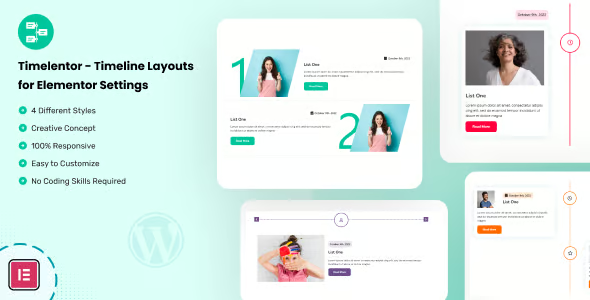
Timelentor Timeline Layouts for Elementor is a specialized collection of timeline layouts designed for those who create pages with Elementor and need to visually and clearly display processes, milestones, or stories. It solves the problem of limited or inflexible timelines within WordPress and is geared towards designers, implementers, and agencies looking to create professional timelines without having to build each block from scratch.
What problem does it help solve?
When working with Elementor and you need to present a chronological story, a product roadmap, a brand evolution, or a workflow, you encounter a clear challenge: simply placing columns and text isn't enough. The information becomes disorganized, lacks visual rhythm, and, in many cases, is difficult to follow on a mobile device. The result is pages where the user gets lost in the content and doesn't fully understand the journey you're trying to present.
If you've ever tried to create a timeline using only sections, icons, and titles, you'll find that maintaining consistency between desktop and mobile becomes a tedious task. You readjust margins, alignments, separators, and fonts at every point, and yet the overall result still doesn't feel fluid. In real-world projects, this translates into long pages with repetitive blocks and no clear hierarchy between dates, milestones, and descriptions.
Timelentor Timeline Layouts for Elementor addresses precisely this issue: it offers pre-designed timeline structures to display chronological information clearly and visually. Instead of improvising each timeline, it uses specific templates to tell stories step by step, outline workflows, and present event or release timelines without the layout becoming a bottleneck.
Why this solution makes a difference
In everyday use, the main difference lies in the time you save building chronological layouts from scratch and the visual consistency you achieve across different pages. With Timelentor Timeline Layouts for Elementor, the approach changes: first, you choose a layout that suits your content, and then you focus on the message, without struggling with columns, offsets, and alignments at every breakpoint.
On the other hand, when working with WordPress and Elementor on business projects, timelines tend to be repetitive: onboarding processes, company timelines, customer journeys, product evolution, and event planning. When you start noticing that you're copying and pasting old sections and reformatting every detail, it's a sign that you need structures specifically designed for that type of block. This design package reduces visual errors, avoids inconsistencies between pages, and improves the readability of each milestone.
In practical terms, the visitor experience also changes. A well-designed timeline guides the eye, clearly differentiates each stage, highlights key dates, and maintains a comfortable reading pace, especially on mobile devices. This impacts metrics such as time spent on page and message clarity, which are critical for landing pages, service pages, and project presentations.
Signs you need this product
- You have several pages where you repeat processes, milestones, or timelines, and each one looks different or visually unaligned.
- You experience friction within Elementor when trying to build complex timelines with icons, text, and dates, and you end up with messy layouts.
- You waste too much time adjusting margins, alignments, and columns to make the timeline look good on desktop, tablet, and mobile.
- Your site is growing and you need a consistent way to display roadmap, business evolution, or service steps without rebuilding everything every time.
- You have received feedback from customers or the team itself indicating that the page is "long", "confusing", or that the chronological information is not easily understood at a glance.
- This appears when you start working with several landing pages and notice that each designer resolves the timelines differently, losing brand unity.
When does it make sense to use it (and when doesn't)
Timelentor Timeline Layouts for Elementor provides real value when your projects require displaying information ordered by date, stage, or sequence of steps on a recurring basis. If you manage corporate websites, professional services pages, portfolios, online academies, events, or product development, having dedicated timeline layouts simplifies editorial work and maintains a clear visual standard throughout your site.
Conversely, if your site only needs very basic pages without chronological narratives, detailed processes, or roadmaps, this type of layout won't be a priority. On small websites with just a homepage and a couple of text sections, it's not necessary to incorporate specific timeline designs; you could manage with simple blocks, without needing to dedicate additional resources to the chronological aspect.
It's also worth considering how often you create new pages. If you work with Elementor sporadically and rarely reuse structures, the impact will be less significant. However, when creating new landing pages and sections is part of your weekly routine, having a set of predefined timelines becomes a clear advantage in your production workflow.
Who it fits best for
- Implementers and designers who build Elementor sites for clients and need to present processes or timelines in a clear and repeatable way.
- Agencies that work with multiple brand projects, launches or events and require a visual standard of timelines for their entire ecosystem.
- Service professionals (consultants, trainers, coaches, creative studios) who demonstrate step-by-step methodologies and want each phase to be immediately understood.
- Content creators who present course roadmaps, project evolution, or personal milestones within their WordPress site.
- Product teams that need to communicate the evolution of a tool, a SaaS or a technology project through key dates and next stages.
Practical benefits
- Real operational improvement: You reduce the time spent building and adjusting timelines, reusing designs specifically created for this format instead of recreating them from scratch.
- User experience: Visitors better understand the sequence of steps, milestones, and the story you're telling, making it easier to make decisions on service or launch pages.
- Control and organization: You maintain a consistent visual style across all site timelines, preventing accidental variations when different people edit with Elementor.
- Time saving: Having ready-made timeline templates lets you focus on the content and not on configuring every detail of the layout, which is key when managing many projects at once.
- Error reduction: You minimize problems with misalignment, text cuts, or broken structures on different devices, since they are part of designs conceived for this type of content.
How it fits within WordPress
Within the WordPress ecosystem, Timelentor Timeline Layouts for Elementor acts as a specialized set of visual structures for Elementor focused on chronological storytelling. It doesn't replace Elementor or your main theme, but rather complements your layout workflow as a recurring work block: when you need to showcase processes or milestones, you choose one of the timelines and adapt it to your content.
In this context, its role is clear: to streamline the creation of specific timeline sections within existing pages, such as "About Us," "How We Work," "Company History," "Roadmap," or "Methodology." In real-world projects, this prevents you from having to invent a different solution each time and allows you to maintain a recognizable style, even as the site grows and new sections are added over time.
Typical use cases
- Corporate websites that showcase the company's history, annual milestones, and team evolution through a well-structured timeline within Elementor.
- Service pages that detail a multi-step work process, from the first contact to the final delivery, making it easier for the potential client to understand what the collaboration will be like.
- Product launches, courses or memberships that present a roadmap with dates, stages and upcoming milestones, in a clear and visually aligned way with the rest of the landing page.
- Project portfolios that tell the story of a specific project, from initial research to implementation and results, using a timeline to organize each phase.
- Event or conference websites that display the sequence of days, activities, and presentations in chronological format so that attendees can understand the program at a glance.
Frequently Asked Questions about Timelentor Timeline Layouts for Elementor
How does Timelentor Timeline Layouts for Elementor differ from using normal sections in Elementor?
When building a timeline using only standard sections and columns, each new project involves rearranging text, icons, dates, and separators from scratch. Timelentor Timeline Layouts for Elementor provides timeline-specific layouts, already designed to highlight milestones, order information sequentially, and maintain a consistent visual pattern. This reduces the amount of manual adjustments and prevents each timeline page from having a different or improvised design.
What types of stories or processes are best represented with these timelines?
This set of designs is specifically geared towards content where sequence matters: company history, steps in a professional service, project timelines, product roadmaps, event planning, or brand evolution. If you've ever experienced visitors not understanding the order of your stages, Timelentor Timeline Layouts for Elementor help clearly separate each stage, assign them a defined visual place, and guide the reader more naturally.
Can I maintain my brand's visual identity using these layouts?
The value of Timelentor Timeline Layouts for Elementor lies in the structure of the timelines themselves, not in imposing a rigid aesthetic. The idea is that you use the date, text, and icon layouts as a foundation and adapt the colors, fonts, and styles to your brand guidelines within Elementor. This way, you maintain your project's visual identity while leveraging a timeline architecture already designed to be clear and easily readable on different devices.
What does an agency gain by incorporating Timelentor Timeline Layouts for Elementor into its workflow?
For an agency, the main benefit lies in standardization. Instead of each designer creating timelines in their own way, Timelentor Timeline Layouts for Elementor provides a common catalog of chronological structures. This makes it easier for projects to maintain a consistent style, speeds up the creation of new landing pages, and reduces internal review time. Furthermore, when a client requests the same timeline style be replicated in another section, the existing template can simply be reused without needing to be rebuilt.
Does Timelentor Timeline Layouts for Elementor replace other elements or does it only focus on timelines?
Timelentor Timeline Layouts for Elementor is specifically designed for timeline layouts. It does not replace the other sections, headings, content blocks, or overall structure of your theme or Elementor. Its function is to complement your layout system when you need to display processes ordered chronologically, allowing you to use your own sections, headings, and modules for the rest of the page content.
Conclusion
Timelentor Timeline Layouts for Elementor exists to solve a very specific problem: converting timelines, processes, and roadmaps into clear, coherent, and easy-to-layout sections within Elementor. When projects start accumulating pages with milestones and stages, having specialized timelines makes all the difference between a chaotic site and a well-organized visual narrative.
If you need to display stories over time on a recurring basis and want to maintain a consistent visual style without spending hours adjusting columns, this set of designs provides a solid foundation for your daily work in WordPress.
Latest update:

Written by: WPClub
With over seven years of experience curating, managing, and distributing GPL products, our content is based on hands-on experience, technical review, testing, and feedback from thousands of users. We aim to democratize and simplify the WordPress world so you can choose with confidence, speed, and ease.
Your Individual Purchase Includes:
- Lifetime updates.*
- Official product, ready to use.
- Immediate access to the product.
- Clean and virus-free files.
- GNU GPL V2/V3 License
- Technical support in Spanish and English.
* In the case of memberships, the period during which you will receive updates will depend on the type of membership purchased: monthly, annual, or lifetime.
Notify Update
We update products Monday through Friday. However, if the product you see is not yet updated, you can notify us so we can prioritize updating it whenever possible.
Get your questions answered here
Here you'll find answers to frequently asked questions about our service: how it works, what it includes, and how to get the most out of it.
On how many websites can I use the products?
You can use any product from our store on any website you want.
Will I get updates?
Absolutely. If you buy an individual product, you'll get lifetime updates for that product.
On the other hand, if you purchase a membership, you will receive updates until your membership expires.
What if I have a problem?
First of all, we want you to know that you can count on us. We will assist you and provide the necessary support, so you can rest assured.
On the other hand, it is important for you to know that, given the time difference between countries, your time and ours may not be the same, so we will be delayed accordingly.
Our opening hours start at 9 AM from Monday to Friday, UTC -3. We are open until around 6 PM.
Do they provide technical support?
Yes, and regarding the time, it is usually on average within 24 to 48 business hours.
However, there are times when we have already provided an answer and solution in less than a day, depending on the case.
Are there download limits?
No. We don't believe in that format, so you can download as many times as you want. No problem. We pay for high-quality professional storage precisely to avoid problems.
Do they provide license keys?
No. Giving out the keys is not a viable option, as we have had experiences where they end up circulating everywhere and we can even lose the associated accounts.
That said, all products are original and, in cases where a license key is required to function, we will take care of pre-activating them for you.
Does my purchase include an invoice?
Yes. After payment, you will be able to access your invoice immediately in the "Purchases" section of your user account.
That is why it is important that you properly complete the information requested at the time of payment.
Is there a warranty?
Yes, of course. If there's a problem we can't resolve, or if there's an external issue that doesn't have a general solution, you'll receive support and, if necessary, a full refund. We have a 14-day refund policy from the date of purchase.
- It should be noted that there is no warranty if the product works well and it simply wasn't what you wanted.
There have been instances where someone buys a product, the product works perfectly, but they don't like it and want a refund, keeping the product. That's not right.
However, everything is evaluable and reasonable. Let's use judgment together.
What are the opening hours?
Our opening hours are:
- Monday to Friday, from 9 a.m. to 6 p.m.
- Saturday and Sunday: No service.
UTC -3 time

Our Reputation on Trustpilot
Many thanks to those who take the time to give us a rating on Trustpilot. Each and every one of your comments is very helpful to us. We strive to provide a rewarding experience for every member of our community, always with respect and care. We'll be here!






















WPClub Memberships
Access our entire catalog for a single payment. We offer three memberships: Monthly, Annual, and Lifetime (One-Time Payment).
- Save thousands of dollars
- Unlimited daily downloads
- No recurring payments
- Fast downloads by AWS
- Quality service and support, validated since 2018
- We work with love for our community