

- Secure payment
- Spanish and English support
- With you since 2018
UiPress (formerly Admin 2020 Pro) 3.4.02
$59.00 El precio original era: $59.00.$5.99El precio actual es: $5.99.
Quick summary
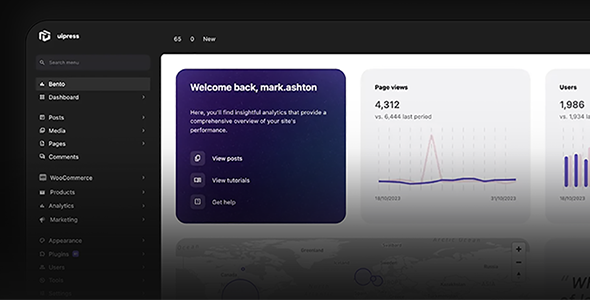
UiPress is a WordPress dashboard customization system that transforms the admin area into a clearer, more organized, and user-friendly environment. It's designed for those who manage multiple sites, work with clients or teams, and need to eliminate visual clutter from their dashboard. It helps simplify menus, reorganize screens, improve the user experience for non-technical users, and provide a consistent interface across all projects.
What problem does it help solve?
In many WordPress projects, the admin area ends up becoming a labyrinth: endless menus, duplicate options, screens that change depending on the installed plugins, and lost users who don't know where to perform each task. When you manage clients, this translates into constant questions, errors when touching sensitive settings, and a general feeling of disorganization.
If you've ever had a client log into the dashboard, get overwhelmed by the number of options, and accidentally break something, the problem isn't just with the training, but with how the back-end is presented. WordPress without a dashboard tailored to your project forces everyone to understand the native logic, even if they only need to perform very specific actions.
In this context, UiPress addresses a very specific problem: transforming the standard desktop, intended for general use, into an environment designed for the type of user who actually accesses it to manage it. This reduces visual clutter, avoids unnecessary access points, and improves clarity regarding what can and cannot be done within the site.
Why this solution makes a difference
The impact of UiPress is noticeable in daily work. By reorganizing and streamlining the dashboard, everyone can find what they need more quickly, reducing the time wasted navigating through menus and submenus. Important actions become more accessible, and areas that users are better off not touching are hidden from view, minimizing risks.
On the other hand, when you start to notice that the site administration is designed only for you, as the developer or implementer, but is also used by writers, sales staff, or the client, it becomes crucial to present them with an interface adapted to their role. UiPress allows you to present a cleaner and more logical work environment for each profile, without changing the WordPress foundation or how it functions internally.
In real-world projects, this translates to fewer critical errors, less need for repeated explanations, and a much more professional image of the project for anyone visiting the dashboard. It's not just about "making it look pretty," but about ensuring that site administration ceases to be a hindrance and becomes an integral part of the overall front-end quality.
Signs you need this product
- You've already had users who mess with system settings or sensitive plugins because they find them in the menu and don't understand their impact.
- Friction has appeared in WordPress when working with clients: repeated questions, "I can't find where to edit this", "why do I have so many options".
- You notice wasted time when performing simple tasks on the panel because the interface is cluttered and it's difficult to locate key sections.
- The project is growing, you're adding more collaborators, and the default administration is starting to fall short in managing different profiles and responsibilities.
When does it make sense to use it (and when doesn't)
UiPress provides real value when you need the administration area to be aligned with the project's organizational level. It's useful for sites with multiple content editors, online stores managed by non-technical staff, agencies delivering WordPress to end clients, and any scenario where back-end clarity impacts the quality of daily work.
This becomes relevant when your WordPress site is no longer just a personal website, but an active business or content platform. At this stage, a well-designed administrative interface improves system adoption by the team, reduces errors, and creates a more professional experience with each login.
On the other hand, if you manage a single website, rarely access the dashboard, and are the only administrator, you probably don't need an additional layer of desktop customization. The standard dashboard will suffice, and your priority will be on other areas of the project, such as performance or marketing.
Who it fits best for
- Agencies and freelancers who deliver WordPress sites to clients want the dashboard to reflect a professional, clear environment aligned with the actual way of working.
- Online stores where different people manage orders, products, or content, and each profile needs to see only what is relevant to their work.
- Corporate or institutional projects with several departments involved in the site update, where the back-end organization influences the team's efficiency.
Practical benefits
- Real operational improvement: Reduction of unnecessary steps, more logical menus, and more direct access to frequently performed actions.
- Clearer user experience: Those who are not technical experts navigate the panel with greater confidence, better understanding what they can modify and what is not part of their responsibility.
- Control and organization: The administration is structured in a way that is consistent with the type of project, which helps to have a more organized view of the site and its internal management.
- Time saving: Fewer minutes wasted searching for screens, checking menus, or redoing tasks affected by incorrect back-end changes.
- Error reduction: By hiding or relocating sensitive areas of the panel and simplifying navigation, actions that cause incidents due to misinterpretation of the interface are reduced.
How it fits within WordPress
UiPress sits at the WordPress admin level. It doesn't replace the core or functionality plugins, but rather focuses on how their options are presented and organized within the dashboard. From this position, it acts as a system for the dashboard's internal design and structure, allowing the management experience to be tailored to the type of user accessing the site.
When working with WordPress, this means you continue using your usual extensions, theme, and workflows, but with a clearer and more consistent administrative interface. In WooCommerce projects, for example, it helps order or catalog managers find themselves in a less overwhelming environment, more focused on their daily tasks.
Typical use cases
- Daily management of an ecommerce site where the sales team logs in to review orders and update products without needing to view technical menus or development sections.
- Client project managed by an agency, where a pre-organized dashboard is delivered, with simplified menus and an administration experience that reduces functional support queries.
- Content website with several writers, where UiPress is used to make the creation and editing area the main focus and hide sections that are only of interest to the general administrator.
Frequently Asked Questions about UiPress
What exactly does UiPress change within the WordPress dashboard?
UiPress works on the visual and structural layer of the admin area. It allows you to reorganize menus, adjust the layout of certain screens, and give the dashboard a cleaner, more consistent look. It doesn't replace WordPress's internal logic or how content is stored; instead, it focuses on how all those options are presented to those who manage them on a daily basis.
Is UiPress useful if I work with clients who don't understand WordPress?
In projects where clients are unfamiliar with WordPress, UiPress helps align the dashboard they see with the tasks they actually need to perform. You can offer them a clearer experience, with fewer distractions and less risk of them entering critical areas. If you've ever had a client break settings because they "appeared there," organizing the dashboard reduces these situations.
Does UiPress replace other role or permission management systems?
UiPress is not intended to be a complete replacement for native role and permission management or other plugins dedicated to that control. Its focus is on the presentation and structure of the dashboard. You can continue using your usual tools to define what each user can do and leverage UiPress to display that capability more intuitively, with a more organized and easier-to-understand administrative environment.
Does it make sense to use UiPress in an online store with multiple job profiles?
In an online store where catalog managers, logistics personnel, billing managers, and customer service representatives are involved, UiPress helps create a less cluttered administration area for everyone. Access to orders, products, and key sections can be presented more clearly, preventing the team from navigating through technical sections that aren't part of their daily work and reducing errors caused by confusion on the dashboard.
What happens if the project grows or changes teams later on?
As a project evolves, administration must adapt to the new context. With UiPress, the dashboard organization can be adjusted as new roles are added or the site's scope expands, without requiring a complete overhaul of the management environment. This ensures a consistent experience for the team, even when the site adds new sections, more content, or more complex internal processes.
Conclusion
UiPress exists to solve a specific problem: a cluttered WordPress dashboard that hinders workflow and leads to errors for daily users. By focusing on the dashboard's presentation and structure, it helps each project achieve a management system that's consistent with its specific needs. If your team or clients are already experiencing back-end confusion, a streamlined interface becomes a crucial component of the system.
Your individual purchase includes:
- Lifetime updates.*
- Product ready to use.
- Immediate access to the product.
- Clean and virus-free files.
- GNU GPL V2/V3 License
- Technical support in Spanish and English.
* In the case of memberships, the period during which you will receive updates will depend on the type of membership purchased: monthly, annual, or lifetime.
Get your questions answered here
Here you'll find answers to frequently asked questions about our service: how it works, what it includes, and how to get the most out of it.
On how many websites can I use the products?
You can use any product from our store on any website you want.
Will I get updates?
Absolutely. If you buy an individual product, you'll get lifetime updates for that product.
On the other hand, if you purchase a membership, you will receive updates until your membership expires.
What if I have a problem?
First of all, we want you to know that you can count on us. We will assist you and provide the necessary support, so you can rest assured.
On the other hand, it is important for you to know that, given the time difference between countries, your time and ours may not be the same, so we will be delayed accordingly.
Our opening hours start at 9 AM from Monday to Friday, UTC -3. We are open until around 6 PM.
Do they provide technical support?
Yes, and regarding the time, it is usually on average within 24 to 48 business hours.
However, there are times when we have already provided an answer and solution in less than a day, depending on the case.
Are there download limits?
No. We don't believe in that format, so you can download as many times as you want. No problem. We pay for high-quality professional storage precisely to avoid problems.
Do they provide license keys?
No. Giving out the keys is not a viable option, as we have had experiences where they end up circulating everywhere and we can even lose the associated accounts.
That said, all products are original and, in cases where a license key is required to function, we will take care of pre-activating them for you.
Does my purchase include an invoice?
Yes. After payment, you will be able to access your invoice immediately in the "Purchases" section of your user account.
That is why it is important that you properly complete the information requested at the time of payment.
Is there a warranty?
Yes, of course. If there's a problem we can't resolve, or if there's an external issue that doesn't have a general solution, you'll receive support and, if necessary, a full refund. We have a 14-day refund policy from the date of purchase.
- It should be noted that there is no warranty if the product works well and it simply wasn't what you wanted.
There have been instances where someone buys a product, the product works perfectly, but they don't like it and want a refund, keeping the product. That's not right.
However, everything is evaluable and reasonable. Let's use judgment together.
What are the opening hours?
Our opening hours are:
- Monday to Friday, from 9 a.m. to 6 p.m.
- Saturday and Sunday: No service.
UTC -3 time

Reviewed by the WPClub team
At WPClub, we carefully review each product before listing it. Our team evaluates its key features, compatibility, and performance to provide you with reliable, up-to-date, and helpful information when choosing and using each resource available in our store.
Download previous versions
If you have purchased this product, or have an active membership, you can download previous versions as we release them, without any limits or restrictions.
| Nombre del producto | Versión | Tamaño | Fecha | Descargar |
|---|---|---|---|---|
| No hay versiones anteriores registradas. | ||||

Our Reputation on Trustpilot
Many thanks to those who take the time to give us a rating on Trustpilot. Each and every one of your comments is very helpful to us. We strive to provide a rewarding experience for every member of our community, always with respect and care. We'll be here!






















WPClub Memberships
Access our entire catalog for a single payment. We offer three memberships: Monthly, Annual, and Lifetime (One-Time Payment).
- Save thousands of dollars
- Unlimited daily downloads
- No recurring payments
- Fast downloads by AWS
- Quality service and support, validated since 2018
- We work with love for our community