

- Secure payment
- Spanish and English support
- With you since 2018
Wiloke Restaurant Menu for Elementor 1.0.23
$10.00 El precio original era: $10.00.$5.99El precio actual es: $5.99.
Quick summary
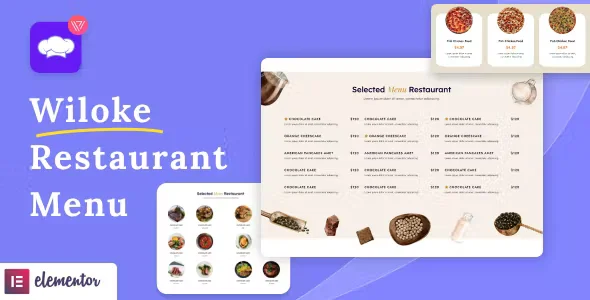
Wiloke Restaurant Menu for Elementor is an extension designed to display menus for restaurants and food businesses within pages created with Elementor. It makes it easy to present dishes, categories, and prices in a clear, visual, and organized way, improving the user experience and helping to convert visits into reservations or actual orders.
Overview
Wiloke Restaurant Menu for Elementor integrates seamlessly into the WordPress ecosystem as a plugin designed for Elementor-built websites that need to display menus attractively. It's a natural fit for hospitality, catering, food truck, and any business that requires a clear and adaptable menu for different types of content.
In real-world scenarios, this is used to replace impractical PDF menus, menus embedded in difficult-to-read images, or unstructured lists. With this type of solution, the menu becomes part of the editable WordPress content, making it easier for the administrator to keep it updated, aligned with the overall site design, and ready for marketing campaigns or seasonal changes.
What is Wiloke Restaurant Menu for Elementor used for?
Wiloke Restaurant Menu for Elementor helps solve a very specific problem: displaying a menu of food products in an organized, visually coherent, and easy-to-manage way. In many places, the menu is presented as a simple list or a scanned image, which makes it difficult to read on mobile devices, update, and optimize for search engines.
With this type of extension, a restaurant, café, or takeaway can present dishes organized by sections (starters, main courses, desserts, drinks, special menus), highlight promotional items, and adapt the structure to its business strategy. In online food stores, reservation systems, franchise websites, or landing pages for new locations, it allows for direct integration of the menu into pages created with Elementor, avoiding design transitions and offering a consistent brand experience.
Who is it ideal for?
- Restaurants, bars, cafes and fast food businesses that want to display their menu in a clear, attractive and updatable way without depending on external files or rigid designs.
- Agencies and web designers who work with Elementor and develop sites for clients in the food service sector, hotels with restaurant service or franchise chains.
- Marketing managers, content managers, and internal teams who need to adapt menus to campaigns, seasons, holidays, or pricing strategies without breaking the site's layout.
Key benefits
- Optimize daily menu management by allowing you to modify dishes, descriptions, and prices directly from the WordPress dashboard, reducing steps and simplifying the workflow.
- It improves the end-user experience by displaying a menu that is organized, legible, and consistent with the overall site design, making navigation and decision-making easier.
- It provides presentation flexibility, allowing you to adjust the menu structure to the visual identity of each project and different page formats created with Elementor.
- It is especially useful for restaurants with extensive menus, multiple categories, or differentiated menus, as it helps to keep the information organized and easy to explore.
- It helps save time and reduce errors by centralizing menu content editing in a familiar environment for WordPress administrators and editors.
Main features of Wiloke Restaurant Menu for Elementor
- Integration with the visual builder to insert menu blocks in specific sections of a page, adjusting structure and content without touching code.
- Possibility of organizing the menu into groups or categories, making it easier for the visitor to quickly identify the types of dishes or products available.
- Options focused on the presentation of the content, such as the arrangement of elements, organization by rows or columns, and emphasis on key information such as name and price.
- Workflow based on direct editing from the WordPress panel and the Elementor layout environment, with fields designed for short descriptions, tags, or additional notes about each dish.
- In real projects it is used to create specific sections such as "Menu of the day", "Main menu" or "Weekend specials", and display them on different pages without duplicating content.
Use cases
- Restaurant managers who want to quickly update the menu when ingredients, prices, or availability change, ensuring that the online menu always reflects the current offerings.
- Hotel website with several dining spaces, where each restaurant has its own page in Elementor and needs to display menus that are distinct but consistent with each other.
- WordPress project that seeks to abandon PDF menus and static images in favor of an editable, lightweight, and mobile-readable format, improving both user experience and internal management.
Frequently Asked Questions about Wiloke Restaurant Menu for Elementor
What types of sites can best take advantage of Wiloke Restaurant Menu for Elementor?
It's geared towards projects related to gastronomy: restaurants, bars, cafes, catering services, food trucks, and similar businesses. It also works well on hotel or resort websites that need to display multiple menus on different pages within a single Elementor-built site.
How is this different from displaying the menu on a simple text page?
It provides a structure designed for restaurant menus, with fields and a visual layout adapted to dishes, categories, and prices. Instead of a generic block of text, the menu is organized and easier for visitors to scan, reducing friction and improving the business's professional image.
Is it useful if I have a long menu with many dishes and categories?
This is especially useful for extensive menus, as it allows you to organize the content into logical groups and present it more clearly. This helps users quickly find the type of dish they're looking for and helps the internal team keep track of the information when there are frequent seasonal changes or new offerings.
Can I adapt the menu design to the visual style of my website?
When working within the Elementor environment, the menu integrates seamlessly with the overall site layout. This makes it easier to maintain consistency in typography, colors, and spacing, respecting the visual identity already established for the rest of the sections and pages.
What benefits does it offer in terms of content management?
Centralize menu editing in one easily accessible location for administrators and editors, eliminating the need to modify external images or documents every time a dish changes. This reduces minor errors caused by outdated versions and facilitates a more organized maintenance routine.
Does it also work for sites that don't sell online but need to display their menu?
It's a good fit for projects that simply want to inform customers about their food offerings, even if they don't handle online orders. By displaying the menu clearly, users can decide what to order in advance, enhancing the experience even before arriving at the restaurant or making a reservation through another channel.
Conclusion
Wiloke Restaurant Menu for Elementor strengthens the digital presence of any food business using WordPress with Elementor. It facilitates clearer menu management, improves the presentation for the end user, and fits the real needs of projects that want to align design, content, and business strategy in a single environment.
Your individual purchase includes:
- Lifetime updates.*
- Product ready to use.
- Immediate access to the product.
- Clean and virus-free files.
- GNU GPL V2/V3 License
- Technical support in Spanish and English.
* In the case of memberships, the period during which you will receive updates will depend on the type of membership purchased: monthly, annual, or lifetime.
Get your questions answered here
Here you'll find answers to frequently asked questions about our service: how it works, what it includes, and how to get the most out of it.
On how many websites can I use the products?
You can use any product from our store on any website you want.
Will I get updates?
Absolutely. If you buy an individual product, you'll get lifetime updates for that product.
On the other hand, if you purchase a membership, you will receive updates until your membership expires.
What if I have a problem?
First of all, we want you to know that you can count on us. We will assist you and provide the necessary support, so you can rest assured.
On the other hand, it is important for you to know that, given the time difference between countries, your time and ours may not be the same, so we will be delayed accordingly.
Our opening hours start at 9 AM from Monday to Friday, UTC -3. We are open until around 6 PM.
Do they provide technical support?
Yes, and regarding the time, it is usually on average within 24 to 48 business hours.
However, there are times when we have already provided an answer and solution in less than a day, depending on the case.
Are there download limits?
No. We don't believe in that format, so you can download as many times as you want. No problem. We pay for high-quality professional storage precisely to avoid problems.
Do they provide license keys?
No. Giving out the keys is not a viable option, as we have had experiences where they end up circulating everywhere and we can even lose the associated accounts.
That said, all products are original and, in cases where a license key is required to function, we will take care of pre-activating them for you.
Does my purchase include an invoice?
Yes. After payment, you will be able to access your invoice immediately in the "Purchases" section of your user account.
That is why it is important that you properly complete the information requested at the time of payment.
Is there a warranty?
Yes, of course. If there's a problem we can't resolve, or if there's an external issue that doesn't have a general solution, you'll receive support and, if necessary, a full refund. We have a 14-day refund policy from the date of purchase.
- It should be noted that there is no warranty if the product works well and it simply wasn't what you wanted.
There have been instances where someone buys a product, the product works perfectly, but they don't like it and want a refund, keeping the product. That's not right.
However, everything is evaluable and reasonable. Let's use judgment together.
What are the opening hours?
Our opening hours are:
- Monday to Friday, from 9 a.m. to 6 p.m.
- Saturday and Sunday: No service.
UTC -3 time

Reviewed by the WPClub team
At WPClub, we carefully review each product before listing it. Our team evaluates its key features, compatibility, and performance to provide you with reliable, up-to-date, and helpful information when choosing and using each resource available in our store.
Download previous versions
If you have purchased this product, or have an active membership, you can download previous versions as we release them, without any limits or restrictions.
| Nombre del producto | Versión | Tamaño | Fecha | Descargar |
|---|---|---|---|---|
| No hay versiones anteriores registradas. | ||||

Our Reputation on Trustpilot
Many thanks to those who take the time to give us a rating on Trustpilot. Each and every one of your comments is very helpful to us. We strive to provide a rewarding experience for every member of our community, always with respect and care. We'll be here!






















WPClub Memberships
Access our entire catalog for a single payment. We offer three memberships: Monthly, Annual, and Lifetime (One-Time Payment).
- Save thousands of dollars
- Unlimited daily downloads
- No recurring payments
- Fast downloads by AWS
- Quality service and support, validated since 2018
- We work with love for our community