

WooCommerce Floating Cart is the plugin we add when an online store needs to reduce friction between "add to cart" and "checkout." Essentially, it displays a always-visible side cart icon with the item count and a slide-out panel that appears when clicked, containing everything needed to complete the purchase without leaving the page. It works for us because it speeds up the natural flow of the shopper: view, add, review, apply a coupon, and pay, all in one place.
In our experience, this plugin is a perfect solution for improving the shopping experience and encouraging customers to click "pay" and complete their purchase. It's attractive, clean, and mobile-optimized. The sense of control offered by the right-hand side (WooCommerce side cart) is key: users see updated totals, shipping costs, and suggested products without having to reload their cart. With WooCommerce Floating Cart, we also activate an embedded checkout form to complete orders directly from the floating cart.
Another reason we chose WooCommerce Floating Cart is its live preview customizer. We adjusted colors, fonts, and icons in real time until the side cart reflected our brand identity. Combined with the fly-to-cart animation, the visual feedback confirmed the action and made the experience more satisfying. When we first installed it, we saw that users interacted more with the AJAX mini cart and less with the traditional cart page, eliminating unnecessary steps.
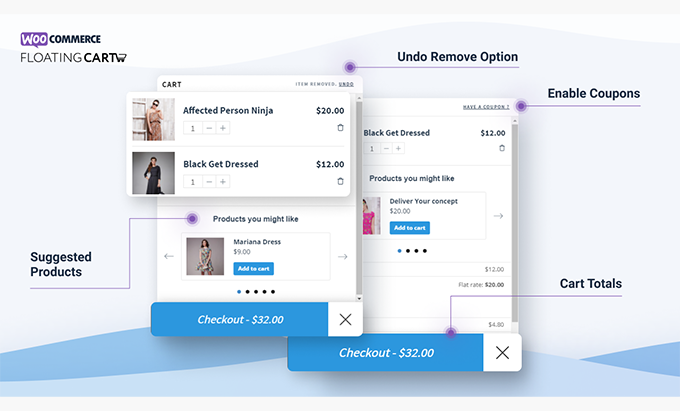
In summary, WooCommerce Floating Cart allows us to create a consistent, fast, and conversion-focused shopping experience without re-engineering the checkout or radical changes to the theme.
Immediate benefits: less abandonment, more completed payments
The value of WooCommerce Floating Cart is immediately apparent. First, it reduces cart abandonment by maintaining context: the customer continues browsing while the floating cart is just a click away. Second, it increases completion rates by concentrating critical actions (applying coupons, viewing totals, choosing a payment method) within the slider panel. Third, it improves the perceived speed thanks to the AJAX mini cart, preventing reloads and downtime.
In our experience, enabling checkout within the floating cart resulted in two clear effects: more clicks on "Checkout" and fewer bounces on the cart page. The fact that WooCommerce Floating Cart displays a free shipping bar encourages customers to reach the minimum purchase threshold without intrusive pop-ups. Furthermore, the always-visible count on the WooCommerce sidebar cart icon serves as a constant reminder that you "have something to complete.".
The visual component also drives conversions. We enable fly-to-cart to confirm the addition, use a button color that contrasts with the theme, and include a clear call to action. With this basic setup, WooCommerce Floating Cart becomes an elegant shortcut to checkout. And if we add suggested products (upsells and cross-sells) within the panel, we capture additional sales without distracting from the main objective: payment.
Finally, the plugin integrates with dynamic totals and coupons. In our experience, allowing users to apply their discount without leaving the page eliminates a psychological barrier and accelerates positive impulse purchases. All of this contributes to a smooth experience that translates into more completed orders.
Key features to sell more
Embedded checkout without reloads (Express Checkout Form)
With WooCommerce Floating Cart, we enabled a complete checkout form within the dashboard. Customers can enter their information, select their payment method, and confirm their order directly in the floating cart. When we tested it, we appreciated the seamless flow: customers never lose track of what they were viewing. This, combined with instant validations and total updates, makes completing a purchase as natural as adding a product.
AJAX search and update + fly-to-cart
WooCommerce's Floating Cart AJAX mini cart refreshes quantities, variants, and totals in real time. The fly-to-cart animation visually confirms that the product has been added, something users expect today. In our experience, this confirmation reduces hesitation and unnecessary clicks. Furthermore, every adjustment is reflected instantly: adding units, removing items, or changing variations happens without reloading and without disrupting the shopper's focus.

Coupons, totals, and free shipping bar
One of the reasons we opted for WooCommerce Floating Cart is how comprehensive it is for managing promotions. Users can apply coupons, see their cart totals, and get the nudge of the free shipping progress bar ("you're just 1 TP4TX away from free shipping"). This combination, when properly configured, organically increases the average order value. We typically display the free shipping progress with a short, motivating copy, and it works.
Upsells and cross-sells within the shopping cart
Suggesting related products from the side cart works because it appears at the precise moment: when the user has already shown intent to buy. With WooCommerce Floating Cart, we set up non-intrusive recommendations and measured their impact. In our experience, adding an accessory or warranty plan as an upsell increases the average order value without complicating the checkout process.
Live customizer: styles, icons, and brand integration
We change colors, fonts, and icons from the customizer with real-time preview. This allows us to align the WooCommerce side cart with the store's visual identity without touching any code. When we do this, we notice that visual consistency reduces friction and builds trust. WooCommerce Floating Cart gives us that fine-tuning control to make the floating cart feel like it belongs on the site.
Visibility and compatibility control (bundles/variations)
Not all stores need to display the floating cart the same way on desktop and mobile. We adjust visibility by device and prioritize essential actions on smaller screens. Furthermore, WooCommerce Floating Cart works well with variable products, bundles, and compositions. In our implementations, we avoid cluttering the panel: if everything adds up, nothing stands out; less is more.
How we implemented it in 3 steps (quick setup, customization, validation with metrics)
Essential setup: We installed WooCommerce Floating Cart, enabled mini cart AJAX, fly-to-cart, coupons, totals, and the free shipping bar. We left the embedded checkout ready and defined the behavior of the always-visible count icon.
Personalization and content: Using the live customizer, we adjust styles and microcopy (CTAs, progress messages, and empty statuses). We integrate relevant upsells/cross-sells and test on mobile first.
Measurement and improvement: We monitor clicks on "Checkout," coupon usage, the percentage of purchases made from the floating cart, and dashboard abandonment. Based on this data, we iterate on: item order, button size, visibility by device, and the number of suggestions.
In our experience, WooCommerce Floating Cart effectively increases conversions and reduces cart abandonment when implemented with a focus on UX and optimized with data. It's not just about "adding a floating cart"; it's about orchestrating the entire flow so that every micro-action leads to checkout.
Use cases by sector: retail, subscriptions, digital, and D2C
Physical retail: highlight sizes/variants and complementary accessories in the side panel. WooCommerce Floating Cart makes it easy to add care products, replacements, or bundles with one click.
Subscriptions: simplify plan confirmation and highlight recurring benefits without leaving the product page.
Digital products: reduce steps between download and payment, with coupons and warranty messages visible in the floating shopping cart.
D2C: Push the free shipping threshold and show recommended bundles that optimize the average ticket.
In all cases, WooCommerce Floating Cart allows us to adapt the panel to each category, keeping the embedded checkout as the main shortcut.
Best practices for a floating cart that converts
One goal per panel: to make the "Complete purchase" button the star.
Short and useful copy: coupons, free shipping and guarantees in simple language.
Maximum two upsell/cross-sell suggestions to avoid distraction.
Sufficient contrast on the main button and visual feedback on each action.
Rules by device: simplify on mobile, take advantage of width on desktop.
Continuous iteration: measure clicks, scrolling within the panel, and completed purchases.
Want to shorten the distance between "like" and "buy"? We implement WooCommerce Floating Cart with design, copy, and measurement so more visitors reach "Checkout" in fewer steps.

Conclusion
WooCommerce Floating Cart is our go-to tool for transforming a passive shopping cart into a conversion engine. Between the always-visible icon, the sliding panel, the AJAX mini cart, and the embedded checkout, it seamlessly converts intent into purchase. If you're looking for a fast and measurable improvement in your funnel, this floating cart is the way to go.

Reviewed by the WPClub team
At WPClub, we carefully review each product before listing it. Our team evaluates its key features, compatibility, and performance to provide you with reliable, up-to-date, and helpful information when choosing and using each resource available in our store.






















