

- Secure payment
- Spanish and English support
- With you since 2018
WooCommerce Pincode Zipcode Checker 3.2.0
$26.00 El precio original era: $26.00.$5.99El precio actual es: $5.99.
Quick summary
WooCommerce Pincode Zipcode Checker is a WordPress plugin that allows you to validate postal codes or PIN codes before checkout. It helps inform customers if a product can be delivered to their area, improving the shopping experience and reducing unfulfillable orders.
Overview
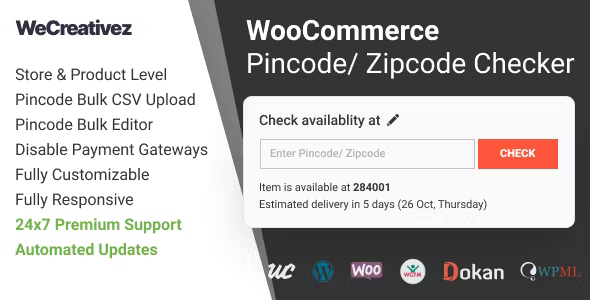
WooCommerce Pincode Zipcode Checker is a plugin designed to manage shipping availability based on postal codes within WooCommerce stores. Its main function is to check, directly on the product page or in the shopping cart, whether an order can be delivered to a specific location entered by the user.
This type of tool is used in WordPress projects that need to control delivery zones, limit services to certain areas, or display specific messages based on the customer's region. It is especially useful when shipping logistics depend on postal codes, geographic ranges, or limited availability, as is the case with many brick-and-mortar e-commerce sites, local stores, or businesses with segmented distribution.
What is WooCommerce Pincode Zipcode Checker used for?
WooCommerce Pincode Zipcode Checker helps prevent orders from being shipped to certain regions by verifying the postal code before the customer completes the purchase. This way, the store clearly informs customers whether delivery is available, if there are special conditions, or if the service is not enabled in that area.
In e-commerce with national or regional shipping, grocery delivery services, local businesses with their own delivery service, or businesses offering in-person services, this type of plugin helps filter customers by location. It's also useful for subscription projects, geographic memberships, or landing pages focused on specific areas, where it's necessary to quickly verify if the user belongs to a service area.
Who is it ideal for?
- Online stores that ship only to certain cities, provinces, or postal codes need to control which customers can complete an order based on their location.
- Local business projects, such as supermarkets, restaurants, pharmacies, florists or neighborhood stores with their own delivery service, where the delivery radius is limited and varies by area.
- Businesses that work with marketing strategies and geographic segmentation, manage different shipping conditions by region, or want to optimize conversion by showing clear information about availability by postal code.
Key benefits
- It allows for more efficient order management by automatically filtering unavailable addresses based on the PIN code or postal code, avoiding impossible requests and reducing manual review work.
- Improve the user experience by offering an immediate response regarding delivery in your area, reducing doubts during the purchase process and avoiding subsequent frustrations due to cancellations or order changes.
- It offers flexibility to apply customized availability rules by postal code, making it easy to adapt the store to different shipping policies, delivery zones, or service coverage.
- It helps scale logistics management in stores with many products or multiple delivery areas, as it centralizes the control of supported postal codes without having to edit each product individually.
- It reduces human errors resulting from manually checking customer addresses, saving time for the management team and minimizing returns or incidents related to out-of-coverage addresses.
Key features of WooCommerce Pincode Zipcode Checker
- It allows you to check the eligibility of an order by entering a PIN code or postal code in a verification field usually located on the product page, in the shopping cart, or at another key point in the purchase flow.
- It usually includes options to define which postal codes are accepted or excluded, making it easier to manage specific delivery zones, restricted areas, or regions with special service conditions.
- It helps organize the logistics workflow by establishing clear availability rules by location, resulting in greater consistency between what the customer sees and what the business can actually deliver.
- In many cases, it allows you to display personalized messages based on the result of the postal code check, so that the customer receives clear information: delivery available, not available, or subject to certain conditions.
- It usually works by relying on a database of postal codes defined by the administrator, which can be updated or expanded as delivery areas change, making it easier to keep shipping information up to date.
- This type of plugin is usually integrated into the standard WooCommerce process without modifying the main logic of the store, functioning as an additional layer of validation based on the customer's location.
Use cases
- Case 1: A fresh produce store that only delivers to certain neighborhoods in a city can use this tool to have the customer enter their postal code before adding to the cart, avoiding orders that cannot be delivered.
- Case 2: A home service business, such as installation, repair, or cleaning, can limit bookings only to specific postal codes where its field team actually works, improving planning and costs.
- Case 3: An ecommerce business that sells products with shipping restrictions due to local regulations can apply availability rules by postal code, avoiding shipments to areas where it is not permitted to deliver certain items.
Frequently Asked Questions about WooCommerce Pincode Zipcode Checker
What problem does WooCommerce Pincode Zipcode Checker solve in an online store?
It helps prevent orders from being sent to addresses where the store doesn't deliver. By validating the postal code before the customer completes the purchase, the store can inform them whether shipping is available, reducing cancellations, manual inquiries, and logistical errors related to out-of-coverage areas.
Where is the field for entering the postal code usually displayed?
It's usually displayed on the product page, in the shopping cart, or in a visible section before checkout. This allows the customer to enter their PIN code or postal code early in the purchase process and get a clear answer about delivery availability in their area.
Can I manage only some specific postal codes?
This type of plugin typically allows you to work with lists of accepted or excluded postal codes. This makes it possible to precisely define which areas offer delivery and which do not, which is useful for businesses with limited delivery areas or special regional conditions.
How does using a postal code checker improve the customer experience?
The customer knows from the outset whether they can receive the product at their home, without discovering restrictions at the end of the process. This transparency reduces frustration, increases trust, and contributes to a smoother shopping experience that is more aligned with the store's logistical reality.
Is it useful for stores that sell both online and in physical stores?
Yes, especially when home delivery only covers certain postal codes. The physical store can continue serving all customers, while the online channel uses the PIN code checker to filter who can receive home deliveries based on their location.
Can it help to better organize logistics and shipping planning?
By segmenting areas using postal codes, the store can more accurately predict which areas will receive the most orders. This makes it easier to organize delivery routes, adjust transportation resources, and define internal policies based on real customer location data.
Conclusion
WooCommerce Pincode Zipcode Checker is a practical tool for any store that needs to monitor shipping availability by location. By validating postal codes before purchase, it improves clarity for the customer, reduces logistical errors, and helps align online store operations with the reality of the delivery network.
Your individual purchase includes:
- Lifetime updates.*
- Product ready to use.
- Immediate access to the product.
- Clean and virus-free files.
- GNU GPL V2/V3 License
- Technical support in Spanish and English.
* In the case of memberships, the period during which you will receive updates will depend on the type of membership purchased: monthly, annual, or lifetime.
Get your questions answered here
Here you'll find answers to frequently asked questions about our service: how it works, what it includes, and how to get the most out of it.
On how many websites can I use the products?
You can use any product from our store on any website you want.
Will I get updates?
Absolutely. If you buy an individual product, you'll get lifetime updates for that product.
On the other hand, if you purchase a membership, you will receive updates until your membership expires.
What if I have a problem?
First of all, we want you to know that you can count on us. We will assist you and provide the necessary support, so you can rest assured.
On the other hand, it is important for you to know that, given the time difference between countries, your time and ours may not be the same, so we will be delayed accordingly.
Our opening hours start at 9 AM from Monday to Friday, UTC -3. We are open until around 6 PM.
Do they provide technical support?
Yes, and regarding the time, it is usually on average within 24 to 48 business hours.
However, there are times when we have already provided an answer and solution in less than a day, depending on the case.
Are there download limits?
No. We don't believe in that format, so you can download as many times as you want. No problem. We pay for high-quality professional storage precisely to avoid problems.
Do they provide license keys?
No. Giving out the keys is not a viable option, as we have had experiences where they end up circulating everywhere and we can even lose the associated accounts.
That said, all products are original and, in cases where a license key is required to function, we will take care of pre-activating them for you.
Does my purchase include an invoice?
Yes. After payment, you will be able to access your invoice immediately in the "Purchases" section of your user account.
That is why it is important that you properly complete the information requested at the time of payment.
Is there a warranty?
Yes, of course. If there's a problem we can't resolve, or if there's an external issue that doesn't have a general solution, you'll receive support and, if necessary, a full refund. We have a 14-day refund policy from the date of purchase.
- It should be noted that there is no warranty if the product works well and it simply wasn't what you wanted.
There have been instances where someone buys a product, the product works perfectly, but they don't like it and want a refund, keeping the product. That's not right.
However, everything is evaluable and reasonable. Let's use judgment together.
What are the opening hours?
Our opening hours are:
- Monday to Friday, from 9 a.m. to 6 p.m.
- Saturday and Sunday: No service.
UTC -3 time

Reviewed by the WPClub team
At WPClub, we carefully review each product before listing it. Our team evaluates its key features, compatibility, and performance to provide you with reliable, up-to-date, and helpful information when choosing and using each resource available in our store.
Download previous versions
If you have purchased this product, or have an active membership, you can download previous versions as we release them, without any limits or restrictions.
| Nombre del producto | Versión | Tamaño | Fecha | Descargar |
|---|---|---|---|---|
| No hay versiones anteriores registradas. | ||||

Our Reputation on Trustpilot
Many thanks to those who take the time to give us a rating on Trustpilot. Each and every one of your comments is very helpful to us. We strive to provide a rewarding experience for every member of our community, always with respect and care. We'll be here!






















WPClub Memberships
Access our entire catalog for a single payment. We offer three memberships: Monthly, Annual, and Lifetime (One-Time Payment).
- Save thousands of dollars
- Unlimited daily downloads
- No recurring payments
- Fast downloads by AWS
- Quality service and support, validated since 2018
- We work with love for our community