

When we need to extract useful data from a website without struggling with spreadsheets or scripts, the WP All Export Pro WordPress Plugin is our go-to tool. It lets us export virtually anything—posts, pages, users, products, orders, customers, and custom fields—to CSV, XML, or Excel in minutes. In our daily work, the drag-and-drop interface makes defining columns as simple as selecting and moving them, and if we want to filter by date, author, or category, we can do so with clear rules, without touching any code. We also schedule automatic exports and send them directly to Google Drive or Dropbox so the sales or logistics team always has the latest report without having to ask.

What is WP All Export Pro WordPress Plugin and why does it speed up your workflow?
WP All Export Pro WordPress Plugin is an advanced WordPress exporter that converts your site's data into ready-to-use datasets. We chose it because it reduces steps and errors: we select the content type, apply filters, and define the output format. When we tested the weekly scheduled exports, we saved hours of manual work; in our case, marketing no longer relies on the technical team to obtain clean lists of leads and sales. Furthermore, the plugin understands the actual site structures (custom post types, taxonomies, meta fields), so we don't lose any critical fields in the process.
Another reason is its compatibility with WooCommerce. With the WP All Export Pro WordPress Plugin, we export products, variations, inventory, orders, and customers, which is key for reconciling sales, sending files to accounting, or updating external catalogs. And if we need to migrate content between sites, we combine it with WP All Import to complete the entire process: export from site A, import to site B, validate, and that's it. In short, it's a solution that speeds up operations by delivering data to those who need it in the correct format.
Key benefits: advanced filters, drag & drop, and CSV/XML/Excel formats
The heart of WP All Export Pro WordPress Plugin rests on three pillars:
Column selection and design with drag & dropWe create exactly the file the team needs. If a marketplace requires a specific column name, we name it during export and avoid rework.
Powerful filters before exportingWe work with rules based on date, author, category, order status, price range, stock, and more. In our experience, these rules prevent sending "noise" to analysts and improve report quality.
True multi-format (CSV, XML, Excel)We choose the format with the recipient in mind. Operations loves CSV for its lightweight nature; management prefers Excel for its ease of use with charts; and integrations favors XML.
Furthermore, the WP All Export Pro WordPress Plugin allows you to schedule recurring exports and connect them to cloud storage. The first time we set up a nightly job, 8 am became synonymous with the file being ready in the shared folder. And because the plugin maintains field consistency, our Google Sheets dashboards update without breaking formulas.
Real-world use cases: orders, products, users, and personalized content
In eCommerce, we use WP All Export Pro WordPress Plugin to:
OrdersGenerate daily reports with status, payment method, total, products, and coupons. Perfect for reconciliation and logistics.
Products and variations: feed external catalogs or sales channels with titles, descriptions, prices, SKU, stock and attributes.
Customers: build segments for campaigns (by date of last purchase, average ticket, city).
Users and membershipsExport profiles, roles, and metadata for integrations with CRM or educational platforms.
Personalized Content (CPT)If you work with ACF, Meta Box or JetEngine, the metafields come out in order, without surprises.
One feature we love: when we migrated content from one site to another, we combined the WP All Export Pro WordPress Plugin with WP All Import. We exported posts, taxonomies, and metadata with their IDs, and re-imported them while preserving relationships. The result: a clean and timely transition.
Automatic exports and cloud uploads (Google Drive, Dropbox, Zapier)
Setting up automations is the difference between a one-off report and a well-developed process. With the WP All Export Pro WordPress Plugin, we create scheduled tasks so that:
They are executed every night, week or month, as the case may be.
Save the file to Google Drive or Dropbox with the name and date.
Trigger an action via Zapier (for example, notify in Slack or add rows in Google Sheets).
We set up a workflow where, every morning, sales finds the CSV file of the previous day's orders in the shared folder. We also integrated with Google Sheets so that the dashboards update automatically. The result is clear: less micromanagement, more data-driven decisions.
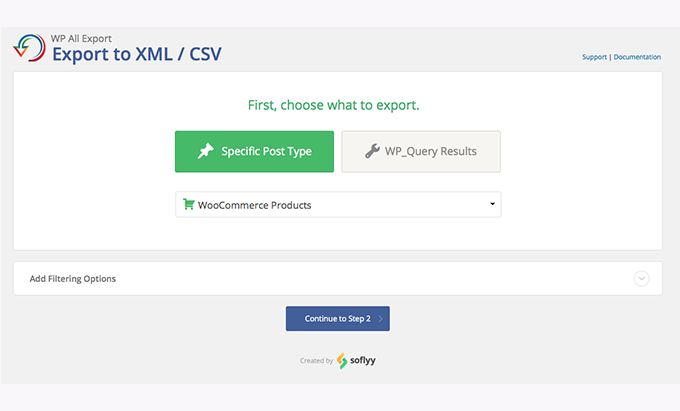
How to export data in 3 steps with WP All Export Pro WordPress Plugin
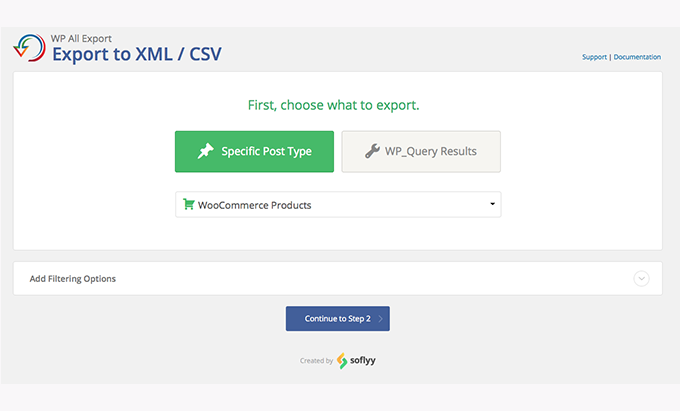
Choose the origin: entries, pages, products, orders, users or your CPT.
Filter and designIt applies rules (date, category, author, status) and defines columns with drag and drop. Here we usually rename headings to match third-party templates.
Deliver and automateChoose CSV/XML/Excel, schedule the recurrence, and send to the cloud or an integration.
When we did our first "quick export" of orders with a "Processing" status and a date range, it took us less than 5 minutes to have the file ready for accounting. Since then, we've cloned that process and only changed the filters.
Easy migrations with WP All Import: from one site to another without headaches
The WP All Export Pro WordPress Plugin + WP All Import combo solves content migrations with very little room for error. Our standard practice:
Export content with all fields (including metadata and taxonomies).
Maintain unique slugs and keys to respect references.
Import to the new site with 1:1 field mappings.
Check relationships (author, categories, featured images).
This approach allowed us to move hundreds of items and products while preserving attributes, variations, and internal links. During a store migration, we relied on rules to exclude obsolete products and move only active ones, which cleaned up the outgoing catalog.
Integrations that add up: WooCommerce, ACF, Meta Box, JetEngine, Gravity Forms, WPML
WP All Export Pro WordPress Plugin doesn't operate in isolation. In WooCommerce, it respects variations, attributes, and common meta fields; with ACF, Meta Box, and JetEngine, it exposes custom fields exactly as you need them; with Gravity Forms, we can extract entries and responses for external analysis; with WPML, we handle languages without duplicating effort. When we connect Zapier, we unlock a world of automation: sending each export to a pipeline, sending notifications to Slack, or feeding it into a CRM.
In practice, the greatest benefit is that the team doesn't learn ten tools: it learns one and applies it to multiple scenarios without redoing processes.
Best practices: performance, safety and quality control in your exports
Plan smart filtersFilter by date/status to avoid large and irrelevant files. We typically work with rolling windows (last 30 or 90 days) to speed things up and stay focused.
Define consistent column namesYou'll save time on downstream tools. We adopt clear prefixes (e.g., order_total, product_sku).
Validate before automatingRun a manual export and check 20–30 rows. We look for special characters, accents, and date formats.
Take care of permitsOnly necessary roles execute and download. On large teams, segment access.
Document recipesIt saves presets. In our workflow, an "order recipe" serves as the basis for new reports with minimal changes.
With these practices, WP All Export Pro WordPress Plugin becomes a reliable link in your data stack, not an outstanding task.
Start exporting useful data today
If your reports are slow, if your team relies on someone else to "pull out an Excel spreadsheet," or if your integrations break due to inconsistent formatting, it's time to invest in the WP All Export Pro WordPress Plugin. We use it to accelerate decision-making, automate deliveries, and maintain data quality every step of the way. Take the next step: standardize your exports and turn your data into results.

Reviewed by the WPClub team
At WPClub, we carefully review each product before listing it. Our team evaluates its key features, compatibility, and performance to provide you with reliable, up-to-date, and helpful information when choosing and using each resource available in our store.






















