
WP Table Manager 4.2.2


- Secure Payment
- Support from Monday to Friday
- With you since 2018
$39.00 El precio original era: $39.00.$5.99El precio actual es: $5.99.
Quick summary
WP Table Manager is a WordPress extension designed to manage data tables visually and efficiently, directly from the dashboard. It's ideal for those who publish comparisons, technical listings, catalogs, or data that changes frequently and needs to keep it clear, consistent, and editable without struggling with shortcodes or HTML. It's especially useful when tables start to grow, multiple editors modify them, and you want to maintain structure, readability, and consistency.
What problem does it help solve?
When working with tables in WordPress, the problem isn't just "making a table look nice." The real challenge arises when you need to update prices, change columns, add rows, or fix errors without breaking the page's design. If you've ever experienced modifying data and the table breaking, the widths becoming misaligned, or the styles disappearing, you know that feeling of constant fragility.
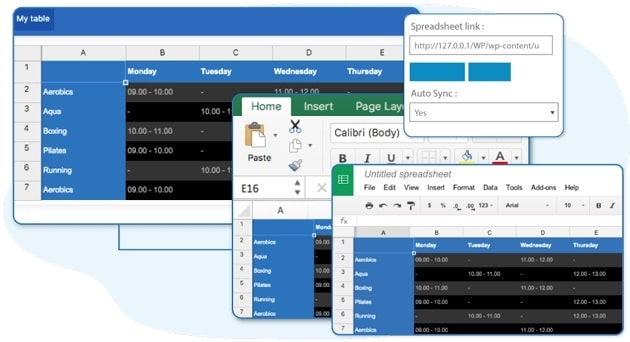
Furthermore, when working with tables copied from Excel or Google Sheets, the code that reaches WordPress is often full of embedded styles, misaligned cells, and inconsistent formatting. This becomes apparent as the site grows, different people copy and paste content, and each table ends up looking different, complicating readability and maintenance. WP Table Manager focuses precisely on this type of chaos: tabular data that must remain easy to read, search, and update without requiring technical expertise.
Why this solution makes a difference
In real-world projects, the difference isn't in simply "having tables," but in how they're managed over time. WP Table Manager allows you to treat each table as editable content with its own logic, instead of a rigid block hidden within a shortcode or HTML code. This reduces errors during editing, avoids modifying code, and makes it easier for multiple editors to update information without fear of breaking the layout.
On the other hand, working with a dedicated table manager improves control over titles, highlighted cells, number and date formatting, and even how critical data is displayed. When you start noticing that fixing visual details takes more time than entering the data itself, that's when a tool like WP Table Manager makes a real difference to your daily routine: fewer corrections, fewer manual revisions, and more focus on the information you want to communicate.
Signs you need this product
- Your site's tables are frequently edited, and each change involves reviewing the layout to ensure nothing has been jumbled up.
- You experience friction when working in WordPress because tables are managed with hard-to-read shortcodes or HTML blocks that nobody wants to touch.
- You start to lose control of the content because you have different versions of the same table on various pages and you don't know which one is up to date.
- Your project has grown from a few simple tables to dozens of comparisons, lists, and data matrices that require a clear and homogeneous structure.
When does it make sense to use it (and when doesn't)
WP Table Manager makes sense when your site's content relies on tables that change regularly: product comparisons, feature listings, complex pricing tables, inventories, results, or detailed timelines. It's also a good fit when your team needs a clear way to locate, edit, and reuse tables without having to check each page individually to see where they were originally inserted. In that context, using a dedicated table manager reduces friction and improves project consistency.
On the other hand, this plugin isn't necessary if your website only uses one or two very simple, static tables that are rarely updated, such as a small table with fixed schedules or a single table on a landing page. If changes are almost nonexistent, and you're comfortable maintaining these tables with the native editor or a simple HTML block, adding WP Table Manager would offer little real value. It's especially useful when managing tabular data has become a core part of your content, not when it's merely occasional.
Who it fits best for
- Content creators who publish technical comparisons, rankings, long lists, or fact sheets with many attributes and need to update data regularly without touching code.
- E-commerce projects or advanced catalogs where product tables, specifications, combinations or price charts are handled that change according to campaigns or seasons.
- Marketing teams, agencies, or corporate website managers who handle multiple pages with tables and require an organized environment to find, modify, and maintain that data consistent throughout the site.
Practical benefits
- Real operational improvement by centralizing the creation and editing of tables in a single environment within the WordPress panel, avoiding duplication and conflicting versions.
- Clearer user experience, as editors work on visual tables that are identifiable and organized by categories, instead of difficult-to-interpret blocks of code.
- Greater control and organization of tabular content, with an overview of all existing tables and the assurance of knowing what data is being used in each context.
- Time savings when updating data: you change the table once and the modification is reflected wherever it is inserted, reducing repetitive tasks and manual reviews.
- Reduction of layout errors, since changes to cells, columns or formats are made within an editor designed to preserve the structure, avoiding unexpected mismatches in the front-end.
How it fits within WordPress
Within the WordPress ecosystem, WP Table Manager acts as a dedicated panel for table-based content. It doesn't compete with your block editor or visual page builder; instead, it integrates seamlessly into your workflow. You create or manage tables through its interface and then insert them into posts, pages, or templates as needed. This allows your theme or page builder to control the overall site design, while the logic and structure of the tabular data are managed from a dedicated environment.
In day-to-day use, the plugin's role is most noticeable when you need to quickly locate a specific list without remembering which page it was created on. Instead of navigating through the entire content tree, you go directly to the table list, open it, edit it, and keep the overall design intact. It's a tool that complements the rest of WordPress's offerings to specifically address the challenges of structured data in rows and columns.
Typical use cases
- In an ecommerce site, maintain a comparative table between several product lines with technical attributes that are updated seasonally, without rebuilding the table every time a new model is introduced.
- In an educational or training setting, manage course schedules, module lists, study programs, and plan prices in tables that change every semester, with the ability to quickly edit by the responsible staff.
- On a corporate or B2B services website, present detailed feature listings, compatibility matrices, or service level charts, keeping the information organized, filterable, and consistent across all pages that use it.
Frequently Asked Questions about WP Table Manager
How does WP Table Manager differ from creating tables with the classic or block editor in WordPress?
The key difference lies in medium- and long-term management. While the classic or block editor treats each table as part of a specific page's content, WP Table Manager manages them as independent elements within the panel. This allows them to be reused across multiple pages, updated only once, and provides a comprehensive overview of all the site's tables. Furthermore, it makes it easier for non-technical editors to modify data without having to review complex code or shortcodes.
What types of projects benefit most from WP Table Manager?
WP Table Manager is especially well-suited to websites where tables are a central part of the content: comparison sites, directories, product catalogs, technical review sites, detailed pricing pages, or educational portals with numerous schedules and programs. In these contexts, the volume and frequency of data changes make managing tables as simple HTML blocks inefficient. The plugin provides structure and agility to keep this data organized.
What happens to the tables I've already created on my current pages?
If you already have tables created directly in the editor, you can keep them as is and start using WP Table Manager for new ones. In real-world projects, a gradual transition is usually more convenient: first, you centralize the tables that are updated most frequently, and then, over time, you migrate those that should be unified and managed more efficiently. This way, you reduce the risk of errors and use the tool where it truly adds value.
Is WP Table Manager useful if I work in a team with multiple content editors?
In collaborative environments, this is especially useful because all editors know where the tables they need to update are located. Instead of searching within each page, they can go directly to the table list and edit only the data they need. If you've ever had someone modify a table on the wrong page or create a duplicate because they can't find the original, having a centralized manager like WP Table Manager helps prevent these situations and maintain consistent standards.
Does it make sense to use WP Table Manager if I only need to display small static tables?
If your site only contains one or two small, static tables with no anticipated changes, incorporating a dedicated table manager might not make much sense. In those cases, the native WordPress editor may suffice. WP Table Manager becomes useful when the number of tables starts to grow, the information is frequently updated, or multiple people are involved in editing them. That's where centralized, visual management becomes a clear advantage over tables embedded directly within the content.
Conclusion
WP Table Manager exists to address a very specific problem: the ongoing management of data tables in WordPress when they cease to be a one-off occurrence and become an integral part of the content. If you need clarity in editing, visual consistency across tables, and less time spent wrestling with code or shortcodes, incorporating a dedicated manager makes perfect sense. The more your site relies on structured, organized data, the more you'll notice the difference in your daily workflow.
Latest update:

Written by: WPClub
With over seven years of experience curating, managing, and distributing GPL products, our content is based on hands-on experience, technical review, testing, and feedback from thousands of users. We aim to democratize and simplify the WordPress world so you can choose with confidence, speed, and ease.
Your Individual Purchase Includes:
- Lifetime updates.*
- Official product, ready to use.
- Immediate access to the product.
- Clean and virus-free files.
- GNU GPL V2/V3 License
- Technical support in Spanish and English.
* In the case of memberships, the period during which you will receive updates will depend on the type of membership purchased: monthly, annual, or lifetime.
Notify Update
We update products Monday through Friday. However, if the product you see is not yet updated, you can notify us so we can prioritize updating it whenever possible.
Get your questions answered here
Here you'll find answers to frequently asked questions about our service: how it works, what it includes, and how to get the most out of it.
On how many websites can I use the products?
You can use any product from our store on any website you want.
Will I get updates?
Absolutely. If you buy an individual product, you'll get lifetime updates for that product.
On the other hand, if you purchase a membership, you will receive updates until your membership expires.
What if I have a problem?
First of all, we want you to know that you can count on us. We will assist you and provide the necessary support, so you can rest assured.
On the other hand, it is important for you to know that, given the time difference between countries, your time and ours may not be the same, so we will be delayed accordingly.
Our opening hours start at 9 AM from Monday to Friday, UTC -3. We are open until around 6 PM.
Do they provide technical support?
Yes, and regarding the time, it is usually on average within 24 to 48 business hours.
However, there are times when we have already provided an answer and solution in less than a day, depending on the case.
Are there download limits?
No. We don't believe in that format, so you can download as many times as you want. No problem. We pay for high-quality professional storage precisely to avoid problems.
Do they provide license keys?
No. Giving out the keys is not a viable option, as we have had experiences where they end up circulating everywhere and we can even lose the associated accounts.
That said, all products are original and, in cases where a license key is required to function, we will take care of pre-activating them for you.
Does my purchase include an invoice?
Yes. After payment, you will be able to access your invoice immediately in the "Purchases" section of your user account.
That is why it is important that you properly complete the information requested at the time of payment.
Is there a warranty?
Yes, of course. If there's a problem we can't resolve, or if there's an external issue that doesn't have a general solution, you'll receive support and, if necessary, a full refund. We have a 14-day refund policy from the date of purchase.
- It should be noted that there is no warranty if the product works well and it simply wasn't what you wanted.
There have been instances where someone buys a product, the product works perfectly, but they don't like it and want a refund, keeping the product. That's not right.
However, everything is evaluable and reasonable. Let's use judgment together.
What are the opening hours?
Our opening hours are:
- Monday to Friday, from 9 a.m. to 6 p.m.
- Saturday and Sunday: No service.
UTC -3 time

Our Reputation on Trustpilot
Many thanks to those who take the time to give us a rating on Trustpilot. Each and every one of your comments is very helpful to us. We strive to provide a rewarding experience for every member of our community, always with respect and care. We'll be here!






















WPClub Memberships
Access our entire catalog for a single payment. We offer three memberships: Monthly, Annual, and Lifetime (One-Time Payment).
- Save thousands of dollars
- Unlimited daily downloads
- No recurring payments
- Fast downloads by AWS
- Quality service and support, validated since 2018
- We work with love for our community